Welcome to your Backlink Marketplace — the easiest way to discover and secure high-quality backlinks to boost your website’s authority and search rankings. Whether you’re a solo entrepreneur, an SEO specialist, or part of a busy agency, our marketplace helps you find the right sites to get your brand noticed — all in just a few clicks.
How does it work? Think of it like an online store — but for backlinks! Instead of cold emails and endless outreach, you get access to a huge selection of vetted websites and blogs, ready to feature your links.
Here’s what you can do:
Browse & Filter Easily search for websites by niche, Domain Authority (DA), organic traffic, language, and more. Want links from health blogs in the US? Or business sites with high Moz DA? Just use the filters and find your perfect match.
Check the Details Every website listing shows clear, trusted SEO metrics like Moz DA, Ahrefs organic traffic, total visits, and country. You’ll also see pricing upfront — no hidden fees or surprises.
Add to Cart Found a good fit? Add it to your cart, choose your link type (Dofollow or Nofollow), and decide whether you’d like a guest post or a link insertion. It’s that simple.
Place Your Order When you’re ready, check out, share your anchor text and target URL, and you’re done! You can track your order’s turnaround time (TAT) right from your dashboard.
Our goal is to save you hours of outreach and negotiation so you can focus on what really matters — growing your site’s authority and traffic.
Tip: Take your time exploring — you can sort by top-selling, newly added sites, or even use advanced filters to get the best match for your SEO goals.
Now that you know what the Backlink Marketplace is, let’s walk through how to access and use it step by step.
Step 1: Open the Backlink Marketplace
Log in to your Scalenut Dashboard.
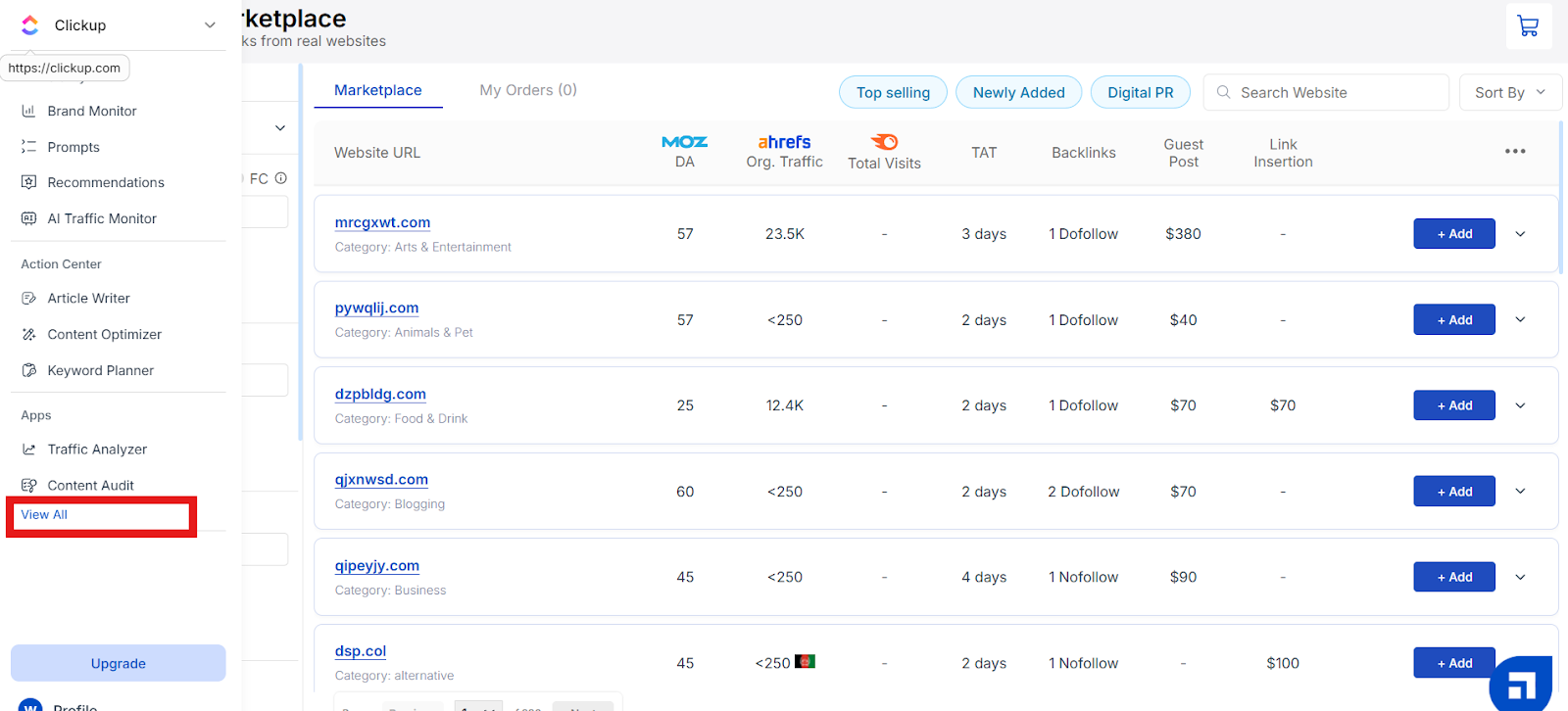
From the left-hand admin panel, under Apps click on view all.
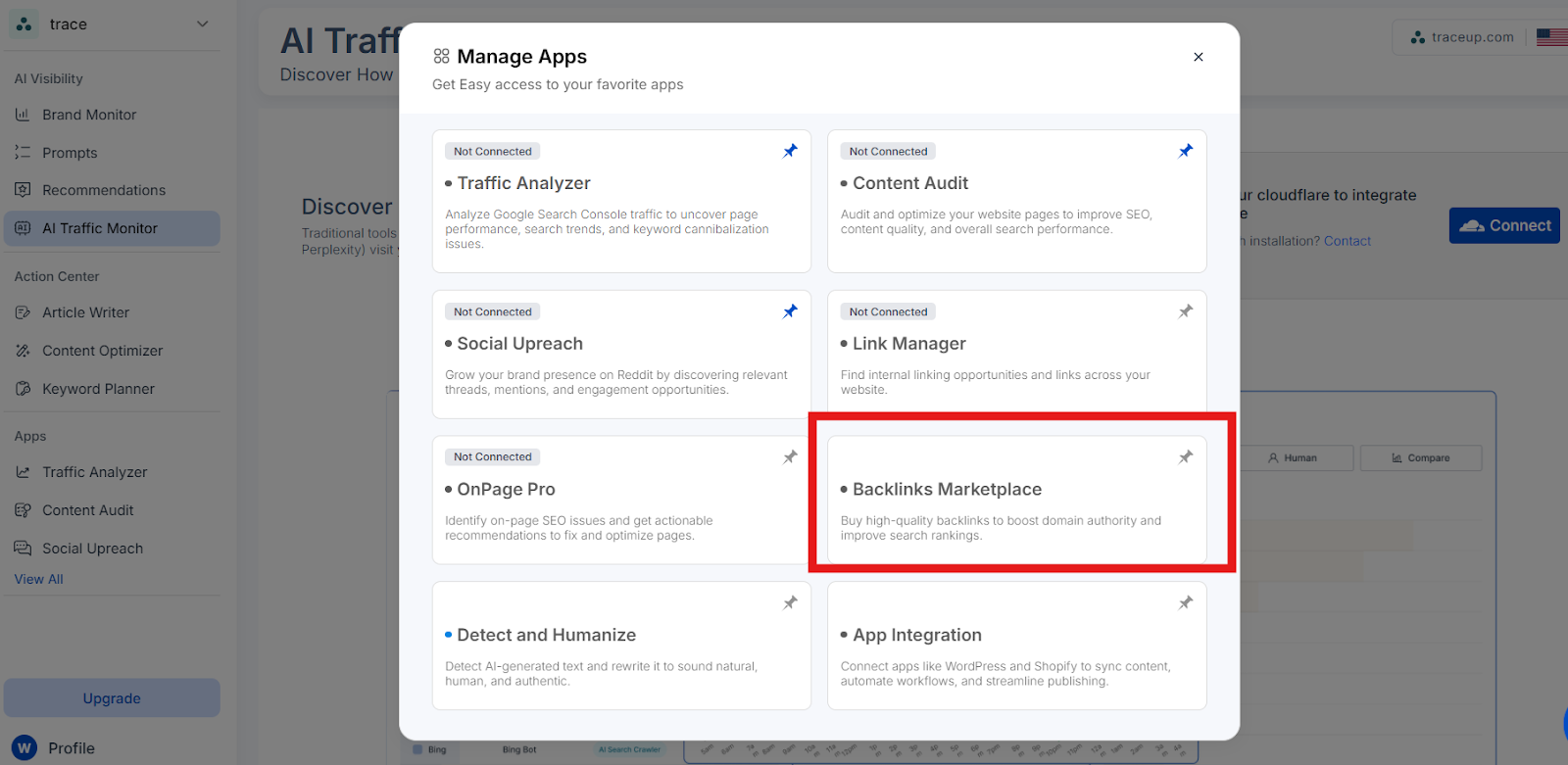
3. When you click on View All, a Manage Apps modal opens. From this modal, you can see a list of all available apps. Simply locate and click on Backlinks Marketplace to access it.
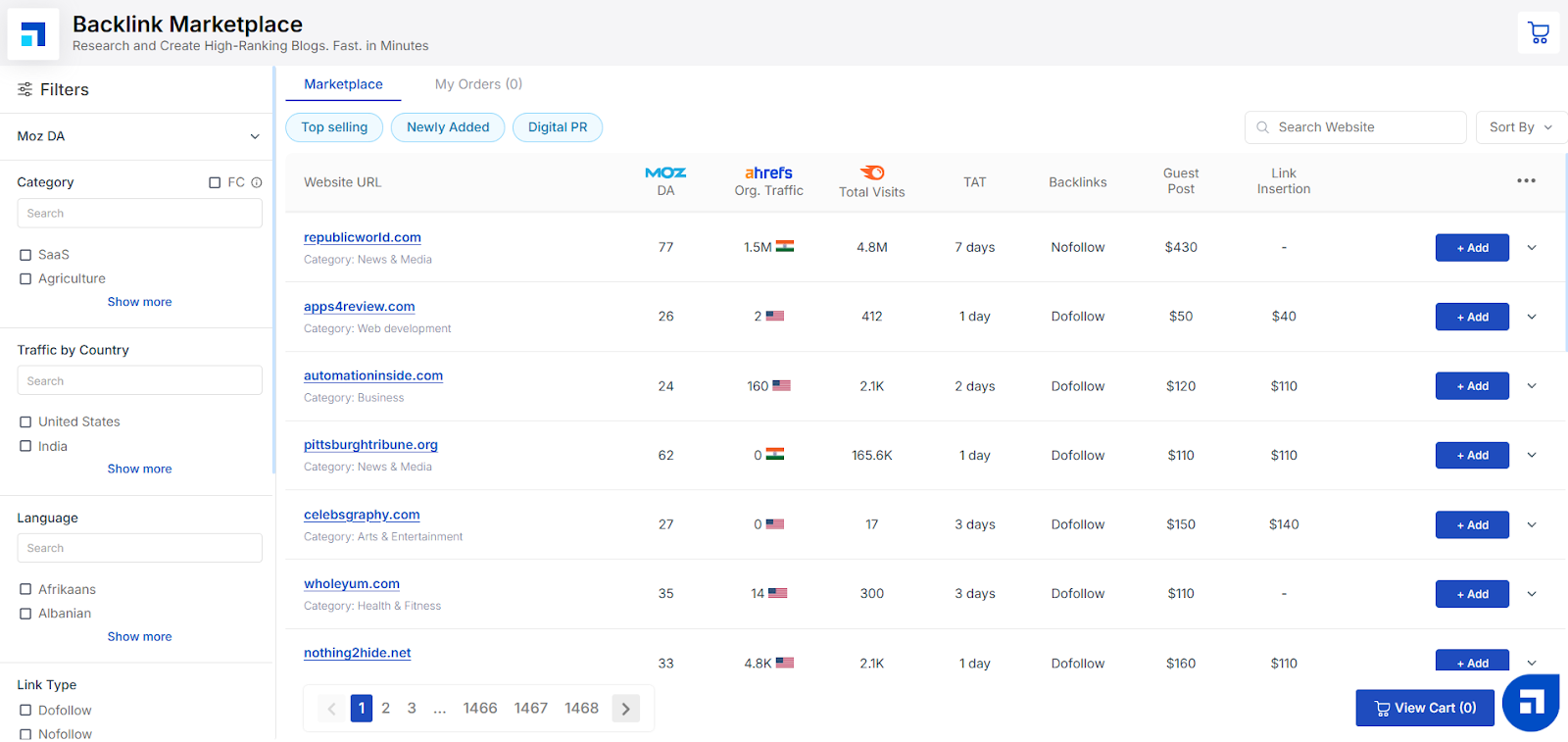
4. This will open the Marketplace page where you’ll see a list of thousands of websites, along with all the filters and metrics you can use to find the perfect backlink opportunities.
Step 2: Filter the Results
Once you’re inside the Backlink Marketplace, you can easily narrow down your options to find exactly what you’re looking for.
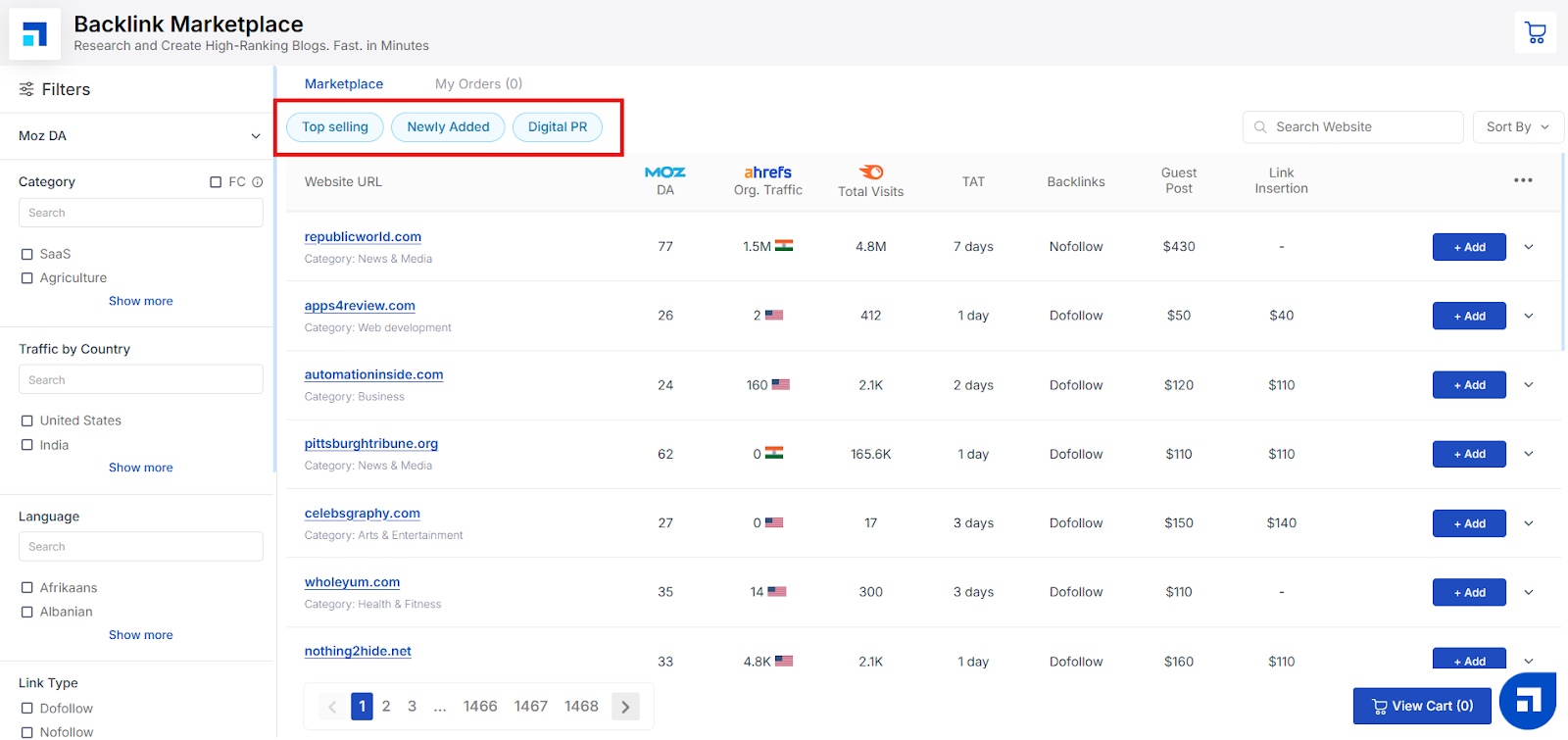
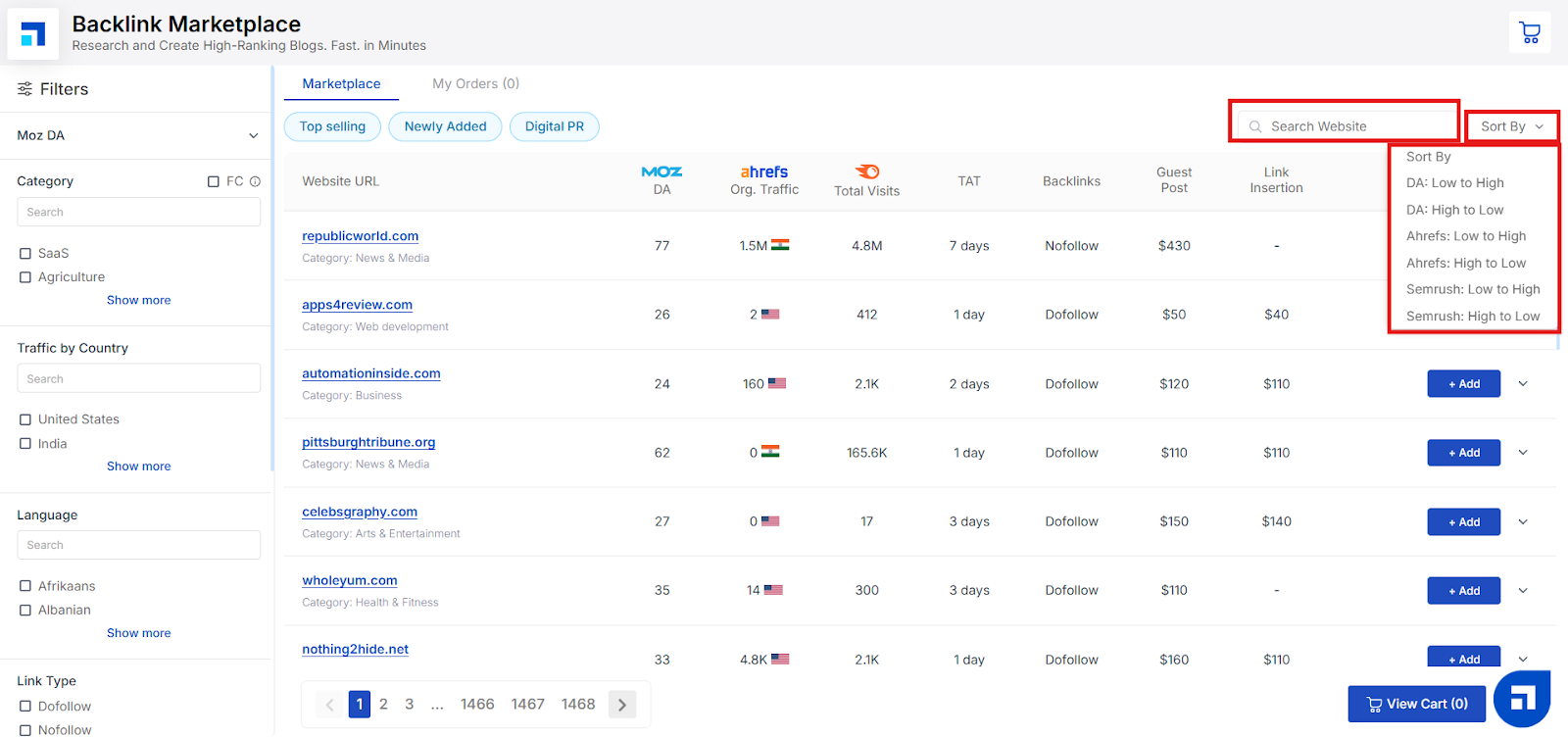
At the top of the marketplace page, you’ll see filter options like:
Top Selling: See the most popular sites other users trust and buy from frequently.
Newly Added: Discover fresh websites that have just been added to the marketplace.
Digital PR: Find sites best suited for Digital PR opportunities to strengthen your brand’s online presence.
Simply click on any of these options to instantly update your results — saving you time and helping you choose the best sites for your backlink strategy.
Step 3: Search and Sort
Looking for something specific? You have two easy ways to find exactly what you need:
Search Bar: Already have a website in mind? Just type its name in the search bar at the top of the Marketplace. This helps you jump straight to the site you’re interested in without scrolling through pages of listings.
Sort Results: You can also organize the website listings to match your exact needs. Use the sort options to arrange results by:
Domain Authority (DA): High to Low or Low to High
Organic Traffic: High to Low or Low to High
Visits: High to Low or Low to High
Sorting helps you quickly focus on sites with the authority, traffic, or reach that fits your SEO goals and budget.
Step 4: Understand Each Metric
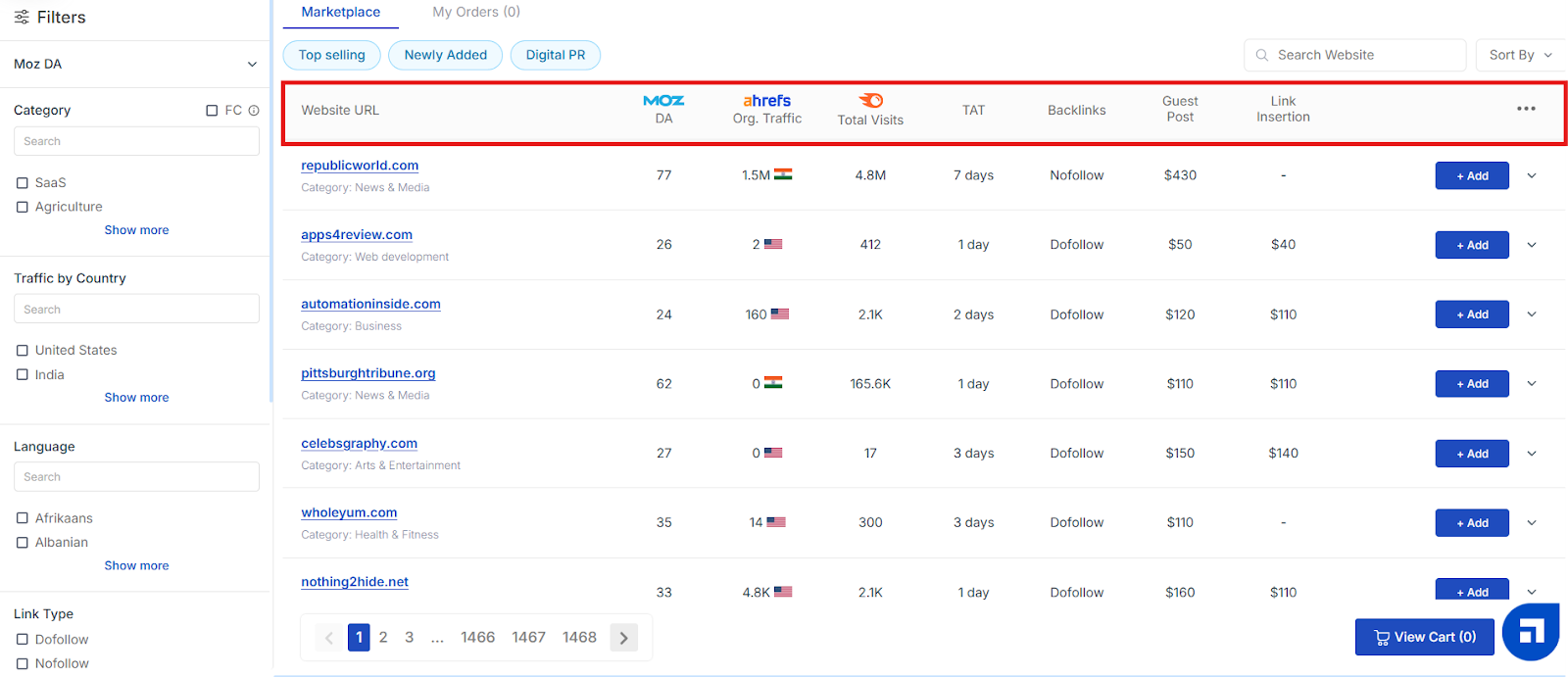
Before you place your order, it’s helpful to know what each metric means so you can choose the best websites for your backlink strategy. Here’s a quick breakdown:
Website URL This shows the domain name of the website where your guest post or link insertion will appear. The Marketplace includes a curated list of websites available for guest posting or niche edits (link insertions).
DA (Domain Authority) Domain Authority is a search engine ranking score provided by the Moz tool. It predicts how likely a website is to rank on search engine results pages (SERPs). The score ranges from 1 to 100, with higher scores indicating a greater ability to rank well.
Org. Traffic (Organic Traffic) This is an estimate of the website’s organic traffic for the previous month, based on data from the Ahrefs tool. It gives you an idea of how much search traffic the site naturally attracts.
Total Visits An estimate of the total visits to the website for the previous month, based on Semrush data. This helps you understand the overall reach of the site.
TAT (Turnaround Time) This is the estimated time required to publish your guest post or insert your link on the chosen website.
Backlinks Indicates whether the link will be Dofollow or Nofollow and specifies how many backlinks you can add within the article pointing to your target website.
Guest Post Fee The cost of publishing a new article on the specified website. Note: This fee excludes content creation — you’ll need to provide the article.
Link Insertion Fee The fee for adding a backlink to an existing article on the website. Since the content already exists, you don’t need to create or submit any new content.
Understanding these metrics will help you pick websites that best match your SEO goals and budget.
Step 5: View More Details for Each Website
If you’d like to dig deeper before making a choice, you can view more detailed information about each website listing.
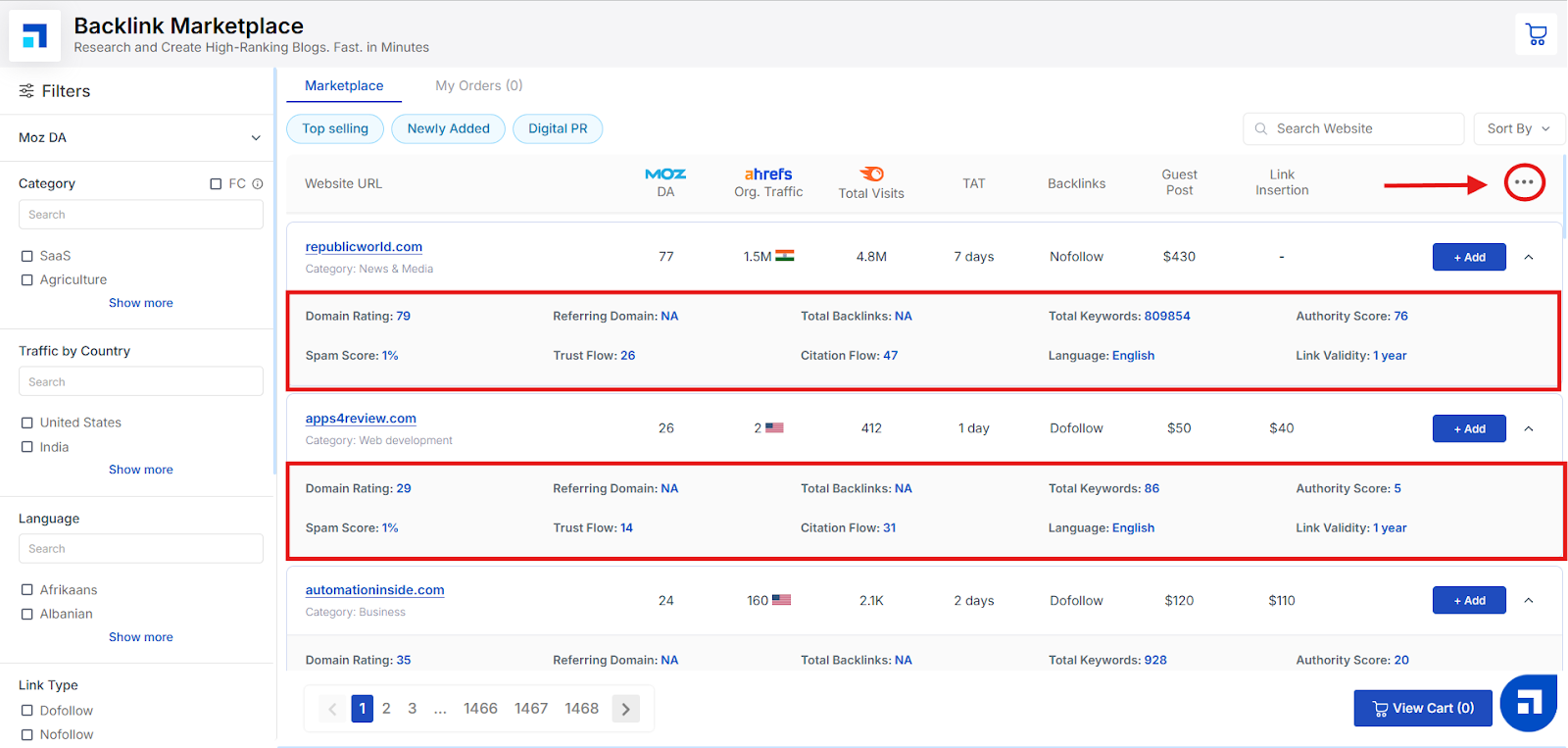
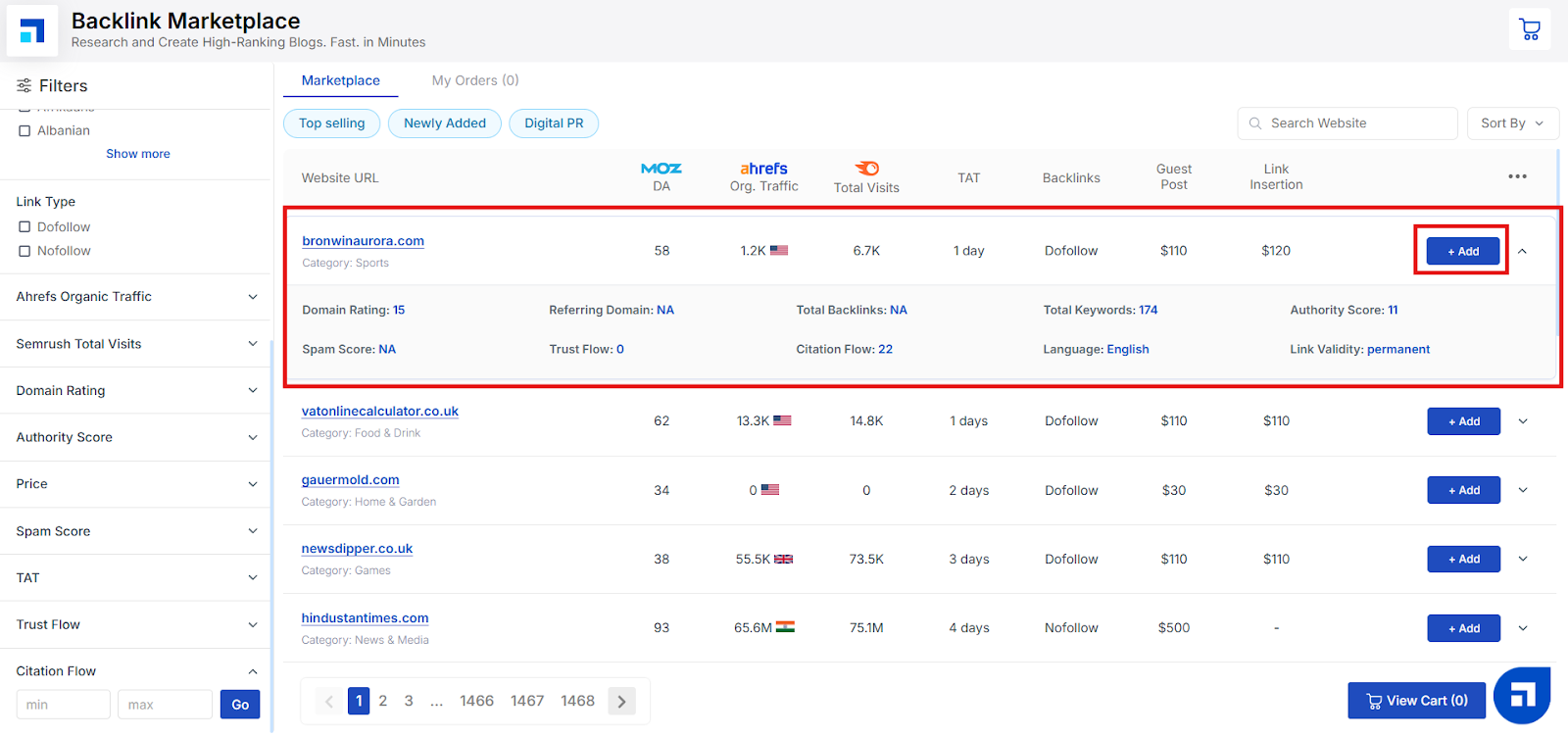
Simply click on the three dots (...) to expand its details. This expanded view will show you additional SEO metrics, including:
Domain Rating: Shows the overall authority of the domain.
Spam Score: Indicates the likelihood of the site being penalized by search engines — lower is better!
Trust Flow & Citation Flow: Trust Flow measures the quality of links pointing to the site, while Citation Flow shows how influential the site might be based on the number of links.
Referring Domains & Total Backlinks: Get an idea of the site’s backlink profile.
Total Keywords: The number of keywords the site ranks for, giving you insight into its reach.
Authority Score: Another useful SEO score showing the site’s overall strength.
Language & Link Validity: Check the primary language of the site and how long your link will remain live.
This expanded view helps you make confident, informed decisions before you add a backlink to your cart.
Step 6: Use Advanced Filtering Options
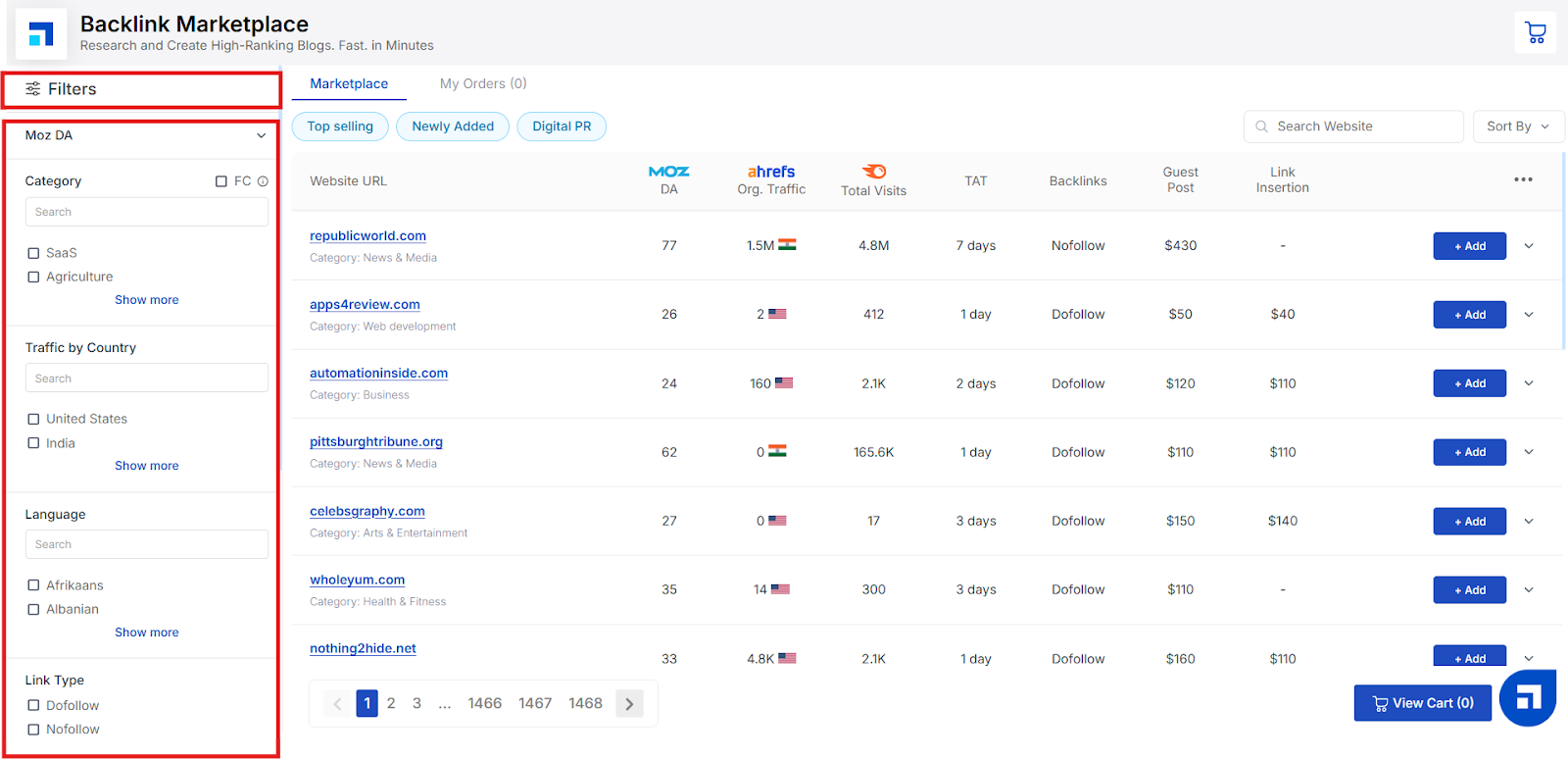
To make your search even more precise, you can use the advanced filtering options available in the left panel of your Backlink Marketplace dashboard. This helps you customize your results based on exactly what you’re looking for — saving you time and effort.
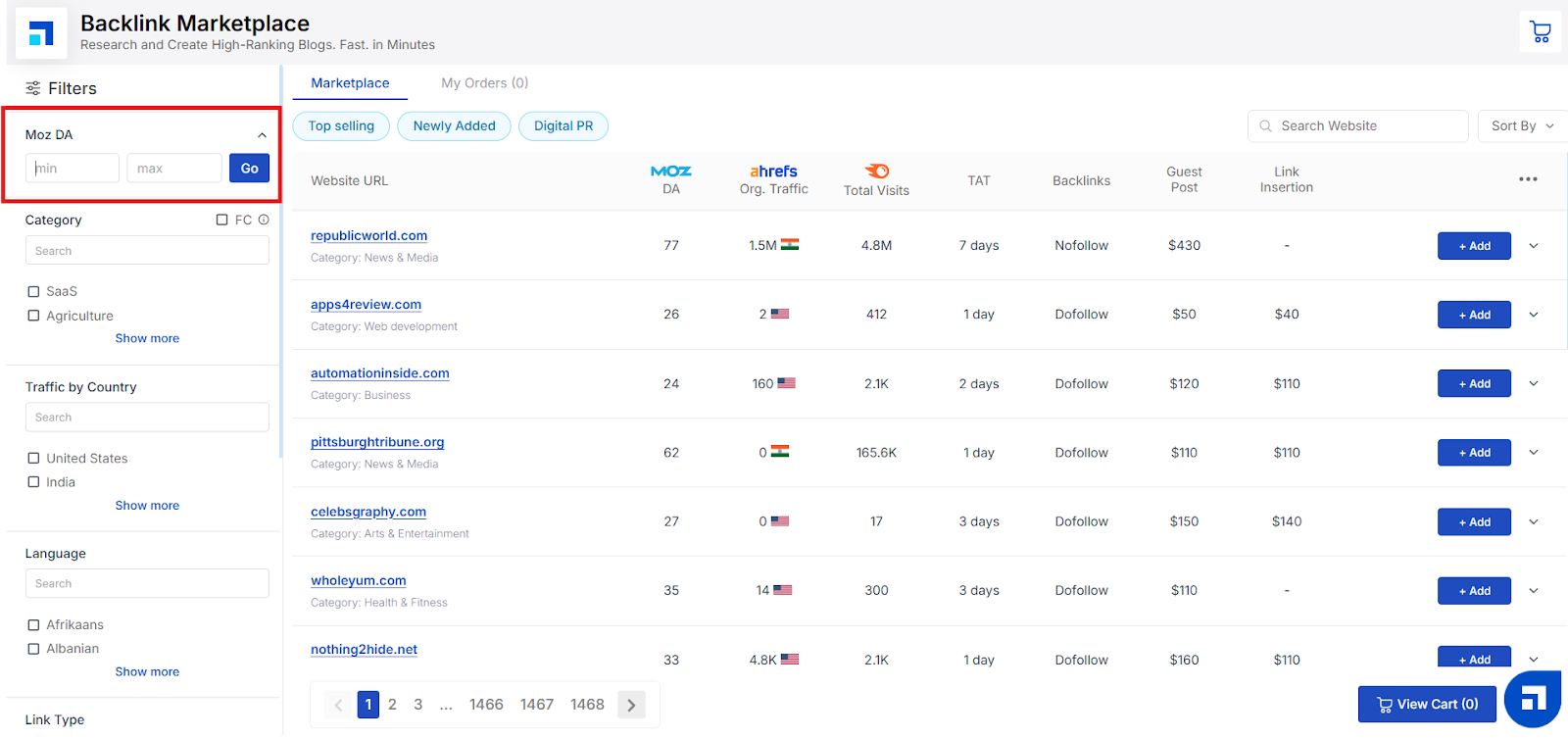
1. Moz DA
What is DA? DA (Domain Authority) is a score developed by Moz that predicts how well a website is likely to rank on search engine results pages (SERPs). The score ranges from 1 to 100, with higher scores meaning a greater ability to rank.
What is a good DA score? Generally, a DA of 30–50 is considered average, 50–70 is good, and 70+ is excellent — but the ideal score depends on your industry and goals.
How to use it: In the filter, you can set your minimum and maximum DA values to see only websites that fall within your desired range. Just enter the numbers and click Go — your results will update instantly.
2. Category
Use the Category filter to select the industry or niche that best matches your backlink goals.
Search Bar: If you know your niche, type it directly into the search bar to find relevant categories quickly.
Show More: Click Show more to see the full list of available industries — from SaaS and Agriculture to dozens of other options.
What does FC mean? FC stands for Forbidden Category. These include websites covering topics like casinos, crypto, CBD, sports betting, vape, and rehabilitation — areas that are sometimes restricted or sensitive. If you want to include these in your results, simply tick the FC checkbox.
This filter helps you find websites that align with your brand’s industry, so your backlinks appear more relevant and natural.
3. Traffic by Country
The Traffic by Country filter helps you find websites that get most of their visitors from specific countries. This is useful if you want your backlinks to reach an audience in a particular region.
Search Bar: Type the name of the country you’re targeting to quickly find matching websites.
Show More: Click Show more to see all available countries and pick the ones that fit your audience.
For example, if you want to boost your brand’s visibility in the United States or India, just tick the relevant checkboxes — and your results will instantly update to show sites with significant traffic from those locations.
This way, you can make sure your backlinks reach the right people in the right place.
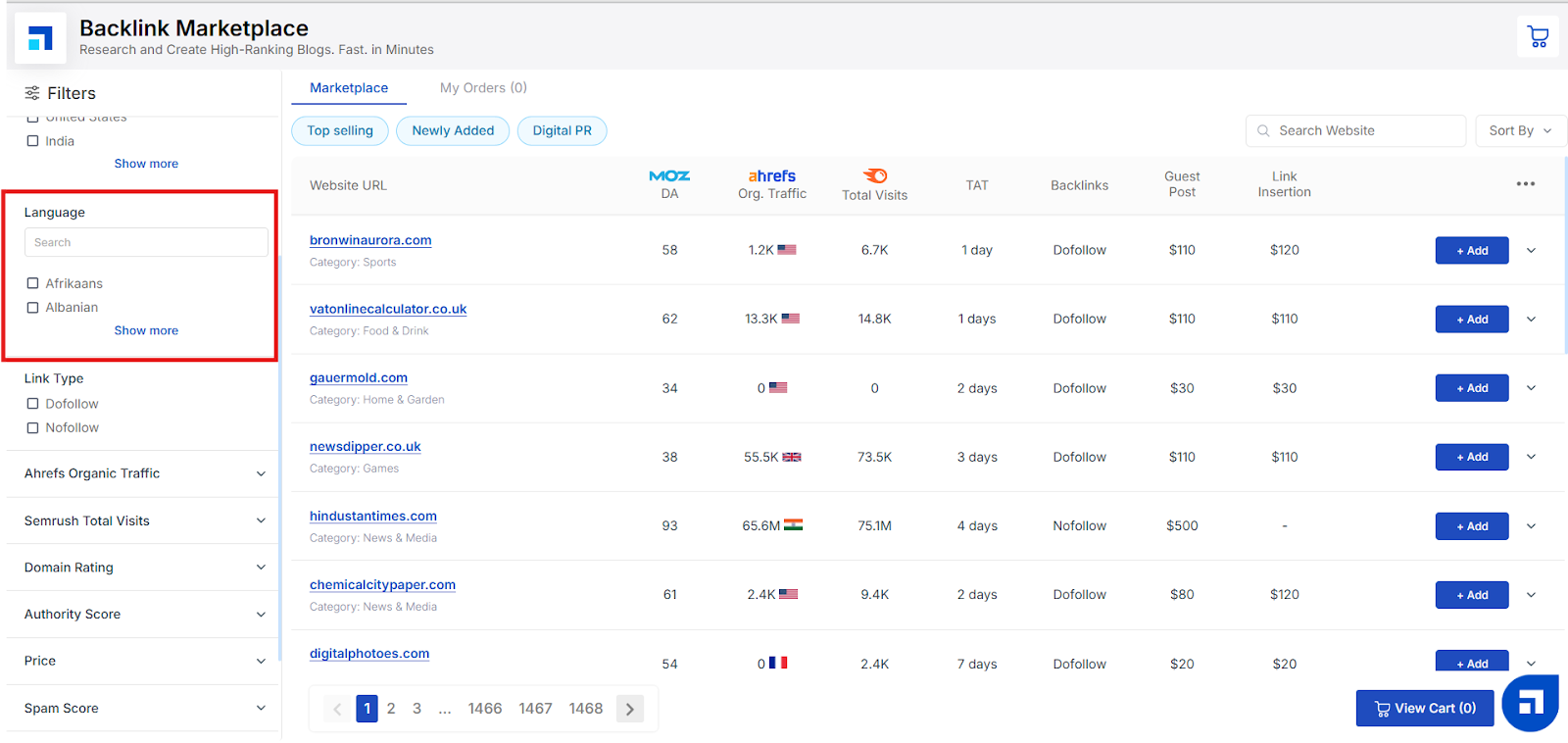
4. Language
The Language filter helps you find websites that publish content in the language your target audience understands best. This ensures your backlinks appear in the right context and reach readers who can actually engage with your content.
Search Bar: Quickly find the language you need by typing it into the search bar.
Show More: Click Show more to see the full list of supported languages, and tick the ones that match your audience.
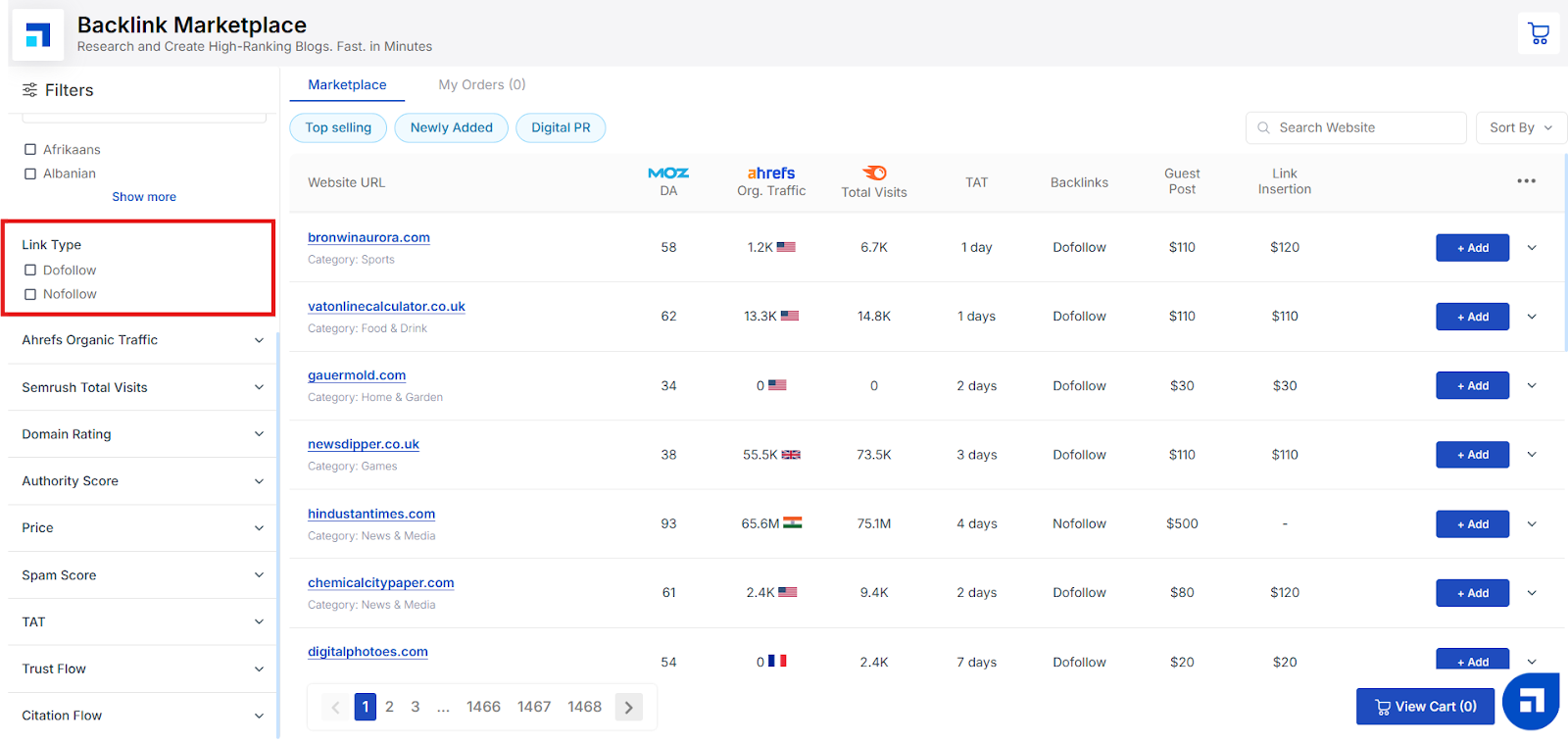
5. Link Type
The Link Type filter lets you choose whether you want your backlinks to be Dofollow or Nofollow, depending on your SEO strategy.
What’s the difference?
Dofollow: These links pass on SEO value (link juice) to your website, helping improve your search rankings.
Nofollow: These links do not pass SEO value directly but can still drive referral traffic and build a natural-looking backlink profile.
Just tick the box for the type of link you prefer — or select both to see all options.
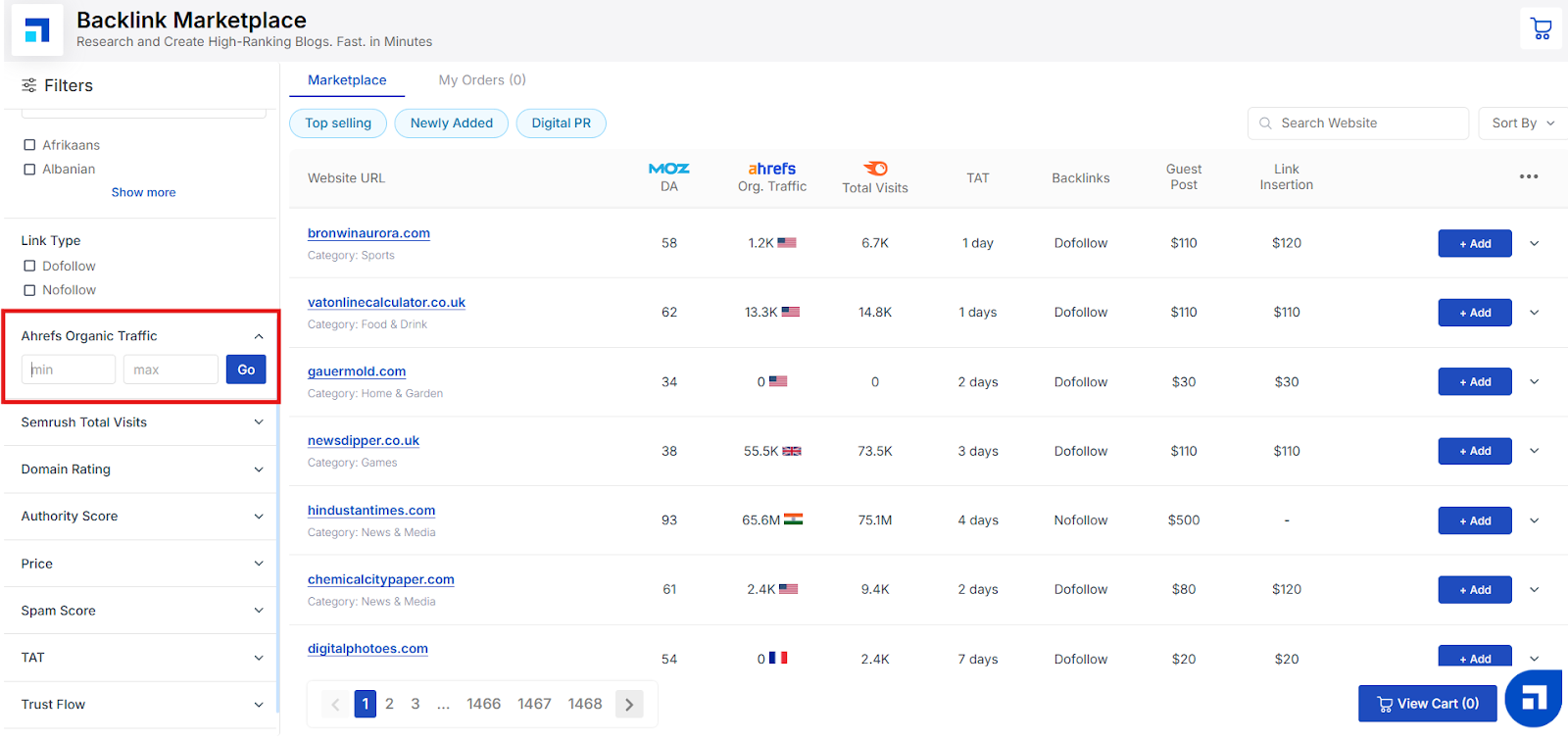
6. Ahrefs Organic Traffic
The Ahrefs Organic Traffic filter lets you find websites based on how much search traffic they receive each month, as estimated by the Ahrefs tool.
Why does this matter? Websites with higher organic traffic often have better authority and reach, giving your backlinks more visibility and potential SEO value.
How to use it: Set your minimum and maximum traffic values to narrow down websites that fit your needs. For example, you might want sites with at least 1,000 visitors per month — or you might prefer smaller, niche sites with less traffic. Once you set your range, click Go and your results will update instantly.
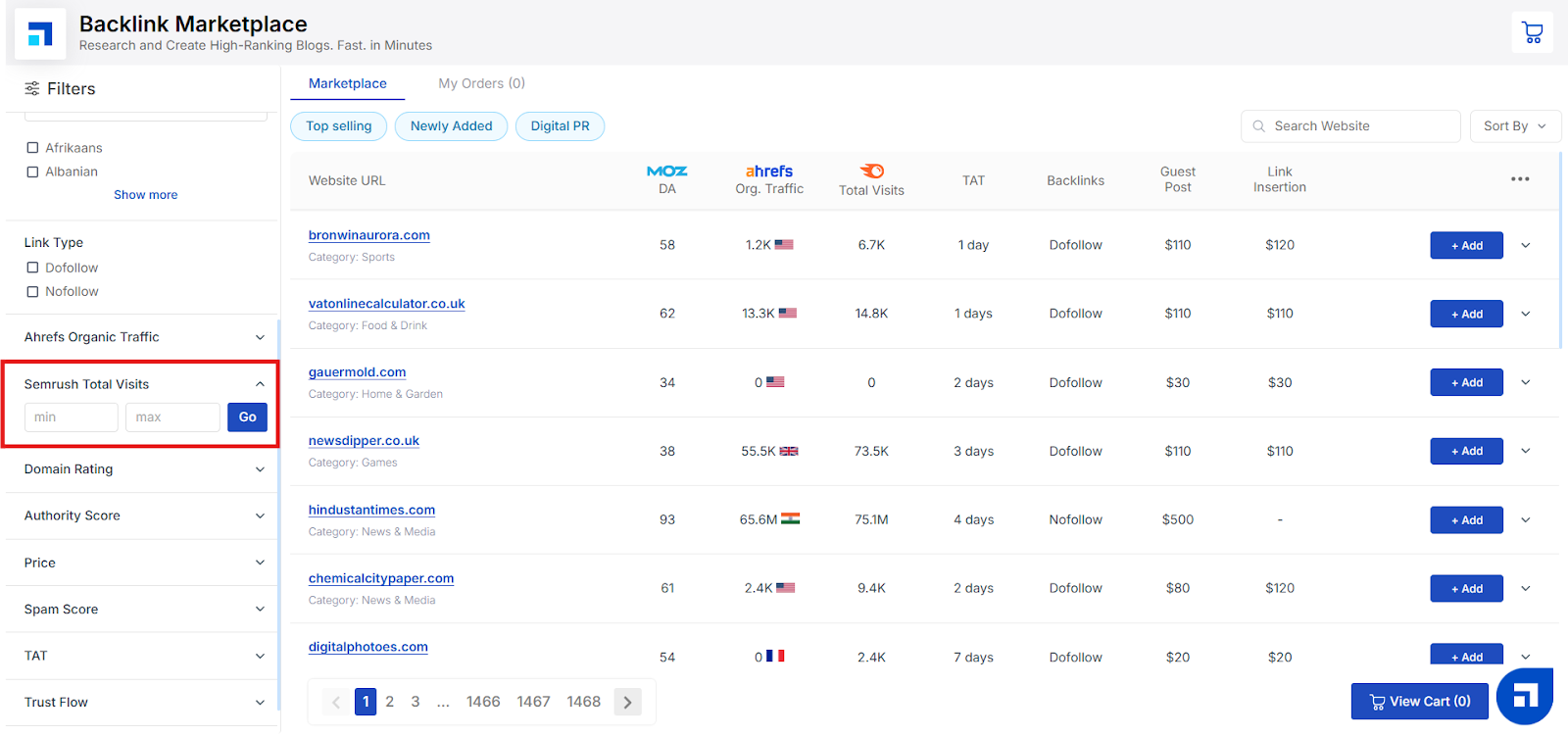
7. Semrush Total Visits
The Semrush Total Visits filter lets you find websites based on their total estimated monthly visits, as calculated by the Semrush tool.
Why does this matter? Knowing a website’s total traffic helps you understand its overall reach and popularity. Sites with higher visit numbers can give your backlinks more exposure, while smaller sites may offer more targeted audiences.
How to use it: Set your minimum and maximum visit numbers to see websites that match your traffic requirements. For example, you might look for sites with 10,000+ visits per month for maximum reach — or a lower range for niche sites. Once you’ve set your range, click Go to instantly update your results.
8. Domain Rating
The Domain Rating (DR) filter lets you choose websites based on their overall authority score.
What is Domain Rating? Domain Rating is a score (from 0 to 100) that shows how strong and trustworthy a website’s backlink profile is. A higher DR means the site has better authority and credibility — which can help boost your own SEO when you get a link from it.
How to use it: Simply set your minimum and maximum DR values to filter websites that match your desired authority range. For example, you might look for sites with a DR above 40 for stronger link equity. Click Go once you’ve entered your range, and your results will refresh automatically.
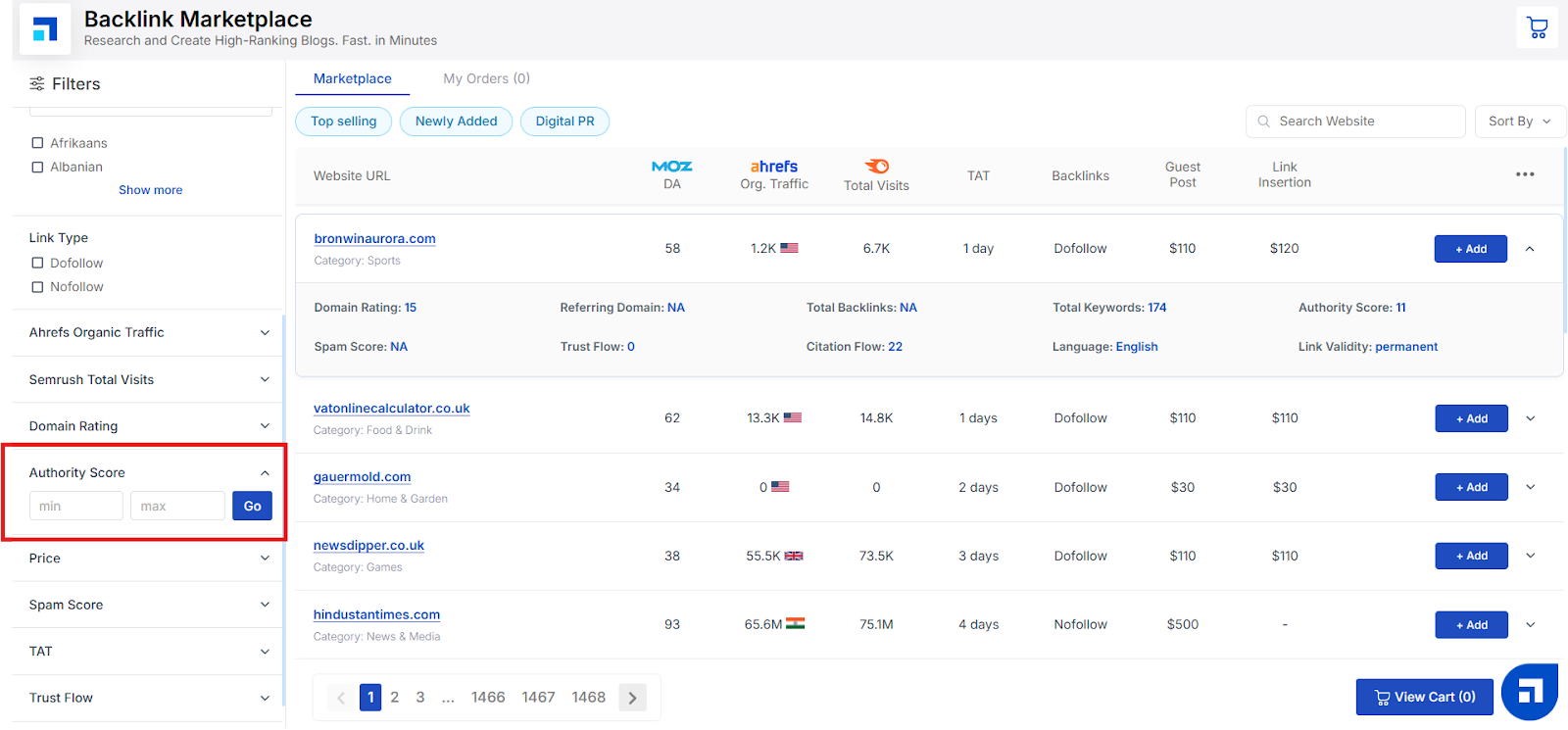
9. Authority Score
The Authority Score filter helps you find websites based on their overall site strength and trustworthiness.
What is Authority Score? Authority Score is a rating (usually from 0 to 100) that shows how credible and influential a website is in its niche. The higher the score, the more reliable the site is considered to be — which can make your backlinks more valuable for SEO.
How to use it: Enter your minimum and maximum Authority Score values to see only websites that fit within your preferred authority range. For example, you might filter for sites with an Authority Score above 50 for maximum impact. Click Go once you’ve set your range to refresh your results.
10. Price
The Price filter helps you find backlink opportunities that fit within your budget.
What is it for? Each website listing in the Backlink Marketplace has its own pricing for guest posts and link insertions. Using this filter lets you narrow down your options based on how much you’re willing to spend — making it easy to find cost-effective opportunities without overspending.
How to use it: Set your minimum and maximum price range to display only the websites that match what you’re ready to invest. For example, you might filter for sites that charge between $50 and $200 per guest post. Click Go after setting your range to instantly update your results.
This way, you stay in control of your SEO budget while choosing the best sites for your needs.
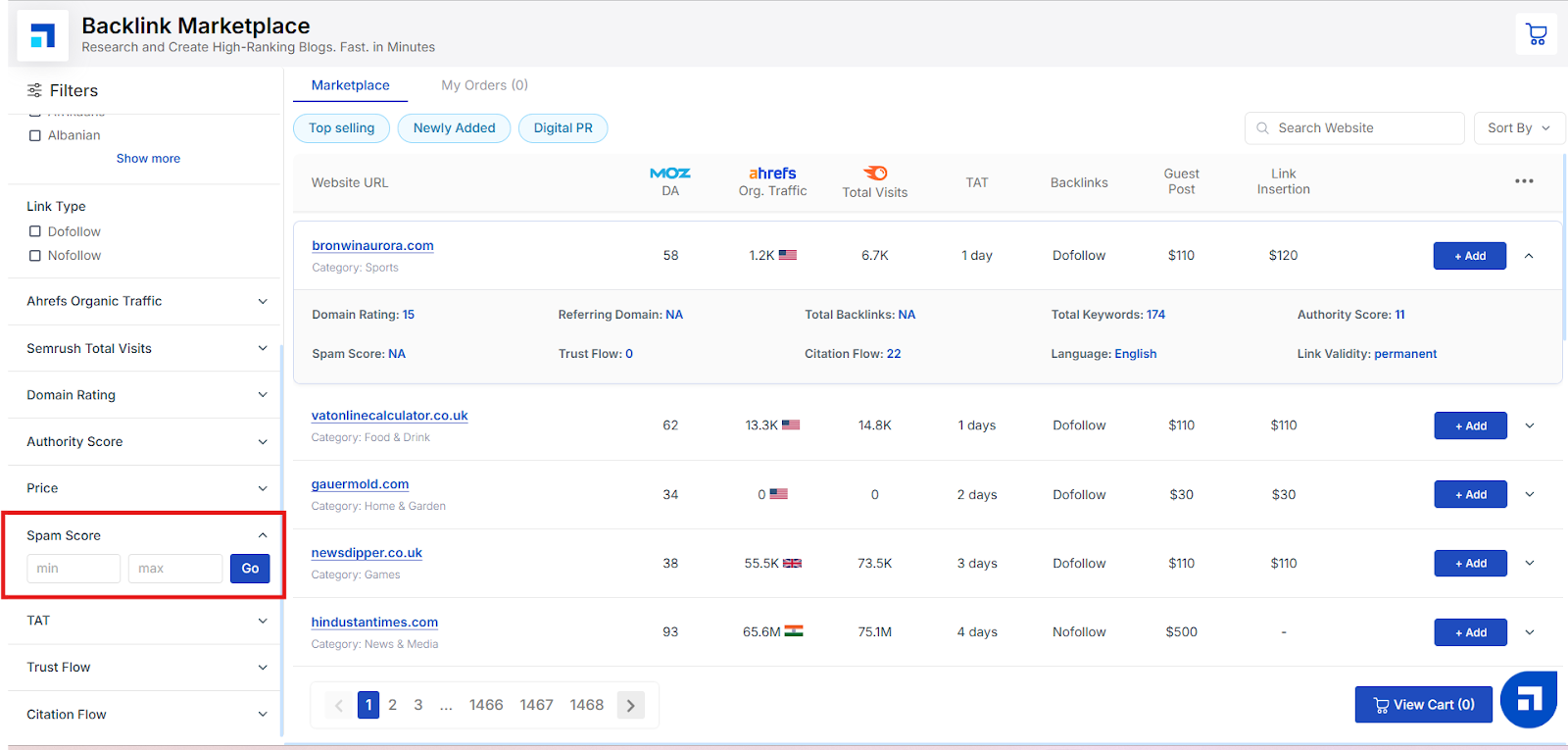
11. Spam Score
The Spam Score filter helps you find websites that have a low risk of being flagged as spam by search engines.
What is Spam Score? Spam Score is a percentage that indicates how likely a website is to be penalized or seen as spammy. A lower Spam Score (closer to 0%) means the website is generally trustworthy and safe for backlinks. High Spam Scores can put your site’s SEO at risk, so it’s best to aim for sites with a low score.
How to use it: Set your minimum and maximum Spam Score range to filter out sites that might harm your SEO. For example, you might look for websites with a Spam Score under 5%. Click Go after setting your range, and your results will update to show only safer websites.
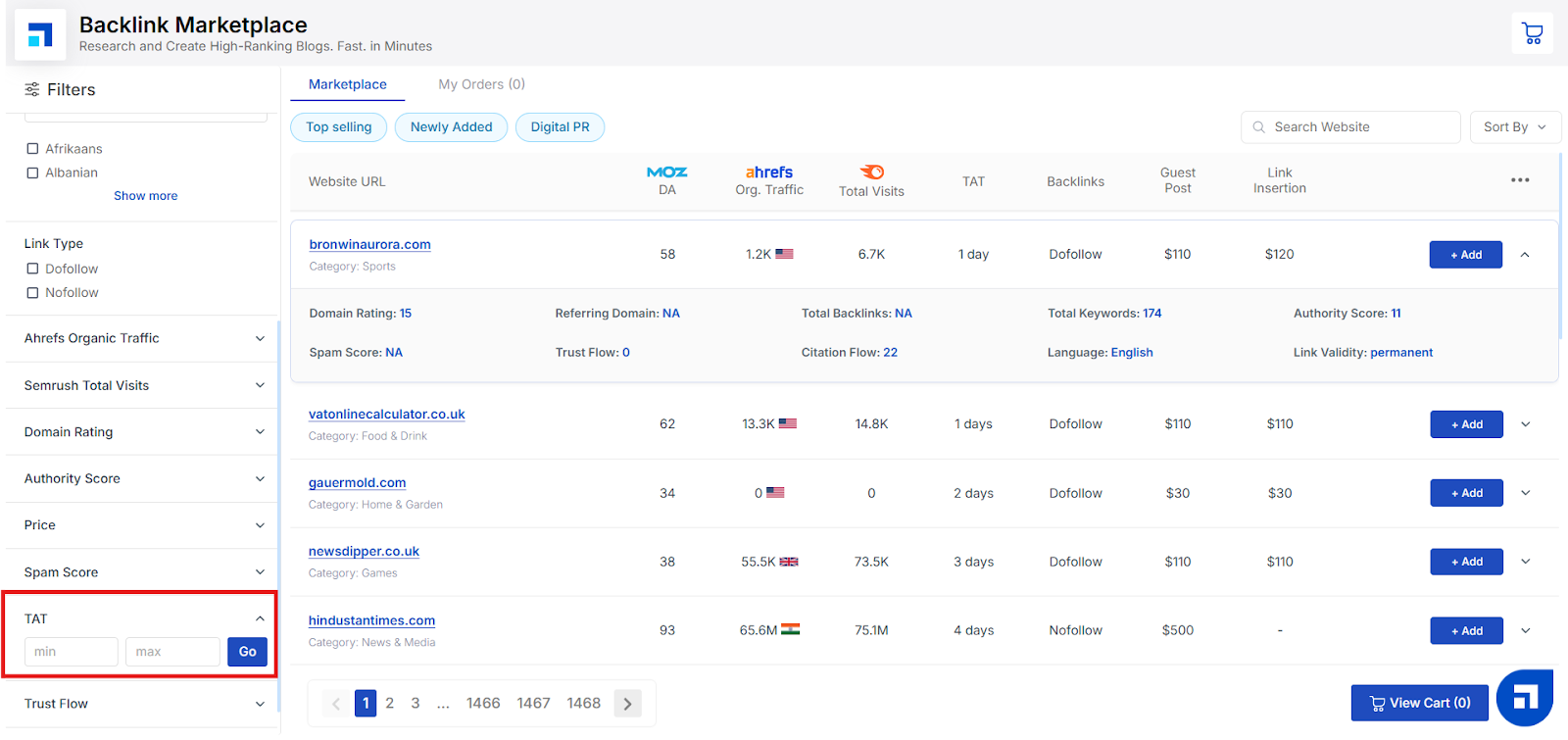
12. TAT (Turnaround Time)
The TAT filter helps you find websites based on how quickly they can publish your guest post or insert your backlink.
What is TAT? TAT stands for Turnaround Time, which is the estimated number of days it will take for your backlink to go live after you place your order. Shorter TATs mean faster results and quicker improvements to your SEO campaigns.
How to use it: Set your minimum and maximum TAT range to choose websites that match your timeline. For example, if you need your link published within a week, you can filter for sites with a TAT of 7 days or less. Click Go once you’ve set your range — your results will update instantly to show websites that fit your publishing schedule.
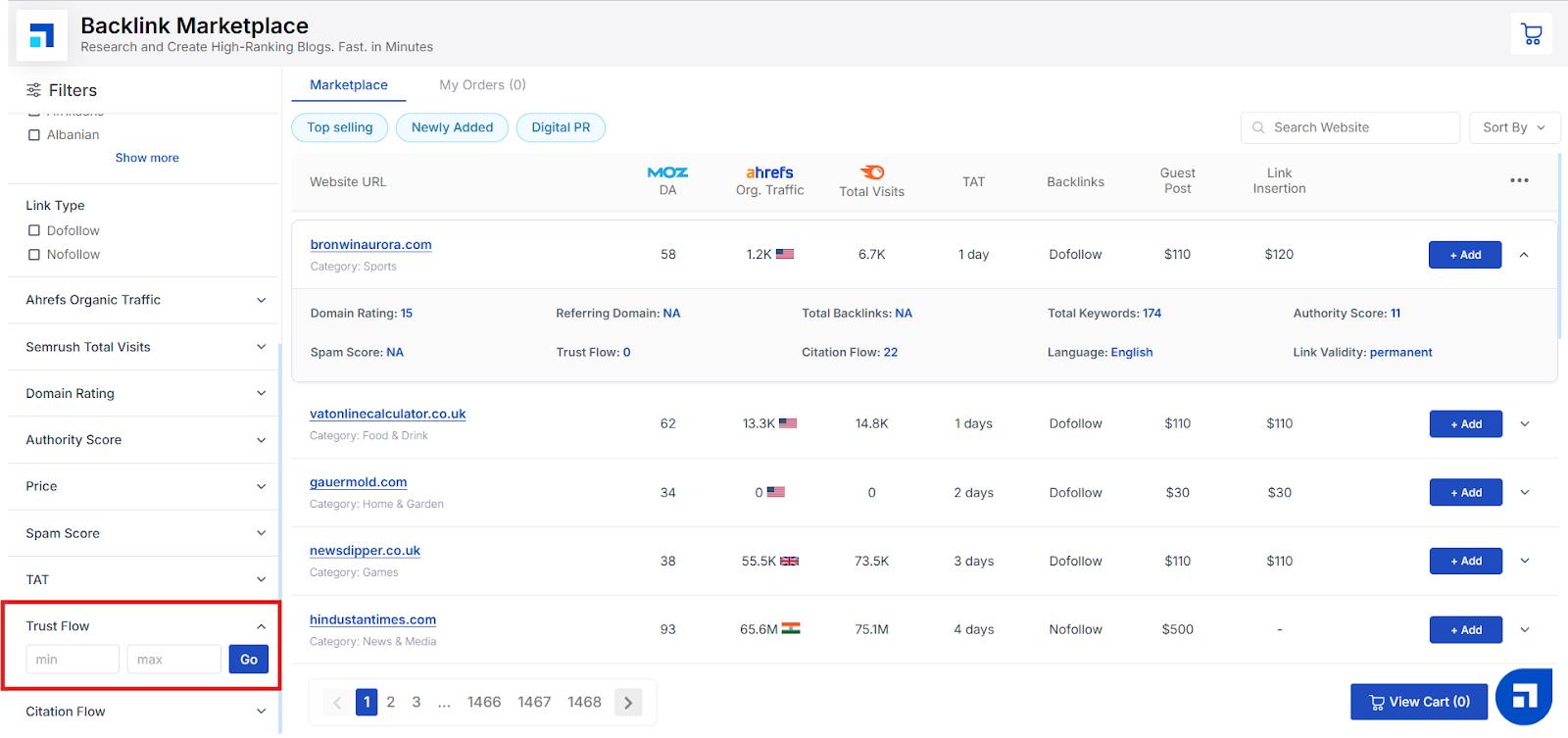
13. Trust Flow
The Trust Flow filter helps you find websites based on the quality and trustworthiness of their backlinks.
What is Trust Flow? Trust Flow is a score (typically from 0 to 100) that measures how trustworthy a website is based on the quality of sites linking back to it. A higher Trust Flow means the site is linked to by other reputable websites, which can make your backlinks more valuable for SEO.
How to use it: Set your minimum and maximum Trust Flow values to filter sites that meet your quality standards. For example, you might prefer websites with a Trust Flow above 20 to ensure you’re getting links from trustworthy sources. Once you’ve set your range, click Go — your results will refresh automatically to show only websites that match.
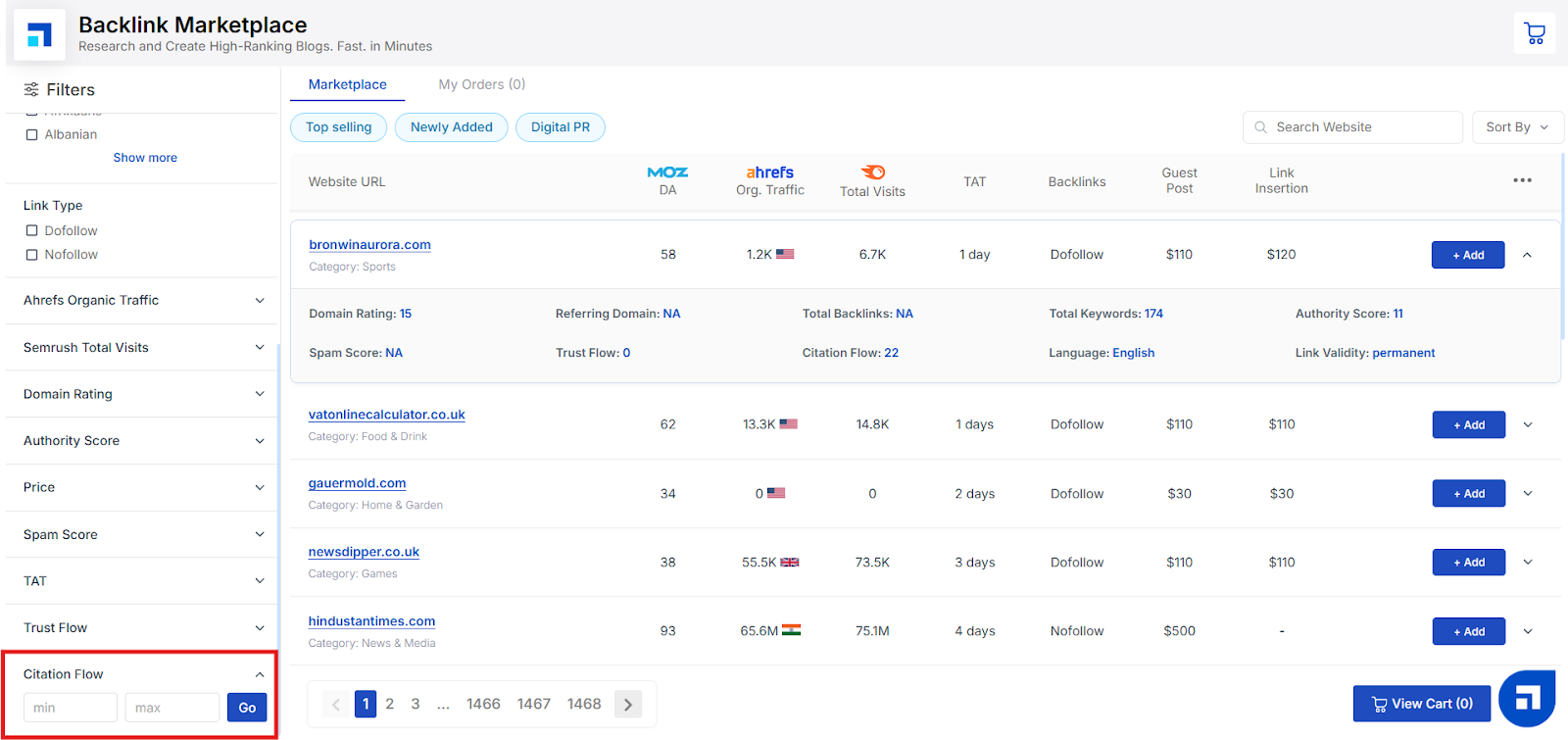
14. Citation Flow
The Citation Flow filter helps you choose websites based on the quantity and influence of links pointing to them.
What is Citation Flow? Citation Flow is a score (from 0 to 100) that measures the number of backlinks a website has and how influential those links are. Unlike Trust Flow, which focuses on link quality, Citation Flow focuses more on link quantity and potential impact.
How to use it: Set your minimum and maximum Citation Flow values to filter websites according to your needs. For example, you might look for sites with a Citation Flow above 15 to ensure they have a healthy number of backlinks and influence. Click Go once you’ve set your range — your results will instantly update to match.
Step 7: Add to Cart
Once you’ve applied all your filters and found the websites that match your requirements, you’re ready to start building your order.
Simply click the “Add” on the websites you want to purchase backlinks from. You can add multiple sites at once and see your selected websites in your cart summary.
This helps you keep everything organized and review your choices before finalizing your order.
Step 8: View Your Cart
After you’ve added your selected websites to the cart, it’s time to review your order.
Click on “View Cart” to see all the websites you’ve chosen, along with the link types, pricing, and any other important details.
Take a moment to double-check that everything matches your requirements — you can still remove sites or adjust your selection before you proceed to checkout.
Step 9: Review Details & Select Link Type
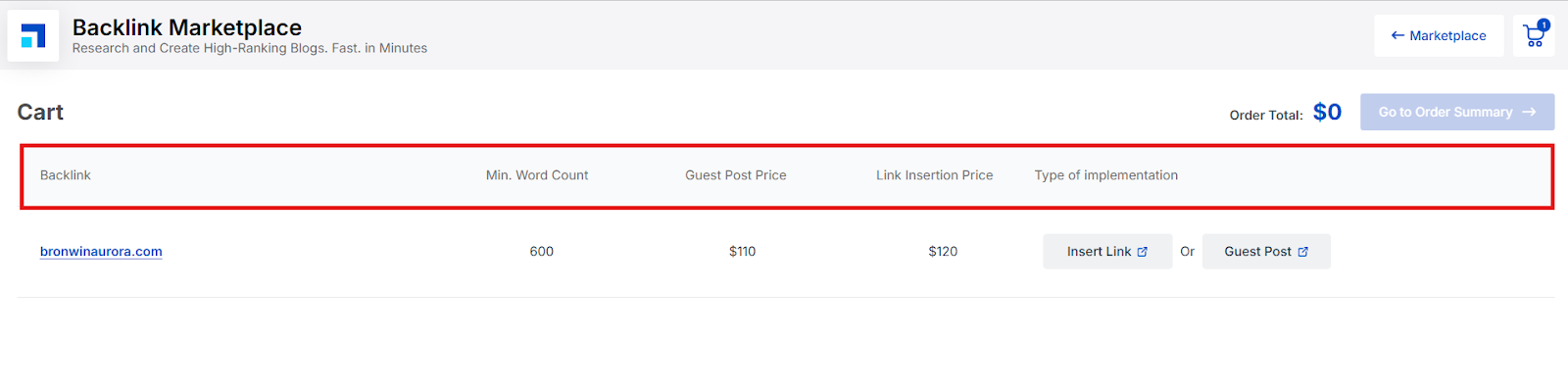
In your Cart View, you’ll see all the important details for each website listed clearly on the screen — no need to click anything extra.
Here’s what you’ll see for each site in your cart:
Minimum Word Count: The required word count for a guest post article.
Guest Post Price: The cost for publishing a new article (content creation not included).
Link Insertion Price: The cost for adding your link to an existing article.
Type of Implementation: Choose whether you want a Guest Post or Link Insertion.
Simply select the option that works best for your campaign. This ensures you get the type of placement you need at the price you’re comfortable with.
Step 10: Provide Content & Submit
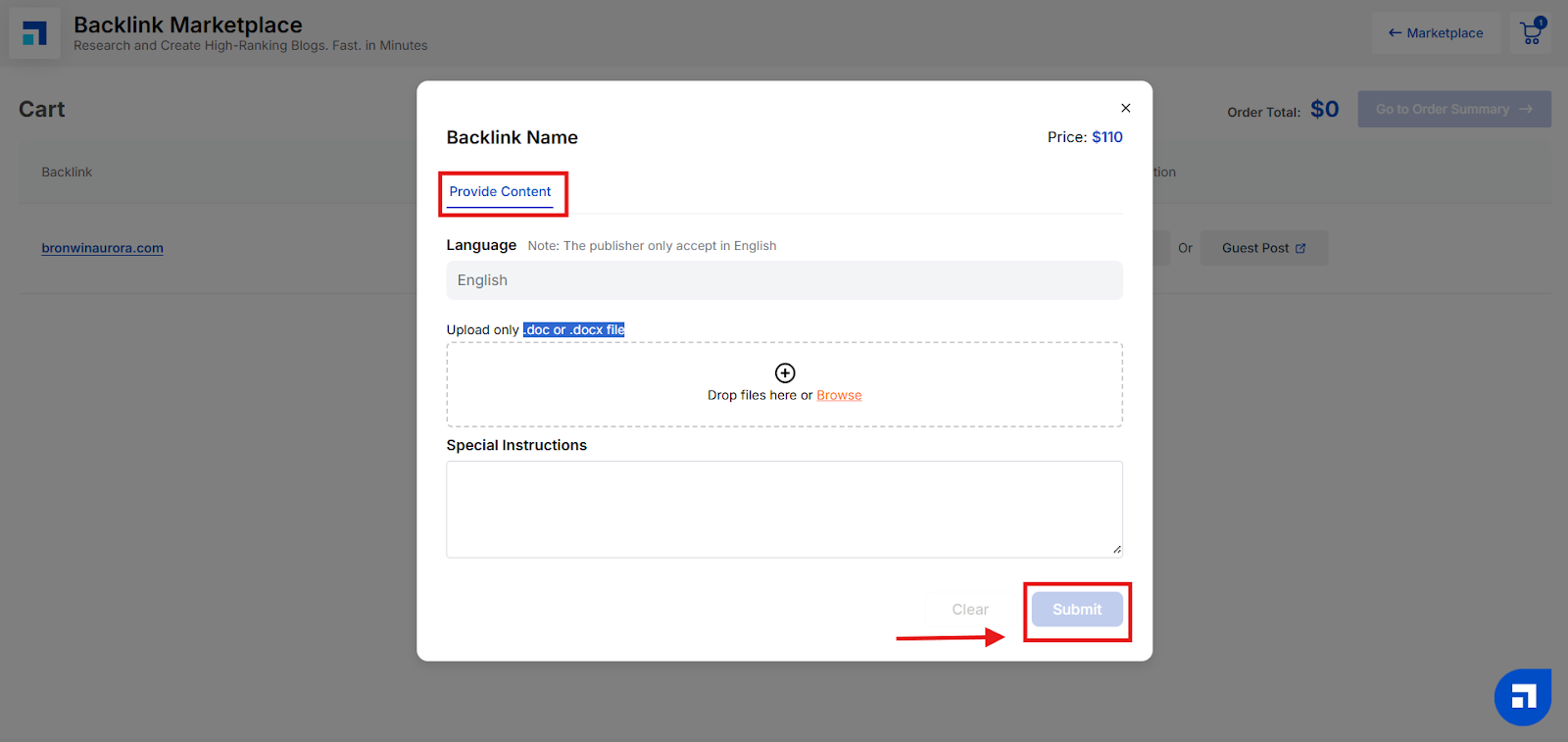
Once you select your Type of Implementation (for example, Guest Post), a pop-up will appear asking you to provide the required content details.
Here’s what you’ll need to do:
Language: Check the language shown — this is the language the publisher accepts for your guest post.
Upload the Doc: Upload your guest post article. Make sure your file is in .doc or .docx format only — other file types won’t be accepted.
Add Special Instructions: If you have any specific requirements or guidelines for the publisher, you can add them here to make sure everything is done just the way you want.
Click Submit: Once you’ve filled everything in, click Submit to finalize the content submission for that website.
Repeat this for each site where you’re placing a guest post — and that’s it! You’re all set to move forward.
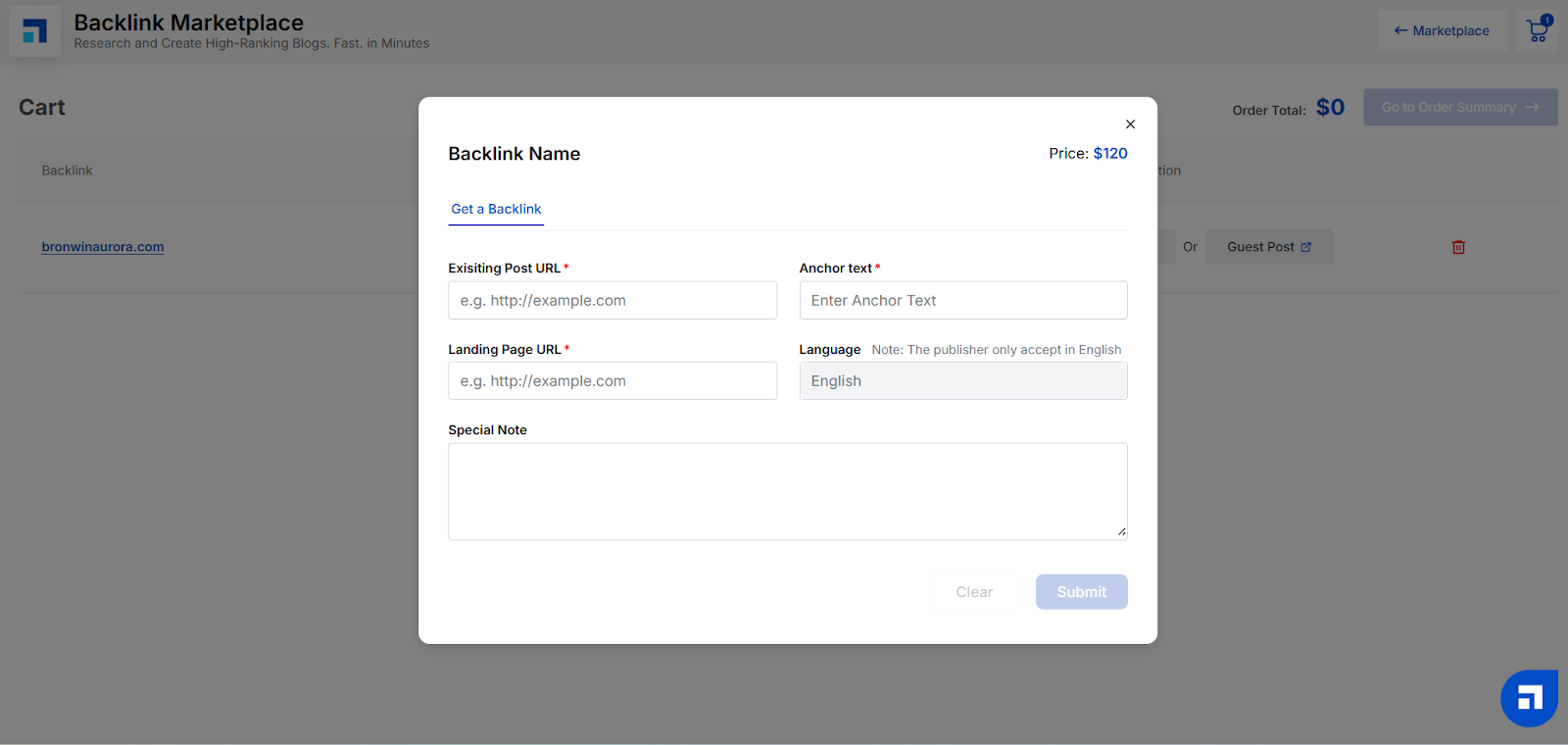
Similarly, if you select Insert Link, a pop-up will appear where you'll need to provide the following details:
Existing Post URL*
Anchor Text*
Landing Page URL*
Language – You’ll see a note here indicating which language the publisher accepts
Special Note – Optional field to share any specific instructions with the publisher
After adding these details, simply click Submit to complete the process.
What Happens After You Place a Backlink Order?
Once you've successfully placed your order in the Backlink Marketplace, here's what you can expect next in the post-purchase process:
1. Order Updates Are Dashboard-Only
After checkout, you won’t receive any email confirmations or notifications. All order-related updates, including status changes, turnaround times, and live link confirmations, are managed directly within the Cart section of your Marketplace dashboard. Be sure to check back there regularly for real-time progress.
2. Publisher Communication
The publishing websites listed in the Marketplace generally do not reach out to buyers proactively. However, if the publisher requires any changes, clarification, or additional information to fulfill your order, they may contact. Otherwise, you can assume the process is moving forward as scheduled.
3. What if a link isn’t live within the TAT?
If your backlink is not published within the promised Turnaround Time (TAT), don't worry. In most cases, the publisher may either cancel the request or issue a refund, depending on the situation. This action and its status will be clearly reflected in your Cart view. If you need support, you can also reach out to the Scalenut team directly for assistance.