GEO Friendly H2-H6 headings are important to creating a well-structured, user-friendly website that attracts and retains visitors.
As the web shifts from traditional SEO to Generative Engine Optimization (GEO), your subheadings (H2 to H6) aren’t just helpful for readers—they’re crucial for machines.
From search engines to AI assistants, how you structure your content can determine how well it's understood, surfaced, and cited.
That’s why Scalenut’s transition into a GEO platform puts strong emphasis on heading structure—empowering you to write content that’s not only well-organized but also AI-discoverable.
The result? Smarter visibility, higher engagement, and stronger performance across platforms.
What Are H2–H6 Headings?
H2 to H6 tags are subheadings that break down your content into digestible sections.
While the H1 is your main title, H2S often act as major section titles, followed by H3S and beyond for further detail. These headings help define the hierarchy and flow of your content, and guide both readers and AI systems through your article's narrative.
Why Headings Matter in a GEO Context?
Semantic Clarity for AI Engines - Headings signal topic shifts and section priorities, helping AI engines like ChatGPT, Perplexity, and Gemini better understand your content’s hierarchy and intent.
Improved Prompt Alignment - Keywords and topics in your subheadings help match your content with specific user prompts—boosting your chance of being pulled into AI-generated answers.
Higher Visibility Across Platforms - Structured headings make it easier for your content to be selected in SERPs, voice search, and AI digests—especially when aligned with user queries.
Better Readability = Better Discoverability - Clear headings keep readers engaged and help AI tools extract relevant answers with ease—supporting both human and machine comprehension.
How to Fix H2–H6 Issues for Better GEO Performance?
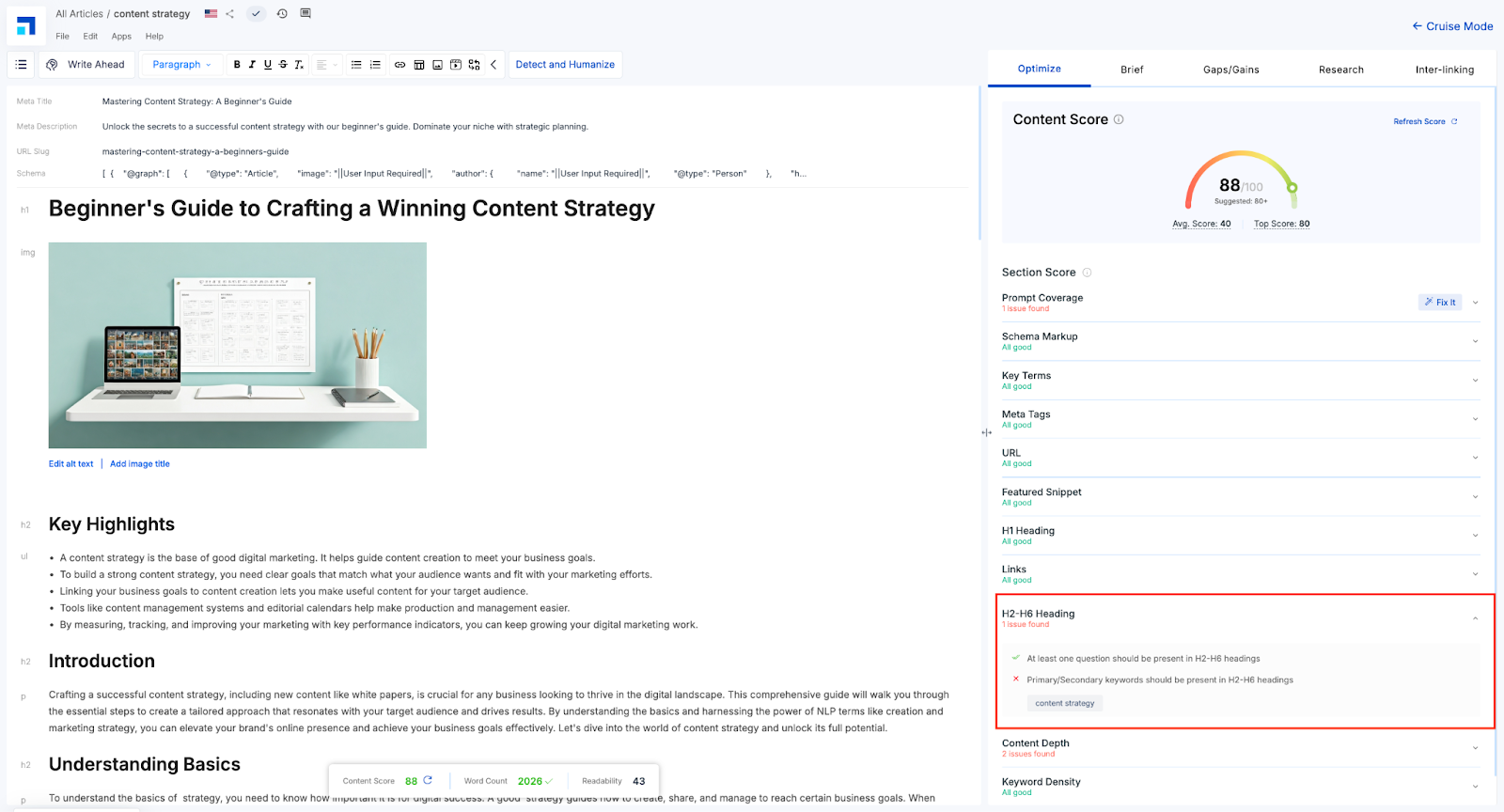
In the screenshot above, the article titled “Beginner’s Guide to Crafting a Winning Content Strategy” is flagged for an H2–H6 heading issue. While the structure is present, it’s missing the primary or secondary keyword—in this case, “content strategy”—within the subheadings.
The H2 “Understanding Basics” is too generic and doesn't reinforce the topic. As a result, AI systems and search engines may struggle to associate the section with the main theme of the article, affecting relevance and visibility.
How to Fix with Scalenut:
Use the H2–H6 optimization checklist under the Optimize tab to spot which headings are missing target keywords.
Select underperforming headings and edit directly in the editor.
Update generic subheads like “Understanding Basics” to something like “Understanding Content Strategy Basics” for improved keyword alignment. You can also add a question in H2/H3.
Making this small adjustment aligns your structure with both user expectations and AI indexing signals—helping your content rank smarter across platforms.
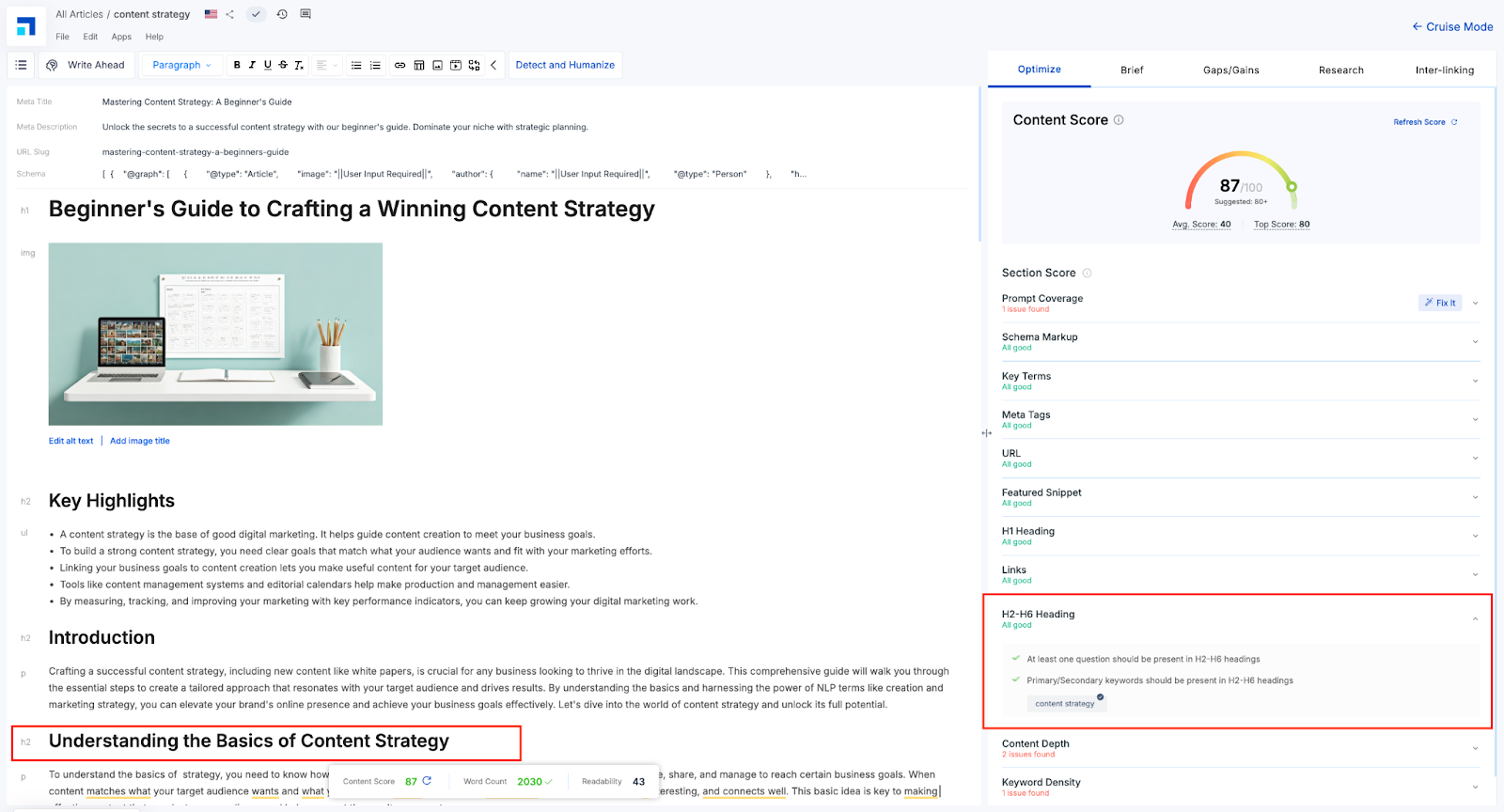
As shown in the screenshot above, the H2–H6 heading issue has now been successfully resolved. The subheading “Understanding the Basics of Content Strategy” now includes the primary keyword “content strategy,” fulfilling GEO requirements. This enhancement improves topic clarity, strengthens semantic relevance, and boosts discoverability.
Had there been a major issue, the ‘Fix It’ module would have assisted you in working on your H2-H6 Headings. In this case, there are no major errors. Hence, one cannot see the ‘Fix It’ module here.
Note -
Symbols are useful for communicating the level of attention required for instruction or task.
Red cross = Major issue needing immediate attention
Orange tick = Minor issue or opportunity for improvement
Green double tick = Perfection.
Ready to learn more about the important parameters? Head over to our next blog post to dive into the details!