Optimize your website's performance with Scalenut's Traffic Analyzer and gain insights into visitor behavior, traffic sources, and engagement metrics
Success isn’t just about getting clicks—it’s about creating content that performs across search engines, AI systems, and multi-channel ecosystems. That’s the heart of Generative Engine Optimization (GEO)—and it’s exactly where Scalenut is headed.
As part of our shift from traditional SEO to a GEO-first platform, we’ve improved tools that help you go beyond rankings to understand how your content is discovered, engaged with, and optimized across the web. One of the key tools leading this transformation is the Traffic Analyzer.
Whether you're a marketer, a brand owner, or a content strategist navigating the noisy web, Scalenut’s Traffic Analyzer acts as your real-time radar—giving you actionable insights into traffic flow, visitor behavior, and content performance across your site.
What is Website Traffic?
Website traffic refers to the total number of users who visit your website and engage with its content within a given time period. It includes page views, session durations, and interaction data—all of which are critical for understanding how visible, relevant, and engaging your content truly is.
In the GEO world, traffic is more than just numbers—it's a feedback loop from search engines and AI systems that signals what content is resonating, and what needs improvement.
What is a Traffic Analyzer?
A Traffic Analyzer is a digital intelligence tool that captures, processes, and interprets how users interact with your website. From which pages are gaining traction to which keywords are slipping—this tool provides a GEO-friendly view of how your content performs in real-time.
Scalenut’s Traffic Analyzer is purpose-built for Generative Engine Optimization, helping you fine-tune your content for discoverability across both traditional and AI-first search platforms.
Benefits of Scalenut’s Traffic Analyzer
1. Track 28-Day Performance - Get a clear picture of how your website is performing over the past 28 days. Spot trends, compare traffic patterns, and quickly identify pages that may need attention—like blogs that are losing impressions or engagement.
2. Understand Page Traffic Shifts - See which pages are gaining traction, which ones are slipping, and what content is newly added or no longer pulling in visitors. This helps you stay on top of what’s working and what needs improvement.
3. See Keyword Rankings Clearly - For every page, find out which keywords or search queries it’s ranking for. This gives you a better idea of how people are discovering your content—and where you might be missing opportunities.
4. Improve Pages with Keyword Optimization - Use the built-in optimization tool to fine-tune your pages for the keywords that matter. It’s a practical way to strengthen your content and help it show up more often in search results.
5. Measure What’s Working - Track the impact of your updates and see whether your rankings and traffic improve after making changes. It’s all about making smart adjustments and seeing real results over time.
Why It Matters in GEO?
Unlike traditional SEO tools that stop at rankings and backlinks, Scalenut’s Traffic Analyzer is built for the age of Generative Discovery. It helps you:
Understand what content engines value today
Adjust to changing user behavior and AI trends
Map traffic to content quality and topic coverage
Take action on real-time insights to stay competitive in AI-first environments
How to Set Up the Traffic Analyzer?
STEP 1: Connect Your Google Search Console
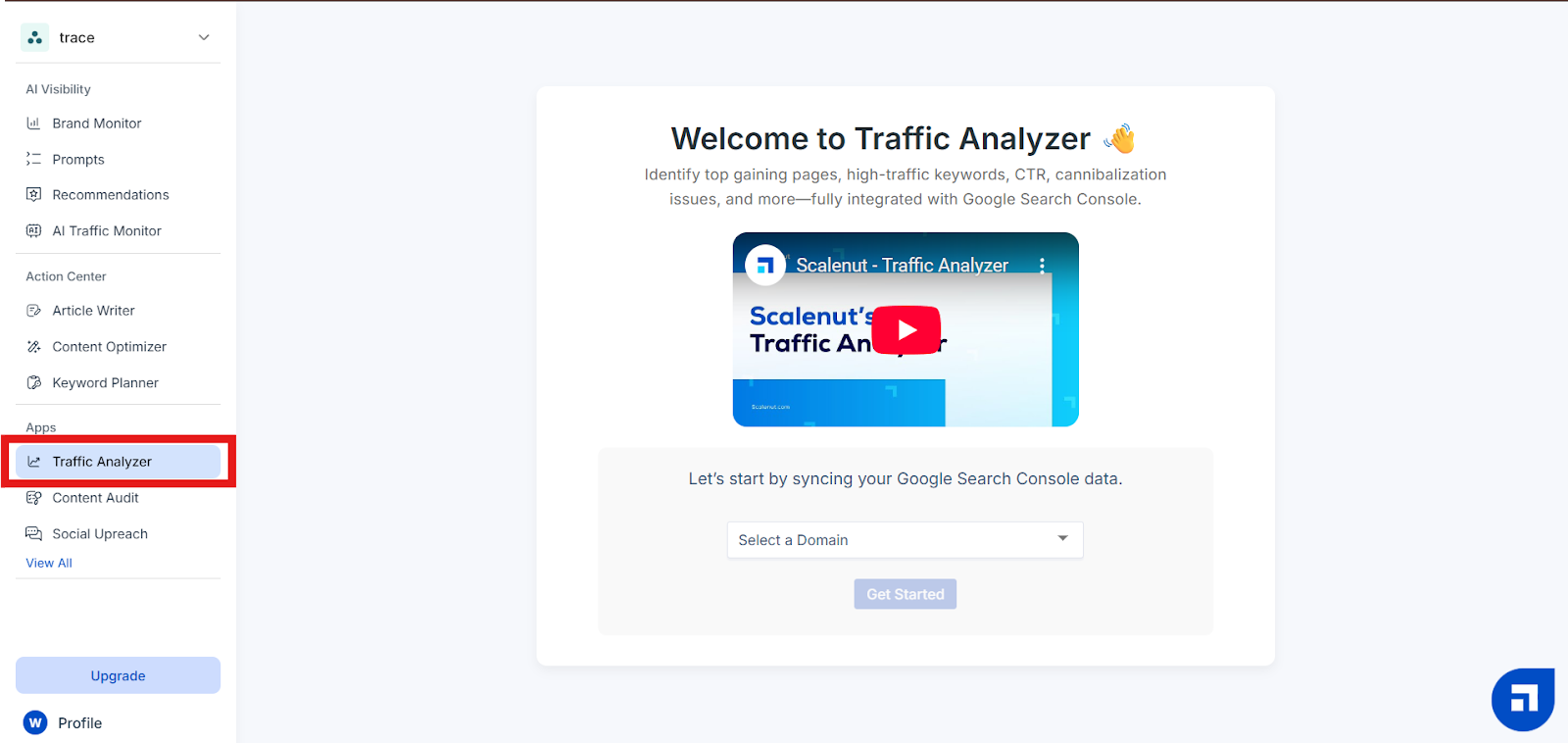
Log in to your Scalenut account and find the ‘Traffic Analyzer’ feature on the left navigation panel under Apps section of Scalenut Dashboard.
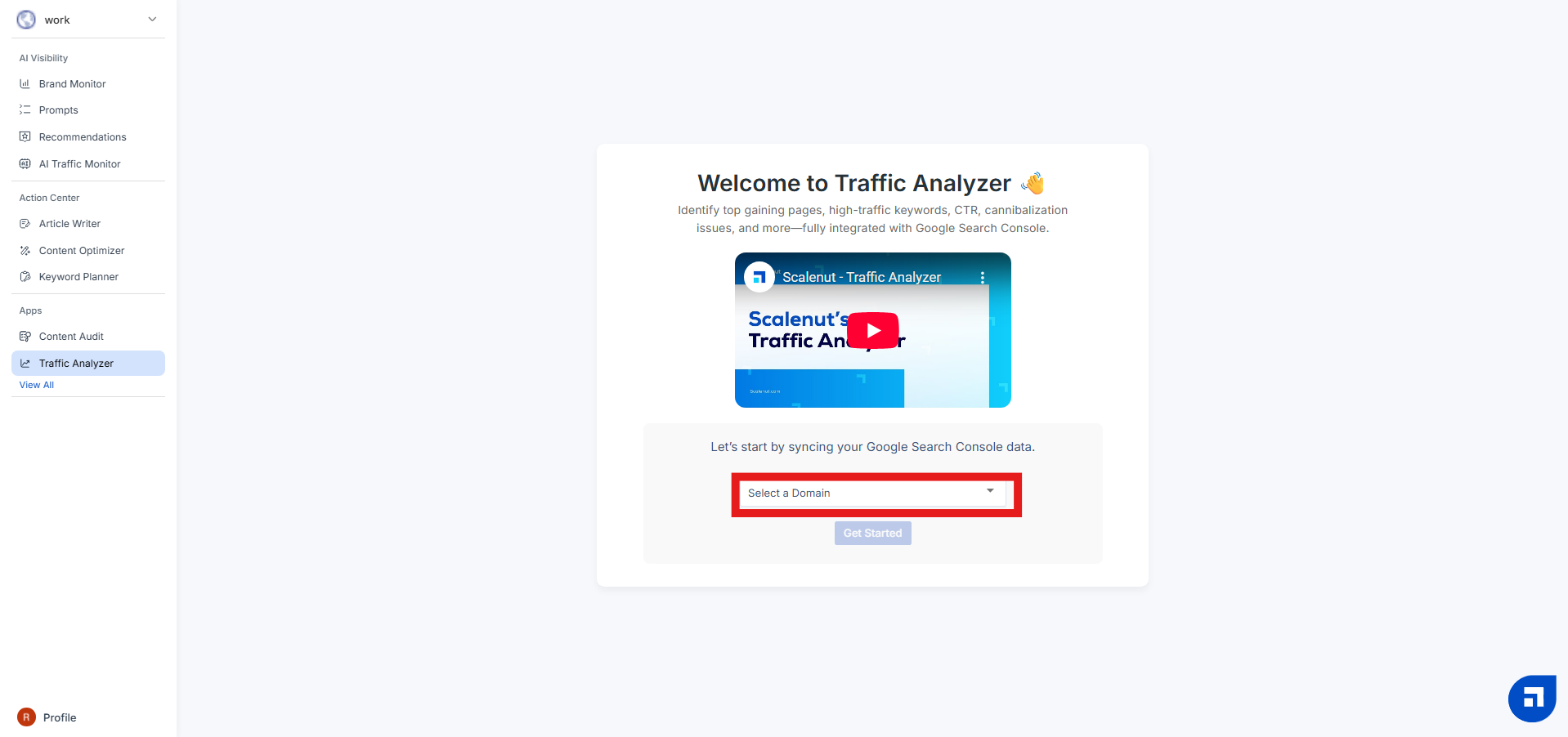
Once you enter the Traffic Analyzer dashboard, you’ll be prompted to sync your Google Search Console account.
Choose the domain you want to analyze from the dropdown and click ‘Get Started’ This allows Scalenut to access verified data directly from your GSC account—so your reports are accurate and real-time.
STEP 2: Select Your Domain and Target Country
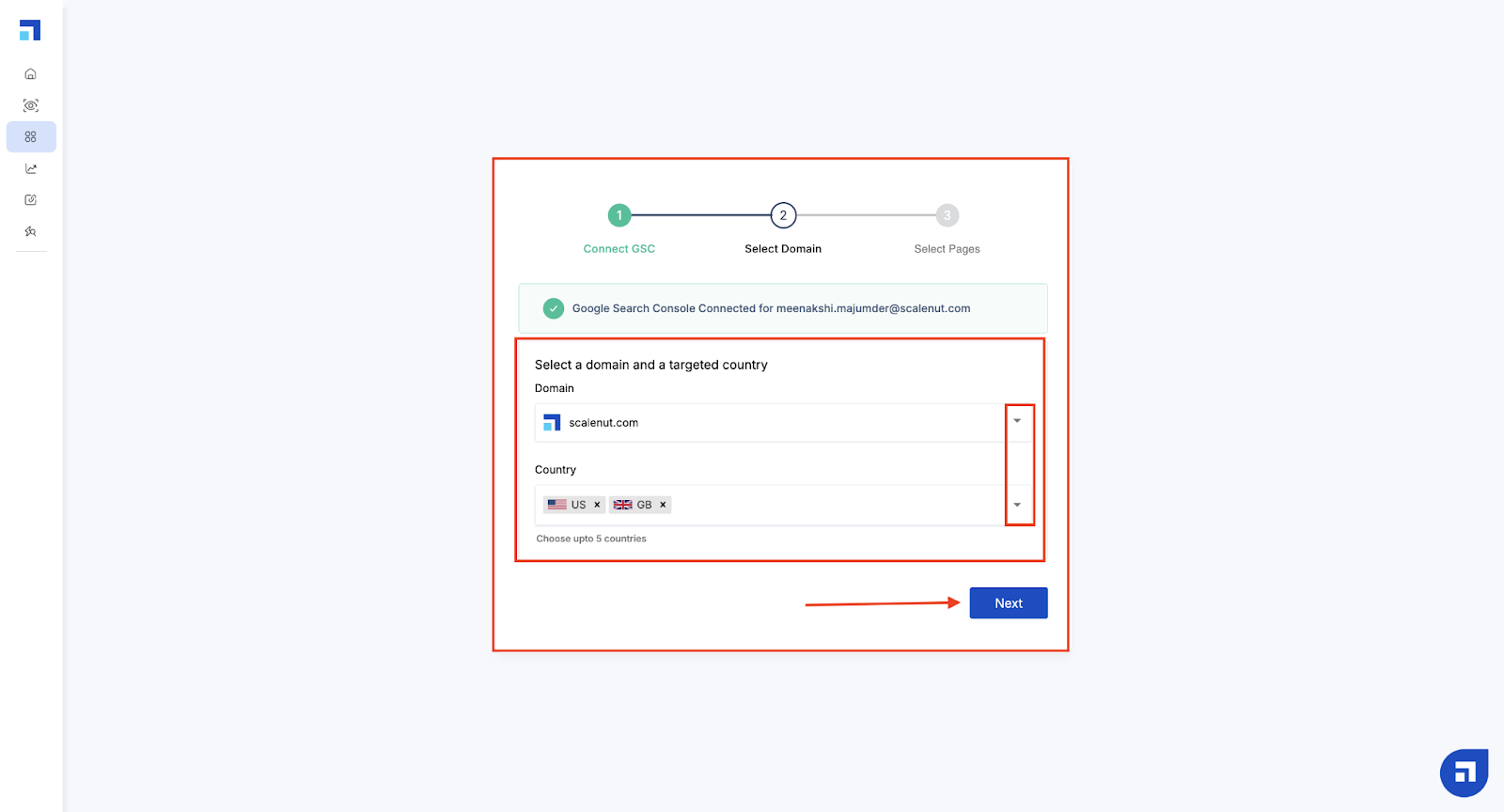
After connecting, you’ll be asked to confirm the domain you want to track and choose your target countries (up to 5).
This helps Scalenut filter data specific to your geographic priorities—ensuring you're optimizing for the markets that matter most.
Click ‘Next’ to proceed.
STEP 3: Choose Pages to Optimize
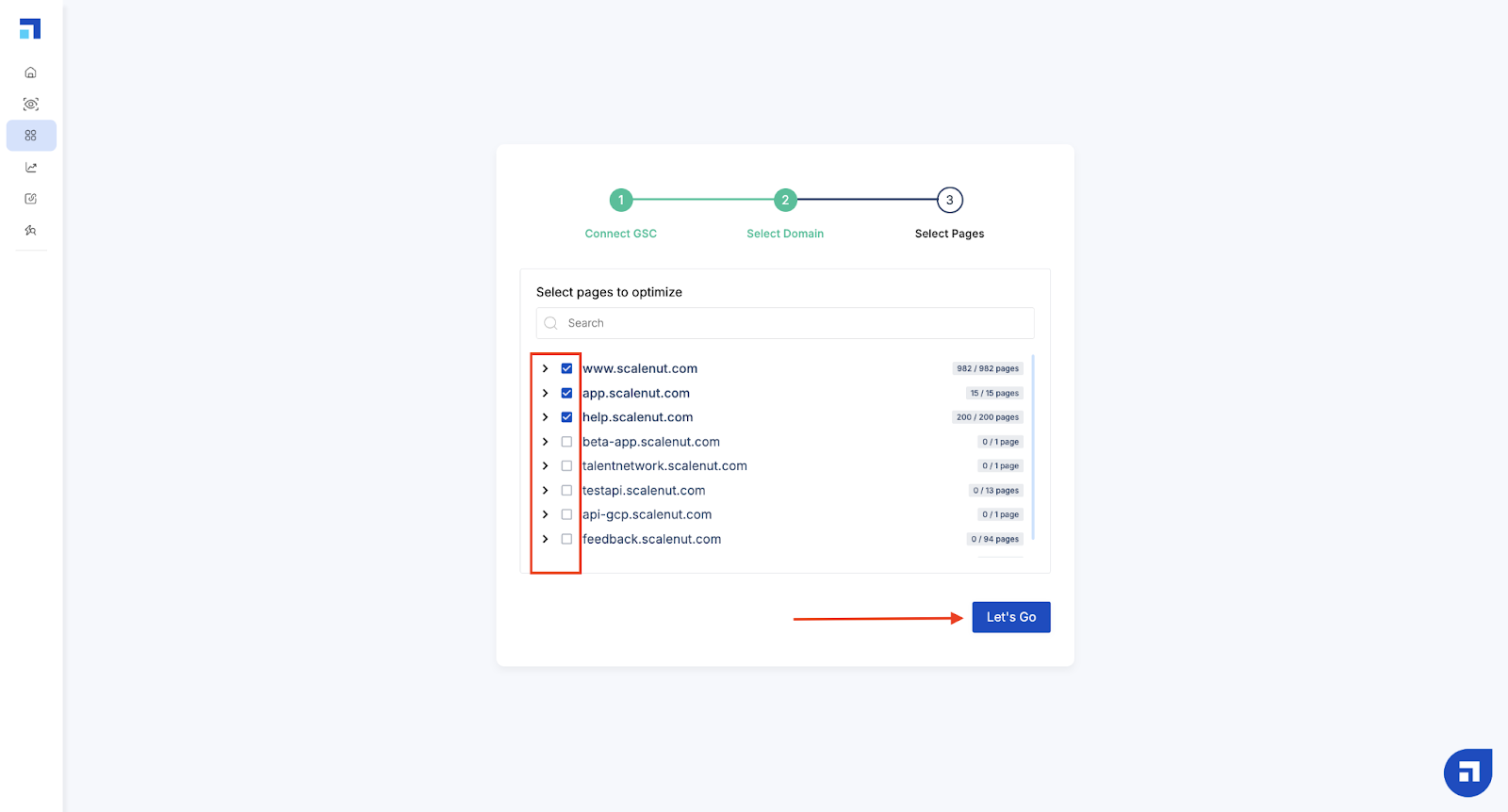
Next, select the pages you want to include in your Traffic Analyzer reports. Scalenut will analyze only the pages you select, helping you focus on sections of your site that need the most attention or are part of your current content strategy.
Click ‘Let’s Go’ to complete the setup.
Once setup is complete, you’ll be taken to your Traffic Analyzer dashboard—ready to explore traffic trends, keyword shifts, and optimization opportunities.
The data available on your Traffic Analyzer Dashboard are as follows -
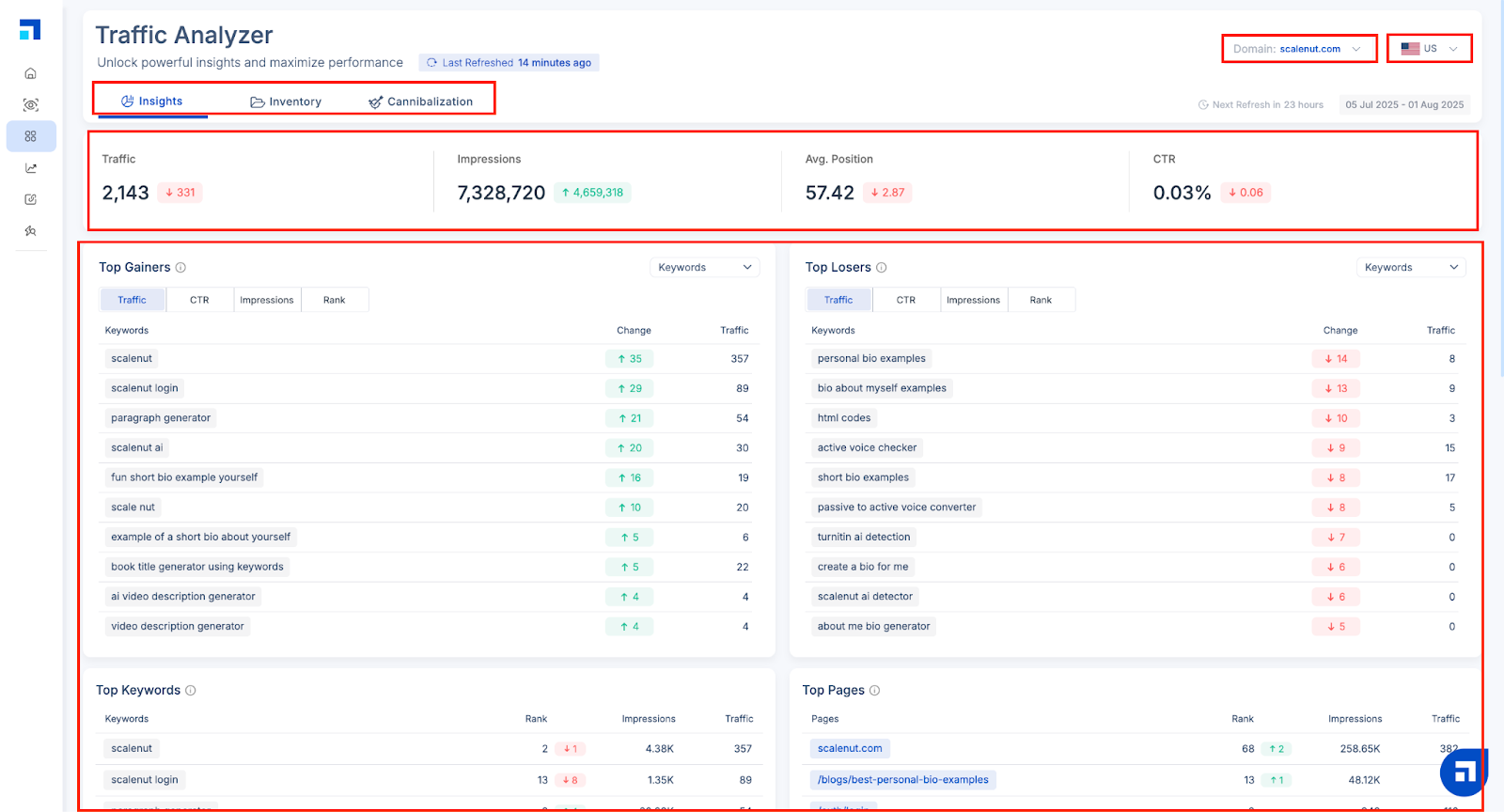
Traffic refers to the number of clicks received from Google Search engine.
Impressions refer to the number of times a web page is displayed to users.
Average Position is a website's weighted average ranking in search engine results pages (SERPs) for all pages and queries.
CTR measures the number of clicks received in comparison to the number of people who viewed it.
Traffic Analyzer: A 3-Section Powerhouse for GEO-Driven Insights
Scalenut’s Traffic Analyzer is divided into three core sections—Insights, Inventory, and Cannibalization—each designed to help you optimize content performance across both search engines and generative platforms.
1. Insights: Quick Wins & Strategic Signals
The Insights tab is your performance overview. It helps you stay on top of content momentum by surfacing:
Top Gainers & Top Losers – Identify pages or keywords that have significantly improved or dropped in performance over the past 28 days.
Top Keywords & Top Pages: Discover which keywords and pages drive the most traffic and how their ranks are shifting.
Filters for CTR, Impressions, Traffic, and Rank to analyze engagement and visibility trends.
Device Distribution – Understand how users access your content (mobile, desktop, tablet).
Position Distribution – See how many keywords rank in positions 1-3, 4-10, and beyond.
New Pages and Lost Impressions – Track emerging opportunities or disappearing visibility.
Perfect for real-time performance tracking and prioritizing quick optimization wins.
2. Inventory: Page-Level Performance Deep Dive
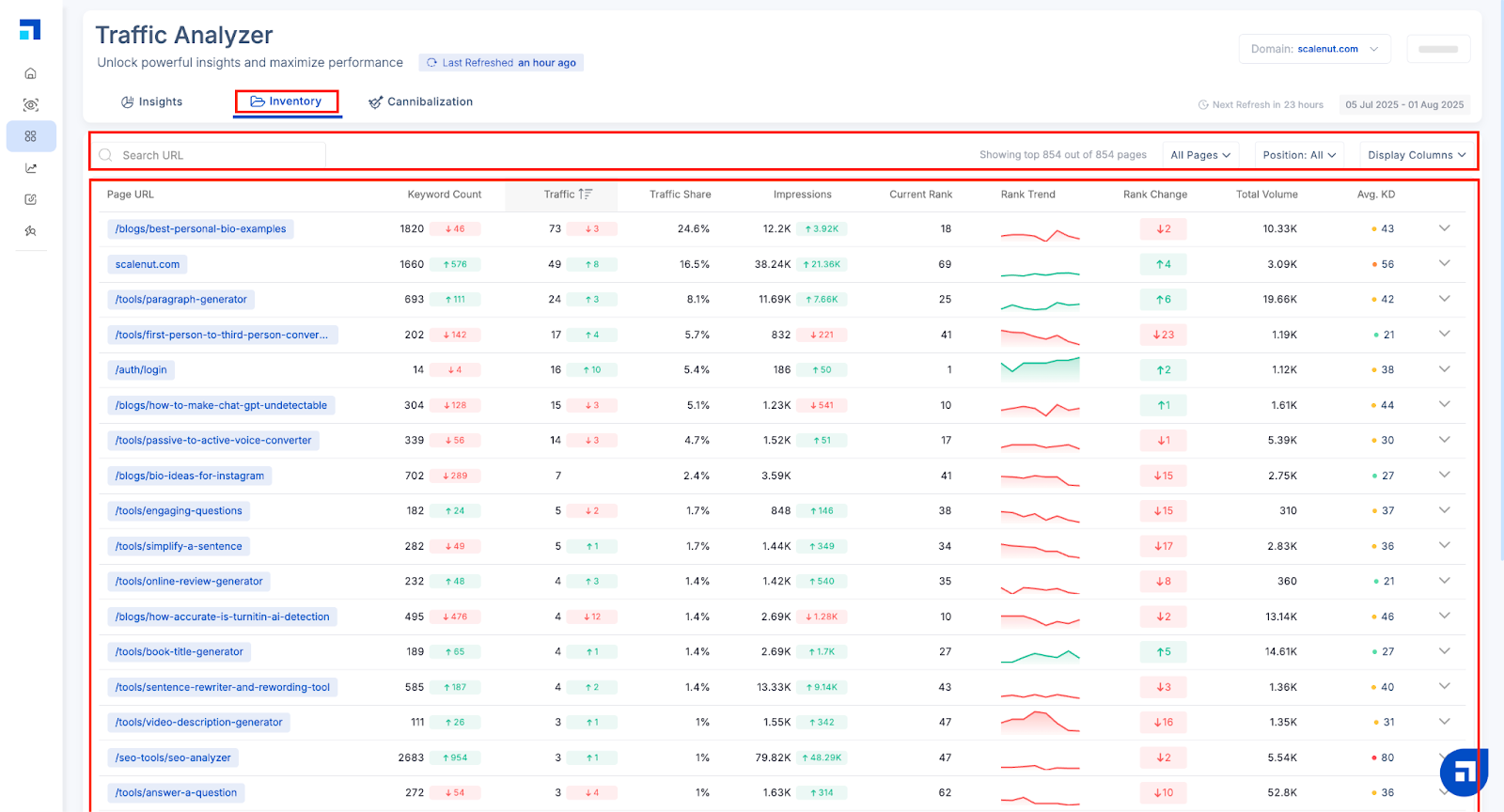
The Inventory tab gives you a granular breakdown of performance at the page level. Here, you can:
View key metrics like keyword count, traffic, traffic share, average position, rank trend, impressions, and keyword difficulty.
Expand individual page rows to explore the top 10 ranking keywords for each page—with detailed data like avg. rank, CTR, search volume, and keyword difficulty.
Sort, filter, and customize your view to focus on specific data points that matter to your content strategy.
This section is ideal for content audits, understanding the ROI of specific pages, and identifying underperformers with high potential.
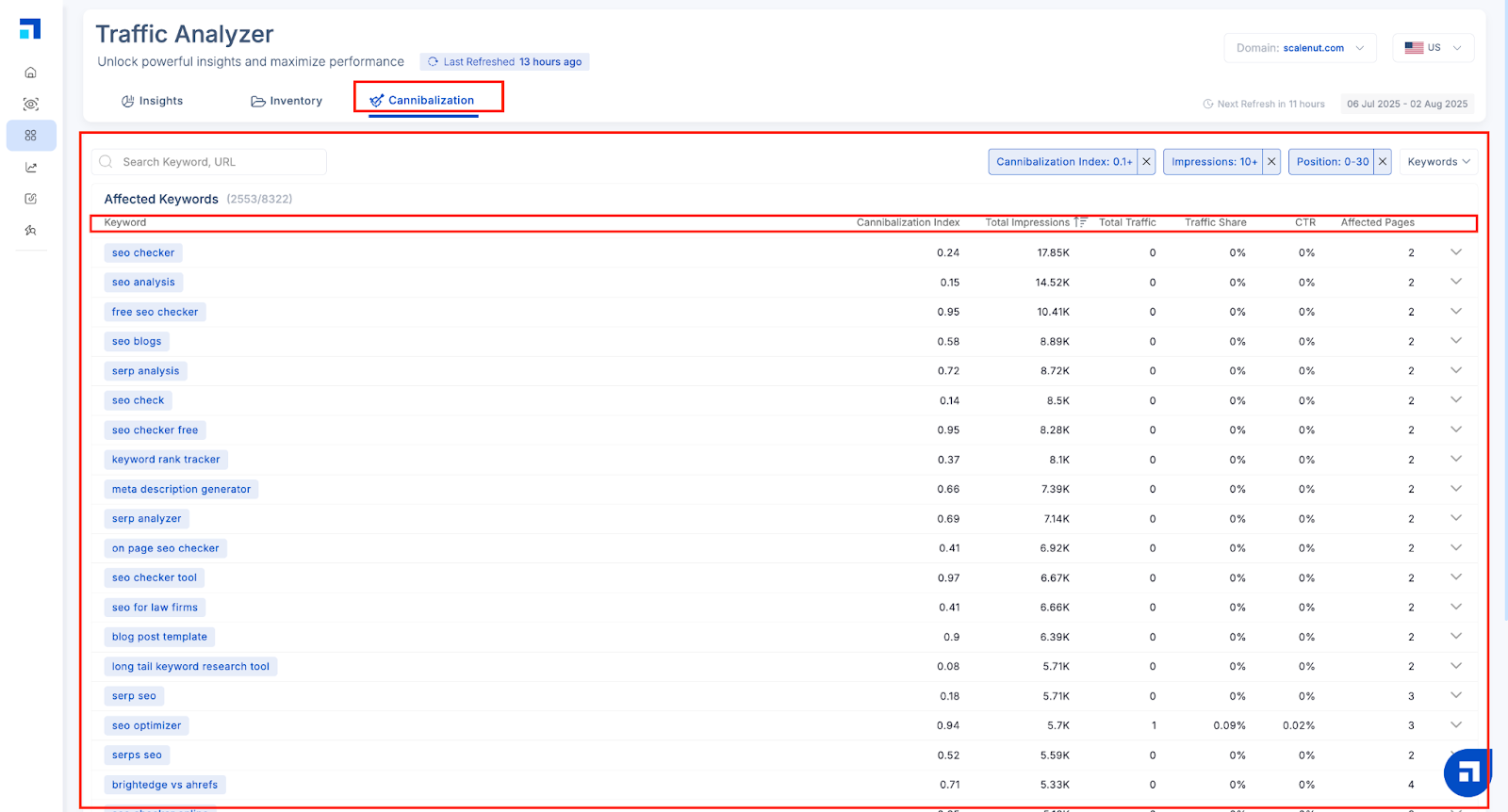
The Cannibalization tab identifies when multiple pages on your site compete for the same keyword—causing confusion for search engines and limiting your chances of ranking well.
You’ll see:
The Cannibalization Index (0–1) indicating severity of overlap
Total impressions, traffic, CTR, and number of affected pages
Expanded views showing rank trends over time and impression share for each page targeting the same keyword
This section helps you clean up your keyword map, consolidate authority under a single page, and strengthen your site’s content clarity—key to thriving in a GEO-first ecosystem where structured, intent-aligned content wins.
Together, these three sections turn Traffic Analyzer into a powerful engine for strategic content optimization—designed not just for rankings, but for multi-engine discoverability and AI-first visibility.
If you’d like to look at the detailed guide for the Traffic Analyzer, please refer here.