Discover how to optimize your content for AI-preferred featured snippets.
As content discovery shifts from search-only to AI-first platforms, earning visibility at the top of results is no longer just about traditional SEO. It’s about optimizing for Generative Engines—where answers are sourced instantly from the most authoritative, well-structured content.
With Scalenut’s evolution into a full-fledged GEO platform, optimizing your content for Featured Snippets is now a key part of maximizing both search engine ranking and AI discoverability
What is a Featured Snippet?
A Featured Snippet is a highlighted summary of an answer to a user's query, extracted directly from a webpage and displayed above the regular search results.
These snippets can take different formats—paragraphs, bullet points, tables, or even videos—depending on the query type.
Why Featured Snippets Matter in Your GEO Strategy?
Position Zero = Maximum Visibility - Featured Snippets appear above the first organic result, dramatically increasing your page’s exposure in both search and AI platforms.
Preferred by AI Engines - Generative engines like ChatGPT, Perplexity, and Gemini often pull from snippet-structured content to serve accurate, direct answers.
Boosts Credibility and Authority - Being featured signals to both users and AI systems that your content is trusted, authoritative, and well-optimized.
Increases Click-Through Rates (CTR) - Clear, well-structured content earns more attention—and more clicks—from users looking for fast, reliable answers.
How to Increase Your Chances of Being Featured?
With Scalenut’s GEO-focused editor, you can:
Identify and target question-based prompts.
Use proper heading structures (H2–H6) to support scannability.
Format answers clearly using lists, short paragraphs, and summaries.
Cover high-intent prompts to increase relevance in AI engines.
Utilise the Prompt Coverage and Content Score features to ensure your content is aligned with both human queries and AI sourcing patterns.
How to Fix Featured Snippet Issues with Scalenut?
The Issue
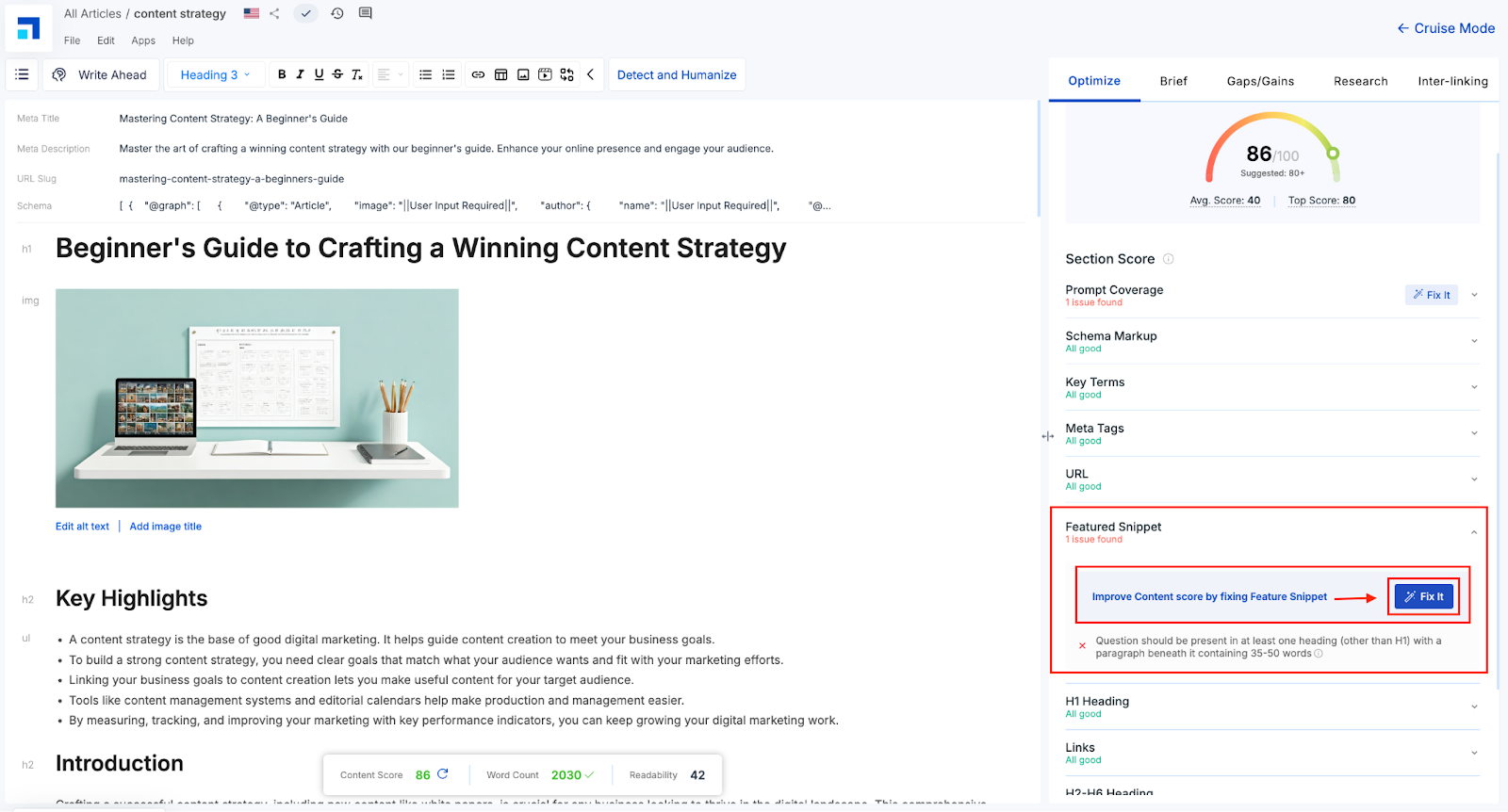
The Featured Snippet section in the Optimize panel shows 1 issue found.
The error reads: “Question should be present in at least one heading (other than H1) with a paragraph beneath it containing 35–50 words.”
This means the content lacks a clear Q&A format that search engines and AI systems look for when selecting Featured Snippets.
Here’s how you can resolve the Issue Manually -
STEP 1: Add a question as a subheading (H2–H6), such as: “What is a content strategy?”
STEP 2: Below this heading, write a concise answer between 35–50 words.
For example: “A content strategy is a plan that outlines how a brand will create, publish, and manage content to meet its goals. It aligns content creation with business objectives and target audience needs, improving engagement, visibility, and conversions across digital platforms.”
Result: This makes your content easier for search engines and AI systems to extract and display as a direct answer box at the top of results.
Or, Resolve the Issue Using the “Fix It” Button -
STEP 1: Go to the Optimize panel on the right-hand side of your editor. Under Featured Snippet, click the Fix It button.
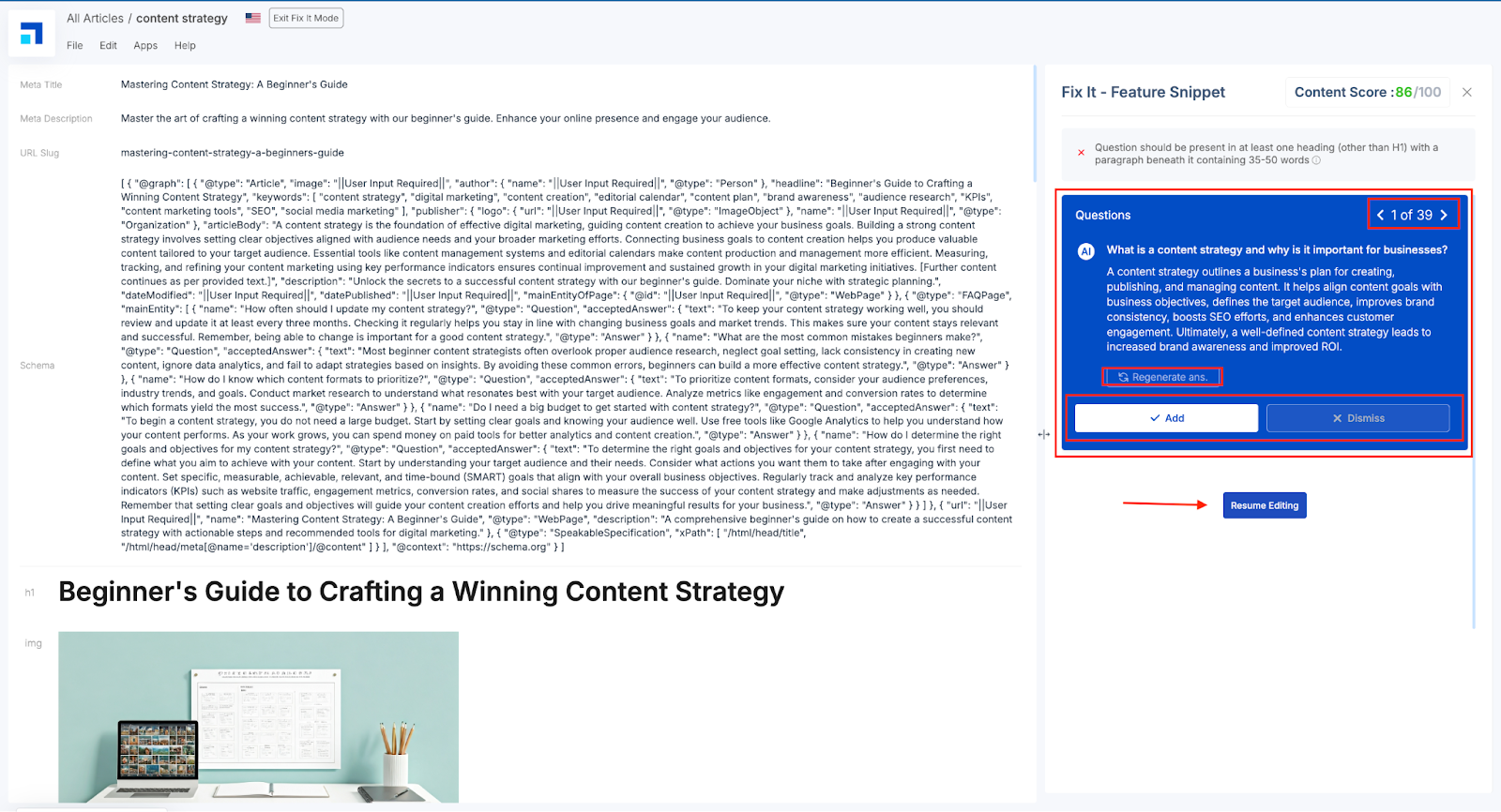
STEP 2: On the redirected Fix It Screen, here’s all you can do with the smart suggestions -
1. AI-Generated Q&A Block - At the top, you’ll see a question followed by a concise answer (35–50 words). This is AI-generated specifically to match the content’s topic and boost eligibility for being selected as a Featured Snippet by search engines or AI tools.
2. Regenerate Answer - If the current suggestion doesn't match your tone or context, click Regenerate Answer. This refreshes the Q&A pair with a new version, still optimized for snippet structure and length.
3. Add Button - Click Add to insert the current Q&A block directly into your article. The system will place it in the optimal location automatically.
4. Dismiss Button - Use this if you don’t want to insert the suggestion at all. This keeps your content unchanged, and the snippet issue will remain unresolved.
5. Navigate Through Suggestions - Use the left and right arrows (e.g., 1 of 39) to scroll through multiple snippet suggestions. This helps you choose the most relevant question and answer combinations for your article.
Once you're done, click Resume Editing to return to the content editor without applying any changes—or after applying them.
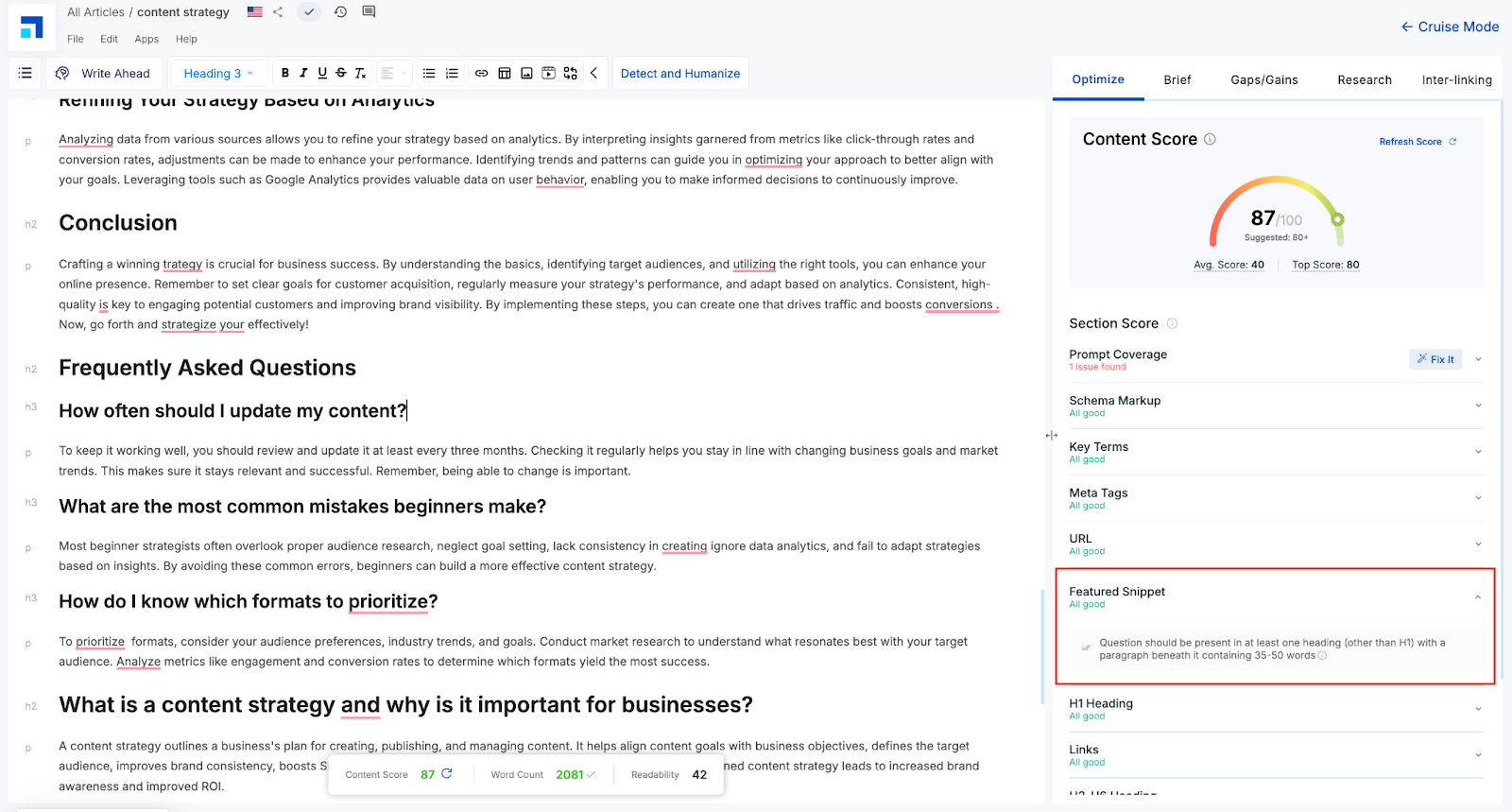
Once you’ve fixed the Featured Snippet issue, the parameter will turn green, and your Content Score will likely increase.
This means your content now meets the snippet eligibility criteria and has a better chance of appearing in “Position Zero” on search engines. A well-placed snippet also increases visibility across AI tools that rely on structured content.
Featured Snippets = GEO Gold
Featured Snippets are no longer just an SEO bonus—they are a core asset in your Generative Engine Optimization toolkit.
With Scalenut, you’re equipped to create content that earns Position Zero and gets picked up by AI, voice assistants, and semantic search engines alike.
Want help crafting snippet-worthy content?Let’s optimize your next piece—GEO-style.