
%20(1).jpg)
Quick summary: Is PageOptimizer Pro worth it?
- Best for: SEO specialists and agencies that regularly refresh existing pages and want detailed, competitor-based recommendations for improving content.
- Main strengths: Content briefs, page scoring, E-E-A-T checks, Watchdog monitoring, and AI visibility tracking. POP Pilot also helps explain findings and guide optimization workflows.
- Pricing: Basic starts at $40/month. Unlimited costs $72/month or $739/year. Paid subscriptions include a 7-day refund guarantee, subject to conditions.
- Main trade-off: Unlimited core reports do not mean unlimited access to every feature. AI writing, NLP, and E-E-A-T analysis still use credits, and optimization scores require editorial judgment.
- Main trade-off: Unlimited core reports do not mean unlimited access to every feature. AI writing, NLP, E-E-A-T analysis, and AI Visibility Tracker runs use POP Credits, so heavier usage can require additional credits.
You have rewritten headings, added relevant terms, and expanded an article, yet competing pages still outrank it. Before paying for PageOptimizer Pro, you want to know which changes it can help you identify and how much work implementing them will take.
POP provides recommendations on keyword placement, word count, and competitor gaps, with POP Pilot helping explain its reports. But the subscription deserves a closer look: Basic includes 20 credits for $40/month, and AI writing uses credits even on Unlimited. This Page Optimizer Pro review examines the editing workflow, AI visibility tracking, and usage limits to help you decide whether POP fits your monthly workload and budget.
What is PageOptimizer Pro?
PageOptimizer Pro (POP) is an SEO platform that uses your URL, target keyword, and location to recommend changes based on ranking competitors. Its checklist covers keyword placement, headings, word count, and topic coverage.
POP also offers AI writing, keyword research, and page monitoring. Its AI Visibility Tracker tracks brand recommendations, citations, competitors, and sources in AI answers, with suggested improvements. POP Pilot explains findings in plain language and helps run optimization tasks. Editors still need to check recommendations for relevance and readability.
What Are PageOptimizer Pro’s Strongest On-Page Features?
PageOptimizer Pro is built around a simple idea: optimize a page with a clear checklist, then improve what matters without turning SEO into a guessing game. If you like structured workflows, POP’s feature-set mostly maps well to how content teams actually operate.
1. SERP-Based Scoring, Content Briefs, And Topic Coverage Guidance
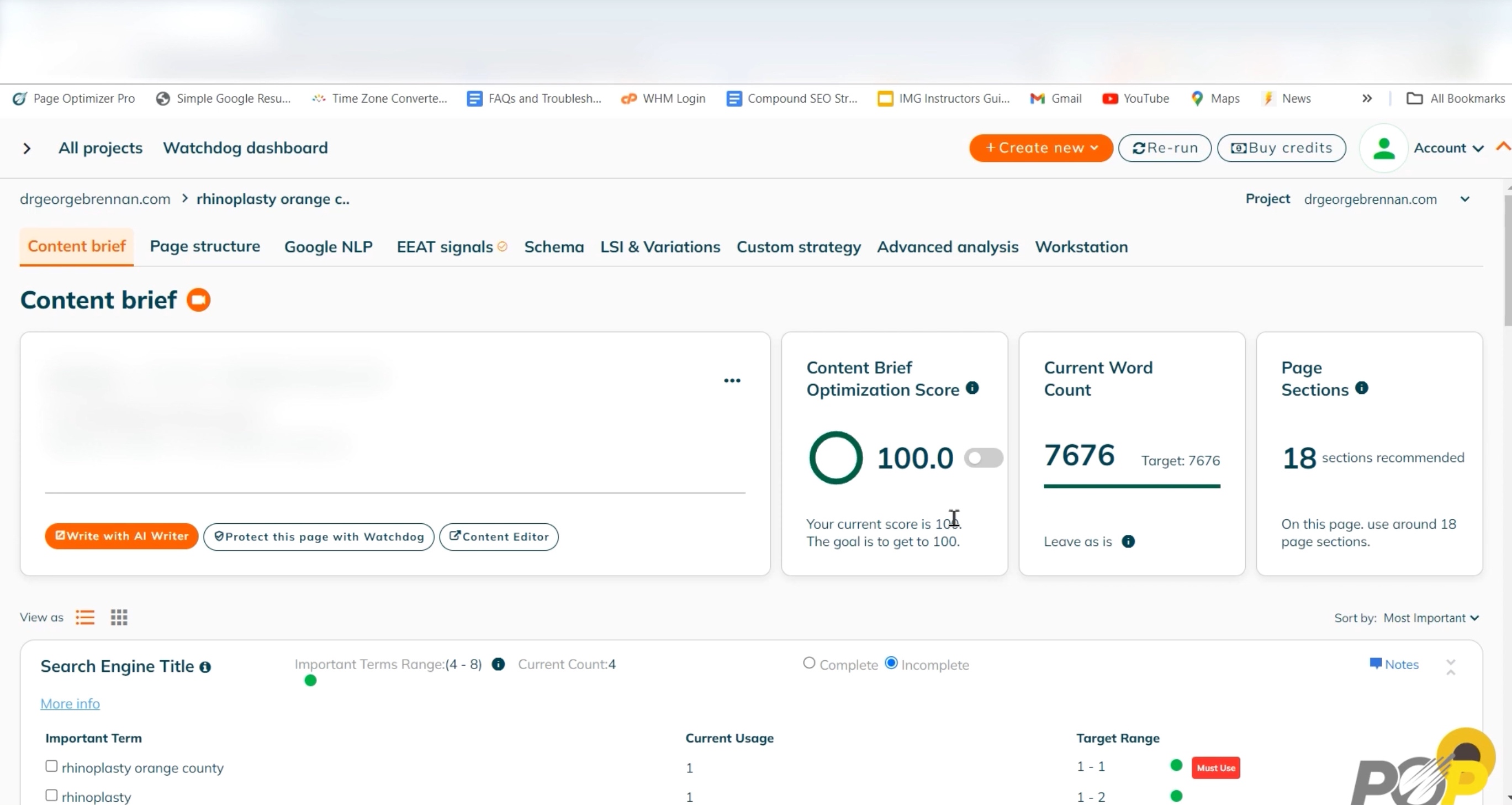
This is the core workflow when you want a repeatable way to tighten a draft or refresh an existing URL around a target keyword.
- Generates a page-level optimization score (out of 100) tied to a target keyword.
- Combines scoring with a content brief and prompts to align your page with what is ranking, including:
- Word count and coverage targets.
- Primary and secondary keyword placement guidance.
- Section-level suggestions for topical alignment.
- Related terms, variations, and questions to include.
- Competitor page title references for added context.
- Useful when you want a fast, repeatable workflow for tightening a draft or refreshing an existing URL without guessing what to prioritize.
2. E-E-A-T Audits And Competitor Comparisons
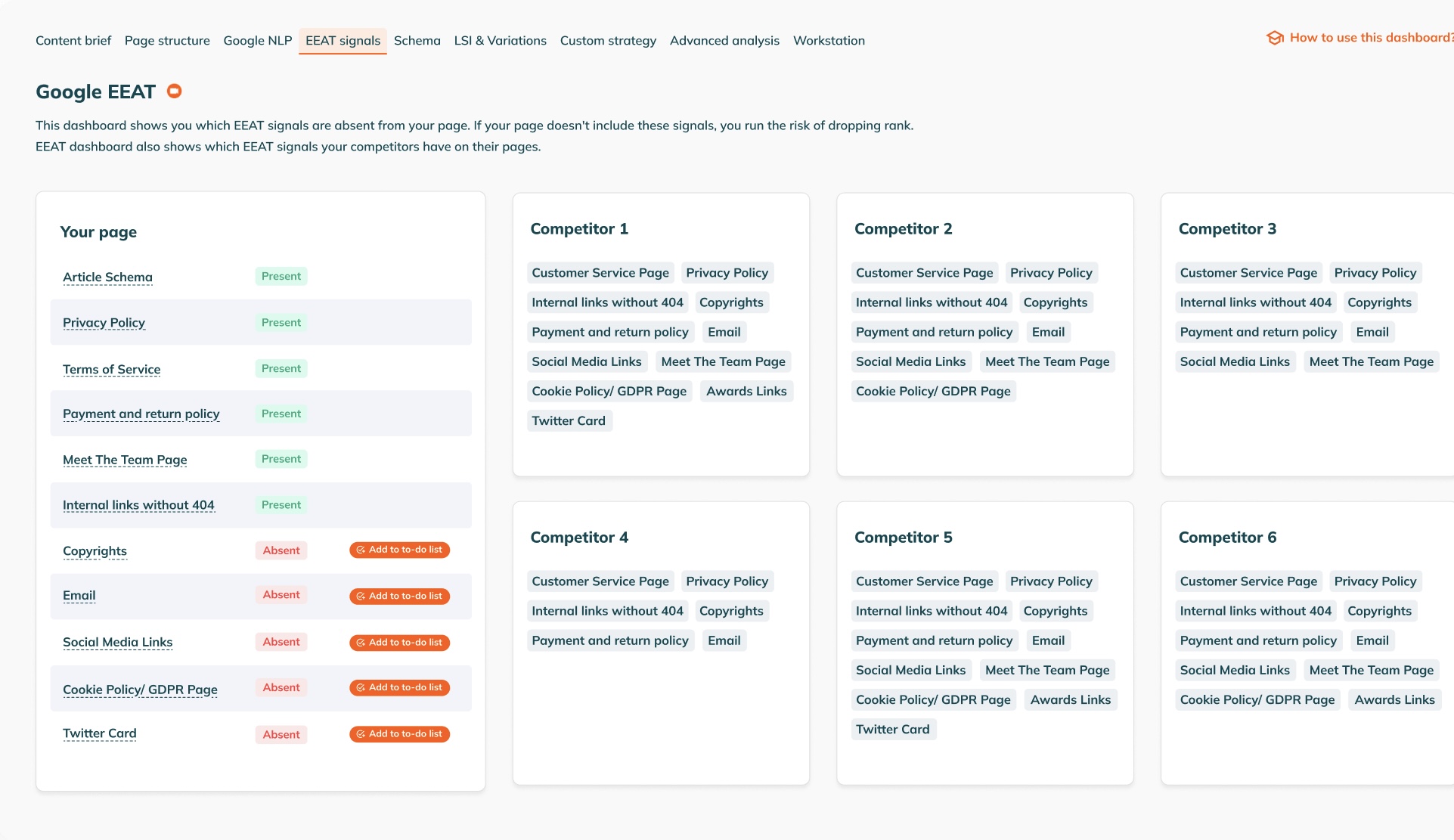
This is most useful when you are trying to improve trust signals, especially in competitive or high-stakes niches.
- Scans your page against competitors for E-E-A-T signals.
- Highlights gaps that may affect perceived trust and quality.
- Provides next-step recommendations you can turn into improvements.
- Useful as a checklist, although the outputs can feel a bit templated depending on the niche, so it still needs human judgment to be genuinely credible.
3. Monitoring And Change Alerts With Watchdog
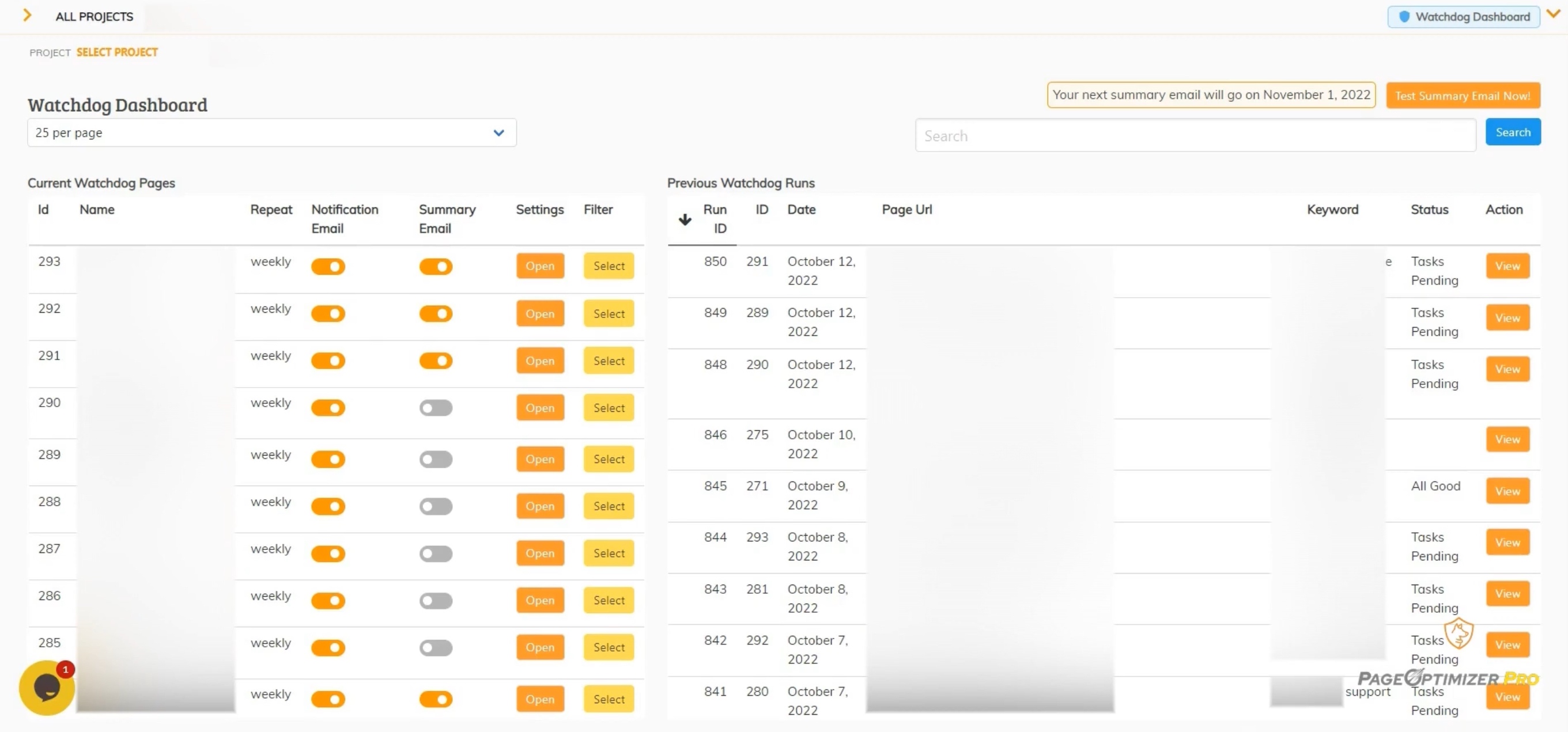
This helps when you manage multiple pages and want early warnings before rankings slip too far.
- Tracks changes that could affect rankings (including competitor movement and SERP shifts).
- Sends alerts when changes are detected, along with suggested to-dos.
- Good for teams managing multiple pages where small ranking drops can go unnoticed.
- The value depends heavily on how often you act on the alerts, otherwise it becomes another inbox notification you tune out.
4. Schema Discovery And Schema Generation
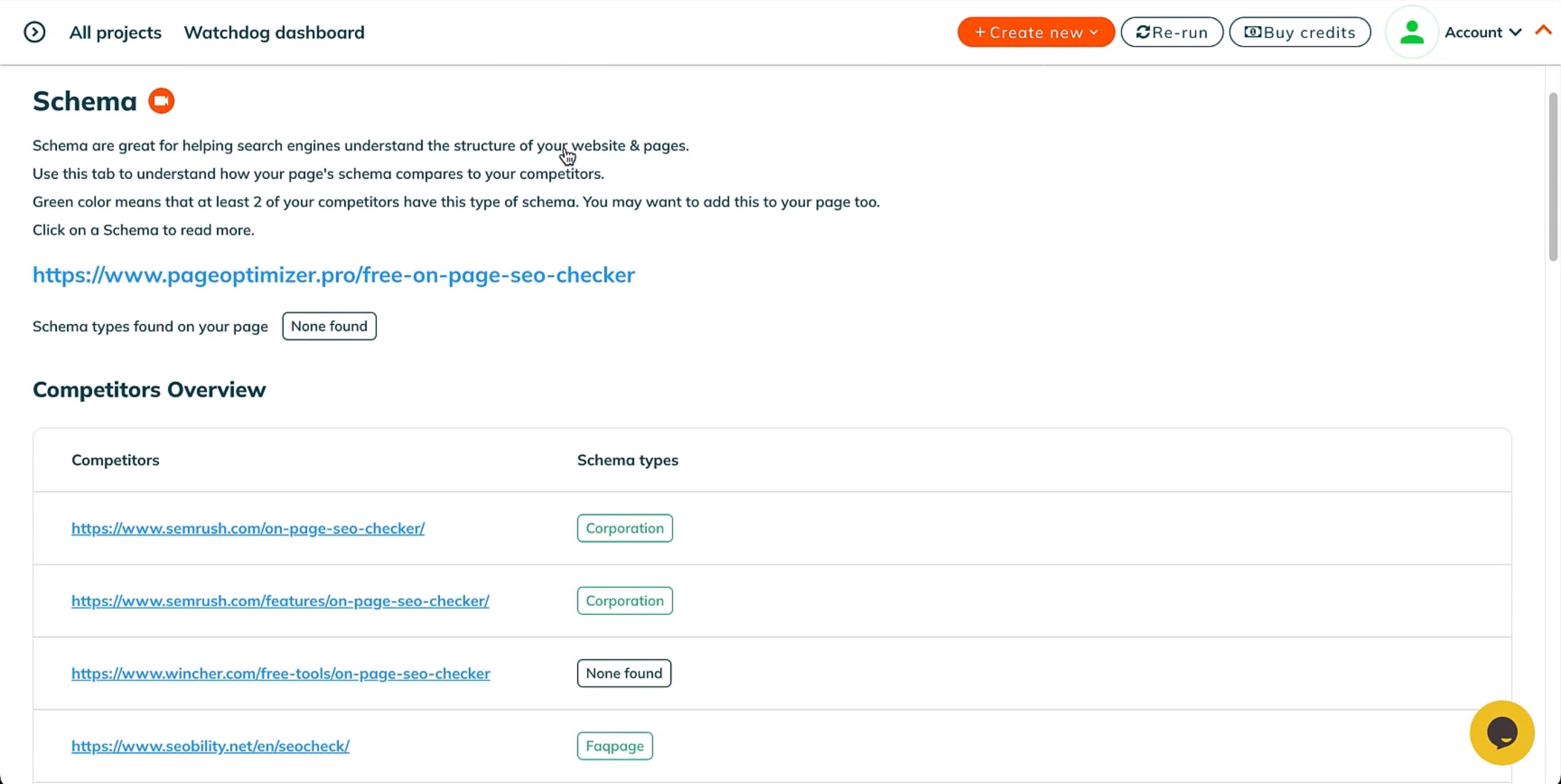
This is helpful when you want a quick way to understand what structured data competitors use and get a baseline implementation in place.
- Detects schema types used on competitor pages.
- Generates schema markup for your page.
- Useful for quick validation and getting a draft in place.
- In practice, schema often needs customization to match real page content and intent, so I treat this as a starting point, not a final implementation.
5. In-Platform Content Editor For Safer Updates
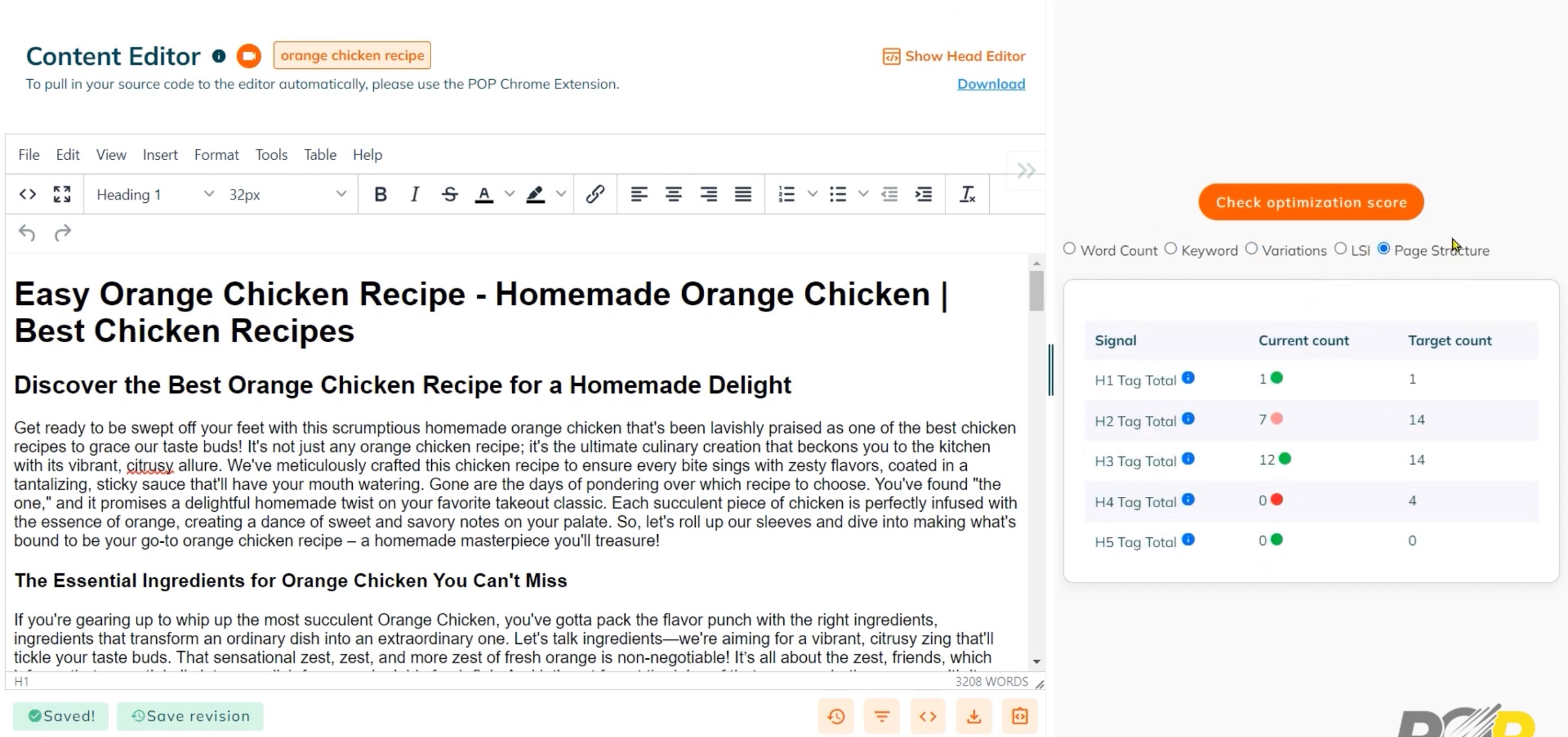
This is a practical feature for teams that want to implement changes carefully and avoid breaking layouts during optimization.
- Lets you implement recommendations without editing the live page directly.
- Designed for controlled changes and exporting optimized code.
- Helpful for teams that want to reduce the risk of breaking layouts or exporting messy edits.
6. Chrome Extension For In-Doc And In-CMS Optimization
This is most useful when writers and editors want to apply recommendations in the same place they write and publish.
- Overlays recommendations while you edit in various tools like Google Docs and CMS platforms.
- Real-time scoring as you make changes.
- Convenient for writers and editors who do not want to bounce between a report and a draft.
- The experience can still feel score-first, so it is important to keep readability and brand voice from becoming secondary.
7. AI Writer For Drafting And Rewriting
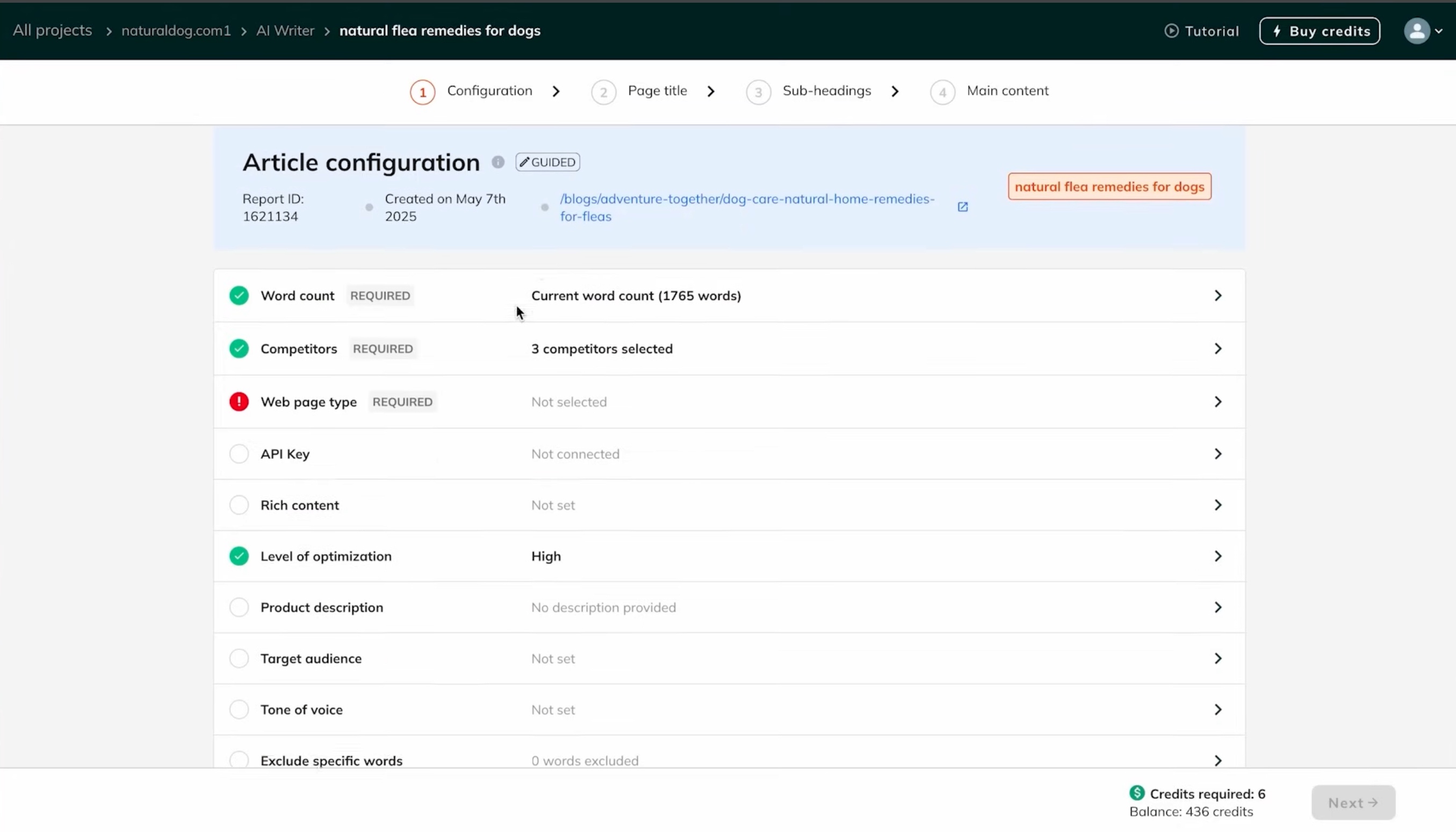
This is best treated as a speed layer for drafts and expansions, not a replacement for editing and positioning.
- Generates content and rewrites based on POP’s brief inputs.
- Built to push the optimization score close to perfect.
- Useful for accelerating first drafts or expanding sections.
- In practice, if your focus is on readability, brand voice, and originality, then use the score as a validation layer.
8. Keyword Research, Clustering, And Rank Tracking
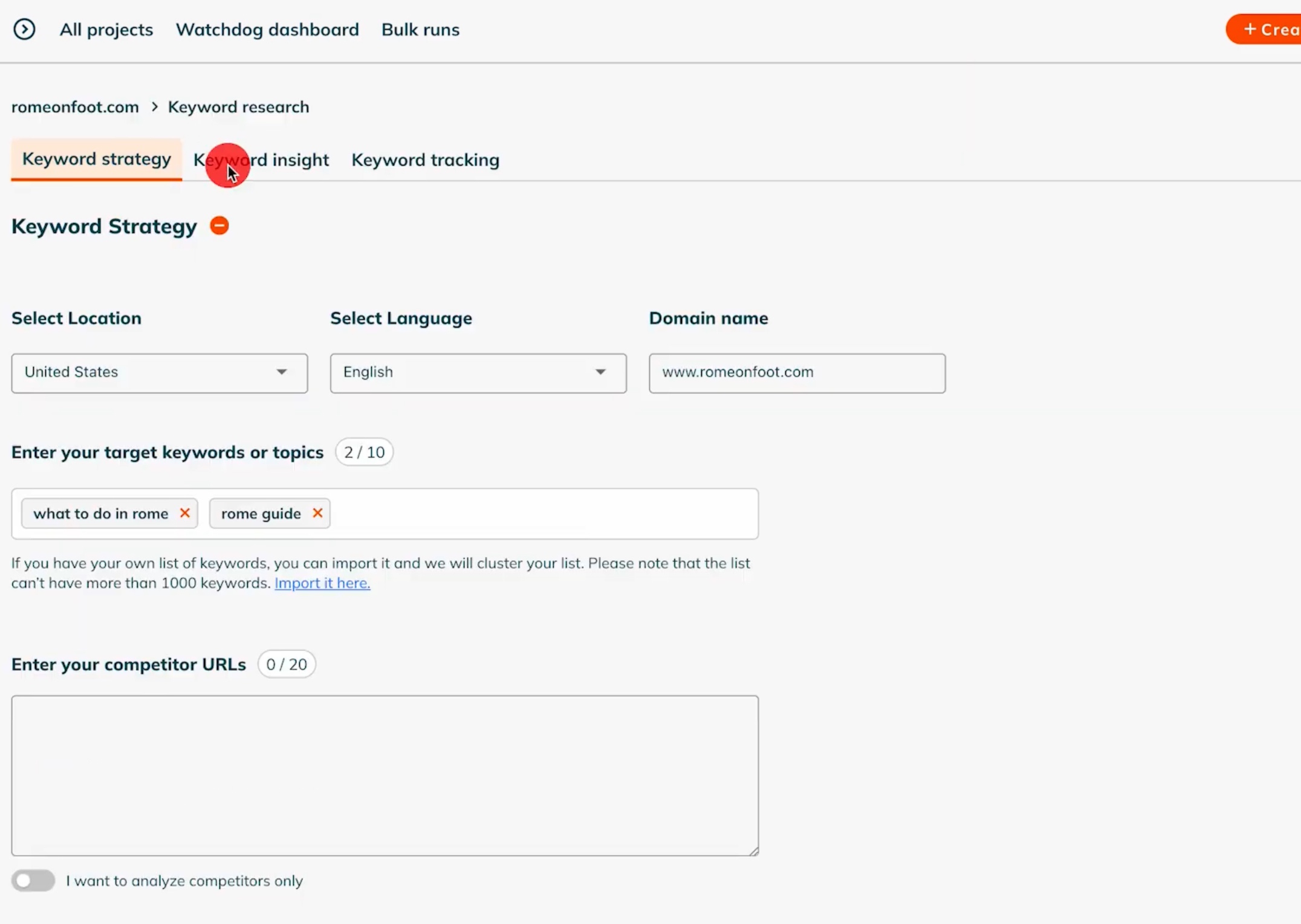
This is helpful if you want a lightweight, all-in-one workflow without relying on separate SEO tools for every step.
- Keyword Insights for keyword discovery and context.
- Keyword Strategy for clustering and topic grouping.
- Keyword Rank Tracker to monitor positions over time.
- If you already rely on a dedicated SEO suite for research and rank tracking, this layer may be more supportive than central.
9. API And Agency Scaling Options
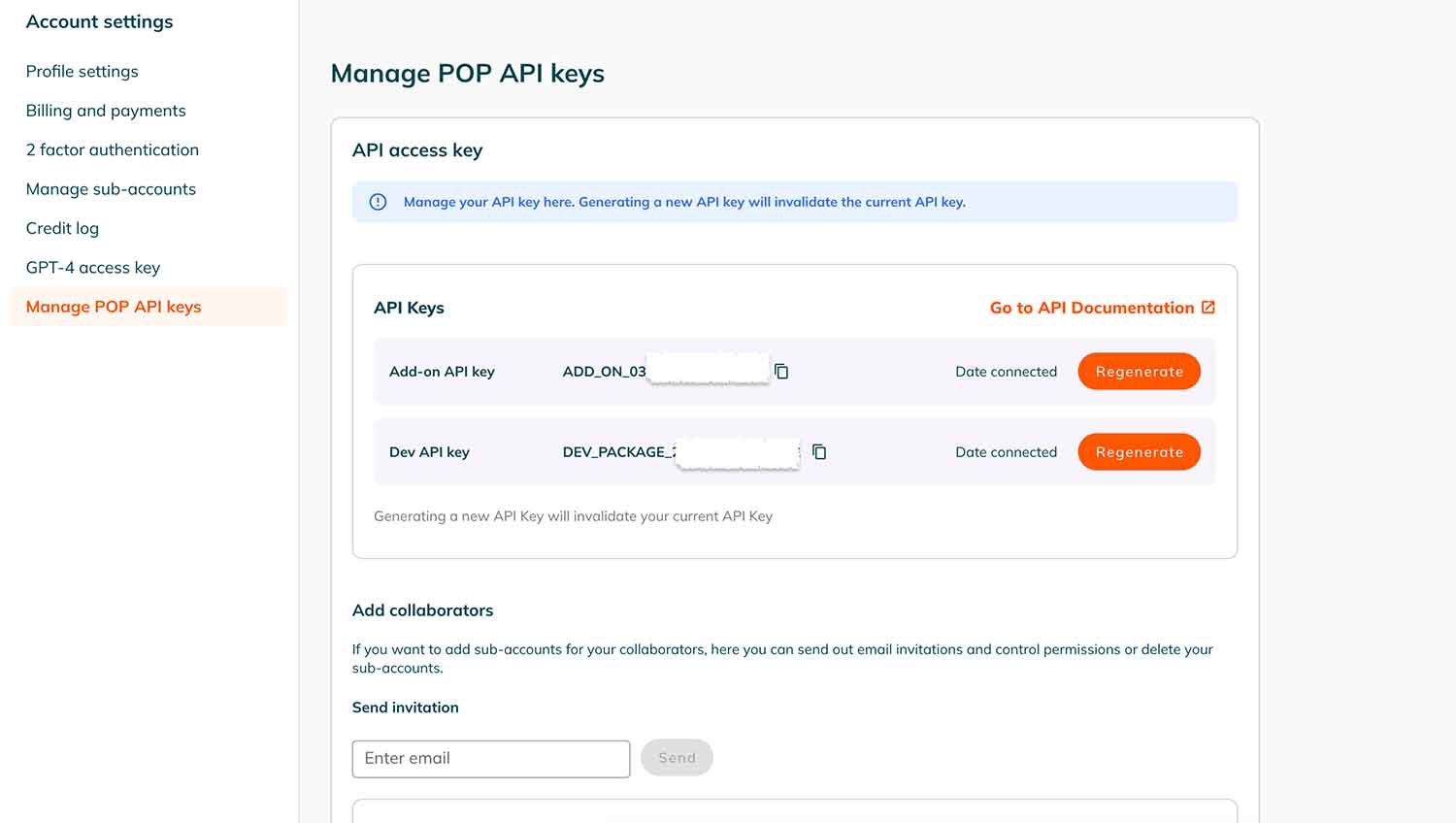
This is where POP becomes more flexible for agencies or teams that want to build repeatable systems beyond on-page optimization.
10. POP API
Useful if you want to embed POP scoring and recommendations into your own dashboards, workflows, or client reporting.
- Exposes scoring and recommendation data for custom workflows.
- Supports integration into internal dashboards and agency systems.
- Useful if you want to productize reporting or build a repeatable content ops workflow.
11. POP White Glove
Best for agencies that need fulfillment support and want a white-label delivery model.
- Done-for-you, white-label content and SEO planning support.
- Built for agencies that want fulfillment without hiring additional staff.
- A practical option if bandwidth is the main constraint, although it shifts a lot of control away from your in-house voice and positioning.
12. Free On-Page SEO Tool
This is a low-friction way to test POP’s approach before committing to the full platform.
- Provides a basic score and introductory guidance.
- Works well as a quick diagnostic or trial entry point.
- Limited compared to POP Pro, but useful for evaluating fit before committing.
13. AI visibility tracking with POP AI Visibility Tracker
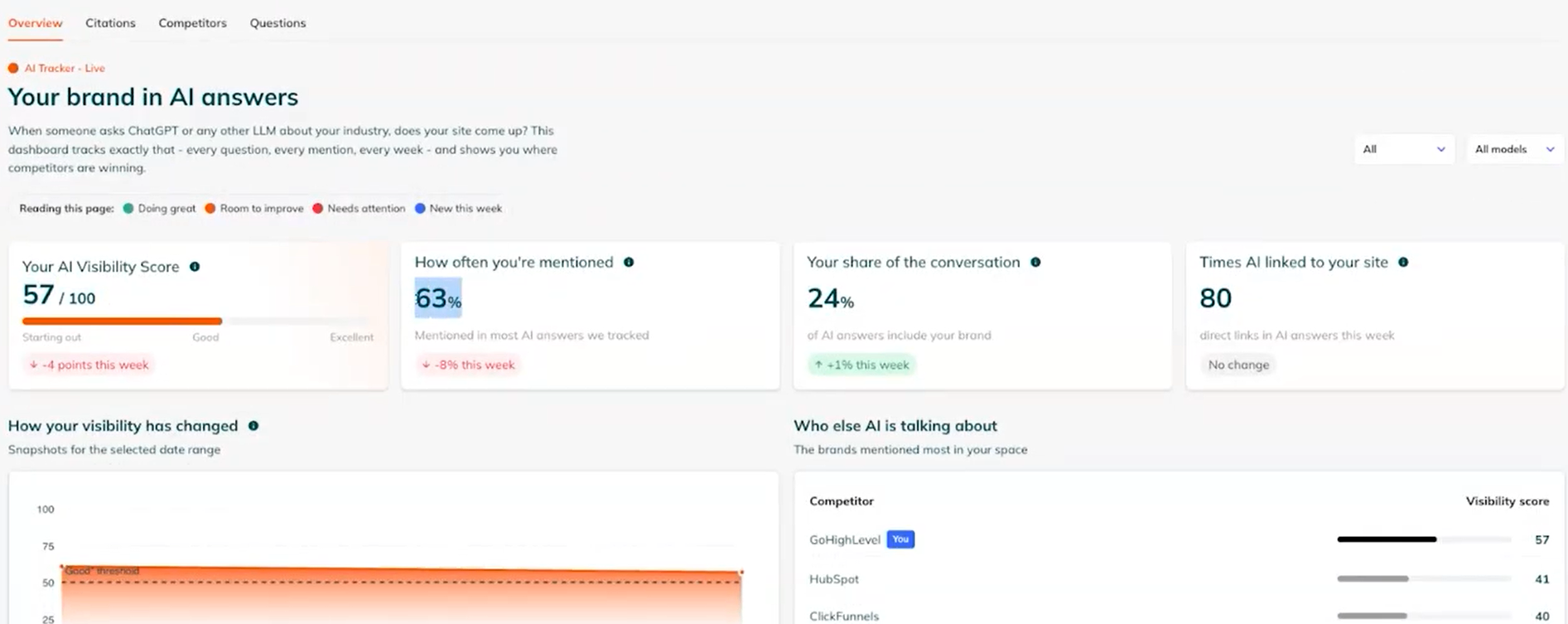
This helps when you want to understand whether AI platforms recommend your brand, cite your pages, or favor competitors.
- Monitors brand visibility and page citations across platforms including ChatGPT, Claude, Perplexity, and Google AI Mode.
- Shows an AI Visibility Score, competing brands, and sources referenced in tracked answers.
- Provides prioritized improvement recommendations that refresh weekly.
Included in all paid POP plans, adding AI visibility monitoring alongside its page optimization tools.
Want to understand what these numbers actually tell you? See how to measure visibility in AI across mentions, citations, position, share of voice, and business impact.
14. Guided SEO workflows with POP Pilot
This is useful when you need help interpreting POP’s reports or deciding which improvements to tackle first.
- Explains optimization scores, content gaps, and competitor findings in plain language.
- Helps run key POP workflows through a conversational interface.
- Suggests specific actions based on the findings available within POP.
- Can make getting started easier for beginners, while advanced optimization decisions still require editorial and SEO judgment.
PageOptimizer Pro Review: What Are Real Users Saying?
“Limited Integrations, keyword Suggestions, the cost might be a concern for smaller businesses or individual users.”, notes Rutvik M on G2
Reviews for PageOptimizer Pro tend to land in a pretty consistent place: users like it because it feels actionable. Many call out the competitor keyword analysis, the clarity of the reporting and content briefs, and the quick scoring that makes it easier to prioritize edits and move a page forward with confidence.
The critiques are just as practical. A common theme is that there is a learning curve if you are newer to SEO, and the keyword suggestions will not always feel perfectly tailored to every scenario. Some reviewers also mention limited integrations, credit usage constraints, and pricing as factors that can matter more for smaller teams.
How Does PageOptimizer Pro Pricing Work, And Is There A Free Option?
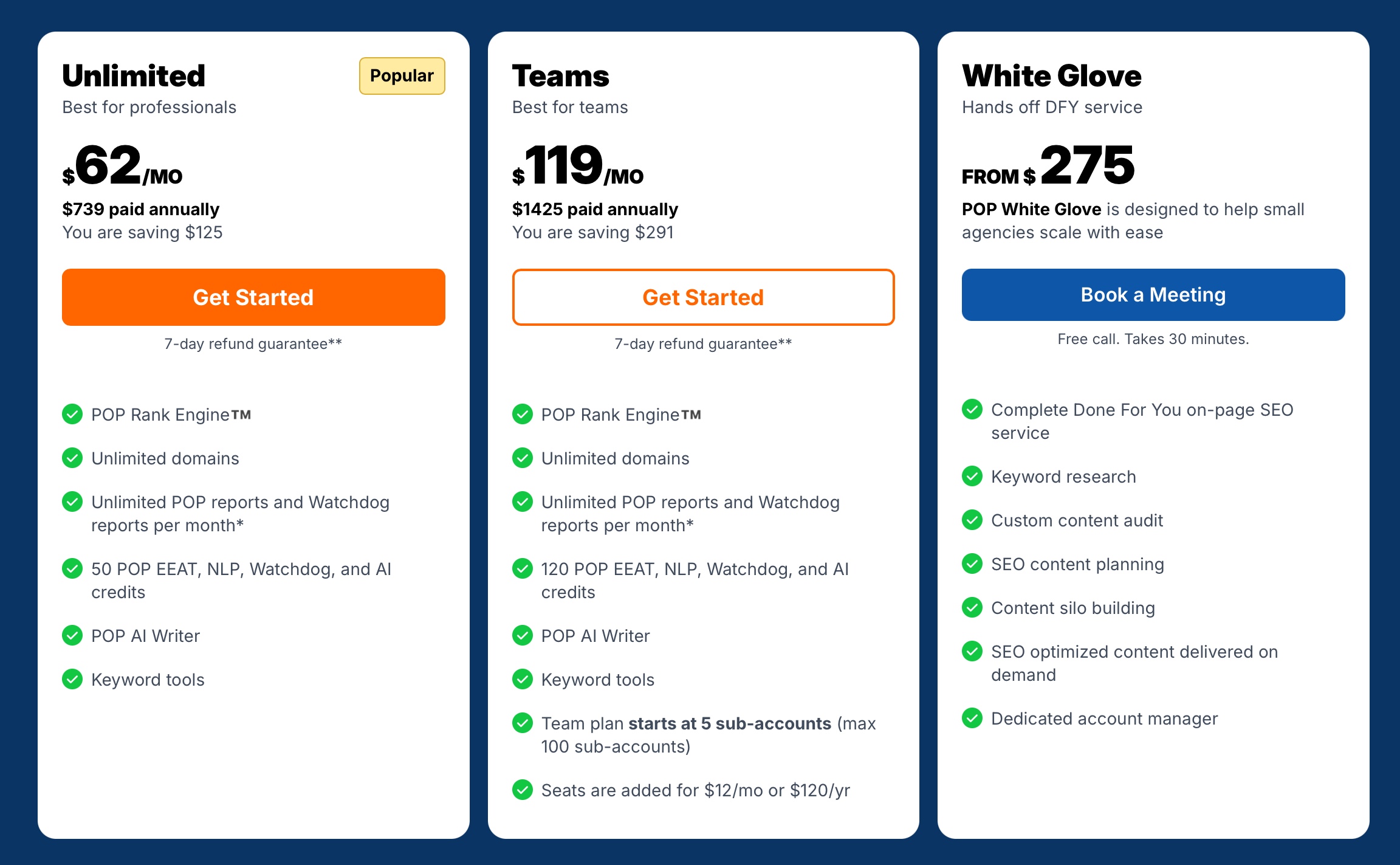
PageOptimizer Pro offers monthly and annual billing, with lower effective monthly rates on annual plans.
- Basic: $40/month
- Unlimited: $72/month, or $62/month billed annually at $739/year
- Teams: $143/month, or $119/month billed annually at $1,425/year
- White Glove: Starts at $275
POP does not offer a free trial. Paid subscriptions come with a 7-day refund guarantee, subject to its refund terms. It also provides a separate free on-page SEO checker, but this is not a trial of the full platform.
Who Are The Ideal Users For PageOptimizer Pro?
Who Is PageOptimizer Pro Best For?
- Structured content teams that want a repeatable way to optimize pages without reinventing the process each time.
- Score-and-checklist SEO practitioners who like validating changes with a clear scoring model.
- Refresh-focused marketers improving existing URLs and on-page alignment for specific target queries.
- Agencies managing multiple clients that benefit from monitoring, reporting, and standardized workflows.
- Teams that want smoother implementation using an editor and extension instead of living inside a separate report.
- Operators with uneven workloads who prefer credits-based usage when output varies month to month.
Who Is PageOptimizer Pro Not For?
- True SEO beginners looking for a fully guided platform with minimal learning curve and fewer moving parts.
- Teams needing deep technical SEO crawling and sitewide auditing with broad integrations in one place.
- Brands prioritizing editorial voice first where score-led optimization can feel limiting.
- Organizations wanting flat, unlimited usage without tracking credits across add-ons.
- Smaller teams that need a free trial to evaluate fit before committing to a paid plan.
Still comparing platforms? Use these 10 checks for comparing AI search optimization tools before choosing one for your workflow.
What Are The Pros And Cons Of PageOptimizer Pro?
What Are The Pros Of PageOptimizer Pro?
- Clear, checklist-based on-page recommendations that are easy to execute.
- Fast page-level scoring that helps prioritize what to fix first.
- Strong SERP alignment through briefs, prompts, and topical coverage guidance.
- Helpful entity and E-E-A-T style signals to improve depth and credibility.
- POP Watchdog report alerts that can surface ranking-impacting changes earlier than manual checks.
- Content Editor and Chrome Extension that make implementation smoother for writers and editors.
- API and agency options that support more scalable workflows.
What Are The Cons Of PageOptimizer Pro?
- The score can become the focus if you are not careful, which can pull attention away from readability and voice.
- Some outputs, especially POP EEAT style guidance, can feel templated and still require strong human judgment.
- Keyword suggestions and recommendations do not always fit every niche or search intent perfectly.
- Credit usage adds another layer to manage, especially if you use multiple add-ons regularly.
- Limited integrations compared to broader SEO platforms, so it may not replace your existing stack.
- Pricing can feel less flexible for smaller teams, especially without a free trial option.
Why is Scalenut a better alternative to PageOptimizer Pro for modern SEO teams?
Scalenut is a better fit for small content marketing teams that need audits, optimization, internal linking, and publishing in one workflow. Its Plus plan combines these capabilities with AI visibility tracking and WordPress/Shopify auto-publishing. For teams maintaining a busy content calendar, this can reduce the handoffs between identifying a content gap, updating an article, and getting it live.
Team pricing provides another practical advantage. Scalenut Plus costs $89/month, supports 2 workspaces, and lets you add up to 4 team members. POP’s Teams plan costs $143/month and starts with 5 subaccounts across unlimited domains. Both prices use monthly billing. For teams managing 1–2 websites, Scalenut offers a lower entry cost for separate team accounts alongside its integrated publishing workflow.
What GEO And SEO Features Make Scalenut Stand Out?
Scalenut blends AI visibility intelligence with practical SEO workflows, which makes it feel like a complete GEO plus SEO platform instead of a single-purpose optimization tool.
How Does Scalenut Support GEO And AI Visibility?
Scalenut’s GEO layer focuses on how brands show up, compete, and perform inside AI-generated answers across platforms like ChatGPT, Gemini, and Perplexity.
AI Brand Visibility And Monitoring
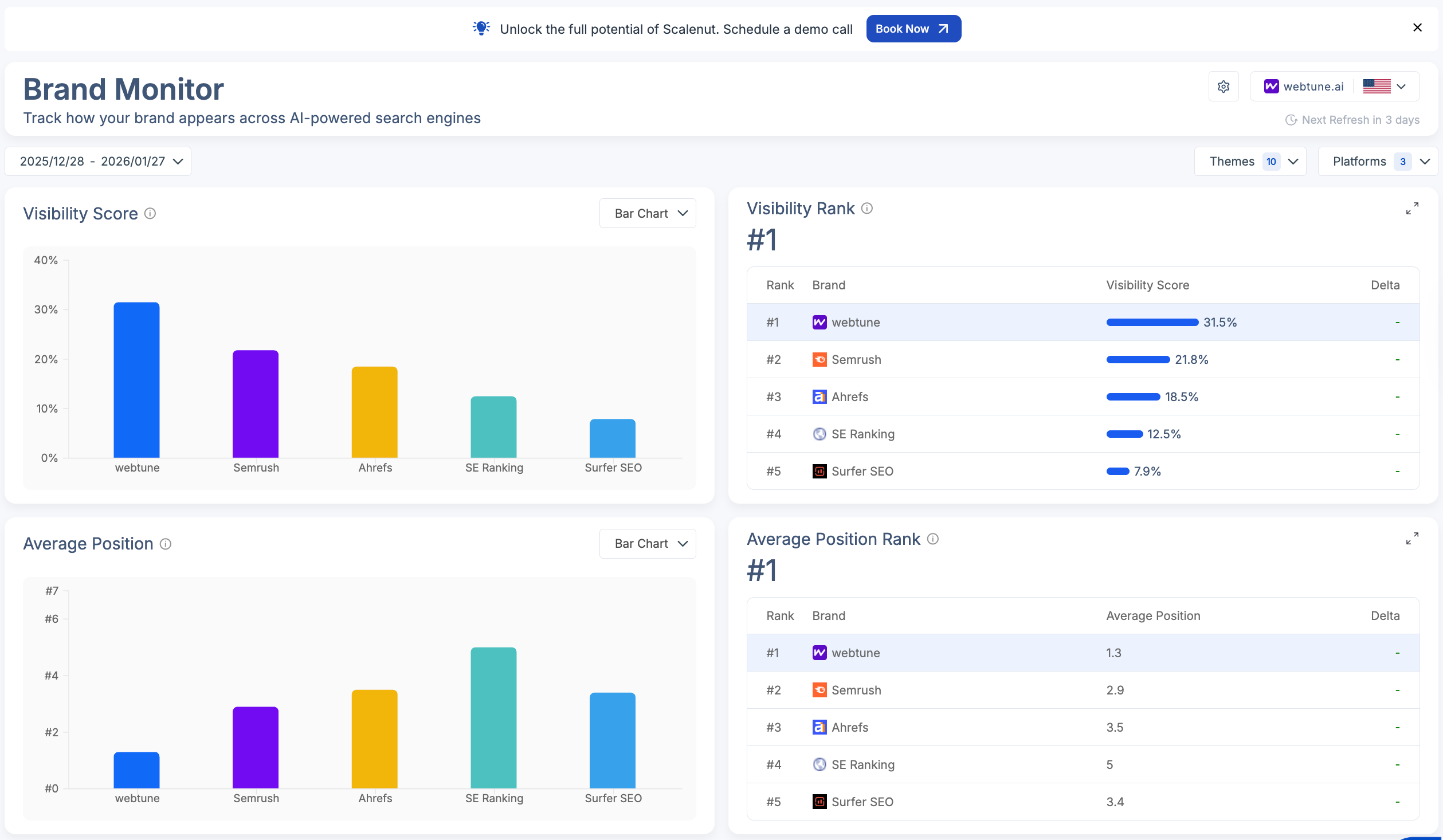
This helps teams see how often the brand appears in AI answers and how that presence stacks up against competitors.
- Visibility Score showing how frequently your brand is mentioned versus competitors.
- Average Position indicating how prominently your brand appears in AI-generated answers.
- Share Of Voice measuring how much space your brand captures inside AI responses.
- Visibility Heatmap showing performance differences across AI platforms.
- Brand Visibility Rank summarizing overall visibility across key topics and prompts.
Prompt-Level Insights And AI Search Intelligence

This helps teams understand how AI interprets your brand across real user prompts and where visibility is being won or lost.
- Prompt tracking to see where your brand is mentioned and how it ranks in responses.
- Citation tracking to identify sources used to support AI-generated answers.
- Competitor visibility insights showing which brands appear alongside yours.
- Query fanouts revealing how a single question expands into related AI-driven queries.
- Sentiment analysis classifying brand mentions as positive, neutral, or negative.
Actionable GEO Recommendations
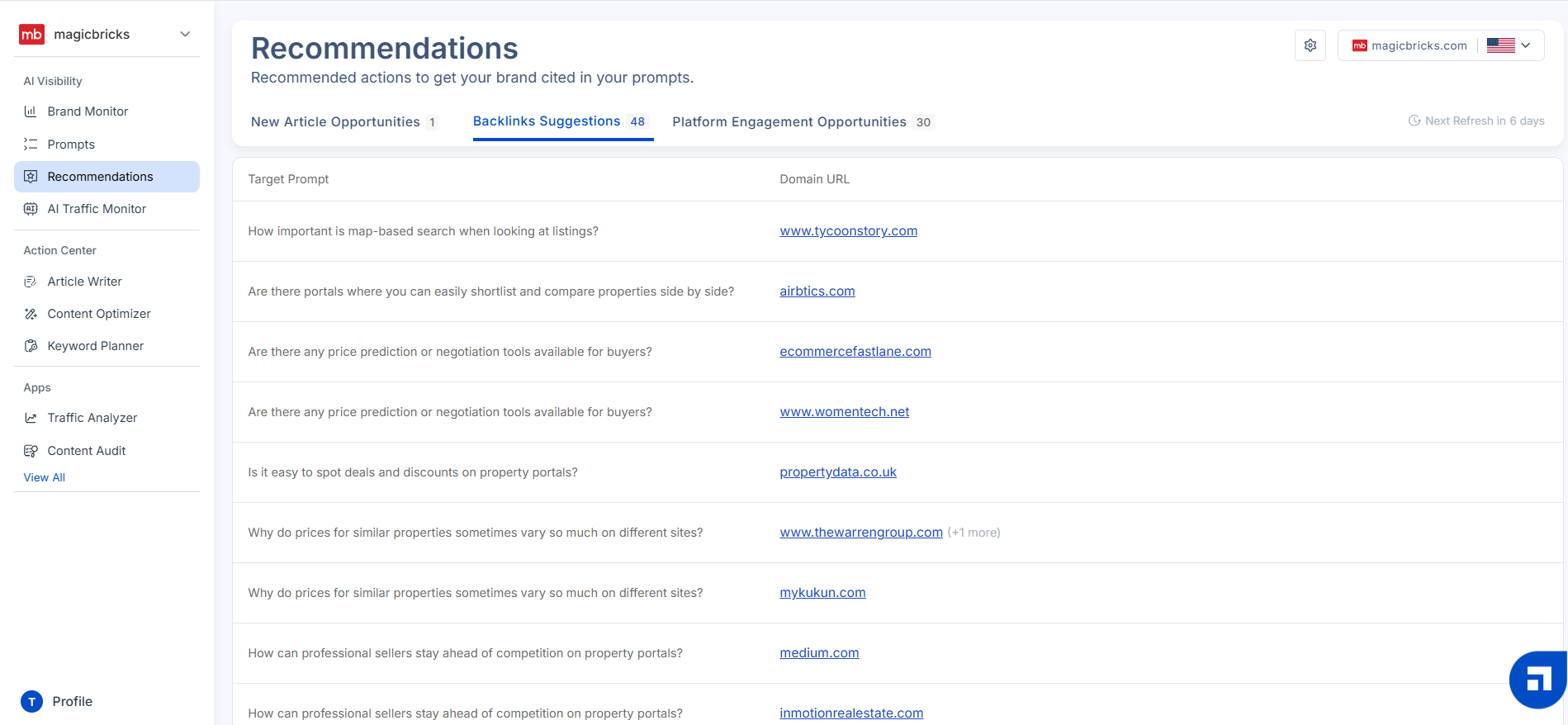
This turns visibility insights into clear next steps that can improve discoverability and authority.
- New article ideas based on high-intent, AI-driven user questions.
- Backlink suggestions to strengthen authority and AI visibility.
- Platform engagement opportunities highlighting relevant Reddit and forum discussions.
- Clear execution paths that connect insights directly to actions.
AI Traffic Monitoring And LLM Interaction Tracking
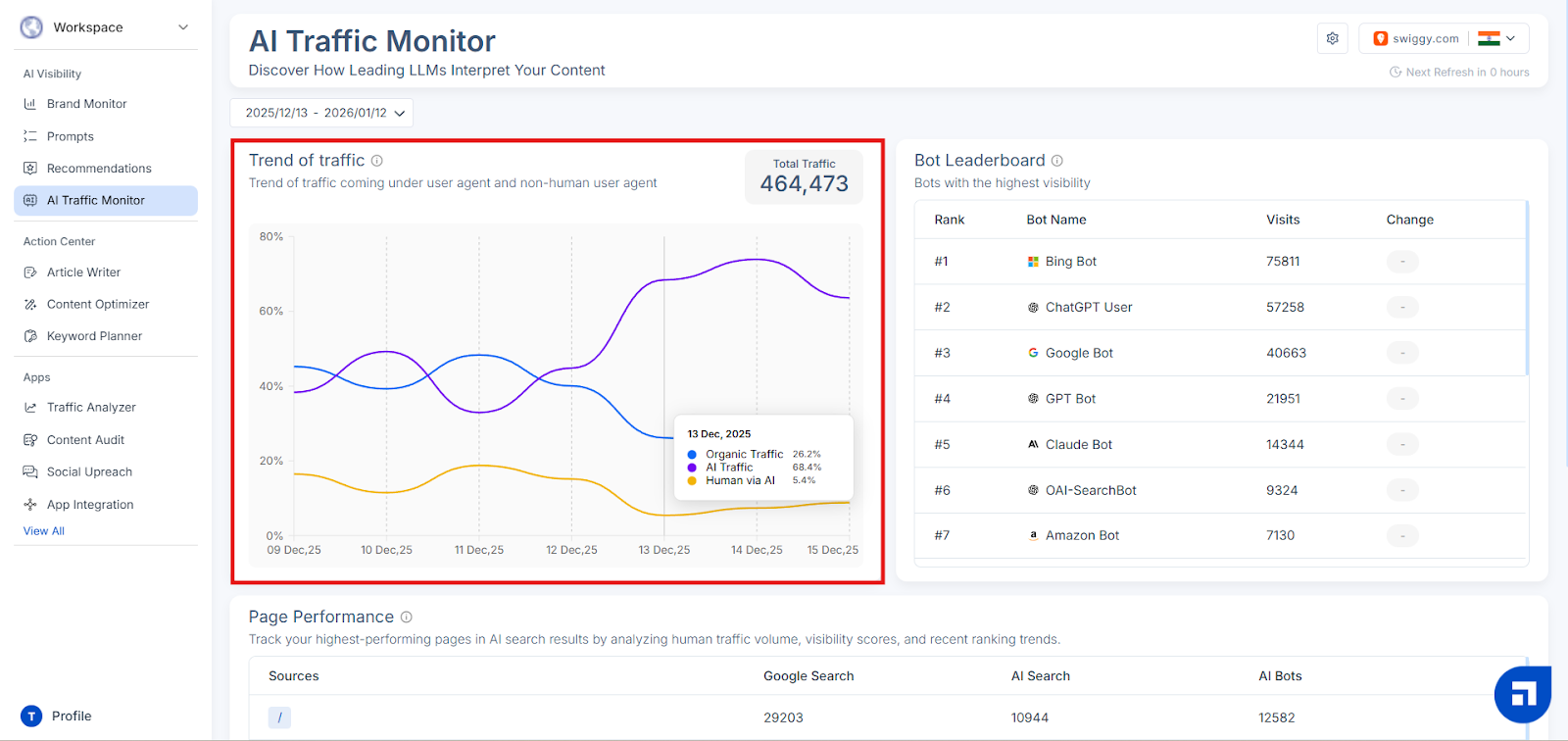
This helps teams understand how AI systems interact with your content and spot shifts in AI-driven visits over time.
- AI bot tracking for visits from tools like ChatGPT and Gemini.
- Cloudflare integration for stronger AI traffic visibility.
- Top sources showing which AI agents access your site most often.
- Top pages highlighting which content AI models reference frequently.
- AI visit trends tracking changes in AI-driven traffic patterns.
Want to see these GEO and SEO features in action? Check out our Scalenut review to learn how its toolkit can strengthen brand visibility.
How Does Scalenut Support SEO And Content Execution?
Alongside GEO, Scalenut includes a full SEO and content execution toolkit built to help teams plan, create, optimize, and scale content efficiently.
Content Creation And Optimization
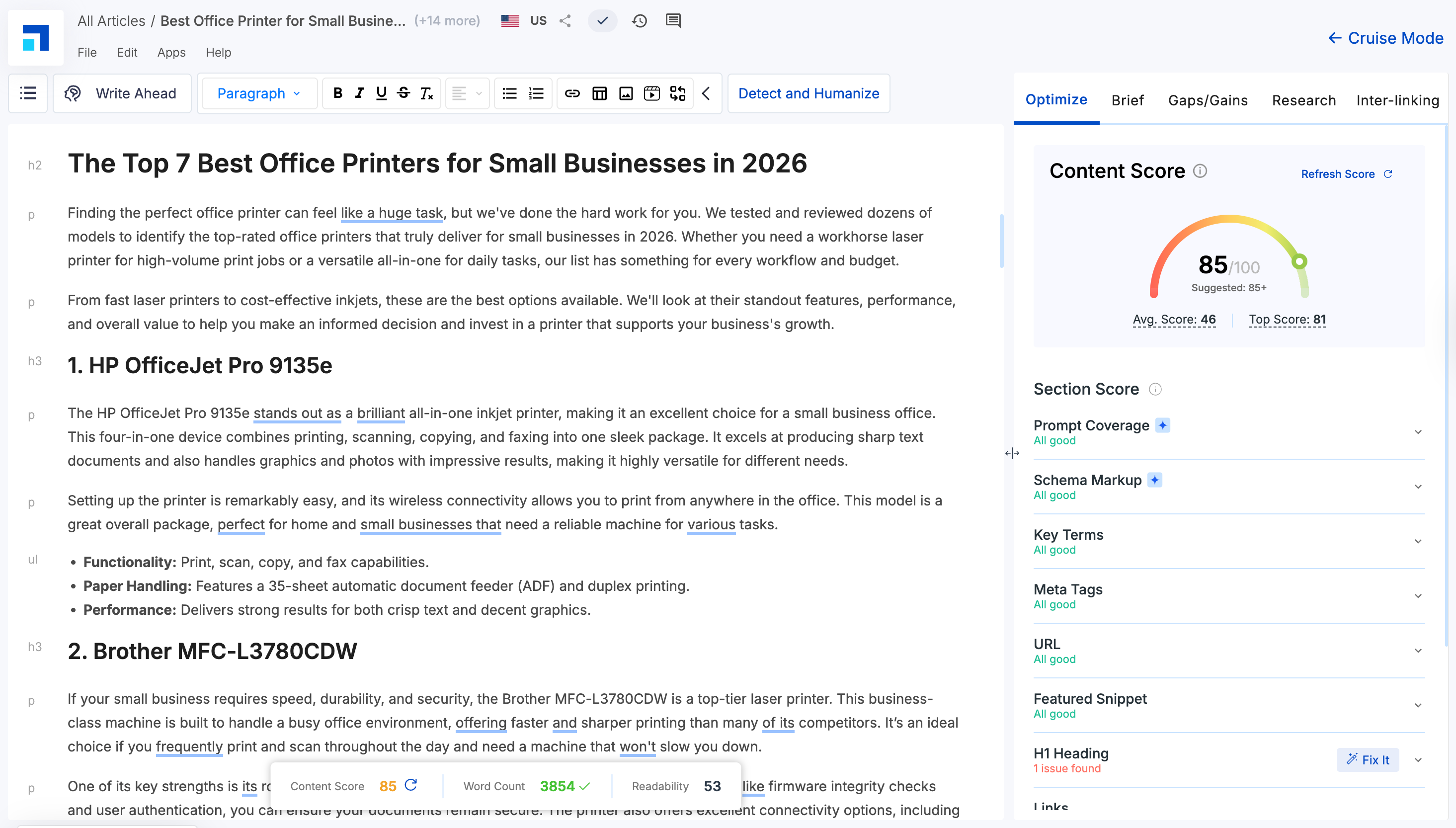
This is the execution layer for moving from outline to publish-ready content with clearer optimization direction.
- Cruise Mode for AI-assisted outlines and drafts using SERP and GEO insights.
- Content Optimizer highlighting improvements for stronger performance.
- AI Humanizer refining AI-written content to sound more natural.
- Content scoring evaluating intent alignment, topic depth, structure, and keyword usage.
SEO Research And Content Planning
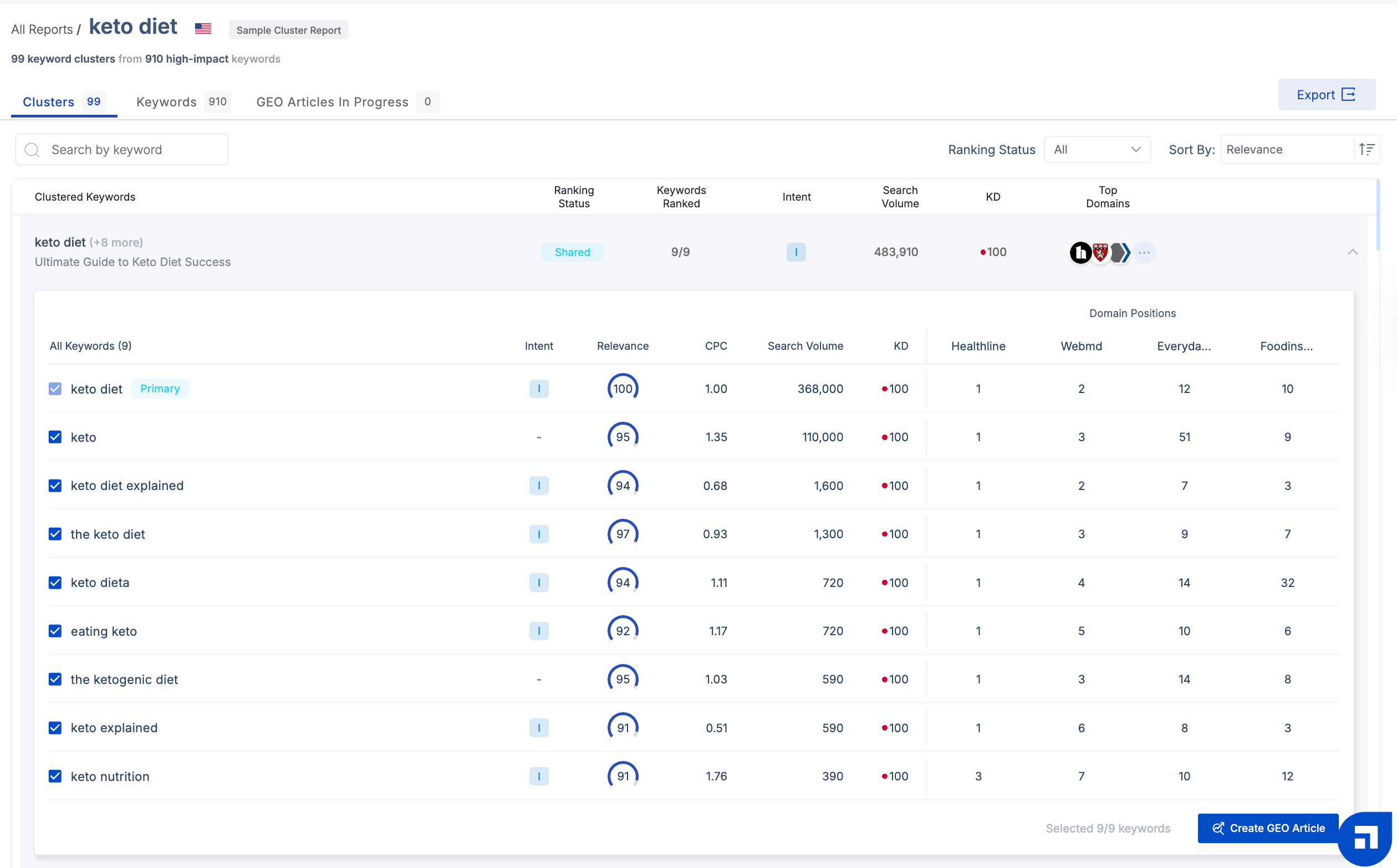
This helps you pick the right topics, structure clusters, and prioritize what to create or refresh next.
- Keyword Planner clustering keywords by search intent.
- Competitor coverage analysis showing how competitors approach the same topics.
- Traffic Analyzer identifying top-performing pages and quick-win opportunities.
- Content Audit flagging pages that need updates or optimization.
Technical SEO And Linking
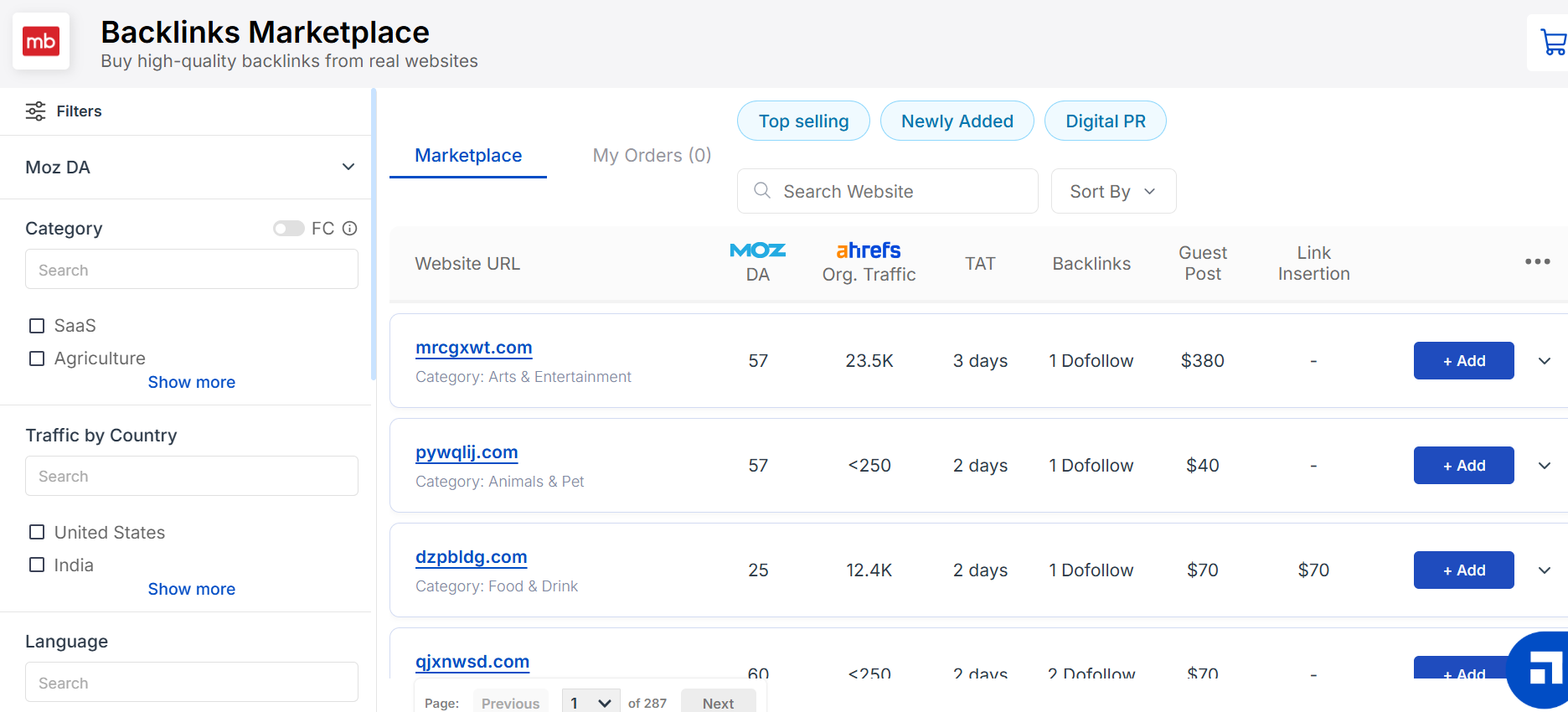
This supports SEO hygiene and link structure so your content is easier to crawl, understand, and distribute internally.
- Link Manager for organizing and strengthening internal linking.
- On-Page Pro evaluating meta titles and descriptions against top-ranking pages.
- Backlinks Marketplace for discovering and purchasing high-quality backlinks.
Want to strengthen your site structure further? See our guide to internal linking for SEO and how to find relevant link opportunities at scale.
Why I Would Choose Scalenut Over PageOptimizer Pro?
I would choose Scalenut when the job goes beyond identifying what needs improvement and includes actually planning, creating, updating, and publishing content at scale.
“I like that Scalenut is extremely user-friendly and affordable. It's a scalable way of generating customized content that's searchable and discoverable by Google and AI engines. I appreciate that it actually works, giving me the ability to drive organic traffic to my website without solely relying on a website team.” says Clayton S. on G2
The practical difference is workflow depth. Scalenut connects AI visibility insights with content audits, topic-gap analysis, keyword planning, GEO content creation, existing-page optimization, internal linking, traffic analysis, and WordPress or Shopify publishing.
For a team running an ongoing SEO and GEO program, that means you can move from finding a visibility gap to deciding what content needs attention, improving or creating it, and getting it live without stitching together as many separate workflows. That broader execution layer is the main reason I would choose Scalenut over PageOptimizer Pro.
Ready To Turn AI Visibility Insights Into Content Actions? Book A Demo To Explore Scalenut.
Frequently Asked Questions
Surfer SEO vs Page Optimizer Pro vs Frase: Which is better in 2026?
Surfer, POP, and Frase now combine on-page optimization with AI visibility features, so the choice comes down to workflow. POP emphasizes detailed page recommendations, Surfer connects optimization with AI tracking, while Frase extends further into auditing, writing, publishing, and ongoing content maintenance.
Which are the top Page Optimizer Pro alternatives?
Strong PageOptimizer Pro alternatives include Scalenut, Surfer, Frase, Clearscope, and MarketMuse. The best choice depends on whether you need deeper best SEO content optimization tool, broader SEO workflows, AI visibility tracking, or publishing support. Scalenut is worth considering when you want SEO and GEO execution together.
Is Page Optimizer Pro pricing affordable for smaller teams?
Yes, if your workload fits the plan limits. Basic starts at $40 per month with 20 POP Credits, while Unlimited includes unlimited core optimization reports plus 50 monthly credits. Costs can rise if AI writing, NLP, E-E-A-T, or AI visibility tracking consumes additional credits.
Can Page Optimizer Pro read hidden text?
POP’s public product information does not position hidden-text analysis as a core feature. More importantly, Google treats text hidden solely to manipulate rankings as spam. Use POP to improve visible content, headings, entities, and structure rather than adding concealed SEO copy.
Cora vs Page Optimizer Pro: which one is worth investing in 2026?
Cora is better suited to advanced SEOs who want extensive correlation analysis across hundreds of ranking factors. POP is easier to use for day-to-day optimization, with prioritized recommendations, AI writing, monitoring, and AI visibility tracking. The better investment depends on your desired analysis depth.
How to use Page Optimizer Pro?
Enter the page URL, target keyword or topic, and location, then run a POP report. Review the prioritized recommendations for titles, headings, term coverage, structure, and word count, apply the changes, and rerun the report. POP Pilot can help explain recommendations and workflows.
Are there any drawbacks to using Page Optimizer Pro compared to other on-page SEO content optimization software?
POP’s main trade-off is that several advanced features use POP Credits, including AI writing and AI visibility tracking, so heavy usage can require extra credits. Its recommendations also still need editorial judgment. Teams wanting broader planning, internal linking, and publishing workflows may prefer Scalenut.
How effective is Page Optimizer Pro for improving search engine rankings?
POP can help improve on-page relevance by identifying content, structure, and term-coverage gaps against ranking top competitors. However, higher optimization scores do not guarantee higher rankings. Search intent, backlinks, site authority, technical health, competition, and content quality still influence organic performance.
What are the pros and cons of using Page Optimizer Pro according to recent reviews?
G2 reviewers commonly praise POP’s actionable recommendations, optimization scores, competitor insights, and ease of implementation. Reported drawbacks include a learning curve, occasional keyword suggestions that do not fit the content, limited integrations, and concerns about costs or credits as usage increases.
What are the key features of Page Optimizer Pro, and how do they help with on-page SEO?
POP’s main features include its Rank Engine, content optimization reports, AI Writer, E-E-A-T and NLP tools, Watchdog monitoring, schema recommendations, keyword research, POP Pilot, and AI Visibility Tracker. Together, they support page optimization, content creation, monitoring, and visibility analysis across search results and AI answers.
What are the best website optimization tools you should be using?
There is no single best web page optimization tool. POP and Surfer are strong for page-level optimization, while Frase and Scalenut cover broader content workflows. Scalenut is especially useful for teams and business owners combining SEO and GEO planning, content creation, optimization, internal linking, visibility tracking, and publishing.


.svg)


.webp)