
Key Highlights
- SurgeGraph focuses primarily on long-form AI content creation with SERP-driven optimization built into the writing workflow.
- It offers tools for outline building, SEO scoring, topic coverage, and bulk article generation to support scaled publishing.
- For GEO and SEO needs, SurgeGraph is best viewed as a writing-first optimization toolkit, not a full visibility platform.
- It does not provide a dedicated GEO layer for tracking AI visibility, citations, or brand presence in AI-generated answers.
- Scalenut is often considered a better SurgeGraph alternative which goes beyond drafting by combining AI brand visibility monitoring with traditional SEO execution tools.
- With features like prompt tracking, citation insights, and AI traffic monitoring, Scalenut addresses emerging AI search dynamics.
- Scalenut also connects insights directly to action through content planning, optimization workflows, and internal linking support.
- For teams balancing SEO rankings with AI-driven discovery, Scalenut offers a more complete and future-ready alternative.
Keeping up with the demands of SEO content creation isn’t just about volume anymore. It’s about relevance, structure, and ranking potential, all while working within tighter deadlines. As someone who’s tested a range of AI SEO tools, I know how hard it can be to strike that balance between speed and strategy.
That’s exactly why SurgeGraph has been gaining attention. It positions itself as an AI-driven SEO content platform that blends long-form writing with SERP analysis and built-in optimization, essentially helping teams go from keyword to published draft without jumping between tools. It’s a solid workflow for producing SEO articles at scale. But is it always the best option?
In this review, I’ll break down SurgeGraph’s key capabilities, where it delivers, where it still feels limited, and what currently stands out as the more future-ready choice, especially if visibility in AI-generated answers is part of your growth strategy. Keep reading!
What Is SurgeGraph.io?
SurgeGraph.io is an AI SEO content platform designed to help marketers turn search-driven topics into long-form drafts faster. It brings together content generation, SERP-informed guidance, and on-page optimization workflows so teams can research, write, and refine articles in one place.
Where it can feel less complete is on the broader SEO side. SurgeGraph is strongest when the goal is producing and polishing content, but it does not position itself as an all-in-one SEO suite, and some capabilities can feel lighter compared to more mature strategy-first platforms.
What Are The Main Features And Benefits Of SurgeGraph As An AI Writing And SEO Tool?
When you look at SurgeGraph from a practical SEO workflow perspective, its core capabilities fall into seven baskets: content creation, optimization, topic planning, competitor intelligence, brand customization, scaling, and publishing support.
1. Content Creation
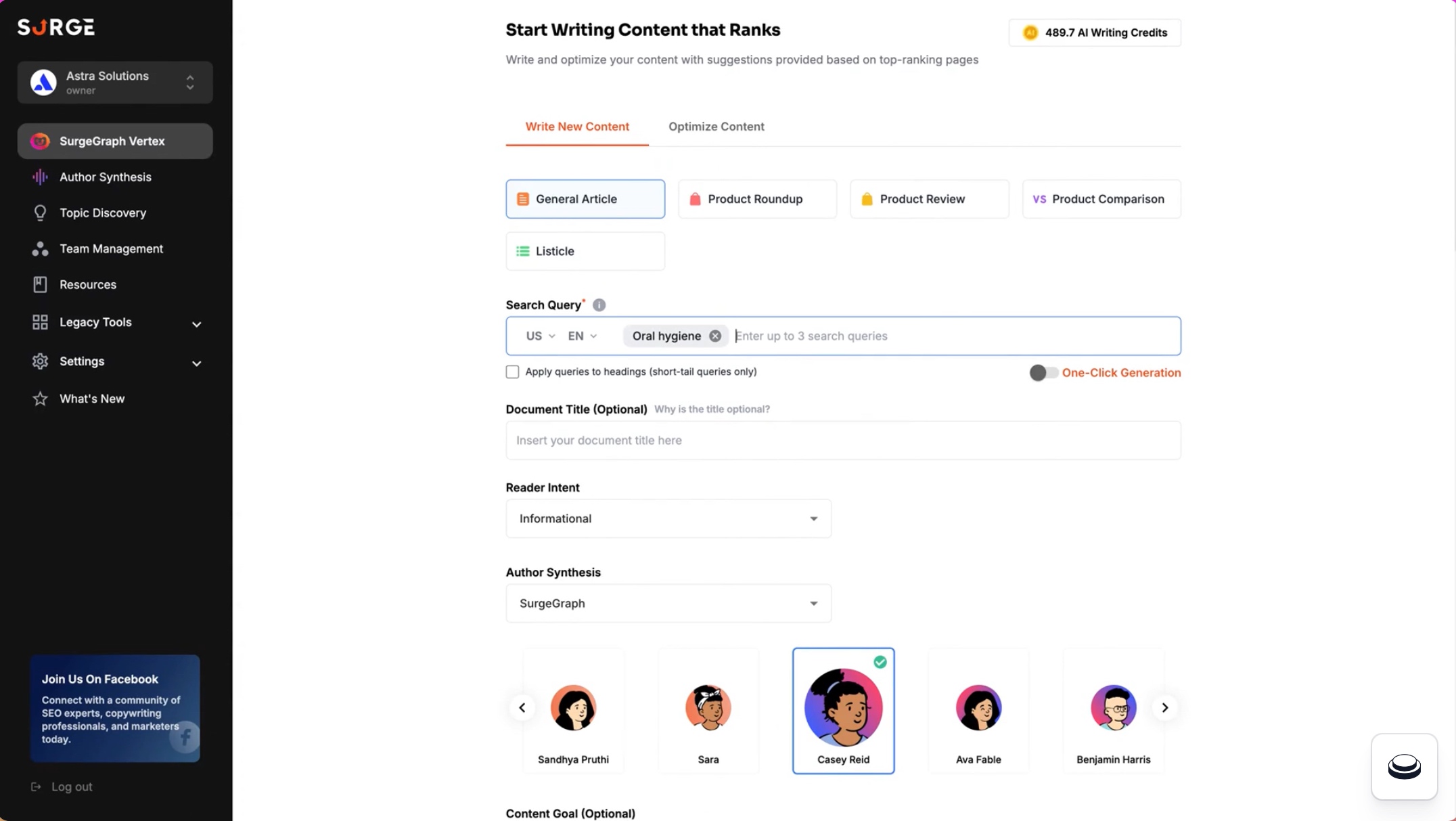
SurgeGraph’s content creation tools are designed to speed up long-form drafting while keeping structure, clarity, and SEO-focused readability intact.
Vertex AI Writer
This is SurgeGraph’s core long-form AI writing tool, built to take you from a topic to a structured draft while keeping the output geared toward SEO-friendly coverage and readability.
- Outline Builder: Creates a structured outline so you can guide the draft before writing begins.
- Article Types: Supports multiple formats, including product-led content like reviews, comparisons, and roundups.
Editor And Section Controls
This set of features focuses on editing and refinement, so you can improve structure and clarity without restarting the entire draft.
- Editable Editor: Gives you a hands-on editor to refine tone, structure, and flow as you write.
- Section-Level Rewrite: Regenerates only the section you want to improve instead of rewriting the whole article.
2. SEO Optimization

These features guide on-page improvements with scoring, recommendations, and quick optimization actions that reduce manual review work.
On-Page Optimization Suite
These tools aim to guide on-page improvements with scoring, suggested fixes, and optimization actions that reduce manual effort.
- Content Score: Provides a real-time score that signals how well your draft aligns with expected on-page coverage.
- Content Suggestions: Recommends improvements such as adding missing subtopics or expanding thin sections.
- Auto Optimizer: Helps apply optimization actions in a few clicks to speed up revisions and reduce repetitive edits.
3. Topic Authority And Coverage
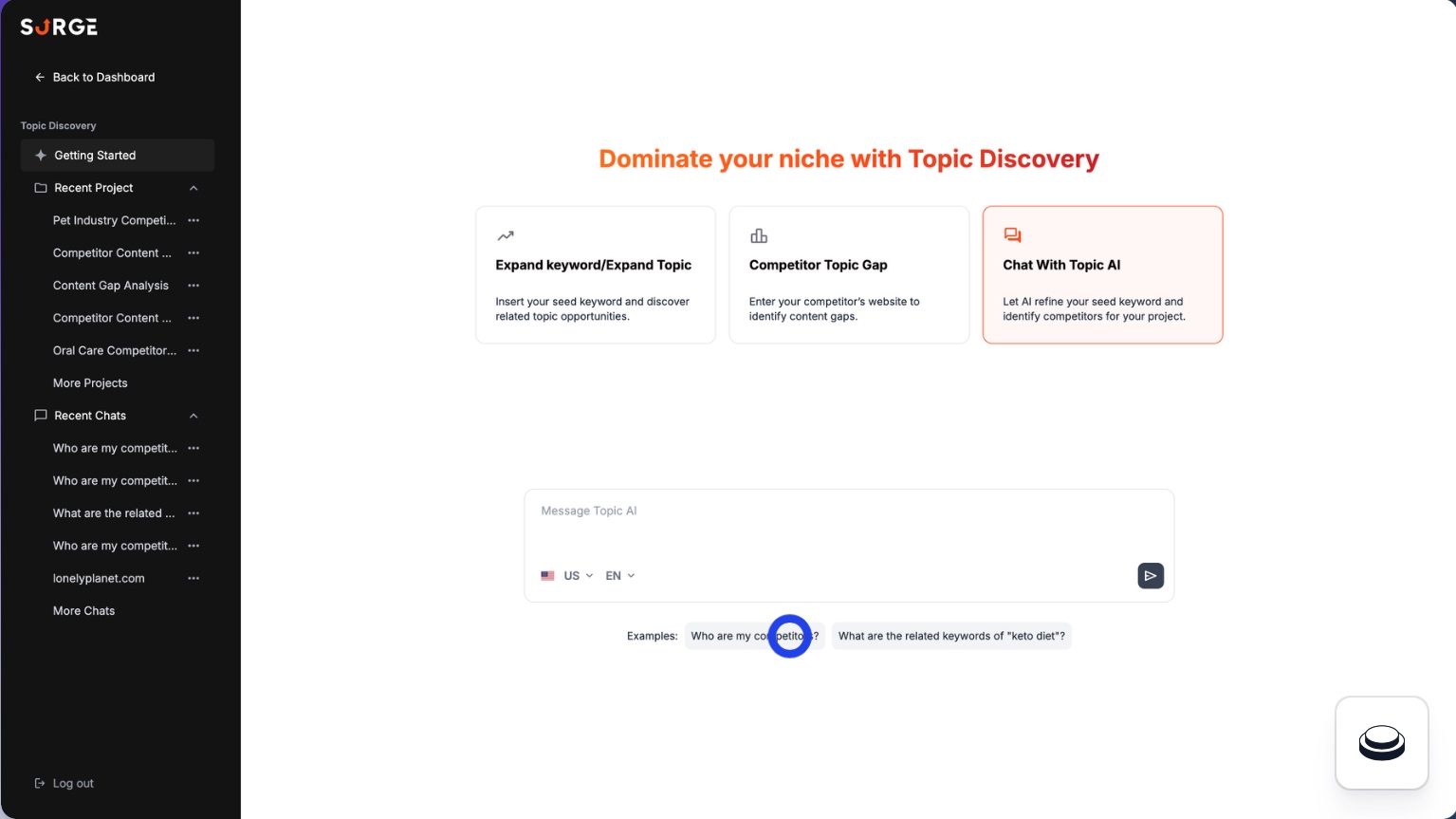
This set supports topical authority by clustering related topics and nudging content toward fuller, more semantically complete coverage.
Topic Discovery
Designed to streamline topic planning by clustering related keywords into organized groups, making it easier to build topical authority and map supporting content around a central theme.
Coverage And Entities
These features support semantic completeness by helping you cover important concepts and related terms that shape relevance.
- Topic Coverage: Highlights whether your content addresses key angles readers and search engines tend to expect.
- Contextual Terms: Suggests related terms and concepts to strengthen topical relevance and depth.
- Information Gain: Encourages adding unique facts and insights so the content is more differentiated.
4. Competitor Intelligence
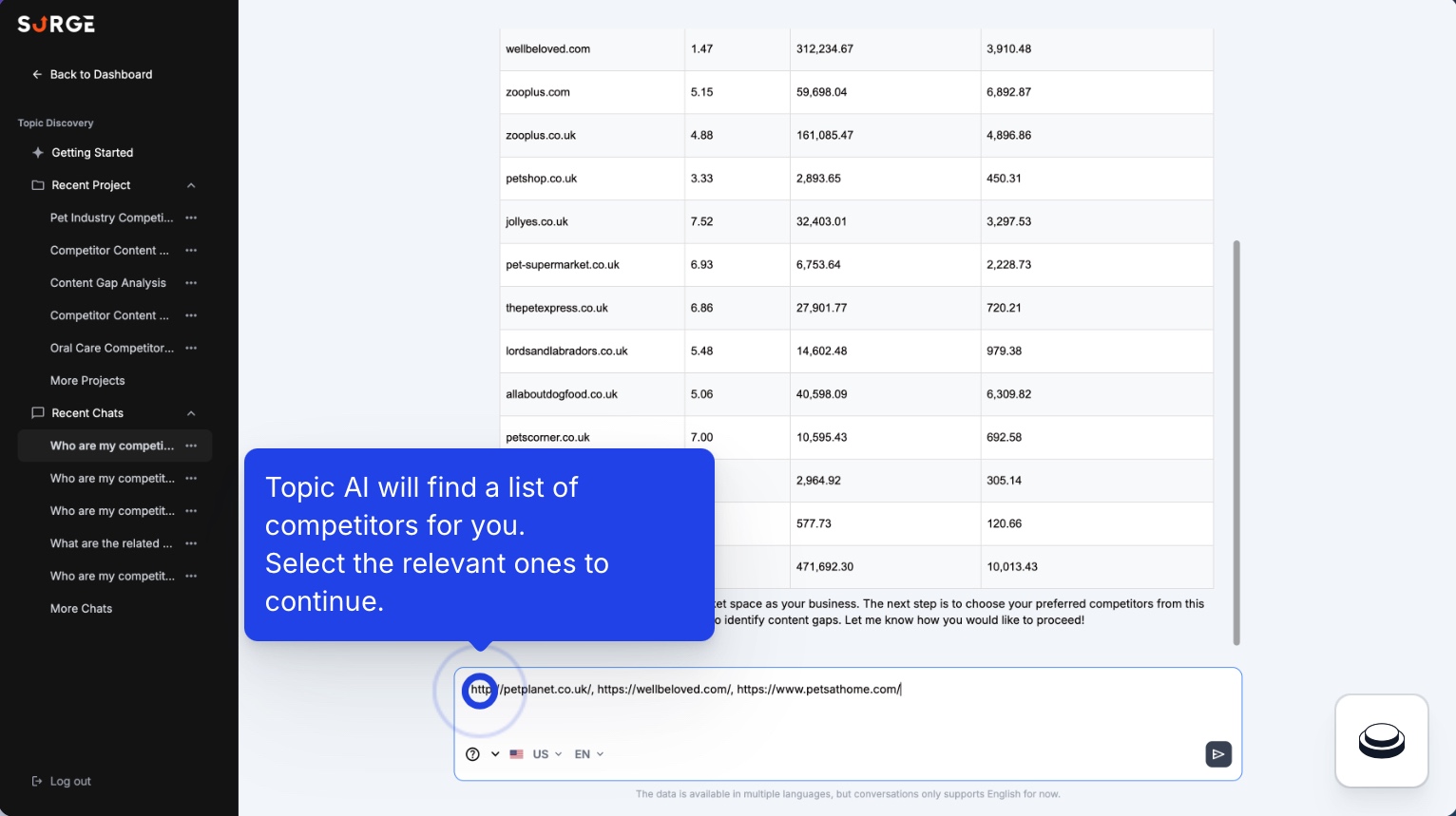
Competitor Intelligence helps teams study what is ranking now, spot repeatable SERP patterns, and identify gaps that can shape better content decisions.
SERP Analysis And Competitor Research
This area focuses on understanding what is ranking now, so you can spot patterns, compare page structures, and identify opportunities to improve.
- SERP Analyzer: Helps you review top-ranking pages and understand common elements like structure and content depth.
- Competitor Research: Supports competitor-focused tracking and research so you can keep an eye on relevant SERP movement.
5. Brand Customization
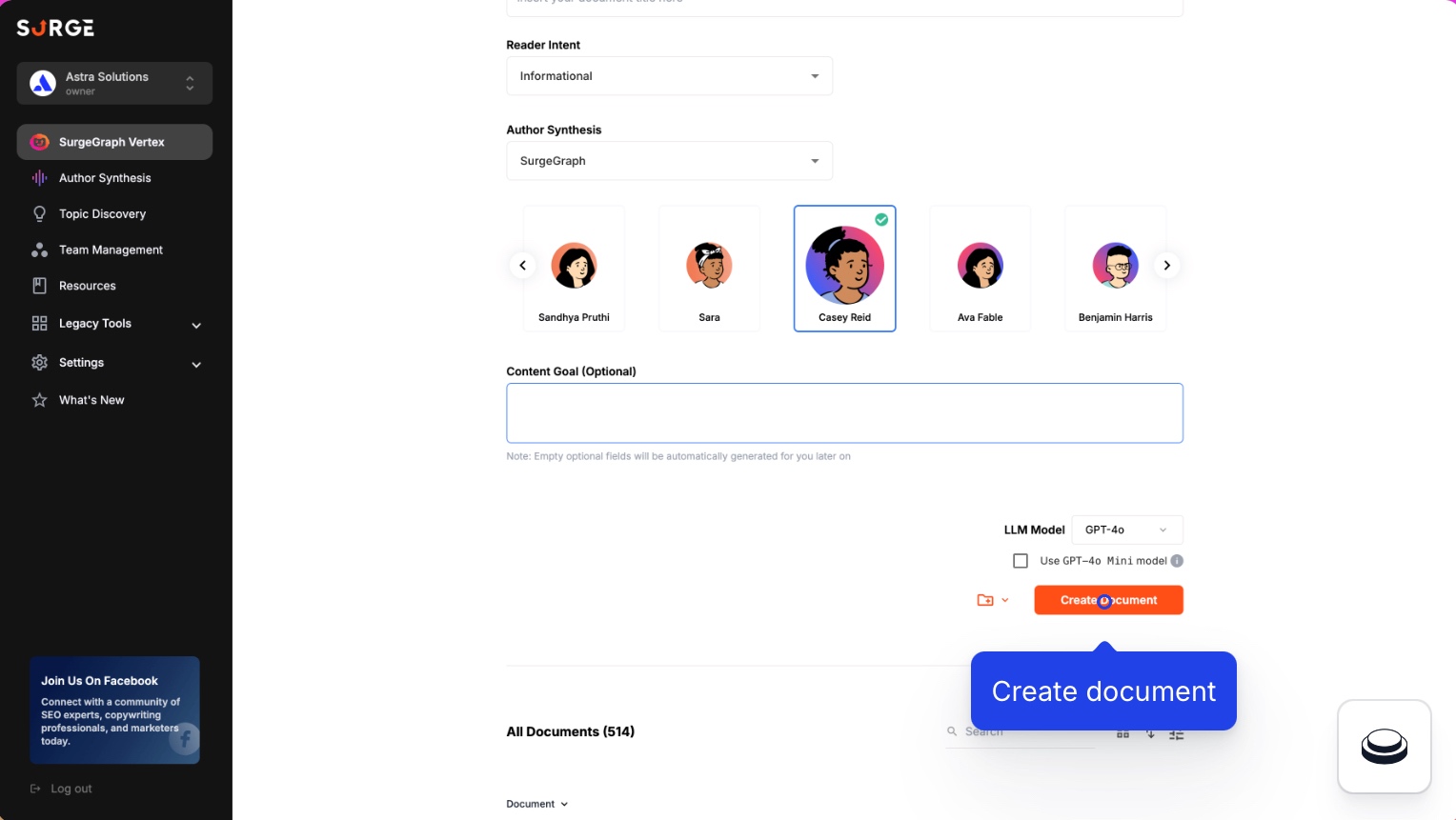
These tools ground drafts in brand context and source material, making output feel less generic and more consistent across content.
Knowledge And Context Injection
This set of tools helps reduce generic output by grounding content in your own materials and contextual direction.
- Knowledge: Lets you reference your documents or sources so the writing reflects your offerings and facts.
- Context Infuser: Injects brand context or guidance into drafts so the content stays aligned with your intent.
Brand Voice And Custom Controls
These features help you steer style and voice, especially if you want more consistency across writers or sites.
- Author Synthesis: Learns from your existing content to better match your preferred tone and writing style.
- Expert & Custom Command: Adds prompt-style controls so you can steer specific sections with clear instructions.
6. Scale And Workflow
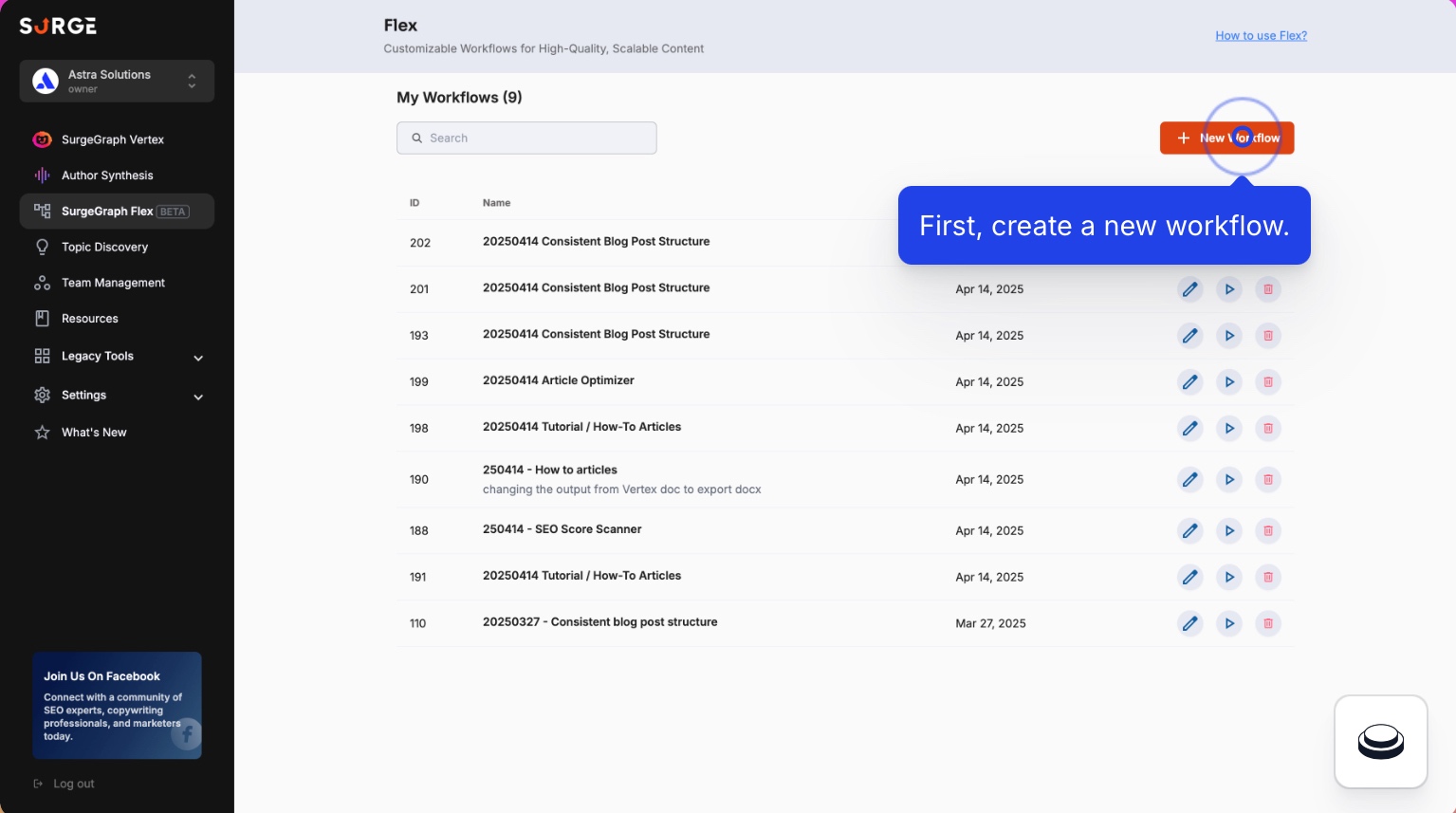
This feature supports repeatable production and higher output volume through workflows, bulk generation, and scalable usage options.
Automation And Workflow Builder
Built for repeatable content production by letting teams standardize steps and structure through Flex workflows, improving consistency and speeding up execution at scale.
Bulk Production And Usage Scaling
This is SurgeGraph’s scaling layer, designed for higher output volumes and more flexible usage.
- Bulk Generation: Produces multiple articles in one run to speed up production across many topics.
- BYOK (Bring Your Own Key): Lets you connect your own AI API key for more control over usage and scaling.
7. Publishing And Visuals
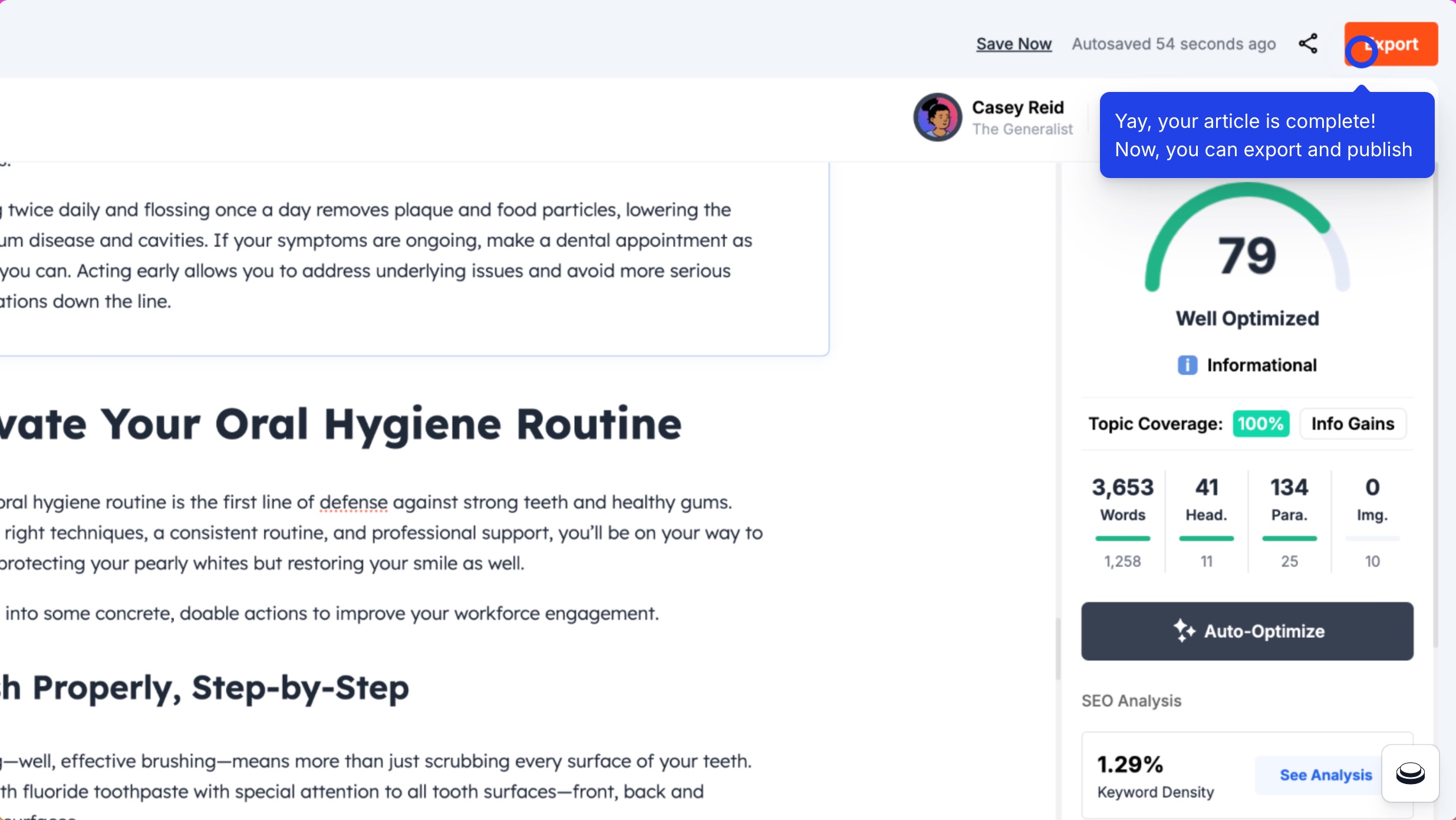
Publishing and visuals on SurgeGraph streamlines the final stretch by enabling direct WordPress publishing and faster visual creation without switching tools.
Publishing
Designed to shorten the draft-to-live workflow with direct WordPress publishing support, so teams can move content from the editor to the site with less manual effort.
Image Support
This capability supports visuals during content production, so you can add images without switching tools.
- Content Vision: Generates AI images that match the topic so you can add visuals quickly.
- Stock Image Support: Inserts relevant stock images sourced from Pixabay to reduce time spent searching for graphics.
What Do Actual Users Say About Their Experience With SurgeGraph On Platforms Like Trustpilot Or G2?
“It may take a while for it to load up fully, but that's because there are a few prompts it needs to analyze. Image generation can be improved.”, says Dayne L. on G2
From user feedbacks, SurgeGraph is most often praised for being easy to use and for producing high-quality content that helps speed up writing workflows. Users also highlight its AI writing capabilities and overall writing improvement, and they note that the combination of SEO tools and keyword research features adds practical value for content creators.
On the downside, a few users mention occasional tool functionality issues that can disrupt the workflow. There are also comments suggesting the image generation feature could be improved.
How Much Does SurgeGraph Cost, And Is There A Free Plan?
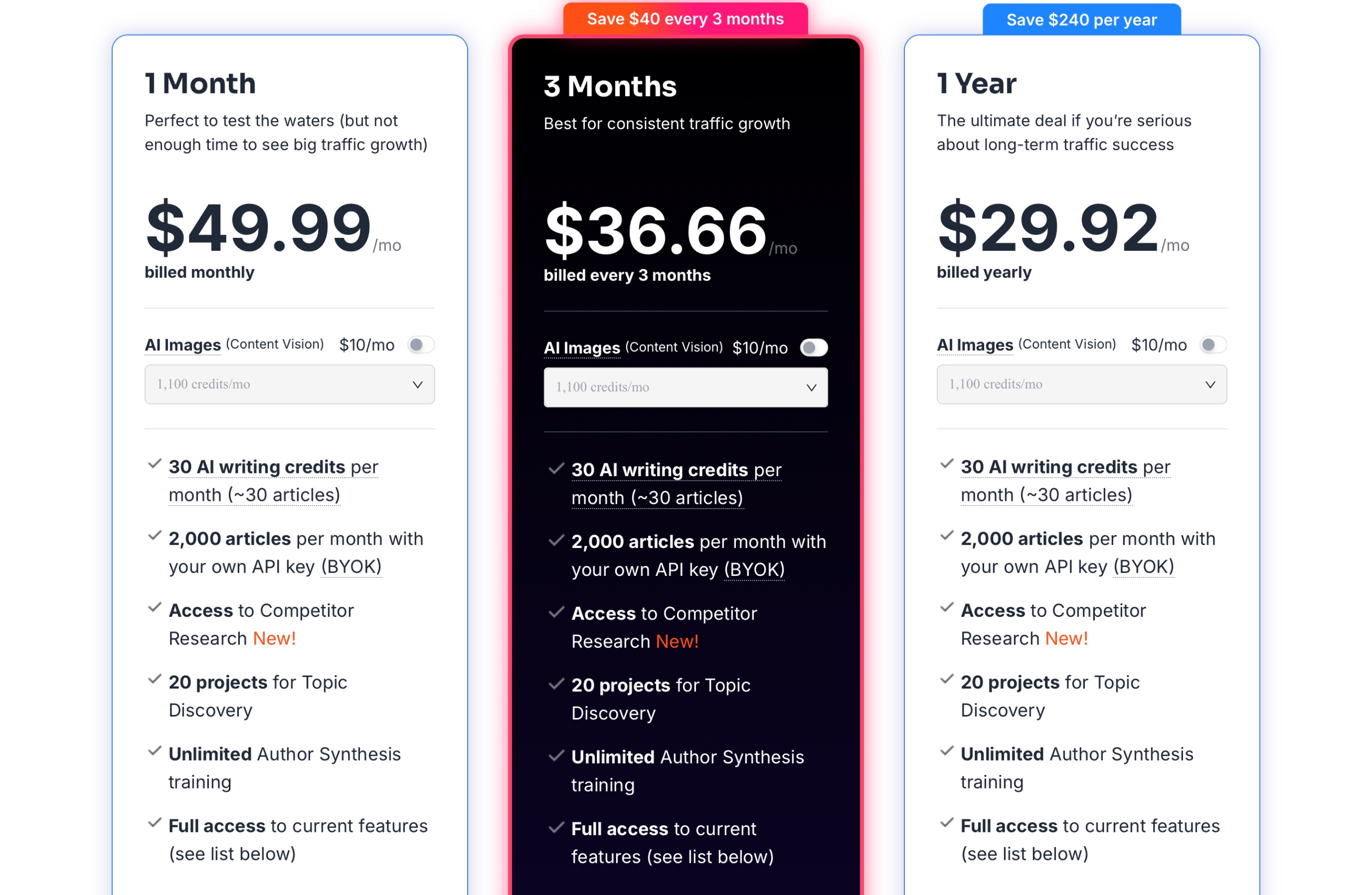
SurgeGraph pricing is straightforward and offers the same core toolkit across plans, with the main difference being how much you save when you commit for longer. If you want to try the platform with minimal commitment, the short-term option makes sense, while the longer plans are clearly designed for teams aiming for consistent publishing and compounding SEO results over time.
While there is no free plan, SurgeGraph’s 14-day money-back guarantee offers a low-risk way to evaluate the workflow. If you are not satisfied, you can contact customer support within that window and request a refund.
Who Is SurgeGraph Best Suited For In Real Workflows?
Who Should Choose SurgeGraph?
- Content marketers who want one place to draft, optimize, and publish SEO articles without juggling multiple tools.
- Writers and lean teams prioritizing speed, structure, and SERP-guided direction for long-form content.
- Affiliate publishers creating product-driven pages such as comparisons, roundups, and review-style content.
- Agencies and consultants managing multiple WordPress sites and needing streamlined publishing workflows.
- SEO teams building topic clusters and supporting content libraries, not just one-off keyword posts.
- Operators who want batch production options and repeatable processes to scale content output.
When SurgeGraph Might Not Be The Best Choice?
- Brands investing heavily in GEO-first workflows and expecting dedicated tooling for AI visibility measurement and citation-focused optimization.
- Teams looking for a full SEO platform that covers technical SEO, deep rank tracking, and robust monitoring in one suite.
- Enterprises that need advanced governance and complex approvals across large teams.
- High-volume publishers who want predictable scaling without relying on credit limits or external API setups.
- Teams that prefer strategy-first platforms where deep content modeling and planning come before draft generation.
What Are The Pros And Cons Of SurgeGraph?
SurgeGraph is built to streamline SEO content production with a heavy emphasis on long-form writing, on-page guidance, and topic planning. It can be a strong fit for teams that want an integrated workflow, but there are a few areas where it may not match broader, more mature SEO platforms.
What Sets SurgeGraph Apart From Other AI SEO Platforms?
- Long-Form First Workflow: It is clearly designed around creating and refining long-form drafts rather than just generating short AI snippets.
- SEO Guidance Inside The Writing Flow: Scoring and suggestions are integrated into the editor so optimization happens while writing, not after.
- Topic Planning For Topical Authority: Topic Discovery and clustering support a content hub approach, not just single-keyword targeting.
- Brand Grounding Options: Knowledge, Context Infuser, and Author Synthesis aim to reduce generic output and improve brand alignment.
- Scale Features For Production Teams: Bulk generation, workflows (Flex), and BYOK support higher-volume publishing workflows.
- Faster WordPress Publishing: Direct WordPress publishing reduces friction when pushing drafts live.
What Limitations Should You Know Before Choosing SurgeGraph?
- Not A Full SEO Suite: It is more content-centric and may not replace advanced SEO platforms that offer deeper monitoring and change tracking.
- Competitor Intelligence Maturity: Competitor-focused features can feel less mature than dedicated competitive research tools.
- Scaling Can Require Tradeoffs: Credits and plan limits can be a constraint at volume, and BYOK adds extra setup and cost management.
- No Dedicated GEO Workflow: It supports GEO-style best practices indirectly, but it does not clearly offer a productized LLM optimization module.
- Mixed Feedback On Tool Polish: Some users flag occasional workflow friction and note that image-related features could be stronger.
Why Is Scalenut A Better Alternative to SurgeGraph?
While SurgeGraph does a solid job with long-form writing, SERP-driven guidance, and on-page content optimization, it is less equipped for AI-driven discovery. It does not clearly offer a dedicated GEO layer for tracking brand presence in AI answers, surfacing citations, or monitoring AI-driven traffic signals in a structured way.
That is where Scalenut becomes the stronger alternative. It adds GEO-native visibility intelligence, including brand monitoring across AI platforms, prompt and citation insights, and AI traffic signals, then ties those insights back to practical SEO execution. For teams trying to compete across both classic search and AI-generated answers, Scalenut offers a more complete content optimization platform rather than a writing-first toolkit.
Want a closer look at Scalenut’s GEO and SEO stack? Read this Scalenut review to see how it can boost visibility across both search and AI answers.
What Are Scalenut’s Most Important GEO And SEO Features?
Scalenut brings together AI visibility (GEO) and practical SEO execution in one platform. Instead of stopping at content generation, it is built to show how a brand appears inside AI answers and then guide the next steps that improve visibility and performance.
How Does Scalenut Strengthen GEO And AI Visibility?
Scalenut’s GEO layer focuses on tracking brand presence in AI-generated responses across AI tools such as ChatGPT, Gemini, and Perplexity, then turning those signals into insights teams can act on.
AI Visibility Tracking And Brand Monitoring
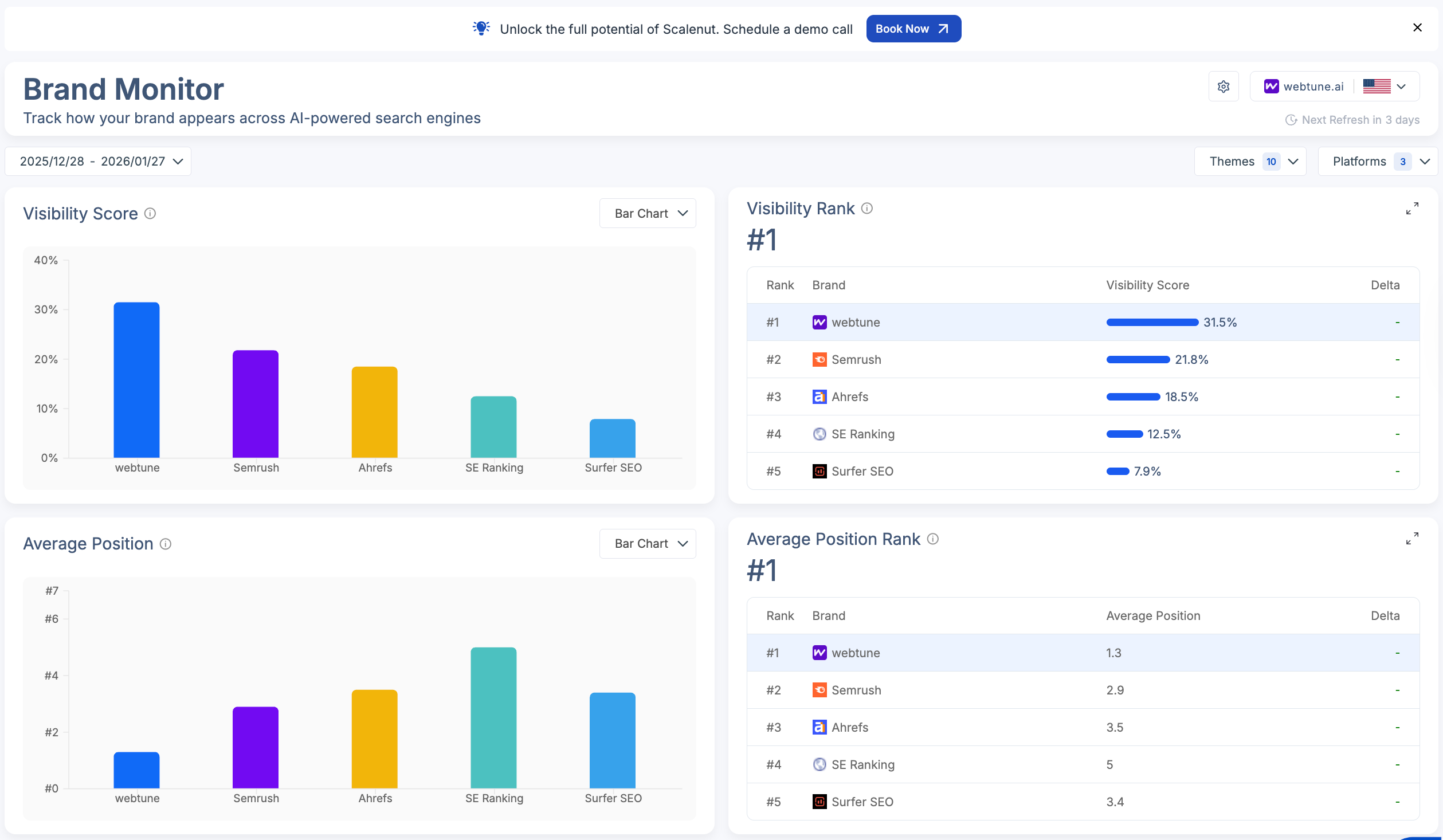
Brand-level metrics make it easier to quantify how often the brand appears in AI answers and how that visibility compares across competitors and platforms.
- Visibility Score gives a quick read on how frequently the brand shows up compared to competitors.
- Average Position indicates whether the brand appears near the top of AI answers or gets buried.
- Share Of Voice quantifies how much of the response real estate the brand captures versus others.
- Visibility Heatmap breaks results out by platform so it is easier to spot strong and weak channels.
- Brand Visibility Rank rolls multiple signals into a single benchmark across topics and prompts.
Prompt-Level Intelligence And Competitive Insights
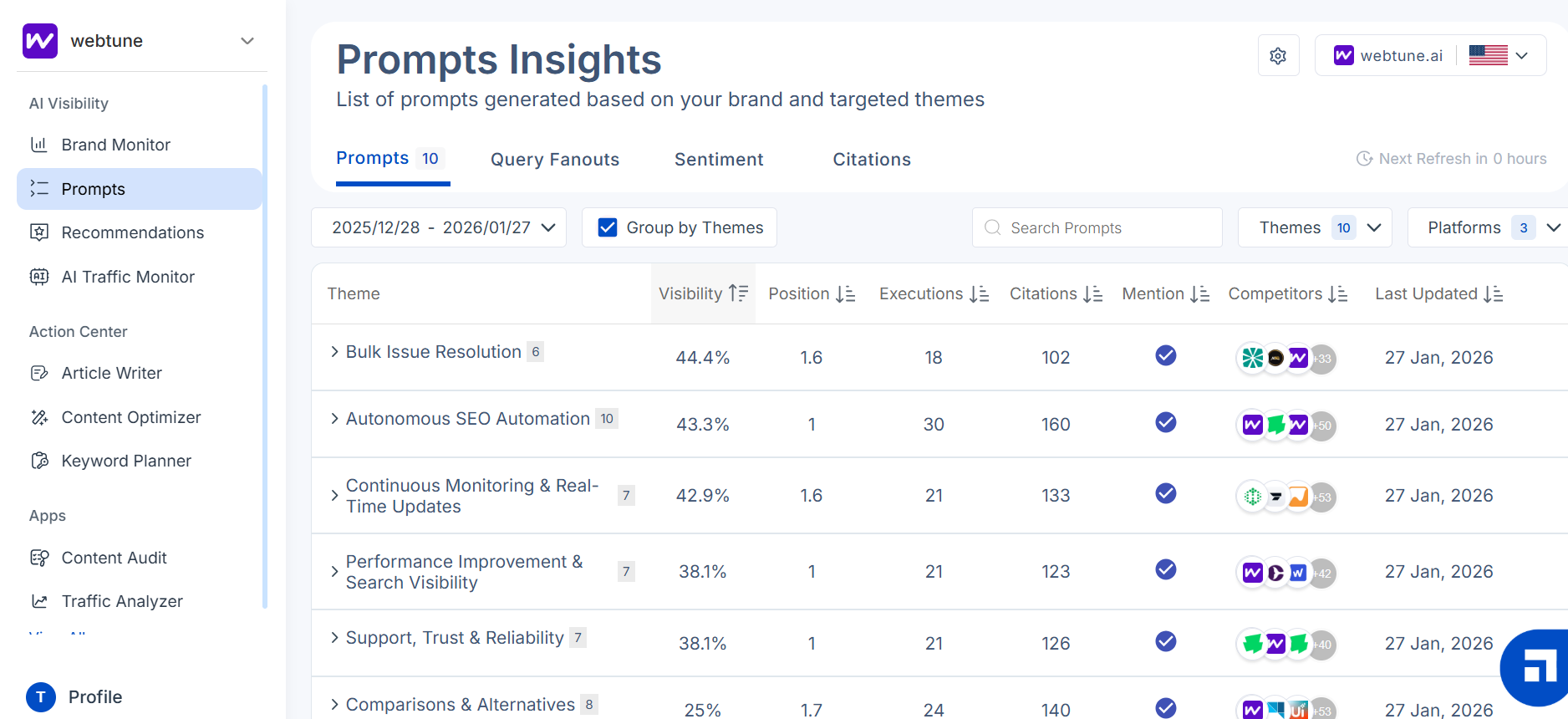
Prompt-level reporting shows where visibility is actually won or lost, including which prompts trigger mentions and which sources AI systems rely on.
- Prompt Tracking surfaces the exact prompts where the brand appears, along with relative positioning.
- Citation Tracking shows which sources are being used to justify AI-generated answers.
- Competitor Visibility Insights highlights the brands most commonly mentioned alongside yours.
- Query Fanouts maps how one question expands into related follow-up queries inside AI experiences.
- Sentiment Analysis tags brand mentions by tone so teams can separate positive exposure from neutral or negative.
GEO Recommendations That Lead To Execution
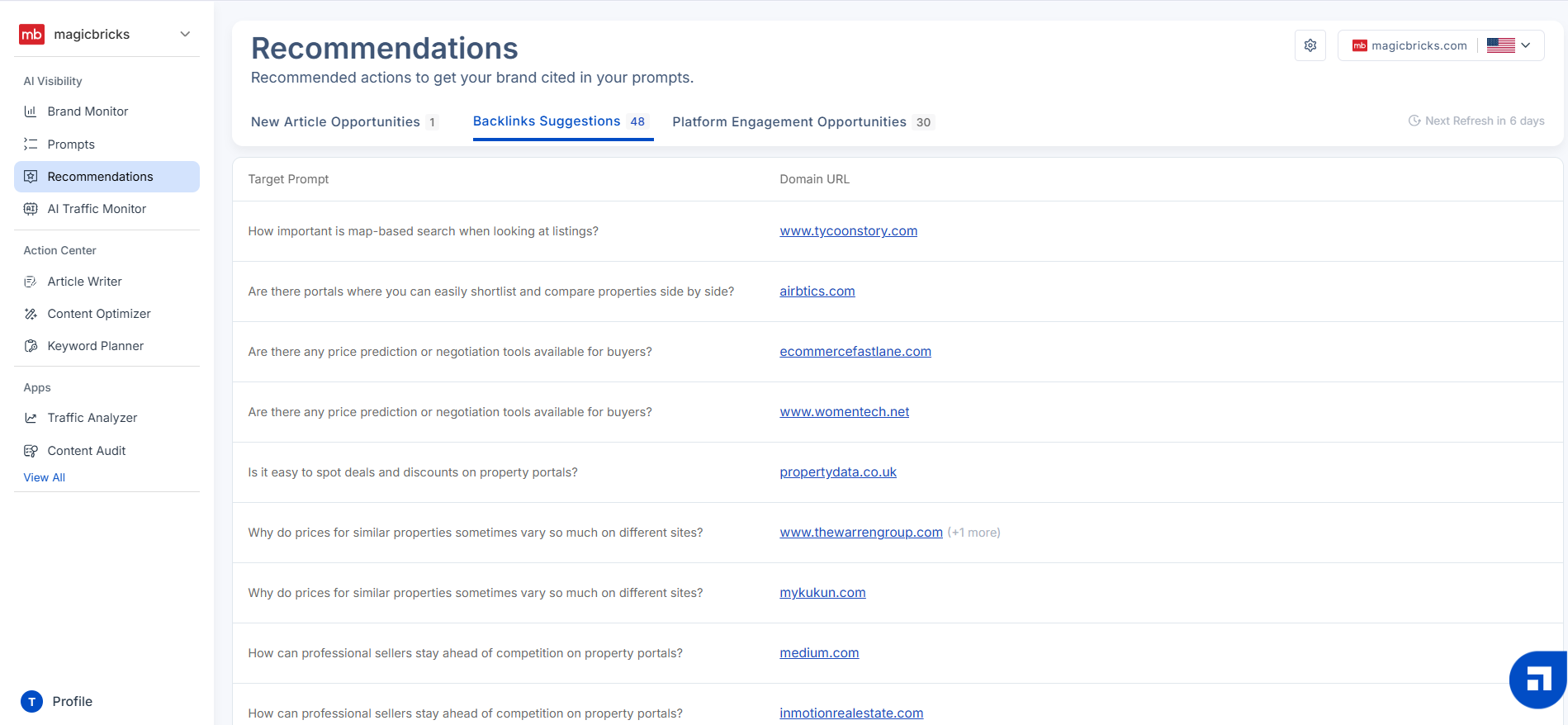
Recommendations translate visibility gaps into practical next steps, making it easier to prioritize content, authority, and engagement work that drives outcomes.
- AI-Led Content Ideas turns AI-driven questions into content opportunities worth targeting.
- Authority And Backlink Suggestions points to ways to strengthen credibility signals that influence visibility.
- Platform Engagement Opportunities flags relevant threads and communities where brand presence can be built.
- Action Paths lays out clear next steps so insights do not stay trapped in dashboards.
AI Traffic Visibility And LLM Interaction Signals
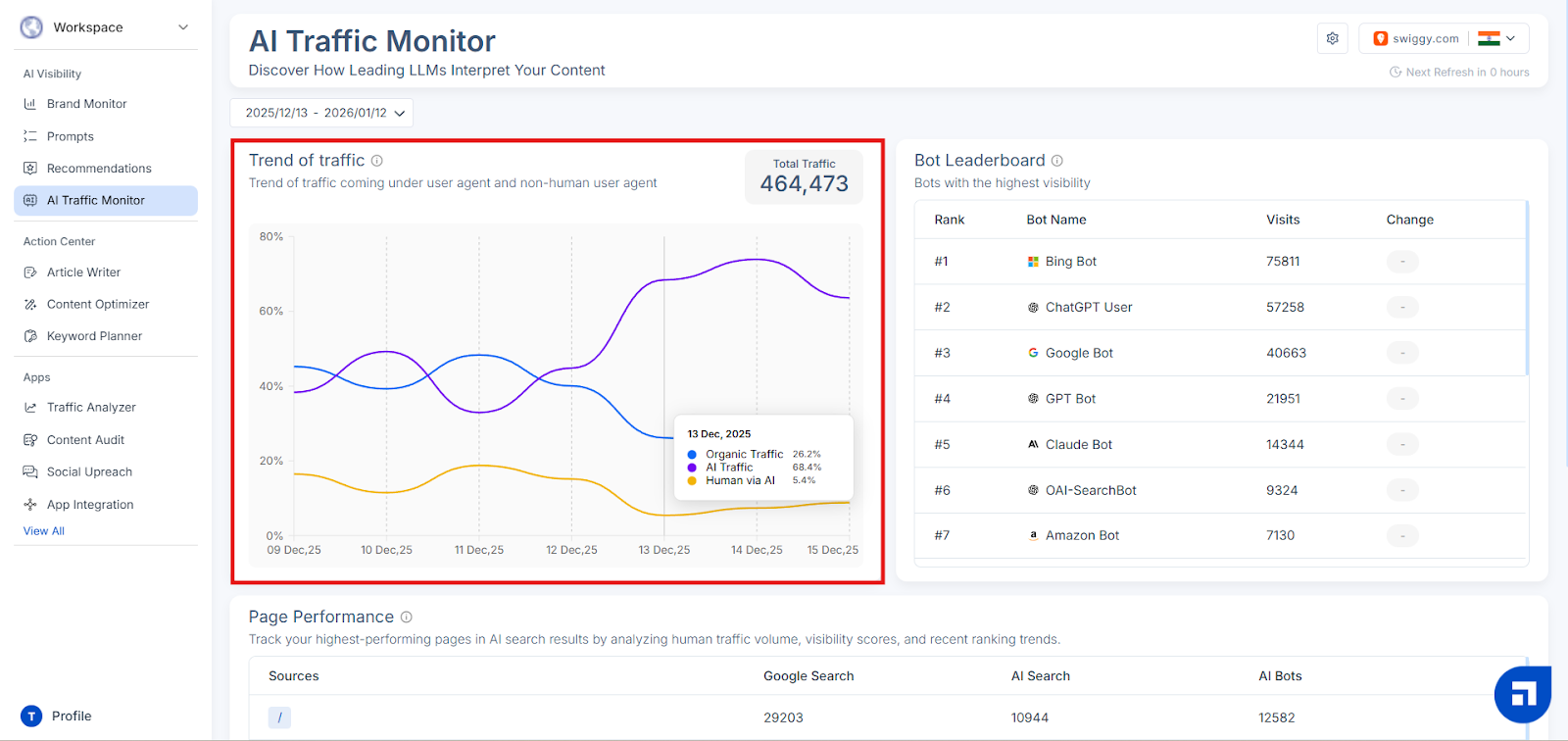
Traffic signals help connect AI visibility to real site outcomes by showing how AI agents interact with the site and which pages they seem to rely on.
- AI Bot Tracking identifies visits attributed to AI assistants and AI search experiences.
- Cloudflare Integration adds an extra layer of tracking depth for sites running on Cloudflare.
- Top AI Sources reveals which AI agents interact with the site most often.
- Most Referenced Pages highlights the pages AI systems appear to rely on most frequently.
- AI Traffic Trends makes it easier to see whether AI-driven visits are growing, flattening, or dropping.
Want to track what’s changing in AI-driven discovery this year? Explore our roundup of top AI monitoring tools that can sharpen your workflow in 2026.
How Does Scalenut Support SEO And Content Execution?
Alongside GEO tracking, Scalenut includes a full SEO workflow for planning, creating, optimizing, and scaling content with structured guidance.
Content Production And Optimization
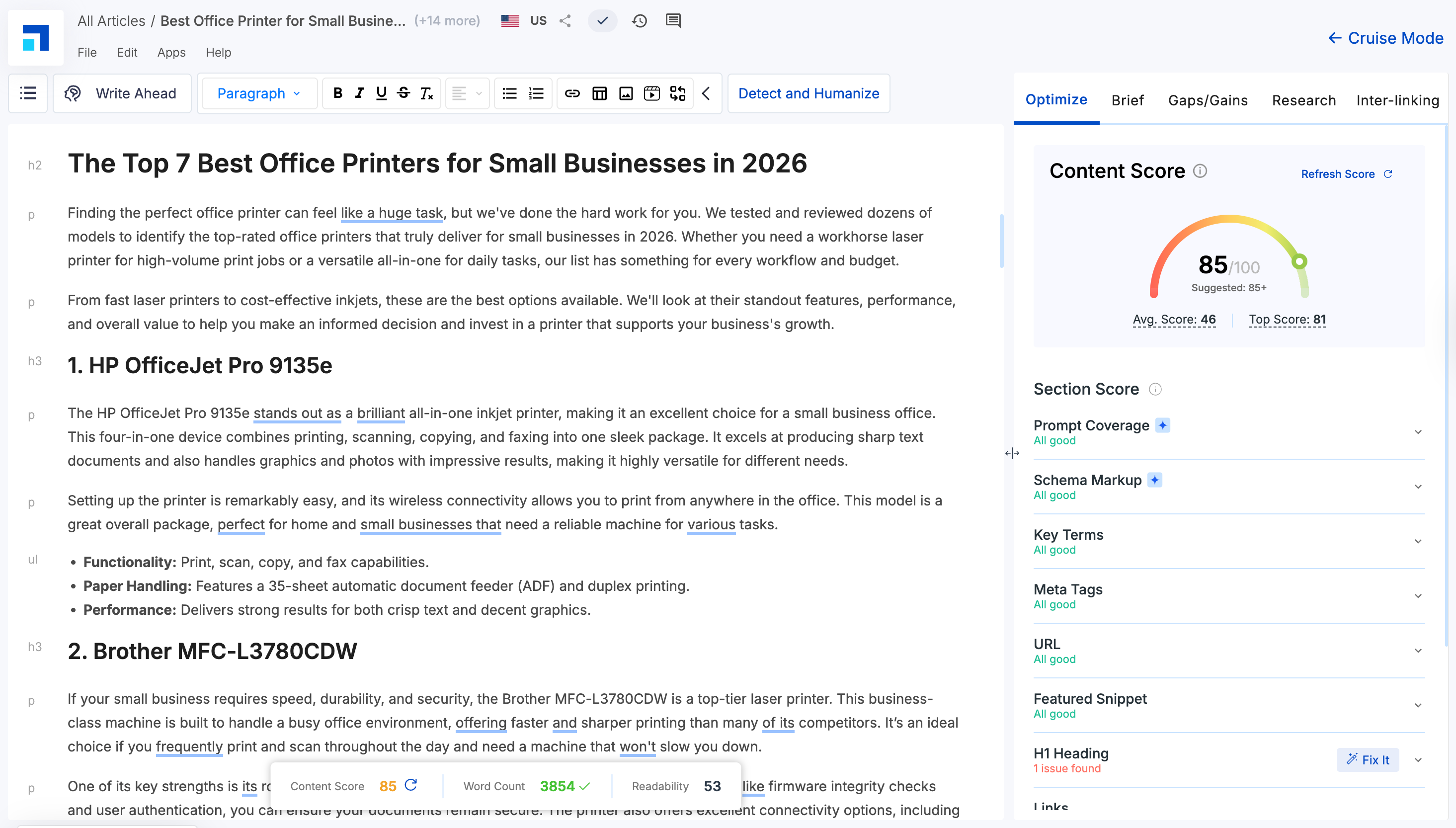
Creation and optimization tools keep execution fast by turning SERP signals into drafts, then guiding improvements for stronger intent match and on-page performance.
- Cruise Mode streamlines outlining and drafting using SERP-informed guidance, with GEO signals layered in where relevant.
- Content Optimizer points out what to change on-page to strengthen performance signals.
- AI Humanizer refines AI-written copy so it sounds more natural and reader-friendly.
- Content Scoring evaluates core SEO quality factors such as intent alignment, depth, structure, and keyword use.
SEO Research And Planning Tools
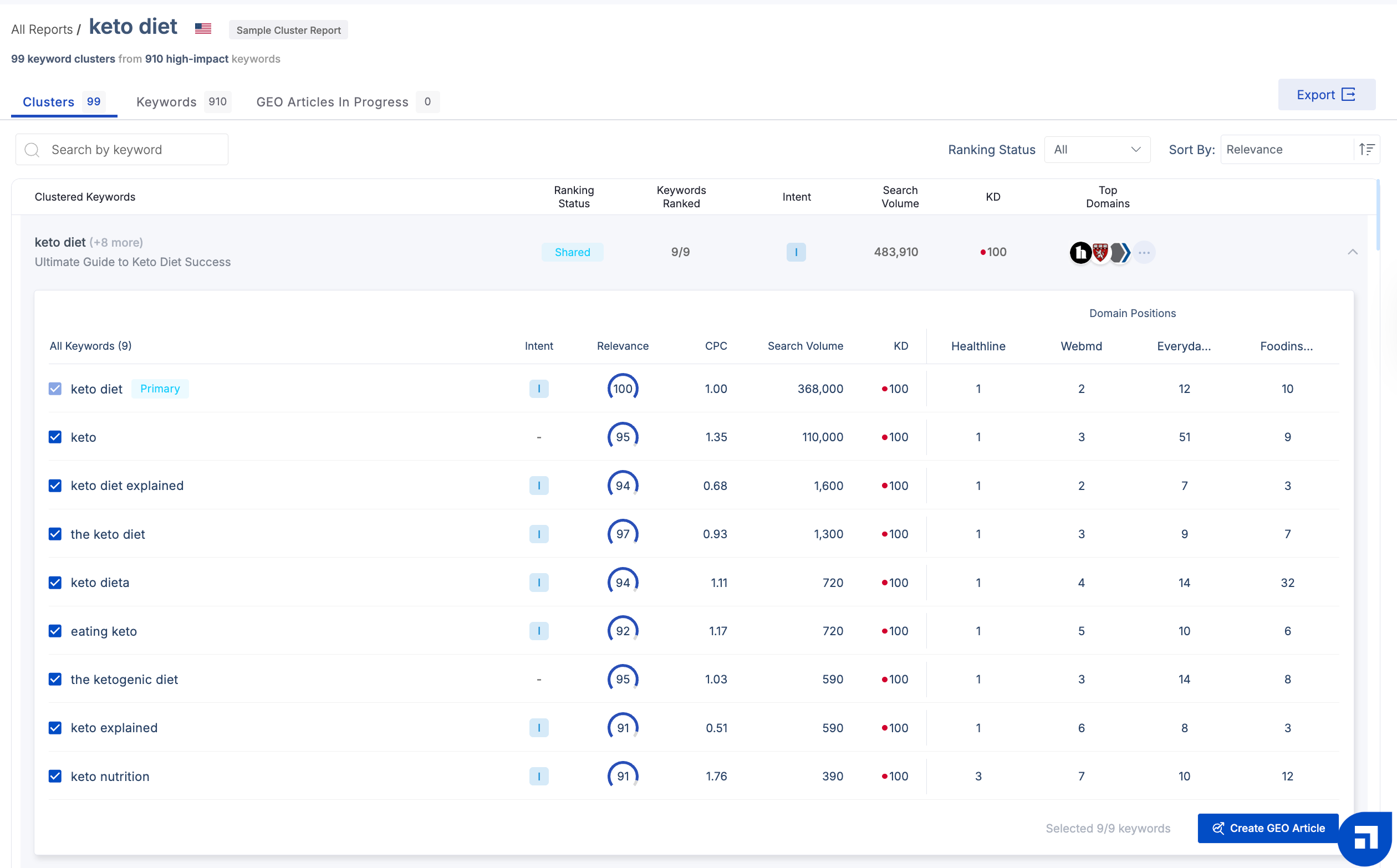
Research and planning features help teams choose the right targets, organize topics by intent, and prioritize updates based on performance opportunities.
- Keyword Planner organizes keywords into intent-based clusters for cleaner content planning.
- Competitor Coverage Analysis shows how competing pages structure and cover the same topics.
- Traffic Analyzer surfaces top performers and highlights pages that look like quick wins.
- Content Audit flags pages that may need refreshes, consolidation, or deeper optimization.
Technical SEO And Linking Support
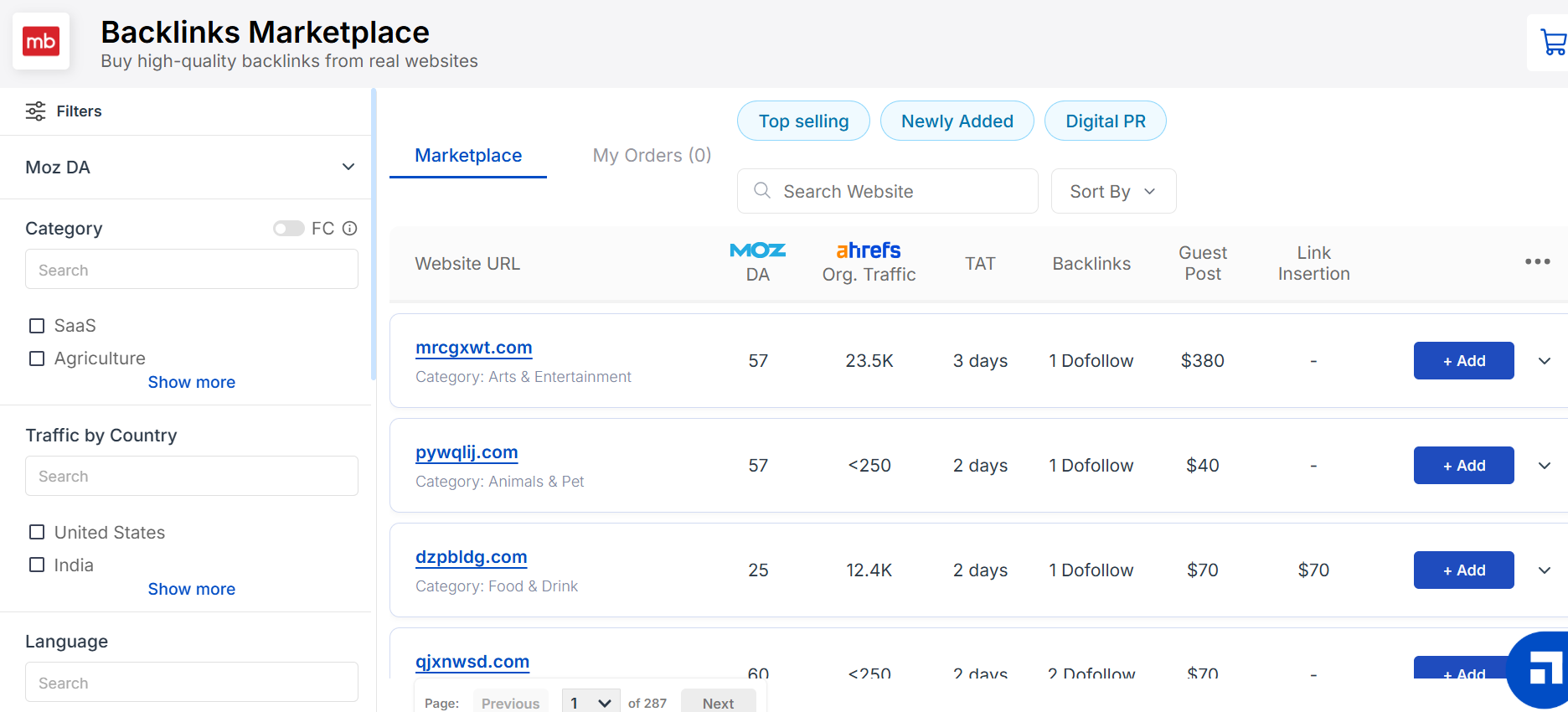
Technical and linking utilities reinforce performance by strengthening internal structure, improving metadata quality, and supporting authority building.
- Link Manager supports internal linking workflows to strengthen site structure.
- On-Page Pro benchmarks titles and descriptions against what is currently working on the SERP.
- Backlinks Marketplace provides a route to discover and secure backlink opportunities through a marketplace model.
Why I Would Choose Scalenut Over SurgeGraph?
If I am choosing a platform to guide decisions, not just speed up drafting, Scalenut gives me a clearer line of sight from visibility to action. It is easier to see which prompts and platforms are driving brand exposure, where competitors are gaining ground, and which content and authority moves are most likely to change outcomes.
“What I like best about Scalenut is how seamlessly it combines keyword research, content planning, and AI writing in one platform. It saves me hours of time and ensures my articles are fully optimized to rank. The Cruise Mode feature especially helps me go from idea to publish-ready in one sitting.” says Joey W, Director
SurgeGraph is a capable writing and optimization tool, but Scalenut fits better when I want one system to manage both AI visibility signals and ongoing SEO execution. For teams balancing content production with measurable competitive progress, Scalenut feels like the more strategic choice.
Schedule a demo today to see Scalenut’s GEO and SEO workflows in action!
Frequently Asked Questions
What are the main features and benefits of SurgeGraph as an AI writing and SEO tool?
SurgeGraph AI combines long-form writing with SERP-driven optimization inside one workflow. It supports blog posts, product-led formats, and structured outlines, helping content writers streamline the writing process and improve alignment with search engine results while saving a lot of time.
How does SurgeGraph’s AI detector work and is it accurate based on real user reviews?
The AI detector tool analyzes text patterns to estimate whether content appears human or machine written. While SurgeGraph promotes strong AI detection accuracy and humanization support, independent user feedback suggests results can vary, so it should not be the only validation method for a piece of content.
Is SurgeGraph worth the price compared to other AI writing tools in 2026?
SurgeGraph operates on a paid subscription model, so value depends on how often teams publish and optimize content. It works well for structured blog production, but compared to Scalenut, it offers less built-in AI visibility tracking for modern search results and GEO needs.
Are there any downsides or limitations to using SurgeGraph for content creation?
SurgeGraph focuses heavily on content production and optimization rather than broader visibility tracking. For SEO experts or bloggers who need deeper AI visibility insights and strategic reporting, Scalenut may feel more comprehensive, especially as AI-driven search engine rankings become more competitive.
How does SurgeGraph help blogs and websites rank higher on Google?
SurgeGraph uses SERP analysis, on-page scoring, and contextual term recommendations to align content with ranking patterns. By guiding optimization around coverage and structure, it aims to improve visibility in search engine results and support stronger performance in competitive search results.
How does SurgeGraph compare to similar tools, like Agility Writer or LSIGraph?
SurgeGraph and LSIGraph are closely related, with SurgeGraph positioned as the evolved version. Compared to Agility Writer, SurgeGraph emphasizes optimization within the editor. However, for teams prioritizing AI visibility and advanced GEO insights, Scalenut offers broader strategic capabilities.
Are there free trials or demo versions available for SurgeGraph?
SurgeGraph does not offer a free plan or trial. Instead, it provides a 14 day money back guarantee. Users can test the platform and request a refund within that window if the subscription does not meet expectations.


.svg)


.webp)