.jpg)
Quick summary
- What AI user agents do: These crawlers and fetchers access websites for model training, AI search discovery, or user-requested retrieval.
- Allow search crawlers: Keep OAI-SearchBot, Claude-SearchBot, and PerplexityBot accessible if you want your public content discoverable in their platforms.
- Separate training permissions: You can block GPTBot and ClaudeBot through robots.txt while allowing their platforms’ search crawlers.
- Understand access limits: Some user-triggered fetchers may not follow robots.txt. Use authentication or server controls to protect restricted content.
- Verify bot traffic: Check server or CDN logs, then match source IPs against official ranges. A user-agent name alone does not prove identity.
- Set realistic expectations: Allowing verified bots supports content access and discovery; it does not guarantee AI citations, recommendations, or referral traffic.
If you’ve spotted AI user agents in your server logs, you need to know which support search, which collect training data, and whether their identities are genuine. A blanket block can restrict discovery, while unrestricted access gives you less control.
This guide explains the key bots used by OpenAI, Google, Anthropic, Meta, and Perplexity, along with their roles and access behavior. You’ll learn how to verify bot traffic, separate search access from training permissions, and troubleshoot blocking issues. It also explains where robots.txt applies and when you need server controls to protect restricted content.
What are AI user agents and why do they matter?
AI user agents are crawlers and fetchers that access websites for AI platforms. They often identify themselves through an HTTP User-Agent header using names such as GPTBot or ChatGPT-User. Their jobs include collecting training data for large language models, indexing content for AI search visibility, and retrieving pages at a user’s request. These bots do not necessarily reason, plan, or remember.
Some robots.txt names are control tokens rather than separate crawlers. Google-Extended, for example, controls whether Google-crawled content can support training Gemini models and grounding without making requests under its own user-agent string.
Understanding these differences helps you:
- Support AI visibility: Let search and retrieval bots access content they may surface in answers.
- Control content use: Allow OAI-SearchBot for ChatGPT search while blocking GPTBot’s training crawl.
- Understand bot traffic: Distinguish verified training crawls, search index, and user-triggered fetches.
Access alone does not guarantee citations, recommendations, or referral traffic.
How do AI user agents differ from traditional web crawlers?
The main differences are how the collected content is used and what triggers the request. Some AI bots crawl automatically, while others retrieve pages in response to a user’s request.
Automated crawling vs. user-triggered retrieval
Traditional crawlers such as Googlebot automatically discover and revisit pages for search engines. AI training and search crawlers also operate automatically, so their visits are not necessarily connected to a live question.
User-triggered fetchers, such as ChatGPT-User and Perplexity-User, access pages when someone requests information through an AI platform. They retrieve content for that interaction rather than systematically crawling the web.
How AI crawlers and fetchers use your content
AI-related web requests generally serve three purposes:
- Model training: GPTBot collects content that may be used to train OpenAI’s models.
- Search indexing: OAI-SearchBot and PerplexityBot crawl content to support discovery in their platforms’ search results.
- On-demand retrieval: ChatGPT-User and Perplexity-User fetch pages to help respond to specific user requests.
A fresh retrieval can access updated page content, but it does not guarantee that changes will appear immediately in AI answers or receive a citation.
What are the most important AI user agents you should know?
AI user agents serve different purposes, from model training to search discovery and user-requested retrieval. Recognizing these names helps you decide which bots to allow, restrict, or monitor.
1. OpenAI user agents (GPTBot, OAI-SearchBot, and ChatGPT-User)
OpenAI separates training, search crawling, and user-requested access through three key bots:
- GPTBot: Collects web content that may be used for model training. You can restrict its crawling through robots.txt.
- OAI-SearchBot: Supports discovery in ChatGPT search. Allow it if you want your pages eligible to appear in search answers.
- ChatGPT-User: Fetches pages for certain user actions in ChatGPT and Custom GPTs. Robots.txt may not apply to these requests, and this bot does not determine search inclusion.
You can block GPTBot while allowing OAI-SearchBot, keeping training permissions separate from search access.
2. Google AI user agents (Googlebot, Google-Extended, and Google-Agent)
For Google and Gemini, website owners need to distinguish crawling from content-use controls:
- Googlebot: Crawls pages for Google Search, including the search infrastructure supporting AI Overviews and AI Mode. It follows robots.txt.
- Google-Extended: Controls whether Google-crawled content can support Gemini training and grounding in Gemini Apps and Vertex AI. It is a robots.txt token, not a separate crawler, and does not affect Google Search inclusion or rankings.
- Google-Agent: Navigates websites and performs actions at a user’s request. Google’s user-triggered fetchers generally ignore robots.txt.
Google-Extended does not appear as an independent crawler in server logs because it has no separate HTTP user-agent string.
3. Anthropic user agents (ClaudeBot, Claude-SearchBot, and Claude-User)
Anthropic uses three distinct bots to support Claude:
- ClaudeBot: Collects web content that may contribute to model training.
- Claude-SearchBot: Crawls content to improve Claude’s search relevance and accuracy.
- Claude-User: Retrieves pages in response to a user’s request.
Anthropic states that all three honor robots.txt. You can restrict ClaudeBot while allowing the search and retrieval bots to access your content.
4. Meta AI user agents (Meta-ExternalAgent, Meta-WebIndexer, and Meta-ExternalFetcher)
Meta uses different bot identities alongside Instagram, WhatsApp, Facebook, and Meta AI:
- Meta-ExternalAgent: Automatically collects content for purposes such as AI model training and product improvement through indexing.
- Meta-WebIndexer: Automatically crawls content to improve Meta AI search results.
- Meta-ExternalFetcher: Retrieves individual links at a user’s request to support product features.
Set access preferences for each token separately and check actual behavior in server logs. Use server or CDN controls when you need enforced blocking, since robots.txt alone cannot enforce restrictions.
5. Perplexity AI user agents (PerplexityBot and Perplexity-User)
Perplexity AI uses its own web crawler alongside a user-triggered fetcher:
- PerplexityBot: Crawls content to surface and link websites in Perplexity search results. It follows robots.txt.
- Perplexity-User: Fetches pages to help answer specific user requests. It generally ignores robots.txt because these requests are user-triggered.
Neither bot collects content for foundation-model training. Both have published IP lists that help you verify whether requests claiming their identities are legitimate.
How Can You Reliably Detect AI User Agents On Your Website?
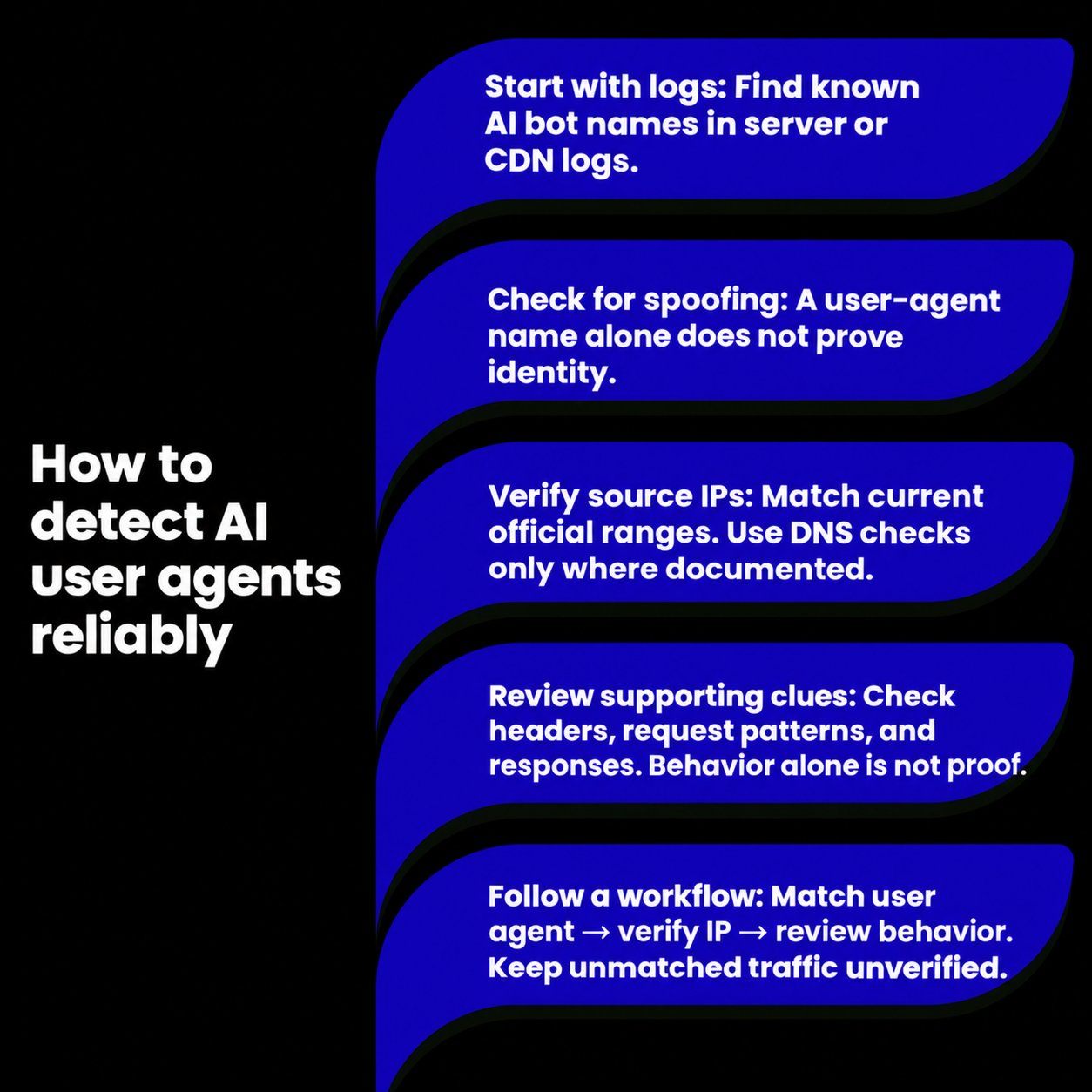
Start with server or CDN logs to identify requests claiming to come from AI bots. Then verify their source IPs using the provider’s official documentation. A user-agent name alone does not prove that a request is legitimate.
1. Identifying AI user agents in server logs
Search your access logs for documented bot names:
- OpenAI: GPTBot, OAI-SearchBot, and ChatGPT-User.
- Anthropic: ClaudeBot, Claude-SearchBot, and Claude-User.
- Perplexity: PerplexityBot and Perplexity-User.
Record the source IP, requested URL, timestamp, user-agent string, and response status. These details help you verify bot identities and investigate access problems.
If your website uses a CDN or proxy, check its logs for the original visitor IP rather than verifying the proxy’s address.
2. User-agent spoofing risks
Anyone can copy a legitimate bot’s user-agent string. A request labeled GPTBot or Googlebot could therefore come from an unrelated scraper.
Avoid granting access based only on the bot name. Verify the source IP before treating the request as genuine or creating a security exception.
3. IP and reverse DNS checks
Check whether the request’s source IP falls within the provider’s current published ranges. Use the AI crawler list associated with the claimed bot or crawler category:
- OpenAI: GPTBot, OAI-SearchBot, and ChatGPT-User.
- Anthropic: Published bot IP ranges.
- Perplexity: PerplexityBot and Perplexity-User.
- Google: Common crawlers, including Googlebot, and user-triggered agents.
Use reverse and forward DNS where the provider documents this method. For Google, check that the reverse lookup returns an authorized hostname for the relevant crawler category, then confirm that a forward lookup resolves back to the original IP. DNS requirements are provider-specific.
4. Header and pattern signals
A user agent string may include a URL pointing to a page about the bot, but that link can also be copied. Its presence or absence does not authenticate the request.
Review request frequency, accessed pages, and response statuses for unusual activity. Treat these patterns as supporting clues, since legitimate crawlers and user-triggered fetchers behave differently.
A missing robots.txt request does not prove spoofing. Crawlers may cache the file, and some user-triggered fetchers may not follow its rules.
5. Verification workflow
Use a consistent process:
- Identify the claimed bot through its user-agent string.
- Verify the original source IP against the appropriate official ranges.
- Apply reverse and forward DNS checks where documented.
- Review request patterns and access responses for unexpected behavior.
- Keep unmatched requests classified as unverified while investigating.
For larger sites, automate IP-list updates and verification. This keeps your checks current and reduces reliance on manual log reviews.
When Should You Allow Or Block AI User Agents?
Deciding when to allow or block AI user agents depends on your business goals and content strategy. It's not an all-or-nothing choice. Allowing certain AI agents can increase your visibility and drive qualified traffic from AI platforms, while blocking others can protect your proprietary data and reduce server load.
The key is to create selective access rules. You might want to allow a real-time retrieval web crawler like ChatGPT-User to ensure your content is citable, but block a training data collector like GPTBot if you don't want your content used to train future models. Understanding the purpose of each agent is crucial to making the right decision.
When To Allow
Allowing AI user agents is often beneficial, especially if a key business goal is to increase brand visibility and attract a qualified audience. When platforms like ChatGPT or Perplexity can access your content in real time, they can cite your pages as sources in their answers, creating a new and powerful referral channel.
You should generally allow AI user agents when:
- You want to be cited in AI search results: Users who click through from an AI-generated answer are often highly qualified and more likely to convert. Allowing real-time retrieval bots like
ChatGPT-UserandPerplexityBotmakes this possible. - Your content benefits from broad exposure: If you want general information about your brand, products, or services to be widely known by AI models, allowing training bots can help ensure you are represented accurately across a range of inquiries.
For most organizations, especially those not primarily monetizing content through subscriptions, the benefits of being discoverable in AI environments outweigh the risks. Allowing access ensures you are part of the conversation as these platforms become a dominant way for users to find information.
When To Block
While allowing AI bots has its advantages, there are strategic reasons to block certain AI user agents. The decision to block often revolves around protecting intellectual property, managing server resources, and controlling how your data is used. Not all AI bot traffic is beneficial for every website.
Consider blocking AI bots under these circumstances:
- Your content is proprietary or behind a paywall: If your business model relies on selling access to content, you likely want to block data collection from bots used for model training to prevent them from learning and reproducing your valuable information for free.
- You want to prevent model training on your data: If you are concerned about large language models being trained on your content without compensation or permission, you can block training-specific bots like
GPTBotandCCBot. This can be done without affecting your visibility in real-time AI search results.
Blocking can also be a practical measure to prevent routine tasks performed by bots from overwhelming your server, especially if you see aggressive crawling from agents that provide no clear benefit. A targeted blocking strategy allows you to protect sensitive content while still engaging with beneficial AI traffic.
Indexing Vs Training Vs Browsing
It is crucial to understand the three primary functions of AI user agents: indexing, training, and browsing. Each activity impacts your website differently, and you can control them separately.
Indexing is similar to what a traditional web crawler does. Bots like OAI-SearchBot or PerplexityBot crawl your content to build a search database specifically for their AI-powered search engines. Allowing this is essential if you want your pages to appear in their search results.
Training is the process where bots like GPTBot or ClaudeBot collect massive amounts of data from the web to build and refine their foundation models. This data becomes part of the model's general knowledge. You can opt out of this process by blocking these specific bots. Finally, browsing (or real-time retrieval) is when a bot like ChatGPT-User fetches a page on-demand to answer a live user query. This is a direct, user-initiated action and is critical for getting your most current content cited.
Selective Access Rules
Use your website’s robots.txt file to set separate rules for search crawlers and training bots. This lets you support AI search discovery while restricting selected training crawls.
- Allow search crawlers: Permit OAI-SearchBot, Claude-SearchBot, and PerplexityBot to access public content you want discoverable in AI search. Access does not guarantee citations or referral traffic.
- Restrict training crawlers: Block GPTBot and ClaudeBot if you want to opt out of their training-related collection while keeping search crawling accessible.
- Preserve directory restrictions: Retain your existing rules and sitemap entries. Specific bot groups do not automatically inherit restrictions from User-agent: *, so repeat relevant directory restrictions in any new bot-specific group.
- Check retrieval exceptions: ChatGPT-User requests may fall outside robots.txt rules, while Perplexity-User generally ignores them. Anthropic states that Claude-User honors robots.txt.
Robots.txt communicates crawling preferences; it does not protect private or paid content. Use authentication or server controls when access must be restricted.
Test changes before and after publishing, then review server or CDN logs to confirm that your intended search crawlers can access public pages.
What are the most common mistakes when blocking AI bots, and how do you fix them?
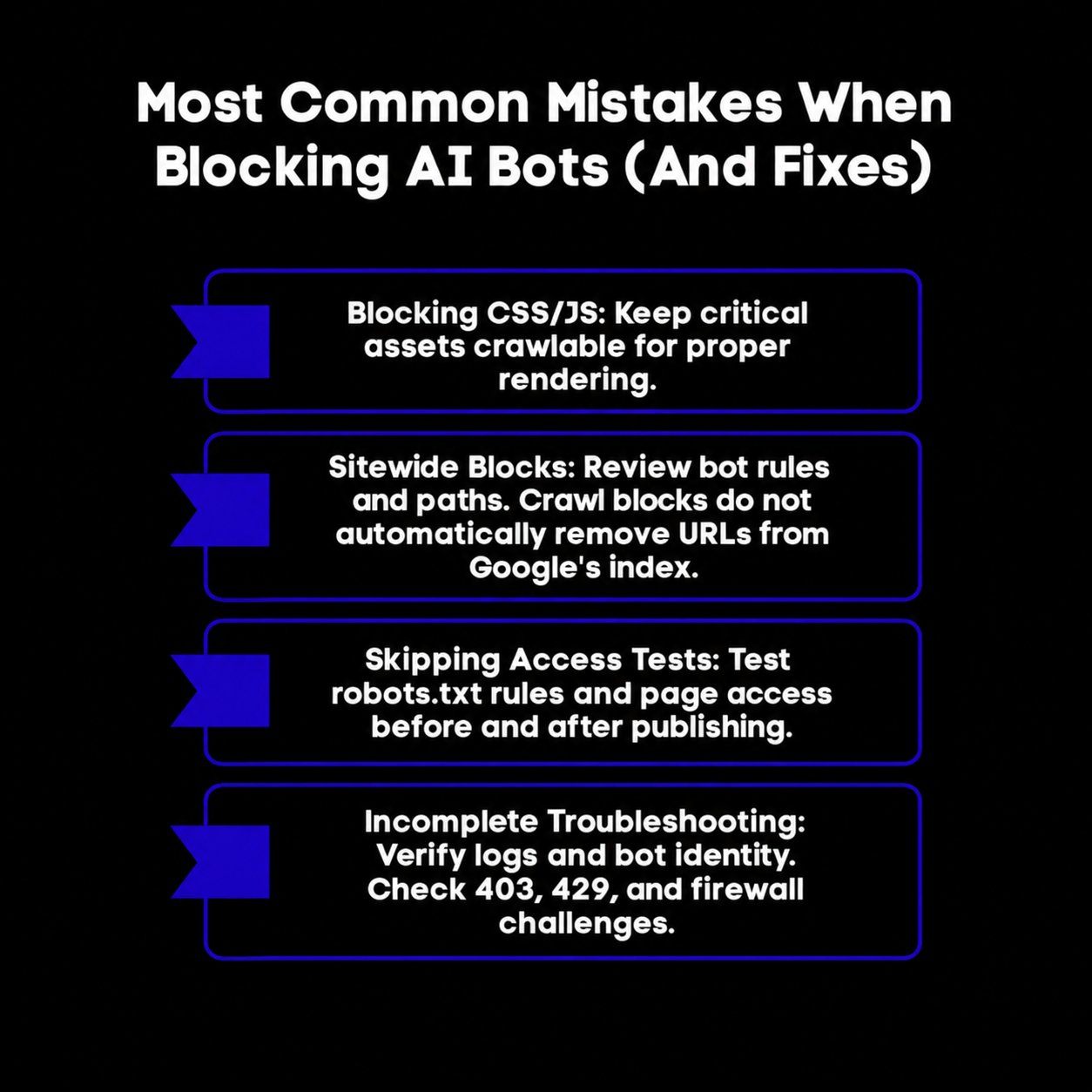
Incorrect blocking rules can restrict useful crawlers or prevent them from accessing your content. These checks help you control bot access without unintentionally limiting search discovery.
1. Blocking CSS and JavaScript
Blocking entire CSS or JavaScript directories can prevent Googlebot from rendering and understanding your pages correctly. Keep resources needed to display public content accessible, and target restrictions to the intended bots or paths.
2. Accidental sitewide blocks
An unintended Disallow: / rule can stop the affected crawler from fetching your entire site. This can prevent content updates from being crawled, but it does not automatically remove every URL from Google’s index. Google may still index blocked URLs discovered through links.
Review your robots.txt for overly broad rules. Confirm that restrictions apply only to the intended bots and directories, while keeping priority public pages accessible.
3. Skipping access tests
Test changes before and after publishing. Check both robots.txt permissions and actual HTTP responses, since a firewall can deny access even when crawling is allowed.
- Robots.txt testers: Use a tool such as TechnicalSEO.com’s tester to check specific URLs against your intended bot rules.
- AI access checks: Knowatoa’s AI Search Console can flag simulated access failures. Confirm these findings against genuine bot traffic, because security systems may block a test request while allowing the real crawler.
4. Troubleshooting checklist
When expected bot activity changes, investigate the request and response before changing access rules:
- Check robots.txt: Confirm the applicable bot group and URL rules, including any sitewide restrictions.
- Review server and CDN logs: An absent bot may not have visited yet, or your server log files may be incomplete. Missing entries alone do not prove blocking.
- Investigate 403 responses: Check whether hosting permissions, application rules, or a firewall denied the request.
- Investigate 429 responses: Review rate limits and request volumes. A 429 response indicates too many requests; Google uses it as a signal to slow crawling.
- Check firewall challenges: Inspect the response body and security events for a CAPTCHA or browser challenge replacing your content. An allow rule in robots.txt does not bypass these challenges.
- Verify bot identity: Compare request IPs with the provider’s published ranges where available. A user-agent name alone is not proof of identity.
If a verified bot is unexpectedly denied, adjust the specific rule and retest. When access must be restricted, use server or CDN controls rather than relying on robots.txt alone.
Scalenut: Where AI Visibility Meets SEO Execution
Allowing or blocking AI user agents is only step one. The real win is knowing whether your brand is getting mentioned in AI answers, why it is not, and what to do next. That’s where Scalenut comes, because it combines GEO tracking with SEO execution in one platform.
- Track AI Mentions And Share Of Voice: See how often you appear in Perplexity and ChatGPT search results, plus Visibility Score, Average Position, and Share Of Voice.
- Prompt And Citation Insights: Find which prompts trigger mentions and which sources AI cites to justify answers.
- Actionable GEO Recommendations: Turn visibility gaps into next steps with content ideas, authority/backlink suggestions, and engagement opportunities.
- AI Traffic Signals: Spot AI-driven visits, top AI sources, and the most referenced pages.
Want to see how Scalenut tracks your AI visibility and turns it into an execution plan? Book a demo and get a walkthrough tailored to your site and competitors.
Conclusion
Managing AI user agents starts with separating search access from training data collection. A training data crawler gathers web data for potential model development, while other bots support search features or retrieve pages for human users. Set permissions by purpose to manage content preferences and keep relevant public pages accessible to generative AI platforms.
As new crawlers emerge, verify AI crawler traffic and review your robots.txt and firewall rules. Even teams with years of experience need current bot documentation, since access policies vary. Measure citations and referral visits alongside bot activity to assess results.
Frequently Asked Questions
How do AI user agents impact website search and indexing?
AI user agents impact search by enabling real-time content retrieval for AI-powered search engines. Unlike traditional indexing, these agents can fetch information from your web pages on-demand to generate immediate answers. Allowing access to the right search crawler ensures your site is cited in these new search results, driving qualified traffic.
Can I prevent specific AI user agents from crawling my site?
Yes, you can prevent specific AI user agents from crawling your site using your robots.txt file. By adding a Disallow rule for a particular user agent, you can instruct that web crawler not to access your entire site or specific directories, giving you selective access control over which bots can interact with your content.
Do AI user agent crawlers follow robots.txt directives like other bots?
Most reputable AI user agents, like those from OpenAI user agent and Google, state that they follow robots.txt directives, similar to traditional bots like Googlebot. However, some bots, particularly those performing user-initiated actions or less reputable search engine crawlers, may ignore these rules. It is always best to monitor your server access logs to verify a bot's behavior.
Can I block AI training bots while keeping my content accessible to AI search?
Yes. Block training crawlers such as GPTBot and ClaudeBot through robots.txt while allowing search crawlers such as OAI-SearchBot, Claude-SearchBot, and PerplexityBot. This keeps search access separate from training permissions, although allowing access does not guarantee citations in AI answers.
Does Google-Extended appear in server logs or affect AI Overviews?
No. Google-Extended has no separate HTTP user-agent string, so it does not appear as an independent crawler in server logs. It controls Gemini model training and grounding, not AI Overviews. AI Overviews use Googlebot and standard Google Search eligibility requirements.
What is a practical list of AI user agents website owners should recognize?
A useful list of ai user agents includes GPTBot, OAI-SearchBot, ChatGPT-User, Google-Extended, ClaudeBot, anthropic-ai, PerplexityBot, Perplexity-User, FacebookBot, Meta-ExternalAgent, and meta-webindexer. Track them in server logs, then decide allow or block rules via robots.txt or firewall policies.


.svg)


.webp)