
.jpg)
Article Schema Markup Example: How to Boost Your SEO Today?

Key Highlights
- Article schema markup is a type of structured data added to your site's code to help search engines understand your content.
- Implementing this markup can make your content eligible for rich results, enhancing visibility in search.
- Key benefits include improved click-through rates, better context for search engines, and stronger indexing signals.
- Common types of article schema include
Article,BlogPosting,NewsArticle, andTechArticle. - You can validate your schema using tools like Google’s Rich Results Test to ensure it's error-free.
- Correctly implementing and maintaining article schema is a critical best practice for modern search engine optimization.
In the competitive digital landscape, ensuring your content stands out is paramount. For businesses investing in their blogs, article schema markup offers a powerful way to enhance how search engines interpret and display your work. By implementing this form of structured data, you provide precise labels that enable search engines to feature your content in enhanced search results. This technical precision aligns with a strategic digital presence, making your articles eligible for rich results that capture user attention and drive engagement.
What Is Article Schema Markup?
Article schema markup is a specific type of code, or structured data, that you add to your website's HTML. This code acts as a standardized vocabulary, helping search engines like Google and Bing to better understand the content of your articles. Think of it as explicitly labeling your content so machines can read it. It clarifies what your content is about, whether it's a news piece, a blog post, or a general article. This article markup defines key details such as the headline, author, publication date, and main image.
By using this schema markup language, you're essentially translating your human-readable content into a format that search engines can easily process. This removes ambiguity and ensures your information is categorized correctly. For instance, a simple blog post can be identified with a BlogPosting schema type. Here is a sample article schema markup for a blog post:
{
  "@context": "https://schema.org",
  "@type": "Article",
  "headline": "A Comprehensive Guide to Blog Schema Markup",
  "author": {
    "@type": "Person",
    "name": "John Doe"
  },
  "datePublished": "2024-01-01",
  "image": "https://example.com/image.jpg",
  "articleBody": "This comprehensive guide explores the intricacies of implementing schema markup in your blog...",
  "url": "https://example.com/blog/comprehensive-guide-to-blog-schema-markup"
}
What Are The SEO Benefits Of Article Schema?

Leveraging article schema provides key SEO benefits. It makes your content eligible for rich results in Google, which are more attractive and informative than standard links. This increased visibility can boost click-through rates and drive more organic traffic. Article schema also gives search engines clearer context, improving how your content matches user queries. Let’s look at how article schema can enhance your SEO performance.
1. Rich Result Eligibility
One of the most compelling reasons to use article schema is to qualify your content for rich results. These are visually enhanced search listings, also known as rich snippets, that display more information than the standard title, URL, and description. This can include elements like a thumbnail image, publication date, and author name, all pulled directly from your schema markup.
How does this improve SEO? These enriched search results are more eye-catching and provide users with valuable information at a glance. When your listing offers more context, users are more likely to see it as relevant and click on it, boosting your click-through rate. This increased engagement signals to search engines that your page is a valuable result for a given query.
To ensure your markup is correct and your page is eligible, it's crucial to use tools like Google’s Rich Results Test. This tool helps you validate your code and identify any errors that might prevent your content from appearing as rich results, allowing you to fix issues before they impact performance.
2. Stronger Entity Clarity
Schema markup strengthens entity clarity, which is how search engines understand the people, places, and things your content is about. By using a specific schema type for your article, you are explicitly defining the content's context. This helps search engines connect your article to a broader network of information, improving its relevance for related queries.
For example, by specifying the author and publisher, you help establish their authority and link them to other works. This detailed information can contribute to the creation or enhancement of a knowledge panel in the search results. A knowledge panel is an information box that appears when users search for entities (like your organization or a key author) that Google recognizes.
This improved understanding goes beyond simple keyword matching. When search engines have strong entity clarity, they can more confidently surface your content for a wider range of relevant searches, even those that don't use the exact keywords from your page. This leads to better visibility and a more authoritative presence in search.
3. Consistent Content Signals
Implementing article schema ensures you send consistent content signals to search engines. Your structured data should always mirror the visible content on the page. This alignment between what users see and what search engines read reinforces the trustworthiness and accuracy of your information, which is a positive signal for ranking.
Inconsistencies, such as a different headline in your schema than on your page, can confuse crawlers and may even lead to penalties. Using a tool like Google's Structured Data Markup Helper can simplify the process of creating accurate markup. This data markup helper guides you through tagging the elements on your page, ensuring the generated code perfectly matches the on-page content.
Once implemented, you can monitor how Google interprets your structured data through the Google Search Console. The "Enhancements" section will show you if your schema is being processed correctly and alert you to any issues. Maintaining this consistency is key to building a reliable and authoritative relationship with search engines.
4. Cleaner Indexing Signals
Article schema provides cleaner indexing signals, which helps search engines process and categorize your content more efficiently. When a search crawler visits your page, structured data offers a clear roadmap to the most important information. It explicitly states the post type (e.g., BlogPosting), headline, author, and publication date, removing any guesswork from the indexing process.
This clarity can lead to faster and more accurate indexing. Instead of having to parse the entire HTML to infer these details, search engines can quickly understand the article's core components. This is particularly beneficial for large websites with thousands of articles, as it helps ensure all content is properly understood and indexed in a timely manner.
Ultimately, providing clean indexing signals through structured data helps your content get into Google Search more effectively. When search engines have a clear understanding of your content from the moment they discover it, your pages are more likely to rank on Google appropriately for relevant queries, leading to better organic performance over time.
What Are the Types Of Article Schema You Can Use?
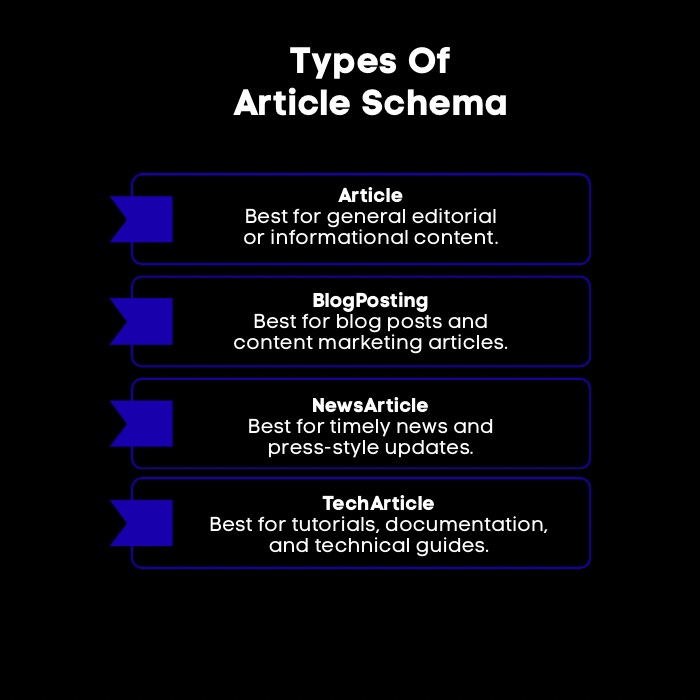
Schema.org provides various article schema types to best represent your content. Using the most specific schema helps search engines understand your article better. Each type has unique recommended and required properties. Selecting the right schema is key to effective markup. Let's review these types in detail.
1. Article
The Article schema type is the most general and widely used form of article markup. It can be applied to a wide range of content, including feature articles, informational pages, and general editorial pieces. This type of markup serves as a catch-all when more specific categories don't quite fit.
When using the Article schema, it's important to follow the structured data guidelines provided by search engines. This includes filling out essential properties like headline, image, and datePublished to ensure your markup is valid and eligible for rich results. Providing these details helps search engines understand the fundamental attributes of your content.
While Article is a flexible schema type, it's always a best practice to use the most specific schema type available. If your content is a blog post or a news report, using BlogPosting or NewsArticle respectively will provide more precise context. However, for any content that doesn't fall into a narrower category, the generic Article schema is the correct and effective choice.
2. BlogPosting
The BlogPosting schema is a more specific type of article schema markup designed explicitly for blog content. If your website features a blog, using this schema type is the ideal way to signal to search engines that the page contains a blog post. This helps differentiate your blog posts from other types of articles on your site, like news reports or product pages.
Using BlogPosting allows search engines to better categorize your content and can influence how it appears in Google search results. For example, search engines may treat blog posts differently than hard news, and using the correct schema helps them make that distinction. This can lead to your content appearing in relevant blog-focused search features.
Implementing the BlogPosting schema is just as straightforward as the general Article schema. You'll still need to include key properties like the headline, author, and publication date. By choosing this more specific type, you provide an extra layer of context that strengthens your SEO and ensures your blog content is properly understood by search engines.
3. NewsArticle
The NewsArticle schema type is designed for content that is timely and reports on recent events. This markup is essential for news publishers who want their content to be featured in Google News and other news-specific carousels in search results. Using this schema signals the time-sensitive nature of your content to search engines.
To use the NewsArticle schema effectively, you must adhere to Google's content policies for news. The content should be original reporting, transparent about authorship, and provide factual information. Essential properties required for article schema markup of this type include headline, image, datePublished, and publisher information, which are critical for establishing credibility.
You can use a structured data markup helper to generate the NewsArticle schema, ensuring all necessary fields are included. Properly implementing this schema can significantly increase the visibility of your news content, driving traffic from users specifically looking for up-to-the-minute information. It's a vital tool for any organization operating in the digital news space.
4. TechArticle
For content that covers technical subjects, such as programming guides, hardware reviews, or software documentation, the TechArticle schema markup is the most appropriate choice. This specific type of structured data helps search engines identify your content as technical in nature, which can improve its visibility for relevant, highly specific queries.
Using TechArticle schema allows you to include properties that are particularly relevant to technical content. For example, you can specify dependencies or proficiency levels, providing even more context to both search engines and potential readers. This helps users find the exact technical information they need.
By implementing TechArticle schema, you're not just telling search engines that your page is an article; you're telling them it's a technical resource. This can lead to better placement in search results for niche technical topics and helps establish your site as an authority in its field. It’s a powerful way to ensure your specialized content reaches the right audience.
Schema Markup for an Article Example
Adding Article schema to a blog post helps search engines read your page more accurately, especially details like the title, author, publish date, and featured image. Here’s a simple JSON-LD schema article example you can customize and paste into your page.
<script type="application/ld+json">
{
"@context": "https://schema.org",
"@type": "Article",
"headline": "A Complete Guide to Article Schema Markup",
"author": {
"@type": "Person",
"name": "Jane Doe"
},
"datePublished": "2026-03-05",
"image": "https://example.com/images/article-schema.jpg",
"articleBody": "This guide explains how Article schema works, what fields matter most, and how to validate your markup for better visibility in search.",
"url": "https://example.com/blog/article-schema-markup-example"
}
</script>
What each field in this article schema example means:
- @context: Tells search engines which schema vocabulary you’re using (Schema.org).
- @type: Declares the content type, here it’s an Article.
- headline: Your on-page title (keep it consistent with the visible H1/title tag).
- author: Who wrote it (usually a Person, sometimes an Organization).
- datePublished: The original publish date.
- image: The main image you want associated with the article.
- articleBody: A short representation of the content (many sites skip this, but it can be useful in a basic example).
- url: The canonical URL of the page.
When this structured data matches what’s actually on the page, it becomes much easier for search engines to interpret your content and surface it correctly across search features where structured data is used.
Which Article Schema Fields Should You Customize (And Why)?
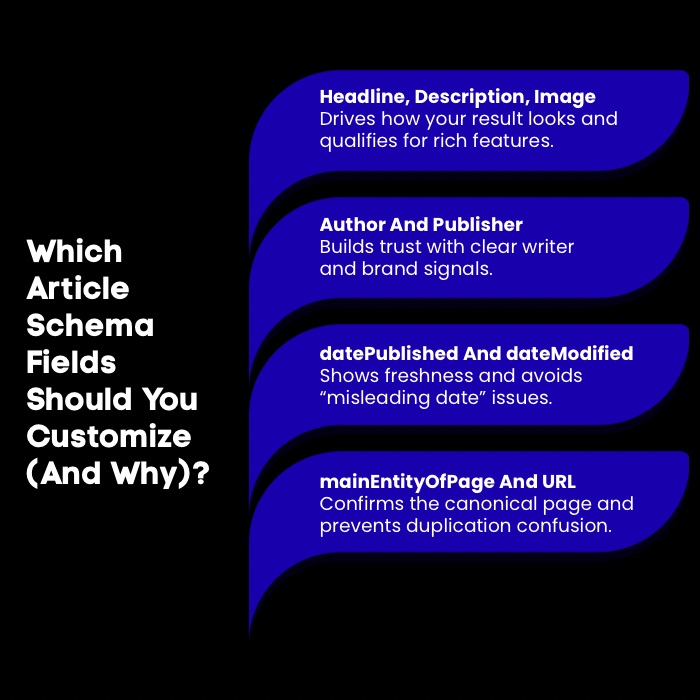
When creating your article schema markup, certain fields should always be customized to provide the most accurate and valuable information. While a schema markup generator can create the basic code, tailoring key properties is essential for maximizing your SEO impact. This customized structured data helps search engines create more compelling rich results. Let’s look at which fields are most important to customize and why.
1. Headline, Description, And Image
The headline, description, and image fields are among the most critical components of your article schema because they directly impact how your content appears in Google search results. The headline should be compelling and accurately reflect the article's topic, as it is often the most prominent text in a search listing.
The description provides a brief summary of the article. While it may not always be displayed, it gives search engines additional context about your content. The image property is crucial for eligibility in certain rich results, such as the Top Stories carousel, where a high-quality thumbnail can dramatically increase click-through rates. When customizing these fields, ensure they are:
- Accurate: They must match the visible content on the page.
- High-Quality: Use a clear, relevant, and high-resolution image.
- Concise: Keep headlines and descriptions impactful and to the point.
Optimizing these elements is fundamental to creating attractive rich results that stand out. They are your first opportunity to capture a user's attention and convince them that your page has the information they are looking for.
2. Author And Publisher Setup
Properly setting up the author and publisher fields is crucial for building trust and authority. The author property identifies the person who wrote the article. It's a best practice to include the author's name and, if possible, a link to an author page or their social media profiles. This helps search engines connect the author of the article to other content they have written.
The publisher property defines the organization that published the content. This should include the organization's name and a high-quality publisher logo. Following the data guidelines for logos, such as using the correct file format and dimensions, is essential for it to display correctly in search results, like in a knowledge panel.
By clearly defining author names and publisher details, you are providing strong signals of E-E-A-T (Experience, Expertise, Authoritativeness, and Trustworthiness). This helps search engines recognize the credibility of your content and can positively impact your rankings over time. It's a simple but powerful way to establish your brand's authority.
3. Dates That Avoid Trust Issues
Including accurate date information in your article schema is essential for building user trust and providing context to search engines. The two most important date properties are datePublished and dateModified. The datePublished field indicates when the article was first made public. This is a required property for many rich result types, especially for news content.
The dateModified property should be used whenever you make significant updates to your content. This tells both users and search engines that the information is current and relevant. Displaying an "updated on" date can significantly improve user trust, as it shows that you are maintaining your content.
It is critical to follow the data guidelines for date formats, which typically require the ISO 8601 format (e.g., 2025-01-10T09:00:00+00:00). Providing incorrect or misleading date information can create trust issues and may lead to penalties from search engines. Accurate dates are a key signal of content freshness and reliability.
4. MainEntityOfPage, Canonical, And URL Hygiene
The mainEntityOfPage property is used to connect your schema markup back to the main content of the web page. This property typically contains the canonical URL of the page, creating a clear link between the structured data and the page it describes. This helps resolve any ambiguity about which page the schema applies to.
Maintaining good URL hygiene is crucial. The URL specified in your schema should be the canonical version of the page. A canonical tag tells search engines which version of a URL you want to appear in search results, preventing issues with duplicate content. Ensuring your schema's URL matches the page's canonical URL is a critical best practice.
This alignment among the mainEntityOfPage property, the canonical tag, and the page's actual URL creates a clean, unambiguous signal for search engines. This good hygiene prevents indexing confusion and ensures that all SEO value is consolidated to a single, authoritative URL, which helps your content perform better in search results.
Want to benchmark your site’s strength fast? Check out my roundup of the 5 best domain authority checker tools to compare scores and track progress.
Where To Add Article Schema On Your Website?
So, how do you add article schema markup to your website? The recommended method is to embed the schema code, preferably in JSON-LD format, directly into your website’s HTML. This script can be placed in the <head> section or just before the closing </body> tag of your page's HTML. This approach keeps your structured data separate from your visible content, making it easier to manage and troubleshoot.
For those who are not comfortable editing code directly, many tools can simplify the process. Google’s Structured Data Markup Helper is a great starting point. It allows you to visually tag the content on your page and then generates the necessary example of article schema code for you. If you use a content management system (CMS) like WordPress, plugins such as Yoast SEO or Rank Math can automatically generate and add schema markup for the correct post type, streamlining the entire implementation process.
How Do You Test And Validate Your Article Schema?
After implementing article schema, it's vital to test and validate it to ensure it's free of errors. So, how can you validate if your article schema markup is correct? The primary tool for this is Google's Rich Results Test. This tool allows you to enter a URL or paste your code directly to check for validity. It will highlight any errors or warnings that could prevent your page from being eligible for rich results.
Another useful resource is the Schema Markup Validator, which provides a more general validation of your structured data against Schema.org standards. In addition to these testing tools, you should monitor your website's performance in Google Search Console. The "Enhancements" report in the console will show you which pages have valid schema, which have errors, and how they are performing in search. Regularly using these tools, including the data markup helper, helps you maintain healthy and effective structured data across your site.
What Are The Most Common Article Schema Mistakes (And How Do You Fix Them)?
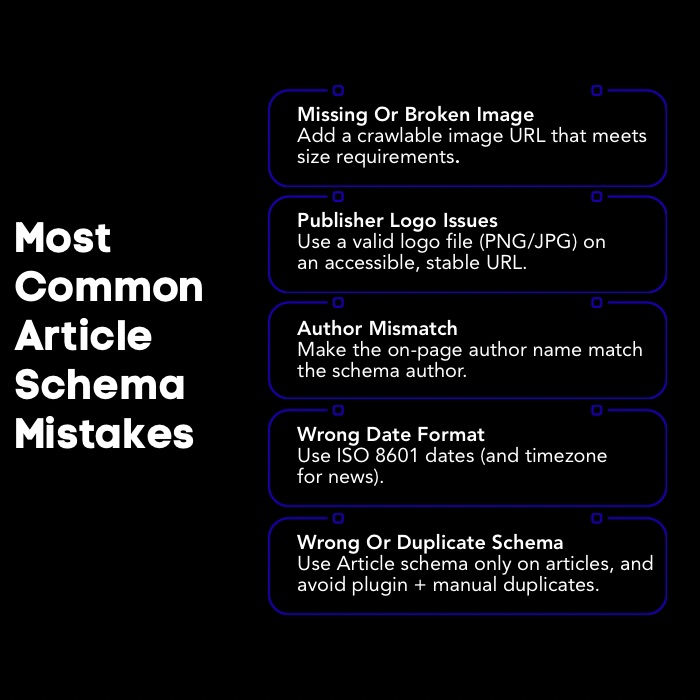
Even with the best intentions, it's easy to make mistakes when implementing article schema markup. These errors can prevent your content from qualifying for rich results and may confuse search engines. Let's examine some of the most frequent mistakes and how to resolve them.
1. Missing Or Invalid Image Markup
A frequent error in article schema is missing or invalid image markup. The image property is crucial because it's often required for your article to appear with a thumbnail in Google search results. If this property is missing, or if the URL provided is broken or incorrect, your page will not be eligible for many visually appealing rich result formats.
The structured data guidelines for images are also very specific. The image must be relevant to the article, and crawlers must be able to access it (i.e., not blocked by robots.txt). There are also minimum and maximum dimension requirements that need to be met.
To fix these issues, ensure your image markup always includes:
- A valid, crawlable URL for the image.
- An image that meets the specified dimension requirements.
- A high-quality image that is representative of the article's content. By double-checking your image markup, you can significantly improve your chances of securing a more prominent spot in search results.
2. Publisher Logo Errors And Format Issues
Errors related to the publisher logo are another common pitfall in schema markup implementation. The publisher property should include a nested logo property that specifies the URL of your organization's logo. This logo can appear in Google's knowledge panel and other search features, so getting it right is important for branding.
Many logo errors stem from format issues. Google has specific guidelines for the publisher logo, including requirements for file formats (like .jpg, .png, or .gif) and dimensions. The logo should be a square or a wide rectangle, and it must be clearly visible on a white background. Using an incorrectly sized or formatted logo can cause it to be ignored by search engines.
To fix these issues, review Google's guidelines for logos and ensure yours complies. Make sure the logo is hosted on a stable URL and is accessible to Google's crawlers. Validating your schema with the Rich Results Test will flag any logo errors, allowing you to correct them and ensure your brand is represented correctly in search.
3. Author Name Mismatches Across Page And Schema
A subtle but significant mistake is a mismatch between the author name displayed on the page and the one specified in the article markup. For search engines to trust your structured data, it must accurately reflect the visible content. If the author names do not align, it sends a conflicting signal that can undermine the credibility of your schema.
This issue often occurs when a website's template automatically populates the on-page author name, but the schema is generated separately without being updated. For example, the page might say "By Jane Smith," while the schema still lists "John Doe." This discrepancy can confuse search engines and may result in the schema being ignored.
To fix this, ensure your system for generating schema, whether it's a plugin or a data markup helper, dynamically pulls the correct author name for each article. If your articles are published by the organization rather than an individual, you can use organization schema for the author property. Regularly audit your pages to confirm consistency between on-page author names and your schema.
4. Date Format And Timezone Mistakes
Incorrectly formatted date information is one of the most common validation errors in article schema. Search engines require dates to be in the ISO 8601 format (YYYY-MM-DD). For added precision, including the time and timezone (e.g., YYYY-MM-DDTHH:MM:SSZ) is a best practice and sometimes required, especially for news content.
A frequent mistake is omitting the timezone or using a non-standard date format like "January 10, 2025." While this is readable for humans, machines require the standardized ISO 8601 format to process the information correctly. These errors can cause your publication date or last modified date to be ignored.
To resolve this, always ensure your datePublished and dateModified properties adhere to the ISO 8601 format as specified in the data guidelines. Most content management systems and schema plugins handle this automatically, but if you are creating schema manually, be meticulous about the format. Validating your markup will quickly flag any date-related errors for correction.
5. Duplicate Or Misapplied Article Schema (Wrong Pages, Plugin Conflicts)
Applying article schema markup to pages that are not articles is a critical mistake that violates structured data guidelines. This markup should only be used for a specific post type, such as a blog post or news story. Using it on product pages, category pages, or your homepage can confuse search engines and may lead to manual penalties.
This issue can sometimes arise from plugin conflicts. For example, you might have two different SEO plugins that both attempt to add article schema to the same page, resulting in duplicate markup. This creates conflicting signals and should be avoided. It is best to use a single, comprehensive tool to manage your structured data.
To fix this, audit your site to ensure article schema is only applied to actual articles. If you have multiple plugins that handle schema, disable the feature in all but one to prevent conflicts. Always adhere to the principle of applying the most specific and accurate schema type for each page on your website.
What Are The Best Practices For Article Schema To Maximize SEO Value?

To truly maximize the SEO value of your article schema, you need to go beyond simply filling out the required fields. Following best practices ensures your structured data not only makes you eligible for rich results but also helps build a more authoritative and interconnected presence in search. Let's explore these best practices in more detail.
1. Link Article To Organization And Author
One of the most powerful best practices is to link your article schema to your broader organization and author entities. Don't just list the author's name as plain text; instead, nest a Person schema within your author property. This allows you to include more details about the author of the article, such as a link to their author bio page or social media profiles.
Similarly, your publisher property should contain a nested organization schema that clearly identifies your brand. This creates a strong connection between the content, its creator, and the publishing entity. This interconnected data helps search engines understand the relationships between different pieces of information.
By linking these entities, you provide valuable information that helps search engines build a more comprehensive understanding of your brand's expertise and authority. This can lead to enhanced visibility, including knowledge panel features, and strengthens the overall trust signals associated with your domain.
2. Add Breadcrumb Schema For Context
Adding breadcrumb schema alongside your article schema provides valuable context about where the page sits within your website's hierarchy. Breadcrumb schema generates a navigational path (e.g., Home > Blog > SEO > Article Title) that can be displayed in Google search results. This helps users understand the page's position on your site before they even click.
This additional schema markup is not just for users; it also helps search engines understand your site structure. By clearly outlining the path to the article, you reinforce the topic's relevance and relationship to other content on your site. This can be particularly helpful for large websites with deep navigational structures.
Implementing breadcrumb schema is a straightforward way to enhance your search listings. It takes up more real estate in the search results, making your listing more prominent, and provides a better user experience by clarifying the page's context. It's a simple addition that complements your article schema perfectly.
3. Keep Brand Identifiers Consistent
Consistency is key when it comes to brand identifiers in your schema markup. Your organization's name, logo, URL, and contact information should be identical across all schema types on your website, including your organization schema and any publisher properties within your article schema.
This consistency should also extend beyond your website. Ensure that the brand identifiers used in your schema match the information on your Google Business Profile, social media profiles, and other online directories. Discrepancies can confuse search engines and dilute your brand's authority and recognition.
By maintaining consistent brand identifiers, you send clear, unified signals to search engines about who you are. This helps consolidate your brand's entity and strengthens its presence in search. It's a foundational practice for building a strong and recognizable digital brand identity.
4. Use FAQ Schema Only When Visible
While not directly part of article schema, it's common to include an FAQ section within an article. If you do, you can use FAQ schema to make those questions and answers eligible for display in search results. However, a critical best practice is that the questions and answers must be visible on the page to the user.
Do not use FAQ schema to "hide" extra content in your structured data that is not present on the page. This practice is against Google's guidelines and can result in a manual action. The purpose of this schema is to mark up existing, visible content, not to add invisible keywords or information.
When used correctly on articles, blog posts, or product pages, FAQ schema can be very powerful. It can make your search listing much larger and more informative, directly answering user questions within the search results. Just remember to always ensure the content in your schema is an exact match for the content visible on the page.
5. Match Schema To On-Page Content
The most fundamental best practice for any schema markup is to ensure it accurately matches the content visible on the page. The information in your structured data, from the headline and author to the publication date, should be a direct reflection of what a user sees when they visit your web page.
Inconsistencies between your schema and on-page content can be seen as deceptive by search engines and may lead to your structured data being ignored or, in worse cases, a penalty. This practice is about building trust with search engines and providing a reliable user experience.
By ensuring your schema is a true representation of your content, you help search engines do their job better. This allows them to more confidently match your page to relevant queries and display accurate information in search engine results. This alignment is the cornerstone of a successful and sustainable structured data strategy for any post type.
Conclusion: Is Schema Markup Worth It?
Yes, schema markup is absolutely worth the effort. It provides a direct line of communication with search engines, enhancing their understanding of your content and making your pages eligible for eye-catching rich results. This increased visibility can lead to higher click-through rates and a significant boost in organic traffic. While it's not a direct ranking factor, the indirect benefits of standing out in a crowded search landscape make implementing schema markup an essential component of modern SEO strategy.
Frequently Asked Questions
What are the essential properties required for article schema markup?
The essential properties for valid article schema markup typically include headline and image. While other properties like author and datePublished are highly recommended to provide more context and comply with structured data guidelines, the headline and image are often the minimum requirements for the schema markup to be considered valid by search engines.
When and where should you use schema markup on your website?
You should use schema markup on any page where you want to provide specific context to search engines, such as articles, products, or local business pages. The code is typically added to the page's HTML, either in the <head> or <body>. Many content management system plugins can automate this for each post type.
Are there tools to generate article schema markup automatically?
Yes, there are several tools that can automatically generate article schema. Google’s Structured Data Markup Helper is a free schema markup generator that guides you through tagging your content. Additionally, many CMS plugins like Yoast SEO or Rank Math will automatically create and insert structured data for the appropriate post type.
How can I validate if my article schema markup is correct?
You can validate your article schema markup using Google's Rich Results Test. Simply paste your URL or code snippet into the tool to check for errors or warnings. You can also monitor your implemented schema markup in Google Search Console under the "Enhancements" report to ensure it's being processed correctly.
Can you explain how article schema improves SEO?
Article schema markup improves SEO by helping search engines better understand your content, which can increase your eligibility for rich results. These enhanced listings in the search results are more visually appealing, leading to higher click-through rates, more organic traffic, and greater visibility on Google Search.
What is the difference between article vs blog post schema?
Article schema is a broad option for many editorial pages, while BlogPosting is more specific to blog content. If the page is part of your blog feed and written as a post, use BlogPosting. Otherwise, Article is typically fine.
What is a good news article schema example?
A strong news article schema example uses the NewsArticle type with headline, image, publisher, and accurate datePublished and dateModified in ISO 8601 format. Keep it consistent with on-page content, and validate it using structured data testing tools.


.svg)


.webp)