.jpg)
Quick Summary: Is Conductor the Best Option for Your SEO Team?
Conductor is a strong fit for large enterprise teams that want SEO, AEO, content optimization, reporting, and website monitoring in one platform.
- Best for: Large SEO and content teams managing complex websites and multiple markets.
- Key strengths: AI search tracking, competitive intelligence, content optimization, reporting, and 24/7 monitoring.
- AI visibility: Tracks prompts, mentions, citations, sentiment, and share of voice across major AI search platforms.
- Main drawback: Pricing is not publicly disclosed, and the platform may feel too broad for smaller teams.
- Pricing: Essentials, Growth, and Enterprise plans, plus a 3-week free trial.
- Verdict: Choose Conductor for enterprise-scale SEO and AEO. Choose Scalenut if you want a more execution-focused GEO workflow with content creation and optimization built in.
You are probably not considering Conductor because you need another basic SEO tool. You are considering it because your team needs deeper search intelligence, AI visibility tracking, content workflows, reporting, and technical monitoring in one place. The real question is whether that enterprise depth will make your work easier or add more process than you need.
Conductor is built for large SEO and content programs, but its breadth may feel excessive for smaller teams. This Conductor review looks at where the platform delivers, where it falls short, and whether it is worth the investment in 2026.
What Is Conductor?
Conductor is an enterprise SEO and content intelligence platform that helps marketing teams research opportunities, improve organic visibility, and report on results. It brings together keyword and topic insights, competitor tracking, and performance reporting so you can make smarter decisions about what to create and how to optimize it.
In practice, I found it works best when you have a bigger SEO program and multiple people involved in planning, execution, and reporting. If your content workflow is more speed-driven and you prefer a lighter setup, you may notice Conductor’s process and structure nudging you toward a more formal operating style.
What Are Conductor’s Standout Features For SEO Teams?
Conductor is built for teams that want one place to manage search insights, content workflows, and performance reporting at scale. In my experience, its strengths show up most when you treat SEO like a cross-functional program, not just a set of isolated content tasks.
Here are the core capabilities that define the platform and how they typically show up in real workflows.
AI Visibility And AEO Insights
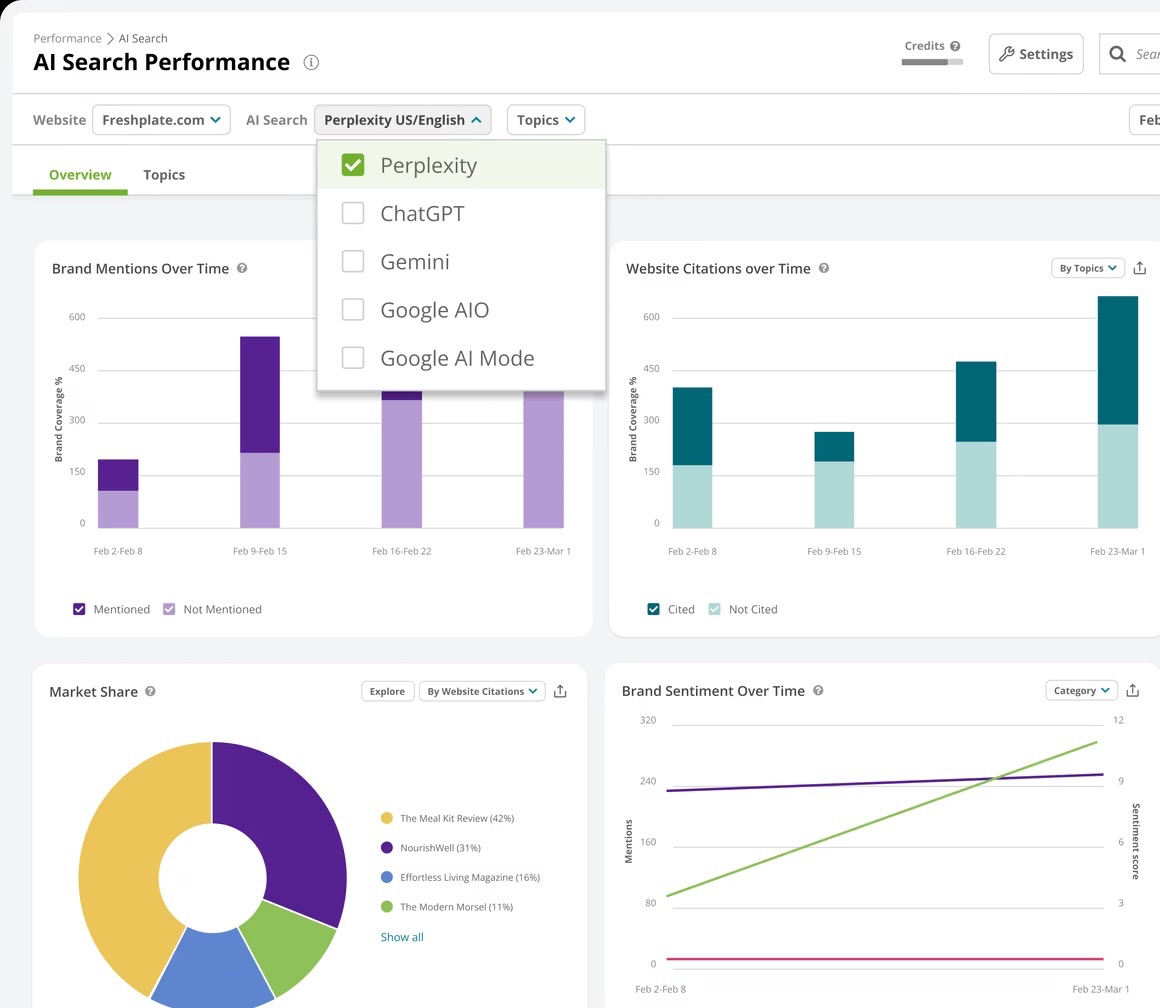
Overall, this feature set helps connect AI visibility to competitive context, but the real value depends on how easily the insights translate into next-step content actions.
- Tracks brand presence across AI-driven answer experiences, with visibility tied to topics and user-style questions.
- Supports prompt and topic-level analysis to identify where your brand is showing up and where it is not.
- Includes competitive views like AI Share Of Voice using mention-based and citation-based signals.
- Adds supporting context such as intent, sources, and AI crawler activity to round out the visibility story.
SEO Research And Competitive Intelligence
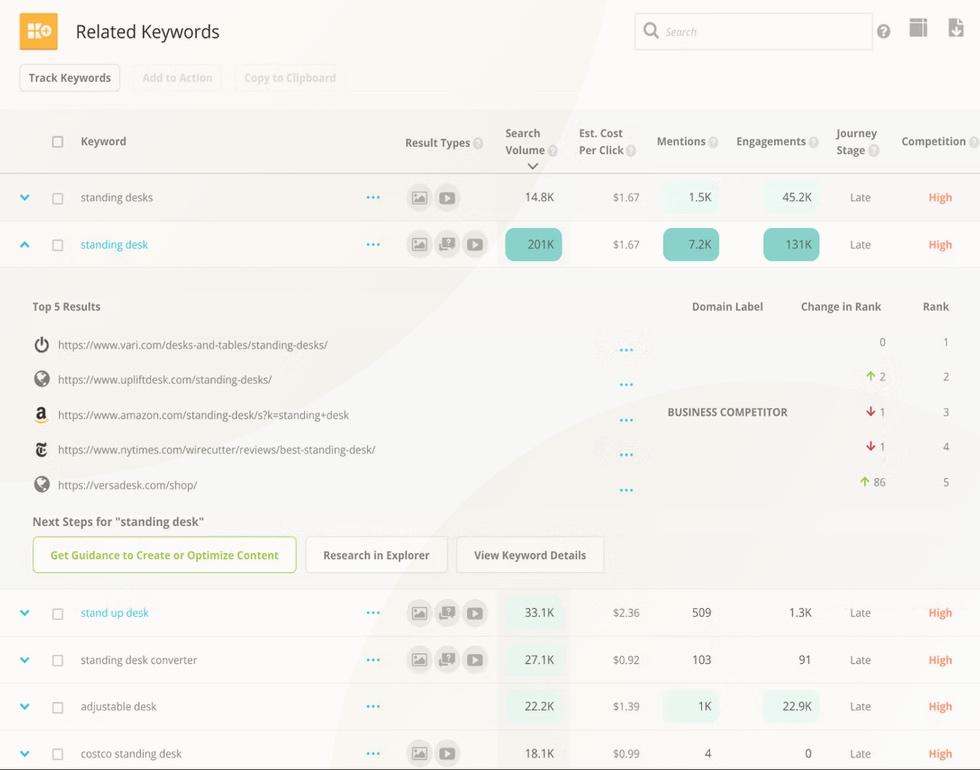
This is where Conductor feels most enterprise-ready, especially for teams that need dependable research depth and market-level tracking at scale.
- Keyword, topic, and competitor research designed for enterprise-scale discovery and prioritization.
- Competitive tracking that goes beyond rankings, including market share-style views and visibility by device and location.
- Daily rank tracking with historical context and filters for SERP features, which is helpful when the results page is changing quickly.
- Site-level competitor insights that surface which pages and keyword sets are gaining or losing momentum.
Content Performance, Reporting, And ROI Measurement
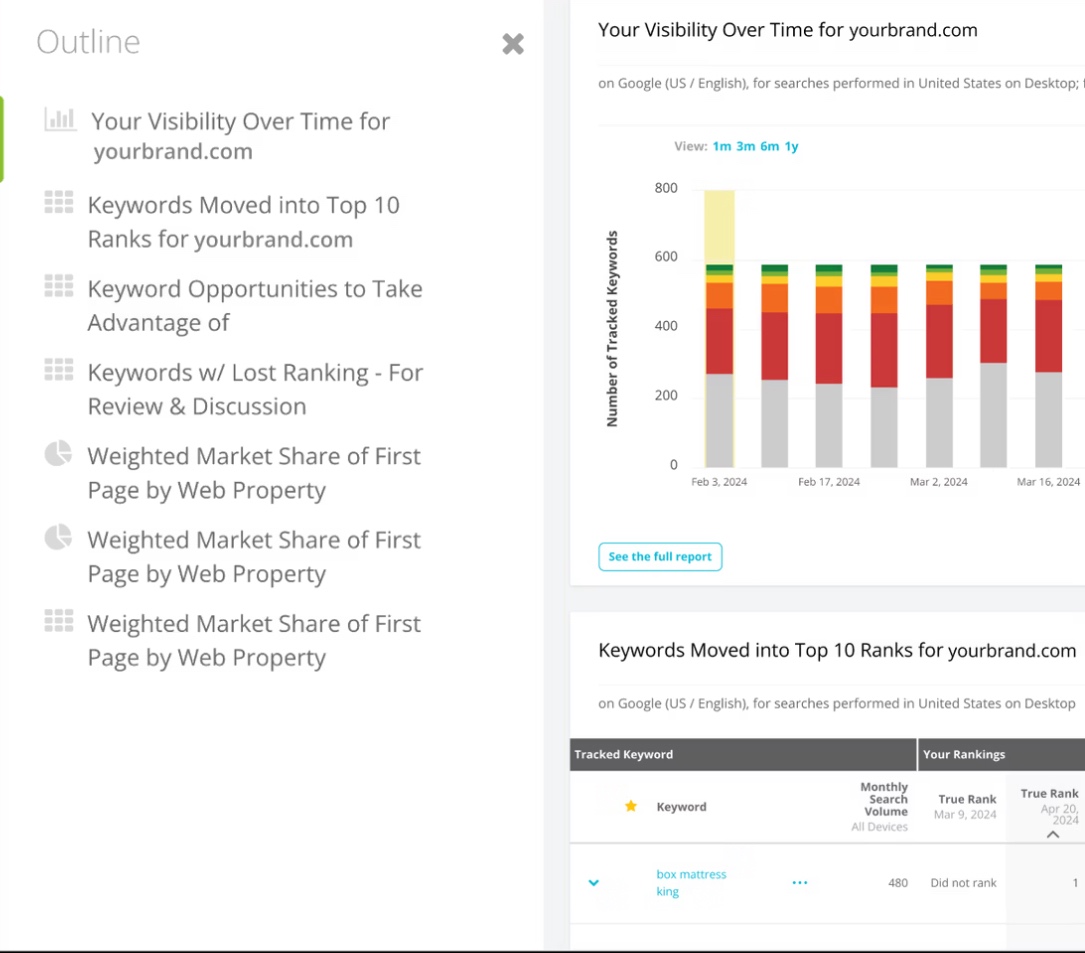
If stakeholder reporting is a big part of your job, this section pulls its weight and makes results easier to communicate beyond the SEO team.
- Page-focused reporting that brings together organic performance, technical signals, and analytics in one view.
- Stakeholder-friendly dashboards and workspaces that can be templated or customized for different teams.
- Change tracking and annotations designed to connect updates to performance movement over time.
- Strong emphasis on tying SEO activity to outcomes, which is valuable only when you need buy-in and budget justification.
AI-Assisted Content Creation And Optimization
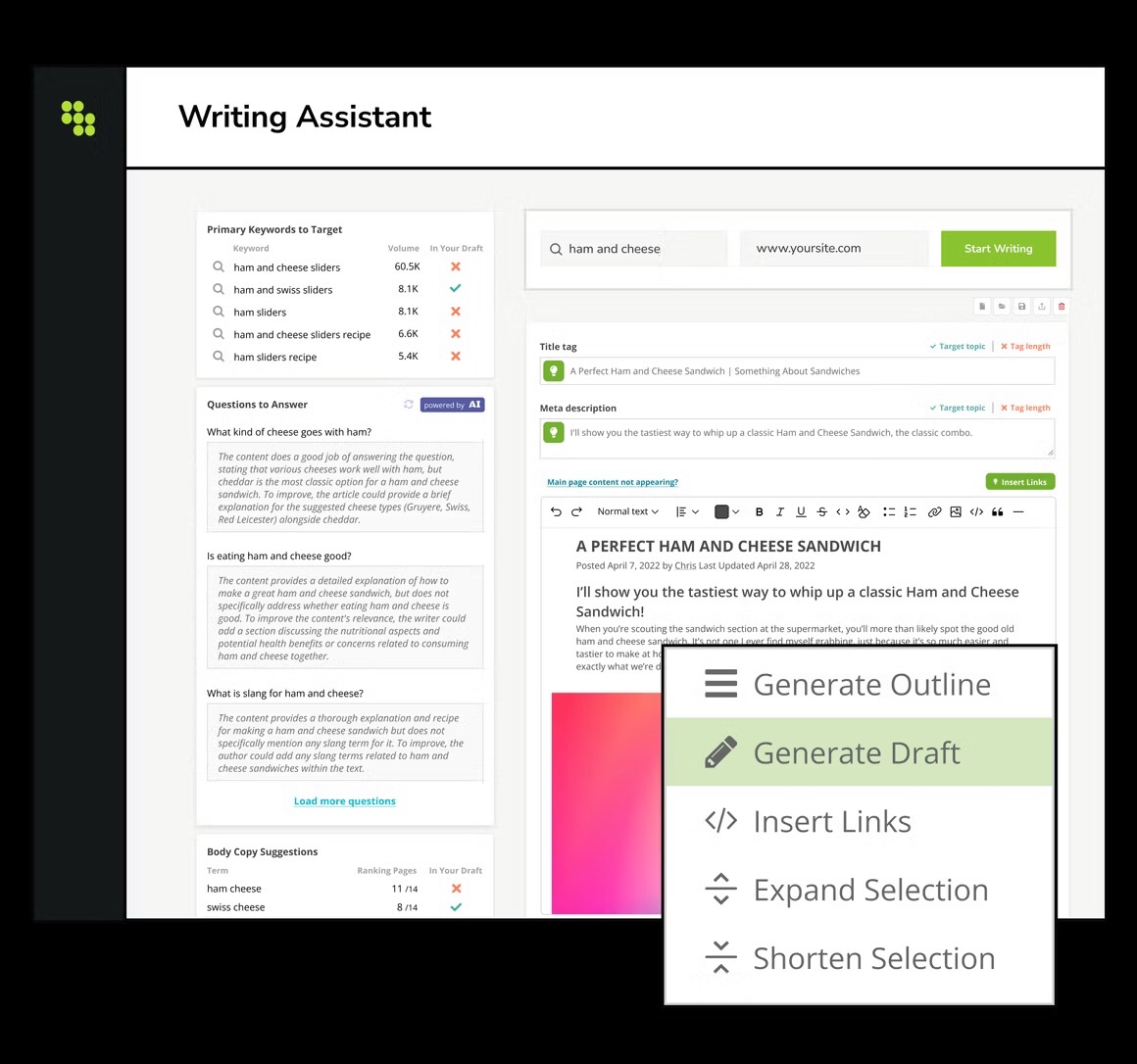
These tools support structured creation, but content teams that already have a strong writing system may find the workflow more helpful for governance than speed.
- AI Topic Map style clustering that frames coverage gaps and topical authority opportunities.
- Writing workflows that support on-page optimization outputs like titles and meta descriptions.
- Content profiles and governance controls to keep voice and standards consistent across teams.
Technical SEO Monitoring And Website Protection
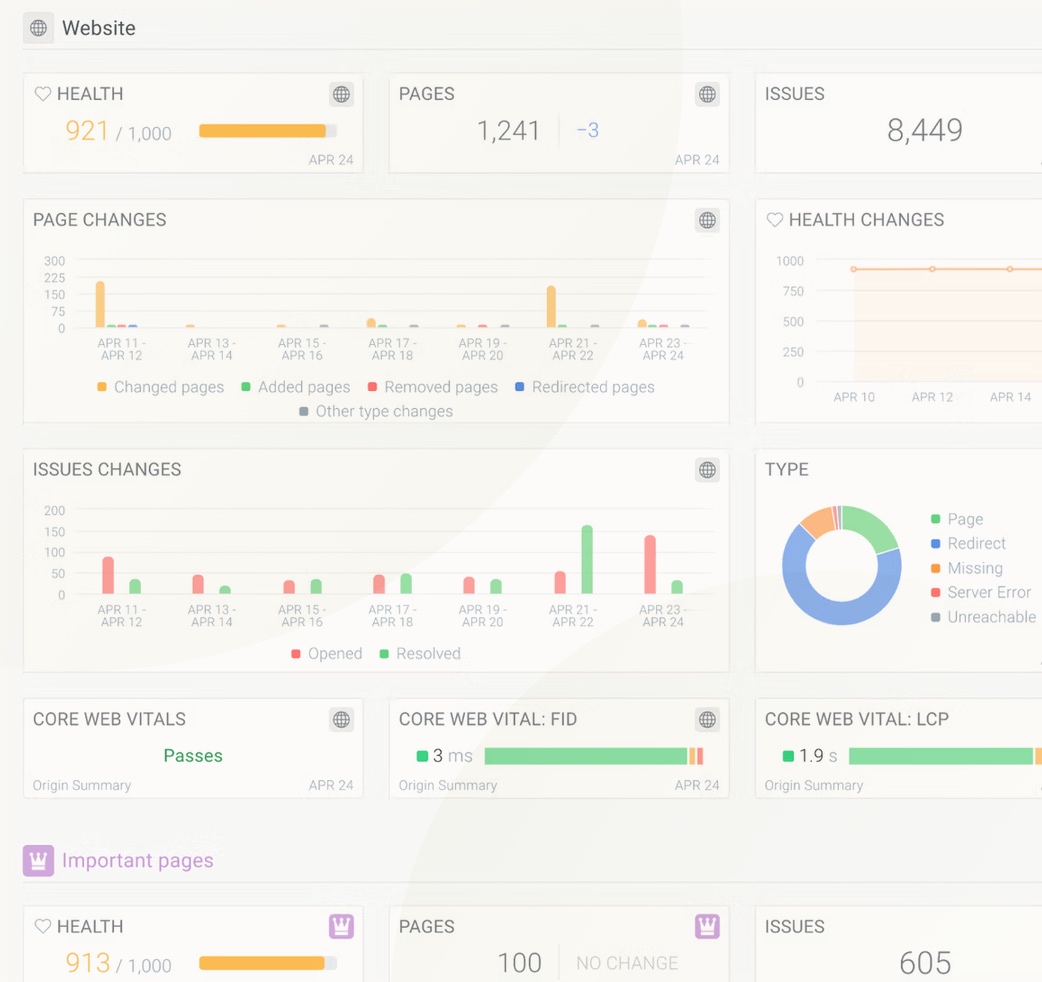
This is one of Conductor’s clearest differentiators for large sites, because it helps catch issues early and reduces the risk of silent traffic loss.
- Always-on technical monitoring and alerting so issues surface without waiting for periodic crawls.
- Page change tracking and audit trails that make it easier to pinpoint what changed and when.
- Custom rules to track specific page elements for QA, compliance, or brand standards.
- This is especially valuable for larger sites, where small technical changes can quietly snowball into costly ranking or compliance issues.
Workflow, Collaboration, And Integrations
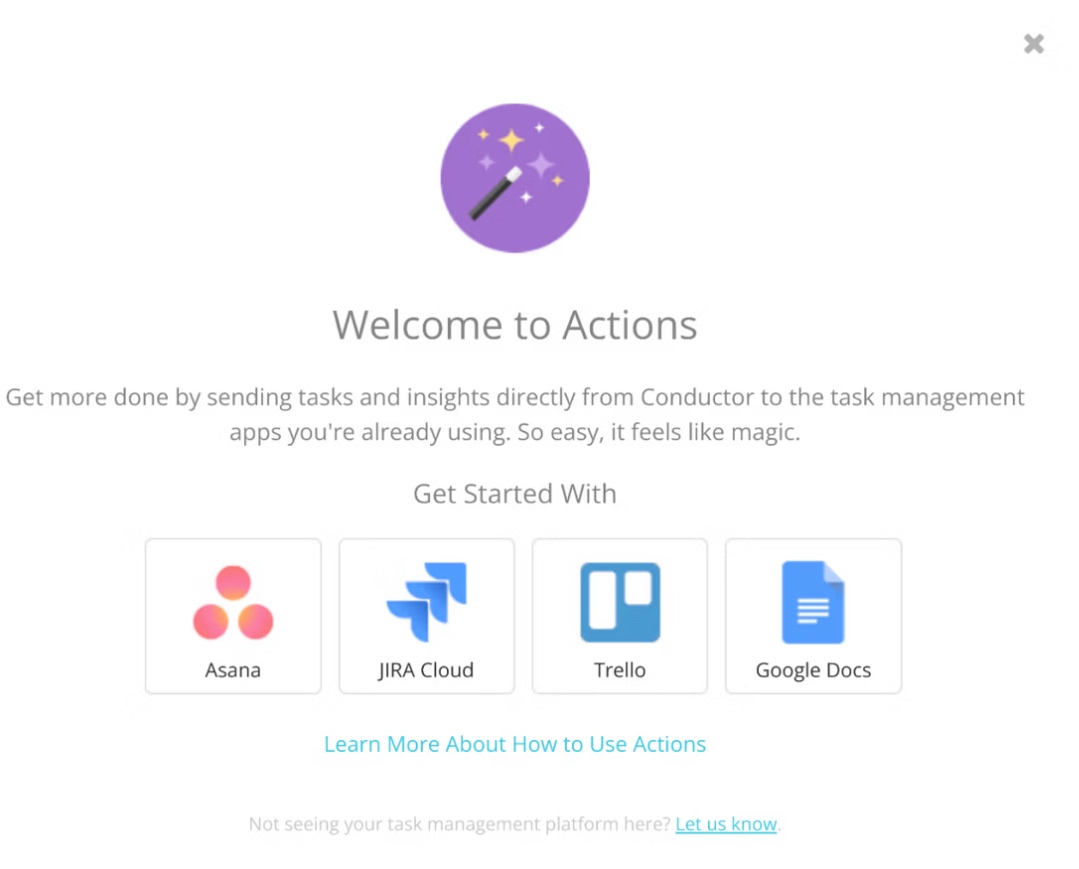
This capability is most valuable when multiple teams are involved, but smaller teams may feel the process overhead more than the collaboration benefit.
- Built-in ways to turn insights into actions, including integrations with common project management tools.
- A platform approach that aims to reduce data silos by fitting into an existing marketing and analytics stack.
- Designed for multi-stakeholder collaboration, where research, content, SEO, and reporting are shared responsibilities.
- While this feature can be a real strength for enterprise organizations, for a smaller content team like ours, the workflow depth feels like more process than what is actually needed.
Conductor Review: What Does Actual Users Say?
“Pricing puts it out of reach for very small teams, and there is a short learning curve before dashboards feel second nature. The interface still feels legacy in places, with navigation and visual design that are less modern and intuitive than newer tools.” says Timmy D, SEO Manager
User feedback paints a pretty consistent picture: Conductor is appreciated for being straightforward to use once you are in the flow. People repeatedly call out the user-friendly interface, solid keyword tracking, and responsive customer support, which makes the platform feel dependable for day-to-day optimization work.
At the same time, reviews suggest the onboarding experience could be smoother. Several users mention a learning curve and ask for clearer guidance or more instructional content, and a smaller set of reviews point to feature limits around advanced analytics and integrations. Pricing also comes up as a concern for teams that need a faster time to value.
What Do Conductor Pricing Tiers Look Like, And Is There A Free Plan?
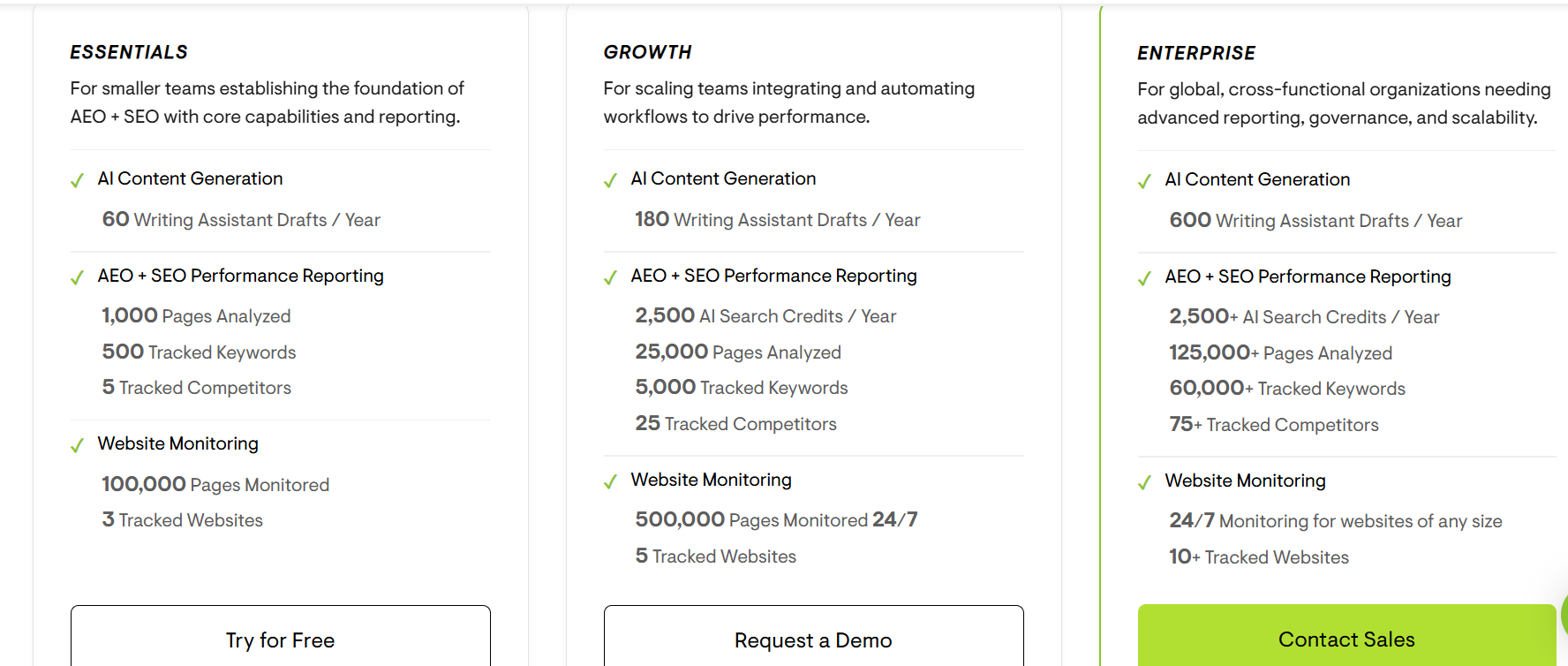
Conductor currently offers three plans: Essentials, Growth, and Enterprise. Pricing is usage-based, with higher tiers increasing limits across content generation, SEO and AEO reporting, keyword tracking, competitor tracking, and website monitoring.
- Essentials: 60 drafts/year, 500 keywords, 5 competitors, 3 websites.
- Growth: 180 drafts/year, 2,500 AI Search Credits, 5,000 keywords, 25 competitors, 5 websites.
- Enterprise: 600 drafts/year, 2,500+ AI Search Credits, 60,000+ keywords, 75+ competitors, 10+ websites.
Conductor does not publish fixed dollar pricing. There is no permanent free plan, but it offers a 3-week free trial with no credit card required.
What Are The Pros And Cons Of Conductor?
What Are The Pros Of Conductor?
- Strong enterprise SEO and content intelligence platform that brings research, reporting, and workflows into one place.
- Solid keyword, topic, and competitor insights that help identify opportunities and track progress over time.
- AI visibility and AEO-oriented views that support topic and prompt-style analysis for modern search behavior.
- Stakeholder-ready reporting and dashboards that make it easier to communicate impact and ROI.
- Always-on technical monitoring and alerting that helps catch site issues early, especially on larger websites.
- Useful integrations and workflow options for coordinating work across teams and project management tools.
- Reliable customer support and a generally polished, professional user experience.
What Are The Cons Of Conductor?
- Can feel process-heavy if you are a smaller content team that wants a faster, lighter workflow from insight to publishing.
- The learning curve can be real, especially if you are not used to enterprise SEO tools and reporting structures.
- Some features feel designed for governance and scale first, which may slow down execution for individual marketers.
- Advanced capabilities can require more setup and ongoing management than teams expect at the start.
- Pricing is typically enterprise-oriented, which can be harder to justify if you do not need the full platform depth.
- If your main focus is rapid content production and iteration, you may find parts of the experience more structured than necessary.
If you want a clearer view of why authority still drives results, check out our guide on the importance of backlinks in SEO.
Who Are The Ideal Users For Conductor?
Who Is Conductor Best For?
- Enterprise and mid-market teams managing multiple websites, markets, or business units.
- SEO programs that require governance and alignment across content, web, and leadership teams.
- Organizations that need stakeholder-ready reporting to tie SEO work to traffic, pipeline, or revenue outcomes.
- Teams that want structured workflows for research, planning, optimization, and ongoing performance tracking.
- Brands that value continuous technical monitoring to protect large sites from costly issues.
- Marketers working cross-functionally with analysts, developers, and product teams who need a shared source of truth.
Who Is Conductor Not For?
- Solo marketers and small teams that prioritize speed and simplicity over enterprise workflow structure.
- Teams that mainly need lightweight optimization and do not require deep reporting or governance layers.
- Marketers who want minimal setup and prefer tools that feel immediately usable without onboarding time.
- Budget-conscious teams that do not need always-on monitoring, advanced reporting, or cross-team coordination.
- High-velocity content teams who may find the platform’s structure more than they need day to day.
If GEO is still new, this quick guide on how beginners can master GEO SEO strategies in 2026 makes the basics easy to follow.
Why Is Scalenut A Better Alternative To Conductor?
Conductor does a lot well, but it often feels like it was built for enterprise SEO operations first and content execution second. When working on GEO goals, the biggest need is not another layer of reporting. It is getting clear, prompt-level signals on where AI engines mention the brand, where they do not, and what content should change as a result. In Conductor, that path can feel indirect, especially if the team is trying to move quickly.
Scalenut fits better because it is designed around the way content teams actually work right now. The AI visibility and prompt insights are set up to lead straight into action, so it is easier to go from “we are missing in these prompts” to “we fixed the page and shipped an update” without extra steps. That tighter feedback loop is the main reason it feels like a more practical choice for GEO-focused content marketing.
What Are Scalenut’s Most Valuable GEO And SEO Capabilities?
Scalenut brings together AI visibility intelligence and hands-on SEO workflows in one platform. Instead of treating GEO as a separate reporting layer, it connects what AI engines are saying about your brand to the content actions that can improve discoverability.
How Does Scalenut Support GEO And AI Visibility?
Scalenut connects AI visibility intelligence with the content actions teams can take to improve both GEO and SEO performance.
- AI brand visibility: Track Visibility Score, Average Position, Share of Voice, rankings, and performance across major AI engines.
- Prompt and citation insights: Monitor prompts, brand mentions, citations, competitors, sentiment, and query fanouts to understand why your brand appears in AI answers.
- Actionable GEO recommendations: Find content gaps, article opportunities, backlink suggestions, and relevant community discussions based on visibility data.
- AI traffic monitoring: Track AI crawler activity, source engines, crawl trends, and the pages attracting the most AI interaction.
Want to see how this works in practice? Read our Scalenut review to explore how its GEO and SEO toolkit helps brands improve visibility in AI-driven search.
Why I Would Choose Scalenut Over Conductor?
Conductor is a strong choice when you need enterprise-grade SEO reporting and coordination across multiple stakeholders. But for a content marketer focused on GEO outcomes, Scalenut feels more practical because AI visibility and prompt insights are easier to translate into content changes without extra steps or heavy process.
“I use Scalenut to create and optimize blog posts for our website. I love the SEO scoring features and all the recommendations it gives. I've noticed overall that when I follow them, my articles actually do improve in their rankings.” says Jake H., Marketing Strategist
Scalenut also keeps the momentum going once you are inside the platform. It is simpler to set up, quicker to act on what you are seeing, and easier to tie prompt gaps to specific updates you can ship. If the goal is to improve how the brand shows up in AI answers while still running a high-velocity content workflow, Scalenut fits that reality better.
Ready To Scale Smarter Content? Book A Scalenut Demo And See GEO + SEO In Action.
Frequently Asked Questions
What is Conductor SEO?
Conductor is an enterprise AEO and SEO platform that combines keyword and competitor research, AI content creation, performance reporting, technical website monitoring, and AI search visibility. It is designed primarily for teams managing complex websites and large-scale search programs.
Is Conductor worth it in 2026?
Conductor is worth considering for enterprise teams that need SEO, AEO, content optimization, reporting, and website monitoring in one platform. Smaller teams may find its breadth excessive, especially if they mainly need faster content execution, prompt tracking, and straightforward GEO workflows.
How much does Conductor cost in 2026?
Conductor does not publish fixed dollar prices. It currently offers Essentials, Growth, and Enterprise plans, with usage limits based on factors such as AI Search Credits, tracked keywords, analyzed pages, competitors, monitored pages, and websites rather than the number of seats.
Does Conductor offer a free trial?
Yes. Conductor currently offers a free 3-week trial with no credit card required. The trial provides access to its SEO, content, and website monitoring capabilities, giving teams a way to evaluate the platform before requesting a paid plan or enterprise quote.
Does Conductor track AI search visibility?
Yes. Conductor’s AI Search Performance tracks mentions, citations, sentiment, competitive market share, topics, and prompts across AI search experiences including ChatGPT, Perplexity, and Google AI Overviews. It can also connect AI visibility insights with content workflows, referral traffic, and AI crawler activity.
What are the main drawbacks of Conductor?
The main drawbacks are limited pricing transparency, an enterprise-oriented feature set, and usage limits across areas such as AI credits, tracked keywords, pages, competitors, and monitored websites. Smaller teams may prefer a simpler platform with more predictable pricing and faster content execution.
What are the best Conductor alternatives in 2026?
Popular Conductor alternatives include seoClarity, Semrush, Ahrefs, BrightEdge, and Scalenut. The best choice depends on your priority: enterprise SEO depth, backlink research, broader marketing tools, or GEO execution. Scalenut is particularly relevant for teams combining prompt-level AI visibility insights with content creation and optimization.
How does Conductor’s pricing compare to other search engine optimization tools like Searchmetrics?
Searchmetrics is no longer a separate SEO platform to compare on pricing, as Conductor acquired the company in 2023. Conductor now uses customized, consumption-based pricing, with plans varying by SEO, AEO, content, monitoring, and usage requirements.


.svg)


.webp)