
.jpg)
How To Refresh Content And Recover Lost Organic Traffic?
Key Highlights
- Refreshing existing content is a fast and effective way to boost organic traffic and improve search rankings.
- A content refresh involves updating facts, improving structure, and aligning with current search intent, unlike a full rewrite.
- Start the process with a content audit to identify pages with declining traffic or slipping keyword rankings.
- Key steps include reviewing search intent, updating statistics, strengthening internal links, and refreshing visuals.
- This strategy helps search engines see your content as fresh and valuable, leading to better performance in search results.
Have you noticed a dip in your website's organic traffic? It might not be a sign to create more new content, but rather to look at what you already have. Your existing blog posts and articles are valuable assets that can lose their shine over time. A strategic content refresh, guided by a thorough content audit, is a powerful content marketing technique. It can revive underperforming pages, recapture lost traffic, and re-establish your authority without starting from scratch.
Why Is It Important To Refresh Content Regularly?
Keeping your content updated is crucial for maintaining and improving your position in search results. Search engines like Google prioritize fresh content because it signals relevance and accuracy to users. When you regularly update your posts, you show that your website is an active and reliable source of information, which can significantly boost your organic traffic.
Compared to publishing entirely new content, refreshing existing articles is often faster and yields quicker results. It builds on the authority your page has already earned, allowing you to see improvements in performance in days rather than months. This makes content refreshing a highly efficient strategy for any business.
What’s the difference between content refresh and rewrite?
A content refresh involves making targeted improvements to an existing piece of content. Think of it as a renovation. You update outdated statistics, add new examples, insert fresh images, or tweak the introduction to better match current search intent. The core structure and main topic remain the same; you are simply making content updates to make it more current and valuable.
On the other hand, a rewrite is a complete overhaul. This is necessary when the original content is fundamentally flawed, poorly written, or so outdated that minor tweaks won't suffice. You start from a blank page, creating entirely new content while keeping the same URL to preserve any existing SEO value. A rewrite addresses deeper issues with the content's quality, angle, or structure.
How can you decide whether a piece of content needs a full rewrite or just an update? If the content has some traffic but has seen a performance decline, a refresh is usually the right choice. However, if a page has zero traffic, covers a topic that is no longer relevant, or is very poorly structured, it's a candidate for a complete rewrite or even deletion.
What Does It Mean To Refresh Content?
Refreshing content means strategically editing and enhancing your existing articles to make them more accurate, relevant, and appealing to both users and search engines. It's a key part of a successful content strategy that focuses on maximizing the value of assets you've already created. This process ensures your information doesn't become stale.
The goal is to provide fresh content that aligns with the latest industry trends, data, and user expectations. Content marketers perform these content updates to breathe new life into old posts, improving their performance and extending their lifespan. This can involve anything from minor text edits to adding new sections or media.
So, what are the essential steps to audit existing content before refreshing it? Start by identifying content older than six months. Next, analyze its performance by comparing clicks over the last 90 days to the previous period. For any poorly performing content that still receives some traffic, you can move forward with an update. Content with zero traffic over the last year can often be removed.
How Often Should Content Be Updated?
The frequency of your content updates depends on several factors, including your industry, the type of content, and your business goals. A good practice is to audit your content at least twice a year to identify refresh opportunities. For fast-moving industries, you might need to perform updates more frequently to stay current.
Integrating updates into your content calendar is a smart move. If you publish eight new articles a month, you might schedule four content refreshes. If your new content output is lower, you could increase the number of updates. This cadence ensures a consistent flow of fresh content for search engines to crawl.
Evergreen content may not need updates as often as time-sensitive topics. However, even these pieces benefit from periodic reviews to check for outdated links or statistics. Always consider your primary KPIs. If a key page starts to see a dip in conversions or traffic, it's time to prioritize it for a refresh, regardless of its publish date.
How Can You Tell When Content Needs A Refresh?
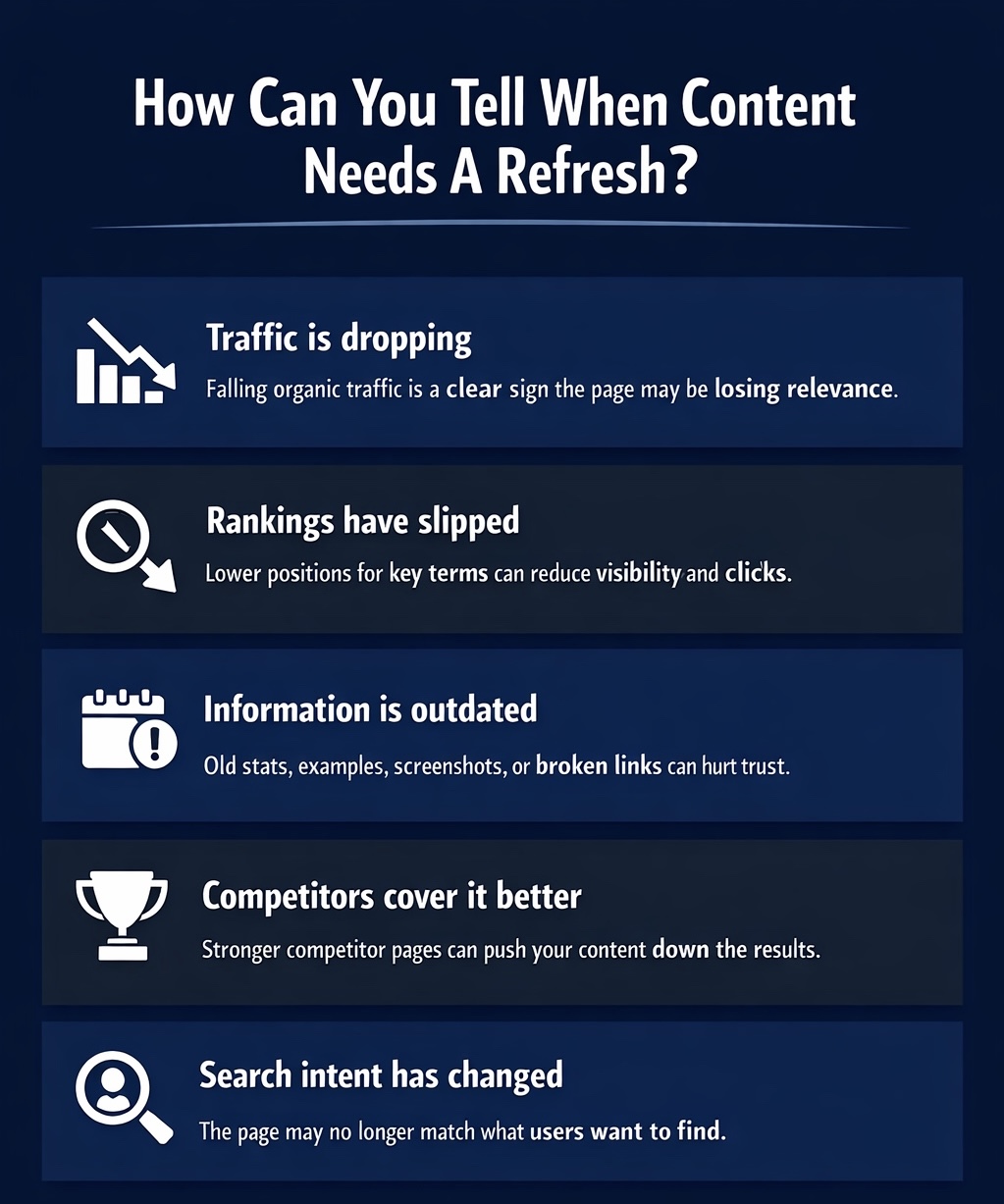
Knowing when to update content is key to improving its performance. Regular content audits help you spot warning signs, such as declining organic traffic, lower keyword rankings, and high bounce rates. Outdated information or broken links are also red flags. Sometimes, changes in search intent mean your article no longer meets user needs. These signals indicate it’s time to refresh your content strategy.
Here are some specific signs to watch for.
1. Traffic Has Started To Decline
One of the most obvious signs that your content needs a refresh is a noticeable drop in organic traffic. You can track this using tools like Google Analytics. When you see a steady downward trend for a page that used to perform well, it's a clear red flag. This decline often means your content is losing relevance or being outranked by competitors.
To confirm this, perform a simple content audit. Compare the total clicks in the last 90 days to the previous 90-day period. If you see a significant decline (e.g., more than 30%), that piece of content is a prime candidate for an update. This data-driven approach helps you prioritize your efforts on the pages that need it most.
Don't ignore these dips in search rankings. A decline in traffic indicates that search engines may no longer view your page as the best answer for its target queries. Refreshing the content can help you regain your position and bring visitors back to your relevant pages.
2. Rankings Have Slipped For Important Keywords
A slip in search rankings for your most important keywords is another critical signal. Even dropping a few spots on the search engine results page (SERP) can lead to a significant loss in visibility and clicks. Monitor your keyword performance regularly to catch these declines early.
When competitors update their content or new articles enter the SERP, your once top-ranking page can get pushed down. Search engines are constantly re-evaluating which page best satisfies user intent. If your content hasn't been touched in a while, it may be perceived as less comprehensive or current than newer alternatives.
During your content audit, pay close attention to pages that have fallen off the first page or lost valuable SERP features like featured snippets. By refreshing the content with updated information and better targeting for those specific keywords, you can fight to reclaim your valuable positions.
3. The Page Has Outdated Statistics, Examples, Or Screenshots
Nothing makes your blog content look stale faster than outdated information. If your article from 2020 is still citing statistics from 2015, readers will immediately question its credibility. Outdated content signals to both users and search engines that your page may no longer be a reliable source.
Take a moment to review your post for old data points, broken links, or screenshots of software that has since been updated. These elements can significantly diminish the user experience and the perceived value of your content. Replacing them is a straightforward yet powerful way to inject fresh content into your page.
Making these content updates shows that you are actively maintaining your site. Adding new content in the form of current research, fresh examples, or updated visuals tells search engines that your page is once again relevant and valuable. This simple act can lead to a quick boost in performance.
4. Competitors Now Cover The Topic Better
Your content doesn't exist in a vacuum. If your competitors are creating more in-depth, better-structured, or more visually appealing content on the same topic, your rankings will suffer. A regular competitive analysis is a vital part of your content strategy to ensure you stay ahead.
Review the top-ranking pages for your target keyword. Ask yourself: What are they doing that you aren't? Do they cover subtopics you missed? Are their articles longer, better organized, or easier to read? Do they use different angles or formats, like videos or infographics, that better match the search intent?
Answering these questions will reveal gaps in your own content. Use these insights to create a plan for your refresh. By adding new content sections, improving your structure, and offering more value than your competitors, you can make your page the definitive resource on the topic and win back your spot in the search results.
5. The Content No Longer Matches Current Search Intent
Search intent, the "why" behind a search query, can evolve. What users were looking for two years ago might be different from what they are looking for today. If your organic traffic has dropped despite maintaining your rankings, it could be a sign that your content no longer aligns with the current search intent.
For example, a query that once returned informational blog posts might now show product pages or comparison guides. Search engines are constantly refining their understanding of what users want. If your content format or angle is out of sync, users will bounce, signaling to search engines that your page is not a good fit.
Conduct a content audit by reviewing the current SERP for your target keywords. Analyze the top results to understand the dominant content type and angle. Then, adjust your content to match. This might mean adding a "how-to" section, including product recommendations, or restructuring your article to provide quicker answers. Providing fresh content that meets today's user needs is essential for long-term success.
How To Refresh Content Step By Step?
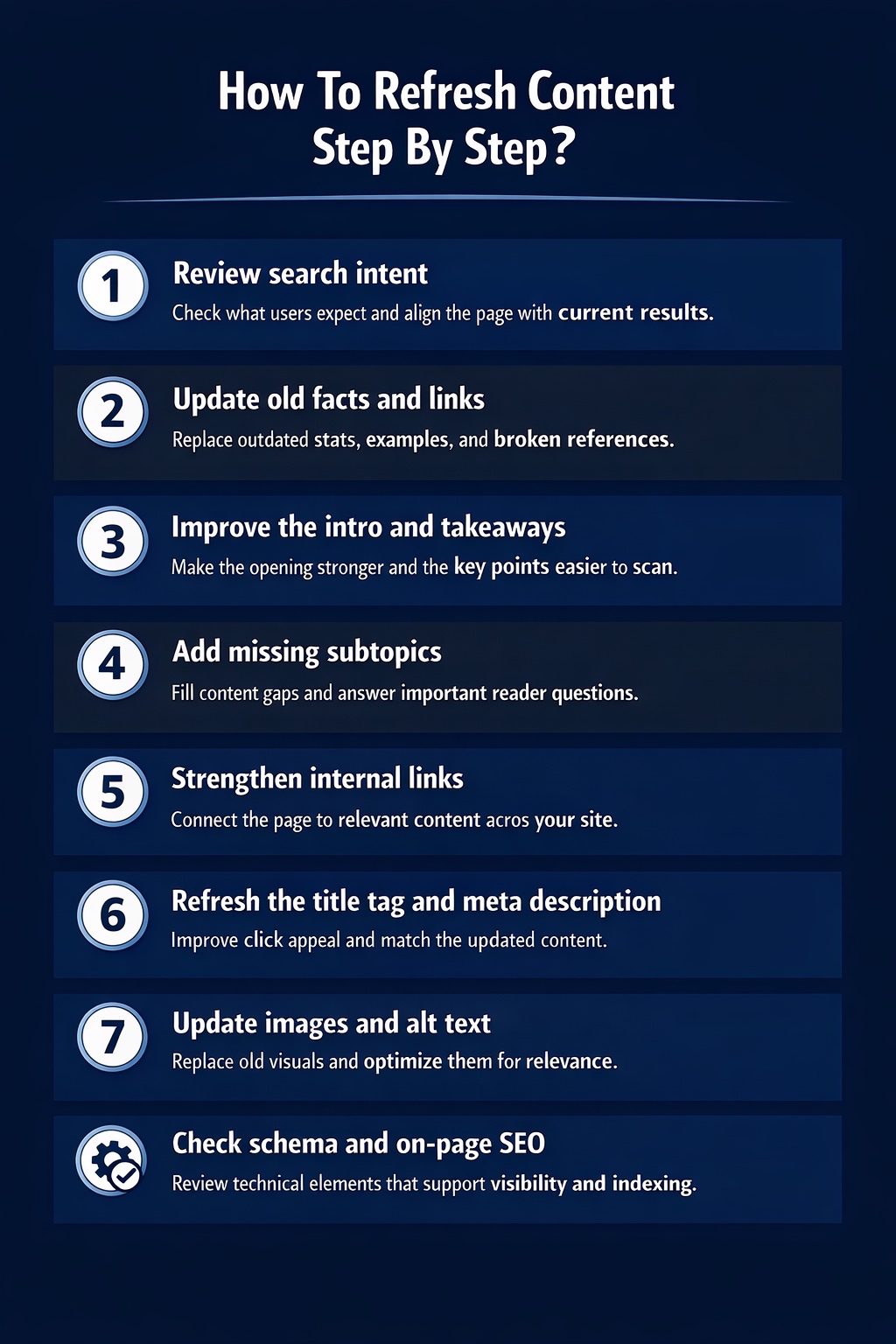
Once your content audit identifies pages needing improvement, it's time to refresh them systematically. These best practices for auditing existing content for refresh goes beyond minor edits; your strategy should focus on meaningful changes that add value. Align with search intent and improve on-page SEO to signal fresher, more authoritative content to search engines and boost organic traffic.
Here is a step-by-step guide to follow.
1. Review Current Search Intent
The first step in any effective content refresh is to re-evaluate search intent. As mentioned, what users want from a specific query can change. Your content strategy must adapt to these shifts to remain competitive. Start by searching for your primary keyword and analyzing the top-ranking pages.
Look for patterns in the results that search engines are favoring.
- Content Format: Are the top results blog posts, listicles, "how-to" guides, or product pages?
- Content Angle: Is the focus on beginners, experts, definitions, or comparisons?
- Key Subtopics: What common questions or themes appear across the top-ranking articles?
Use these observations from your content audit to guide your updates. You may need to restructure your article, change your introduction, or add new content sections to better align with what is currently performing well. This ensures your refreshed piece directly addresses the user's needs.
2. Update Old Facts, Statistics, And References
Using outdated content like old statistics is a surefire way to lose credibility. Readers and search engines both value current, accurate information. A key part of your refresh process should be a thorough review of all data points and references in your blog content.
Comb through your article and identify any statistics, studies, or dates that are no longer current. Replacing this outdated content with the latest available information is a simple yet powerful way to signal freshness. This shows that you are actively maintaining your content and providing up-to-date value.
When making these content updates, be sure to:
- Find the most recent studies and reports to support your claims.
- Update any references to years (e.g., change "in 2021" to the current year).
- Replace broken links with live, authoritative sources. This effort can give your page a significant boost in the search results.
3. Improve The Introduction And Key Takeaways
The introduction is your first and best chance to grab a reader's attention. A weak intro can lead to a high bounce rate, signaling to search engines that your content isn't engaging. When refreshing a blog post, always revisit the opening paragraphs.
Consider using a proven formula like the PPP (Preview, Proof, Preview) method. Briefly state what the post will cover, provide a piece of evidence to establish your authority (like a compelling statistic), and then tease what the reader will learn. This structure sets clear expectations and builds trust from the start. Keeping the introduction concise, around four to seven sentences, is also crucial for holding attention.
Similarly, review or add a key takeaways section. This helps readers who are scanning your content to quickly grasp the most important points. Improving the beginning and end of your relevant content makes it more user-friendly and effective, which is a key goal of any content strategy.
4. Add Missing Subtopics And Reader Questions
A comprehensive article that covers a topic in depth is more likely to rank well. During your content audit, you may have noticed that competitors are addressing subtopics or questions that your article misses. Filling these content gaps is an excellent way to add value and improve user experience.
Use tools like AnswerThePublic or look at the "People Also Ask" section in Google search results to find common questions related to your topic. Incorporating answers to these questions directly into your content makes it more helpful and thorough.
Consider these methods for adding new content:
- Create new H3 or H4 sections to cover missing subtopics.
- Add an FAQ section at the end of your post to answer common reader questions.
- Integrate long-tail keywords naturally by addressing these specific queries. This approach makes your fresh content more comprehensive and better aligned with what your audience is actively searching for.
5. Strengthen Internal Links
Internal linking is a powerful yet often overlooked part of any SEO and content strategy. When refreshing content, you have a perfect opportunity to improve your internal linking structure. Well-placed links help search engines understand the relationships between your pages and pass authority throughout your site.
Start by linking from your refreshed article to other relevant pages on your website, such as pillar pages or related blog posts. This helps guide users to more of your content, increasing their time on site and reducing bounce rates. It also helps spread "link equity" to other important pages.
To improve search visibility when updating old content, also find opportunities to link to your refreshed article from other high-performing pages. What best practices should you follow?
- Link from your most authoritative pages to the post you just updated.
- Use descriptive, keyword-rich anchor text.
- Ensure the links are contextually relevant and add value for the reader. A strong internal linking structure can provide an instant boost to your organic traffic and search results.
6. Refresh The Title Tag And Meta Description
Your title tag and meta description are the first things a user sees in the search results. They are your advertisement, and they play a huge role in convincing someone to click on your link instead of a competitor's. Refreshing them can significantly improve your click-through rate (CTR).
When updating these elements, make sure they accurately reflect the refreshed content of your page. If you've added new information or updated the year, your title tag should reflect that. For example, changing a title from "Best Laptops of 2022" to "Best Laptops of 2024" is a simple but effective update.
Here are a few tips for optimizing your title tags and meta descriptions:
- Include your primary keyword, preferably near the beginning of the title tag.
- Keep title tags under 60 characters and meta descriptions under 160 characters.
- Use action-oriented language in your meta description to entice clicks. These changes help your page stand out in the SERP features and attract more visitors from search engines.
7. Update Images, Screenshots, And Alt Text
Visuals are a critical part of your blog content. Outdated images or screenshots can make your entire article feel old and unprofessional. Swapping out this outdated content with fresh, high-quality visuals is an essential step in any content refresh. A good user experience depends on modern and relevant imagery.
If your article includes screenshots of software, make sure they show the current interface. If you use stock photos, consider replacing them with custom graphics, charts, or illustrations that better support your content. Posts with relevant images get significantly more views and social shares, so this is a worthwhile investment.
Don't forget to optimize your new visuals for SEO. This means using descriptive file names and writing clear, keyword-rich alt text for each image. Alt text not only helps visually impaired users but also gives search engines more context about your page's content. These content updates can improve both engagement and rankings.
8. Check Schema And On-Page SEO Elements
Beyond the visible content, technical on-page SEO elements play a huge role in your search rankings. When refreshing a post, it's the perfect time to conduct a mini-audit of these factors. This includes checking your schema markup, which helps search engines understand your content and can unlock rich SERP features.
For example, if you've added an FAQ section, implement FAQ schema to help it appear directly in the search results. Also, ensure you are using the dateModified property in your article schema to clearly signal to search engines that the content has been updated.
What Should You Avoid When Refreshing Content?
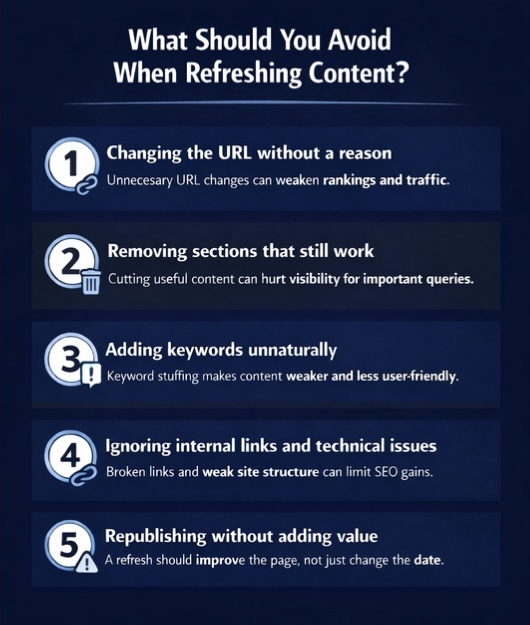
Updating content can boost organic traffic, but common mistakes can hurt your SEO. A strong content strategy means knowing both what to do and what to avoid. Careless updates may cause lost rankings, technical issues, or poor user experience. Always refresh content with a clear plan and awareness of potential risks.
Here are some common mistakes you should steer clear of during your content audit and refresh process.
1. Changing The URL Without A Good Reason
Your page's URL is its permanent address on the web. It accumulates authority and backlinks over time. Changing the URL without a very compelling reason is one of the biggest mistakes you can make during a content refresh. When you change a URL, you essentially reset its SEO value to zero unless you implement a proper 301 redirect.
A new URL means you lose all the existing backlinks pointing to the old one. This can cause a dramatic drop in your search rankings and organic traffic. Search engines will see it as a brand new page, and it will have to earn its authority all over again, which can take months.
Only consider changing a URL if it is very long, unclear, or contains outdated information like a year (e.g., "/best-seo-tips-2021"). Even then, you must implement a 301 redirect from the old URL to the new one to pass along as much link equity as possible and avoid technical issues like 404 errors.
2. Removing Sections That Still Perform Well
In your eagerness to update a post, it can be tempting to delete large sections of old content. However, you must be careful not to remove content that is still performing well. A particular section or paragraph might be responsible for ranking for several long-tail keywords and driving valuable traffic.
Before you delete anything, use tools like Google Search Console to see which queries your page is ranking for. Your content audit should identify which parts of your article are attracting users. You may find that a seemingly minor section is actually a key driver of your page's performance in the search results.
Instead of removing relevant content, look for ways to improve it. Can you update the information within that section? Can you expand on it to make it even more valuable? Preserving what works while enhancing the rest of your post is the best approach for these key posts.
3. Adding Keywords Unnaturally
While it's important to target relevant keywords, stuffing them unnaturally into your content is a practice that can hurt your rankings. Search engines are sophisticated enough to detect keyword stuffing, and they penalize pages that prioritize keywords over a good user experience. Your primary focus should always be on writing for your human audience.
When adding new keywords identified in your research, integrate them naturally into your sentences and headings. The language should flow smoothly and make sense to the reader. Forcing keywords where they don't belong will make your content sound robotic and will likely turn readers away.
Also, be mindful of keyword cannibalization. This occurs when multiple pages on your site compete for the same keyword, confusing search engines and diluting your authority. Your content strategy should ensure each page targets a unique set of keywords. A refresh is a good time to refine your focus and avoid this issue.
4. Ignoring Internal Links And Technical Issues
A content refresh isn't just about the words on the page. Ignoring the technical aspects of your content can undermine all your efforts. Internal linking is a prime example. As discussed, failing to add new internal links to and from your refreshed page is a missed opportunity to boost its authority and guide search engines.
Similarly, you should use this opportunity to fix any underlying technical issues. During your content audit, check for broken links (both internal and external) and fix them. Ensure your page loads quickly and is mobile-friendly. These factors are crucial for both user experience and SEO.
Search engines consider site health when determining rankings. A page with broken links or slow load times will be seen as lower quality, regardless of how great the content is. Overlooking these technical details can prevent your refreshed content from reaching its full potential in the search results.
5. Republishing Without Improving Real Value
Simply changing the publish date and hitting "update" without making substantial improvements is a tactic that no longer works. Search engines are smart enough to see through this. Google considers this "noise" and it can actually harm your rankings. The goal of content updates is to add real, tangible value for the user.
Your refresh must provide fresh content that is genuinely better than the previous version. This could mean adding new research, providing more in-depth explanations, including new visuals, or improving the structure and readability. Your content strategy should focus on making the page more comprehensive, accurate, and helpful.
Before you republish, ask yourself: Is this page significantly better now? Does it offer more value to the reader than it did before? If the answer is no, you haven't done enough. A true refresh elevates the quality of the content, which in turn boosts organic traffic and signals to search engines that your page deserves a higher ranking.
How Do You Update Titles And Meta Descriptions During A Refresh?
When refreshing a blog post, updating your title tag and meta description is crucial for improving your click-through rate (CTR) from search results. Start by ensuring the title accurately reflects the updated content. For example, add the current year to signal freshness (e.g., "Best Marketing Strategies for 2026"). Your title should be compelling, under 60 characters, and include your primary keyword near the beginning. It's your first chance to grab a user's attention on the search engine results page.
Your meta description should act as a short ad for your content. In under 160 characters, explain what the user will find and why they should click. Use action-oriented language and include your primary keyword naturally. Mention any significant updates, such as "now includes new 2024 data" or "features an updated FAQ section." This tells users and search engines that your content is current and comprehensive, making them more likely to choose your link over others.
How Do You Re-Index Refreshed Content Faster?
After you've made significant content updates, you want Google Search to recognize those changes as quickly as possible. The most direct way to do this is by using the URL Inspection tool in Google Search Console. Simply paste the URL of your refreshed page into the search bar at the top of the dashboard. Once Google analyzes the page, you'll see a button to "Request Indexing." Clicking this tells Google that your page has been updated and should be re-crawled.
While this is the primary method, you can also help speed things up by generating new signals to the page. Share your updated article on social media to drive immediate traffic. If you have an email newsletter, feature the refreshed post there. Building a few new internal links from high-traffic pages on your site to the updated content can also encourage Google's crawlers to visit it sooner. These actions help ensure your improvements are reflected in the search results faster.
Can AI Help You Refresh Content More Efficiently?
Yes, AI can be a powerful ally for content marketers looking to streamline the content refresh process. AI tools can rapidly analyze your existing content and competitor articles to identify content gaps, suggest missing subtopics, and find relevant keywords you may have overlooked. This can significantly speed up the initial content audit phase, allowing you to focus on the creative aspects of the update.
AI can also assist in generating new content sections, rewriting awkward sentences for better clarity, or even drafting an entirely new introduction. It can help you find fresh statistics and summarize recent research to support your claims. While AI shouldn't replace human oversight—as quality and accuracy are paramount—it can handle many of the time-consuming tasks involved in a content refresh, making the entire workflow more efficient and effective.
How Can Scalenut Help You Refresh Old Content More Effectively?
If your older pages are losing traffic, Scalenut can help you refresh them with more clarity and less guesswork. Its Content Audit feature helps you identify weak pages, spot gaps in structure and optimization, and understand which updates can have the biggest impact. Instead of manually figuring out what needs attention, your team gets a clearer view of where content is falling short.
Scalenut also helps turn those insights into action. You can improve metadata, strengthen page structure, refine keyword targeting, and update content in a more focused way without starting from scratch. That makes it easier to refresh old content faster, improve search performance, and recover lost organic traffic.
Book a demo with Scalenut to see how it can simplify your content refresh workflow.
Conclusion
Refreshing your content is not just a necessity; it’s a strategic move in the ever-evolving digital landscape. Regular updates can rejuvenate your organic traffic and ensure that your content remains relevant, authoritative, and valuable to your audience. By understanding when and how to refresh content, you can effectively address shifts in user intent and outrank competitors.
Remember, the goal is to provide real value and stay ahead of the curve. So, don't let outdated information hold you back—embrace content refreshes as an integral part of your SEO strategy. If you're ready to optimize your content and recover lost organic traffic, feel free to reach out for a free consultation!
Frequently Asked Questions
How to decide if content should be refreshed or deleted?
During your content audit, if a piece of outdated content still receives some traffic or targets a relevant keyword, it's worth updating. However, if the content has zero traffic over the past year and is no longer aligned with your content strategy, it’s better to delete it and redirect the URL.
How often to refresh signage content?
The frequency for refreshing signage content depends on its purpose. For promotional content, updates should align with campaign schedules. For evergreen or informational signage, conduct a content audit every 6-12 months to ensure all information is accurate and the design remains fresh, updating the publish date only after significant changes.
Which pages in a website should you refresh first?
Prioritize pages that were once key posts but have seen a significant drop in organic traffic or keyword rankings. Your content audit should identify this "low-hanging fruit." These pages have existing authority, and a refresh can often produce the fastest and most impactful results for your blog content.
How do you re-index refreshed content faster?
To get your content updates indexed faster, use the URL Inspection tool in Google Search Console and click "Request Indexing." This directly notifies Google of the changes. Additionally, promoting the refreshed page on social media and adding new internal links to it can speed up the re-crawling process.
Which metrics should I analyze when conducting a content audit for refresh purposes?
When conducting a content audit, focus on metrics like organic traffic trends, search rankings for primary keywords, click-through rate (CTR), and bounce rate. Analyze this data in tools like Google Analytics and Google Search Console to identify pages with declining performance that would benefit from a refresh.
What best practices should I follow to improve search visibility when updating old content?
To improve search visibility, update your title tags and meta descriptions to be more compelling and include the current year. Strengthen your content strategy by adding internal links from high-authority pages to your refreshed post. Also, ensure the content itself is substantially improved to provide more value to the reader.
How can you build a workflow for refreshing old content?
Build a simple process that starts with auditing underperforming pages, prioritizing high-value URLs, reviewing search intent, updating outdated information, improving on-page SEO, and tracking results after publication. A clear workflow makes it easier to refresh content consistently and improve performance over time.


.svg)


.webp)