
.jpg)
What is LLMs.txt? A Beginner's Complete Guide

Key Highlights
- An llms.txt file is a proposed standard that provides a clear, machine-readable guide to your website's most important content for large language models.
- Unlike robots.txt, which controls crawler access, llms.txt is designed to improve how AI systems understand and summarize your information.
- By creating this text file, you can guide AI to your most authoritative and up-to-date web pages, improving the accuracy of AI-generated answers.
- This file helps with generative engine optimization (GEO) by making your content more accessible and reliable for AI systems.
- Creating one involves listing your key content in a simple Markdown format and placing it in your website's root directory.
- Adoption is growing, but it's important to have realistic expectations about its immediate impact on AI search results.
What Is LLMs.txt?
Have you ever wondered how you can better communicate with artificial intelligence systems? The llms.txt file is an emerging, proposed standard designed to do just that. It's a simple text file that lives in the root directory of your website, acting as a guide for large language models (LLMs) like ChatGPT, Claude, and Google Gemini.
Its main purpose is to tell these AI systems which parts of your site are most important, providing a clear, structured summary of your core content. This helps the AI understand your website more effectively without getting bogged down by complex code or website navigation.
What LLMs.txt Is Not
Llms.txt is not a replacement for web standards like robots.txt or XML sitemaps; each serves a different purpose. Robots.txt tells search engine bots which pages to avoid, acting as a gatekeeper. In contrast, llms.txt guides AI models to your most important content; it highlights rather than blocks. Unlike an XML sitemap, which lists all indexable URLs for search engines, llms.txt (written in Markdown) is a curated list of high-value pages relevant to large language models. Its structure and purpose are fundamentally different.
Why Was LLMs.txt Created?
The llms.txt file was created to help large language models better understand website content by cutting through the clutter of standard HTML pages, like menus, ads, and scripts, that often confuse AI. Proposed by innovators such as Jeremy Howard, llms.txt offers a clean summary and key links, giving AIs direct access to a site’s core information.
This approach, known as generative engine optimization (GEO), helps websites become more visible and authoritative in AI-driven search, making their content a preferred source for next-generation search engines and assistants.
How LLMs.txt Works
The llms.txt file provides a simple, structured guide for AI systems. When an AI bot visits your site, it looks for this file in the root directory. Instead of processing complex HTML, the AI reads llms.txt to quickly find your most important content. The file uses Markdown to link to key pages, often clean, text-only (.md) versions, making information retrieval faster and more accurate. This direct guidance helps the AI better understand your site, supporting generative engine optimization (GEO) and improving response quality.
Where The File Lives And How It Gets Discovered
To be effective, llms.txt should be placed in your website’s root directory, making it accessible at https://www.yourdomain.com/llms.txt. This follows the standard for files like robots.txt and sitemap.xml, ensuring AI systems and search engine bots can easily find it when they crawl your site.
While some suggest placing it in a subpath (e.g., /docs/llms.txt) for section-specific use, the root is best for visibility. Make sure the file is publicly accessible by checking its URL in your browser; if you can load it, so can AI crawlers, helping them better understand your site’s structure and content.
What You Typically Include Inside LLMs.txt
When creating your llms.txt file, focus on being concise and highlighting your website’s most valuable content. This file acts as a highlight reel to guide AI systems to your best, most authoritative information. Use the required Markdown format: start with an H1 for your site name, add a brief summary in a blockquote, include any key details, and then list priority page links under H2 headings.
Here are some key things to include:
- A summary of your website or project.
- Links to your most important content, such as core service pages, product details, or foundational blog posts.
- Links to canonical pages to avoid confusion with duplicate versions.
- Brief, descriptive notes for each link to provide context.
- A section for optional, secondary information that an AI can skip if it needs a shorter context.
What You Should Avoid Including
What you leave out of your llms.txt file is as important as what you include. Its purpose is to highlight your best content clearly. Adding unnecessary or low-quality links reduces its effectiveness and can confuse AI systems. Prioritize quality over quantity; avoid listing every page like a sitemap. Be selective and strategic, including only pages that best represent your brand and provide real value.
Here are some specific things to avoid including:
- Duplicate pages or thin content that offers little value.
- Non-canonical URLs, which can create conflicting signals for the AI.
- Redirecting URLs, as they add an unnecessary step and can cause processing issues.
- Anything that creates ambiguity or contradicts information in your
robots.txtor sitemaps.
How To Create LLMs.txt?
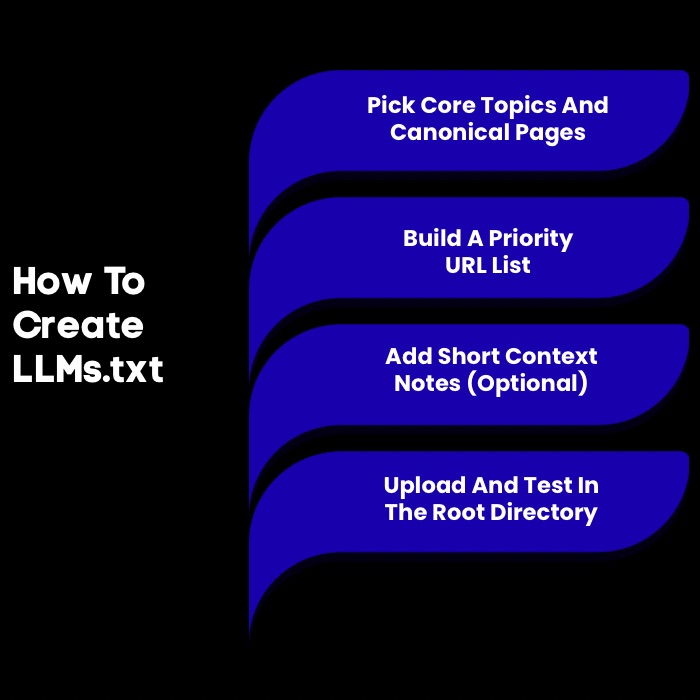
Creating an llms.txt file is simple and requires no advanced technical skills. Use any text editor, like Notepad or a code editor, to write the file in Markdown. Just identify your key content, organize it with headings, and list the URLs. Save the file as llms.txt and upload it to your website’s root directory. This easy step can greatly improve how your content is recognized in search engine optimization.
Step 1: Choose Your Core Topics And Canonical Pages
To create an effective llms.txt file, start by identifying your site's most important content. Focus on the core topics, products, or services that define your brand. Select a few canonical pages, the main versions of key pages, to ensure AI accesses authoritative information and avoids duplicate content issues.
This practice is essential for both SEO and guiding AI. Make a list of these crucial pages, such as your homepage, “About Us,” key product or service pages, and top blog posts. Careful selection lays the foundation for a strong llms.txt file.
Step 2: Build A “Priority URL” List
Once you've identified your core pages, build a "priority URL" list; this will be the foundation of your llms.txt file. Organize URLs under clear, descriptive headings like "Documentation," "Key Services," or "Top Articles." Use H2 Markdown headings (## Section Name) for structure. This makes it easier for AI and search engines to navigate your key content.
Your priority URL list should feature:
- The full, absolute URL for each page.
- Links to the clean, Markdown version of the page if available (e.g.,
page.html.md). - A logical grouping under relevant H2 headings.
- Links to your most valuable and authoritative content first.
- An optional "Optional" section for secondary information.
Step 3: Write Short Context Notes (Optional)
Adding brief context notes to your URLs can make your llms.txt file more useful. These short descriptions provide AI systems with extra metadata about each linked page. Keep notes concise and descriptive; a few words are enough. Add the note after the URL using a colon.
Here are a few tips for writing effective context notes:
- Keep them short and to the point.
- Use clear language that accurately describes the page's content.
- Focus on what makes the page valuable or unique.
This small addition can help AI systems make better decisions about when to use your documentation or content in their responses.
Step 4: Host And Validate
After creating your llms.txt file, upload it to your website’s root directory, where files like robots.txt are stored. To ensure search engines and AI systems can access it, test its visibility by visiting https://yourdomain.com/llms.txt in a browser. If you see the file’s content, it’s publicly accessible. Proper hosting and validation are essential for maximizing visibility.
To ensure everything is set up correctly, consider these validation steps:
- Check the URL to confirm the file is live in the root directory.
- Use a tool like
llms_txt2ctxto parse your file and check for llms.txt format errors. - If you use Google Search Console, monitor for any crawl errors related to the file, although official support is not yet confirmed.
What Are The Best LLMs.txt Use Cases For GEO And AEO?
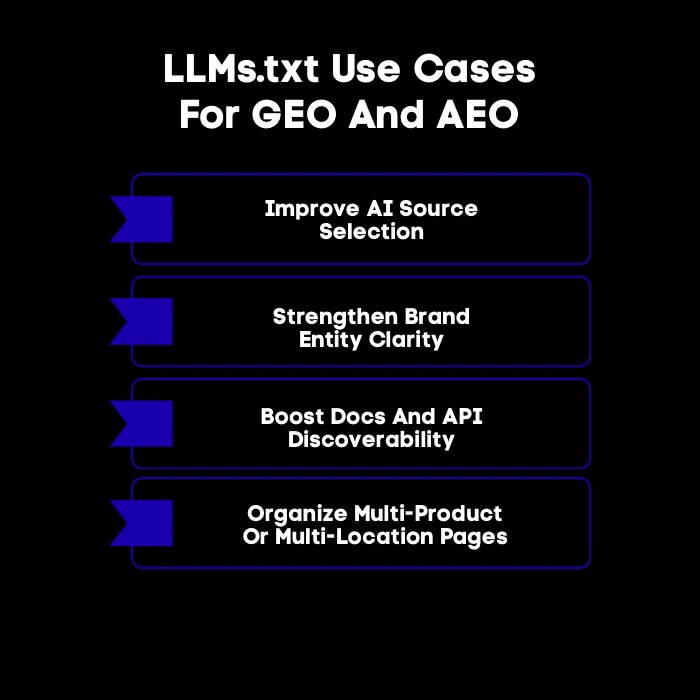
The llms.txt file is essential for Generative Engine Optimization (GEO) and Answer Engine Optimization (AEO). By listing your content, you direct AI to prioritize your authoritative information over outdated sources. This increases your visibility in AI search results and strengthens your brand’s presence and control in the AI era.
The following sections outline specific use cases.
1. Improving Source Selection For AI Answers
An llms.txt file helps guide AI models to your most reliable sources, reducing the risk of inaccurate answers from outdated or unreliable sites. By directing AIs to your canonical, updated pages, especially for technical docs, product specs, or company policies, you increase the chances your website is used as a primary source.
This prioritization delivers better responses and strengthens your brand’s authority, ensuring AI assistants reference your best information instead of whatever appears first online.
2. Strengthening Entity And Brand Clarity
An llms.txt file clarifies your brand and entity for search engines and AI. Here, "entity" refers to a specific person, place, organization, or concept. By summarizing your brand and offerings in llms.txt, you help AI accurately identify who you are and what you do, reducing confusion with similar names or outdated information.
The summary and curated links build a reliable reference profile, preventing misrepresentation. This ensures AI delivers answers that align with your messaging and supports your SEO strategy by strengthening your brand’s trust and authority.
3. Supporting Documentation And Developer Content Visibility
For companies with technical products, an llms.txt file is key for boosting documentation visibility. Developers use AI assistants to find code examples, understand APIs, and troubleshoot. If your docs aren’t accessible to AI, you miss a chance to support users. Linking API references, guides, and other docs (ideally in clean Markdown) via llms.txt helps AI quickly find and use your information.
This gives developers accurate answers from your official docs, enhances their experience, and reduces support workload, letting your team focus on complex issues and improving user satisfaction.
4. Helping Multi-Location Or Multi-Product Brands Avoid Confusion
For businesses with multiple locations, products, or services, maintaining clarity is challenging. An llms.txt file can reduce confusion for both customers and AI by logically organizing information. For example, a retail brand with stores in different cities or a software company with several products can use an llms.txt file to:
- List product lines under separate H2 headings
- Provide links to location-specific pages with clear notes
- Direct AI to the correct documentation or policy page
This structure ensures that search engines and AI deliver accurate, relevant information, even for complex business models.
Explore our guide on the best AI search visibility tools for AI answers to track citations, monitor brand mentions, and measure share of voice across AI platforms.
What Are The Best Practices For LLMs.txt For SEO Teams?
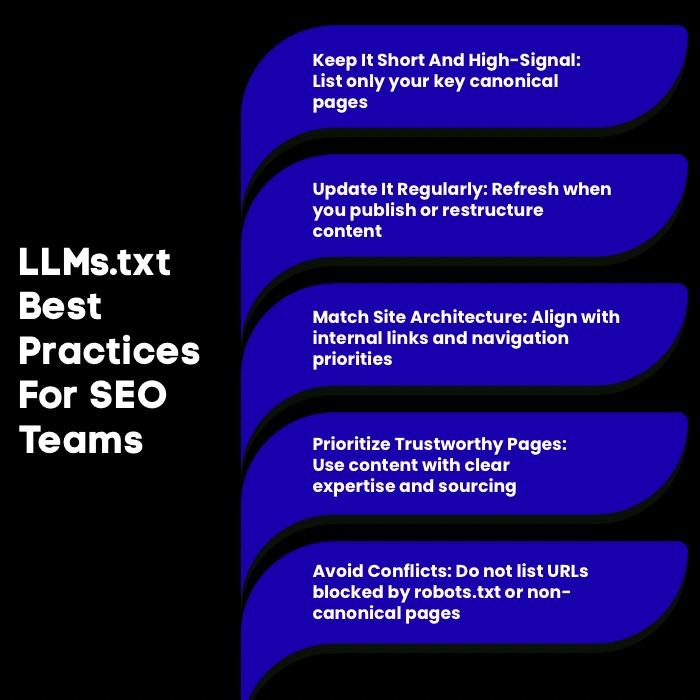
For SEO teams, adopting llms.txt is a proactive way to align with AI-driven search. The goal is to create a high-quality file consistent with your overall SEO strategy, not just add another server file. Use llms.txt as an extension of your information architecture, reflecting your site structure and priorities. Keep it clean, updated, and in line with core SEO principles to optimize your content for next-generation search.
Here are the llms.txt best practices:
1. Keep It Short And High-Signal
For llms.txt, less is more. Aim for a concise, high-value resource; don’t include every page on your site. Too many URLs weaken the file’s impact and make it harder for AI to find your key content. Focus on quality: list only your most authoritative and valuable pages that best represent your brand and offer the most useful information. To keep your file effective:
- Limit entries to essential, canonical pages.
- Use the "Optional" section for non-critical resources.
- Prioritize pages that answer common questions or explain core concepts.
A lean, focused llms.txt is far more effective than an overloaded one.
2. Update It Like A Living Index
Your llms.txt file shouldn't be a "set it and forget it" task. Treat it as a living index that evolves with your website. Update it whenever you add cornerstone content, major product descriptions, or restructure your site. Regular updates ensure AI systems and search engines access your most current information, maintaining accuracy and authority, especially in fast-moving industries.
An outdated llms.txt can lead to AI citing old data, hurting user trust and your brand's reputation. Integrate llms.txt updates into your content publishing or website maintenance workflows to keep your visibility strong and accurately represent your brand in the age of AI.
3. Match Your Internal Linking And Information Architecture
For maximum impact, your llms.txt file should align with your website’s internal linking strategy and information architecture. These elements signal to search engines which pages matter most, and your llms.txt should reinforce, not contradict, these signals. Highlight in your llms.txt the same priority pages featured in your main navigation, breadcrumbs, and internal links. When llms.txt, internal linking, and site structure all emphasize the same pages, you send a unified message to search engines and AI systems, strengthening your key content’s authority.
4. Align With E-E-A-T Signals
Your llms.txt file can strengthen your website’s E-E-A-T (Experience, Expertise, Authoritativeness, Trust) signals, which search engines use to assess content quality. By listing your most authoritative pages, you highlight your expertise and credibility. Directing AI systems to these pages increases the chances that your brand’s experience and authority are reflected in AI-generated answers—especially for high-trust topics like finance or health.
To align llms.txt with E-E-A-T:
- Link to author bios or an “About Us” page showing your team’s expertise.
- Prioritize in-depth articles and case studies over superficial content.
- Include links to pages with clear sources, data, or evidence to build trust.
5. Avoid Conflicting Signals
Consistency is essential for guiding AI and search engines effectively. SEO teams should avoid conflicting instructions between llms.txt and other files like robots.txt. For example, listing a URL in llms.txt while blocking it in robots.txt sends mixed signals, causing crawlers to ignore the page. To prevent this:
- Never include a page in llms.txt if it’s disallowed in robots.txt.
- Ensure canonical tags match URLs in llms.txt.
- Prioritize pages in both llms.txt and your XML sitemap and internal links.
Clear, consistent signals across all files are key to SEO success.
What Are The Most Common LLMs.txt Mistakes To Avoid?
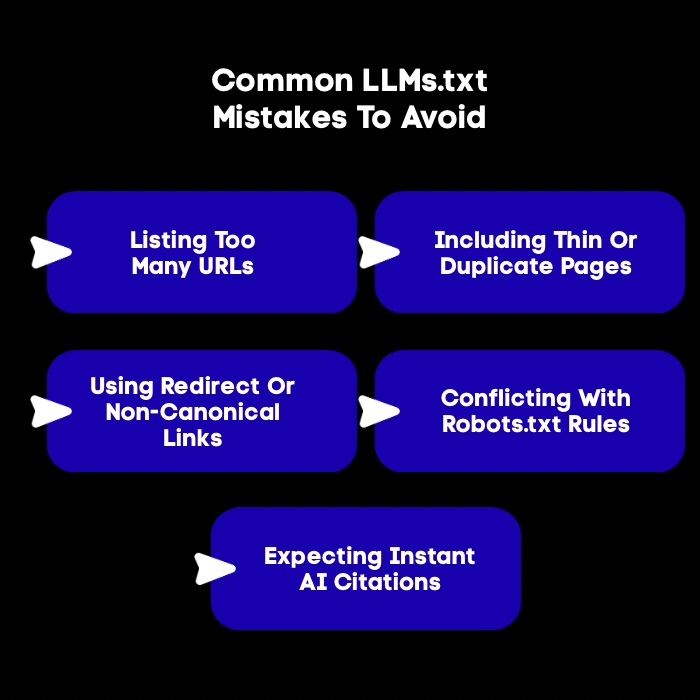
Creating an llms.txt file is straightforward, but common mistakes can undermine its effectiveness. SEO teams must avoid these errors to send clear signals to AI systems. Issues include treating the file as a sitemap, misaligning it with other SEO directives, adding too much information, linking to irrelevant pages, or conflicting with files like robots.txt.
These issues confuse bots and weaken the file’s purpose. The next sections will outline these pitfalls so you can avoid them.
1. Listing Too Many URLs
A common mistake is listing too many URLs in llms.txt. This file isn’t meant to index your whole website; that’s what your XML sitemap is for. Instead, llms.txt should highlight only your most important content. Including dozens or hundreds of links weakens its impact and confuses AI systems about your priorities.
To avoid this, be selective:
- Only include a few high-value, canonical pages.
- Treat the file as your website’s “greatest hits,” not a full catalog.
A short, focused list sends a much stronger signal about what matters most.
2. Including Thin Or Duplicate Pages
Including links to thin or duplicate content in your llms.txt file is a common mistake. Thin content offers little unique value, while duplicate pages repeat similar information. Pointing AI systems to low-quality content hurts your authority and leads to poor AI-generated answers.
Instead, only include pages that are rich in original content, the canonical version if duplicates exist, and substantial enough to answer user questions. This boosts visibility for your best assets.
3. Linking Non-Canonical Or Redirect URLs
Avoid linking to non-canonical or redirecting URLs in your llms.txt file. This causes confusion and extra processing for AI systems and search engines.
Your file should only include clean, direct URLs; the final destination that returns a 200 OK status code. Always double-check that each URL is the canonical version and does not redirect elsewhere. This attention to detail keeps your file efficient and easy for bots to process.
4. Conflicting With Robots.txt Rules
One of the most damaging mistakes you can make is creating a conflict between your llms.txt and robots.txt files. These two files must work in harmony. A conflict occurs when you list a URL in llms.txt but then block crawlers from accessing it in your robots.txt file. This contradiction sends a confusing message to search engines and can nullify the benefits of your llms.txt.
You are essentially telling an AI, "This page is important," while telling a search engine bot, "You are not allowed to see this page." This can result in the page being ignored altogether. Always audit both files to ensure they are aligned.
5. Expecting Instant AI Citations
A common mistake is expecting immediate results from your llms.txt file. While it guides AI, it's not a magic solution for instant citations or better search rankings. Adoption and impact are still evolving, and AI systems need time to crawl and process your file, sometimes days, weeks, or longer.
Patience is essential; benefits will be gradual, not instant. Treat llms.txt as a long-term strategy to future-proof your content. Proper setup and maintenance lay the foundation for improved visibility in an AI-driven world, but don’t expect overnight results.
Conclusion
Understanding llms.txt is crucial for anyone looking to enhance their web presence in an evolving digital landscape. This file not only clarifies your content structure but also strengthens your SEO by signaling priority URLs and enhancing the discoverability of your resources.
By following best practices and avoiding common pitfalls, you can effectively utilize llms.txt to improve your site's performance. As the way search engines interact with content continues to evolve, keeping your llms.txt updated will ensure you're well-positioned to leverage the benefits it offers.
Frequently Asked Questions
What is llms txt supposed to be?
The llms.txt file is a proposed standard for a text file that guides large language models. It's meant to be a curated map of a website's most important content, helping AI systems and search engines understand the structure and priority of key web pages more effectively.
ai.txt vs llms.txt: What’s the difference?
Both llms.txt and ai.txt are proposed file names for guiding AI, and the concept is very similar. The llms.txt specification, proposed by Jeremy Howard, has gained significant traction and uses Markdown files. Currently, llms.txt is the more widely discussed and adopted term across the internet.
How to see the llms.txt file of a website?
You can see if a website has an llms.txt file by typing /llms.txt after its domain name in your browser's address bar (e.g., https://example.com/llms.txt). If the file exists and is public, its content will be displayed, giving you insight into how that site is guiding AI systems.
How to use llms.txt?
To use llms.txt, you create a simple text file listing your most important web pages in Markdown format. You then upload this file to your website's root directory. This allows AI systems and search engines to find it and use it as a guide for generative engine optimization.
Will llms.txt file help your SEO?
Yes, an llms.txt file can indirectly help your search engine optimization efforts. By guiding AI systems to your most authoritative content, you can improve your visibility in AI-driven search results and strengthen your brand's E-E-A-T signals, which can positively influence your overall rankings and visibility.
How does the llms.txt file help with generative engine optimization?
The llms.txt file helps with generative engine optimization (GEO) by providing a clear, curated path to your best content for AI systems. This increases the likelihood that AI-powered search engines will use your authoritative information to answer user queries, making your content more visible in generative responses.
What information should be included in an llms.txt file?
An llms.txt file should include essential information such as the model's name, version, training data details, usage restrictions, and any licensing agreements. This ensures transparency and helps users understand how to properly utilize the language model within ethical and legal boundaries.
How do large language models use the llms.txt file?
Large language models use the llms.txt file as a starting point to understand a website. AI systems crawl this file to quickly identify high-priority content without having to parse complex HTML. This allows them to efficiently retrieve and process your most relevant information for generating accurate answers.


.svg)


.webp)