
.jpg)
Schema Markup for AEO: Quick Summary
To implement schema markup for AEO, choose markup that matches the page, add it in JSON-LD, validate the published output, and monitor its search performance.
- Match schema to the page: Use Article or BlogPosting for editorial content, Organization and Person for entities, and Product, Offer, or LocalBusiness where relevant.
- Write the content first: Every marked-up detail must be accurate and visible on the page.
- Use JSON-LD: It is Google’s recommended format and is easier to maintain across templates.
- Check existing markup: Audit schema added by your CMS, theme, or plugins before adding custom code.
- Know current feature support: FAQPage and HowTo markup no longer generate Google rich results.
- Validate before and after publishing: Use the Rich Results Test, Schema Markup Validator, and URL Inspection.
- Measure the results: Track valid items, rich-result performance, AI search impressions, citations, referral traffic, and conversions.
Schema markup works best when it solves a clear problem: helping search engines identify what a page contains without relying only on inference. Used correctly, it can clarify entities such as articles, authors, organizations, products, and offers, while making eligible pages available for supported rich results. What it cannot do is guarantee a ranking, citation, or place in an AI-generated answer.
This guide explains how to use schema markup for AEO with realistic expectations, from selecting the right type and adding JSON-LD to validating the markup, avoiding conflicts, and measuring its impact.
What Is Schema Markup in AEO?
Schema markup is structured data added to a web page to describe its content in a standardized, machine-readable format. Using Schema.org vocabulary, it can identify entities such as an article, author, organization, product, and the relationships between them.
For AEO, schema provides search engines with additional context and can support eligible rich results. It does not replace clear content and is not required for inclusion in AI-generated search answers.
Why Does Schema Markup Matter for Answer Engine Optimization?
Schema markup gives search engines clear, machine-readable details about a page. It identifies the content type, author, organization, product, and related entities. Accurate schema can reduce ambiguity and make pages eligible for supported rich results.
However, schema is not required for AI search. It does not improve rankings, establish trust, or guarantee citations. Google confirms that no special schema is needed for AI Overviews or AI Mode.
Use schema as a supporting SEO layer. Match it to the page, keep it accurate, and validate it after publishing. Helpful content, crawlability, and indexing remain more important for AI visibility.
How do I implement schema markup for AEO step by step?

Implementing schema markup for AEO involves auditing the page, choosing a relevant schema type, generating JSON-LD, adding it to your site, and validating the final output. Google does not require special schema for AI features, so focus on accurately describing your visible content.
Let’s look at it in detail:
1. Audit the page and existing schema
Check whether your CMS, theme, or plugin already generates structured data. Look for missing information, outdated details, conflicting entities, and markup that does not match the visible page.
2. Choose a schema type that matches the content
Select the most specific type that describes the page, not simply the keyword you want to rank for. Common combinations include BlogPosting for articles, Product and Offer for product pages, Organization for company pages, Person for authors, and LocalBusiness for location pages.
Use FAQ schema only for visible question-and-answer content. Google generally limits FAQ rich results to authoritative government and health sites, while HowTo rich results have been retired.
3. Match the markup to visible page content
Every fact included in the schema should also appear on the page. Do not add hidden questions, ratings, reviews, prices, or product details solely through structured data.
If the page lacks enough information to support the intended schema, improve the visible content first. Schema clarifies existing content but does not replace it.
4. Generate accurate JSON-LD
Google recommends JSON-LD because it is generally easier to implement and maintain. You can create it manually, through a generator, or with a CMS plugin.
Follow Google’s documentation for the chosen type and include all applicable required properties. Add recommended properties when they are relevant, prioritizing accuracy over quantity.
5. Add the markup without conflicts
Add the JSON-LD to the page’s head or body section, or through a CMS field, plugin, or template. Check the existing schema first to avoid adding contradictory information.
A page can contain multiple relevant schema types. Keep entity names, URLs, author details, and identifiers consistent across them.
6. Test before and after publishing
Use the Schema Markup Validator to check Schema.org markup and Google’s Rich Results Test to check eligibility for supported search features. Test the live URL again after publishing and monitor relevant reports in Google Search Console.
Fix all errors and review warnings before completing the implementation. Valid schema improves eligibility but does not guarantee that Google will display a rich result.
How Do I Add Schema Markup to My Website?

Add schema markup by placing JSON-LD in your page’s HTML or adding it through a CMS plugin, theme template, or Google Tag Manager. Before adding anything, check whether your theme or plugins already generate schema. For repeated page types, use a template that pulls accurate information from each page instead of repeating static values.
1. Add JSON-LD to the Head or Body
Place the JSON-LD script in either the head or body of the page. Google supports both locations and recommends JSON-LD because it is generally easier to implement and maintain.
Ensure the markup describes content visible on the page. Test it with the Schema Markup Validator and Google’s Rich Results Test.
2. Add Schema in WordPress
First, check whether your WordPress theme or SEO plugins already generate schema. Configure or extend the existing output instead of installing multiple plugins that may produce contradictory information.
For custom implementation, use a dedicated plugin, custom plugin, or child-theme hook. Avoid editing the parent theme directly because updates can overwrite your changes.
3. Add Schema in Shopify
Audit the schema generated by your Shopify theme and installed apps before adding new markup. Product and review apps may already output structured data.
Modern Shopify themes commonly use a product template that references Liquid sections or snippets. Add dynamic JSON-LD to the relevant Liquid file, ensuring details such as price, availability, ratings, and URLs match the current product page. Test changes in a duplicate theme before publishing.
4. Use Google Tag Manager When Needed
Google Tag Manager can deploy JSON-LD without directly editing the website’s source code. Add the markup through a Custom HTML tag and use triggers to control which pages receive it.
Use variables to pull titles, URLs, images, and other values from each page instead of hard-coding them. For frequently changing product prices or availability, theme-generated or server-rendered markup is more reliable than Google Tag Manager.
Which Schema Types Help Most With AEO?
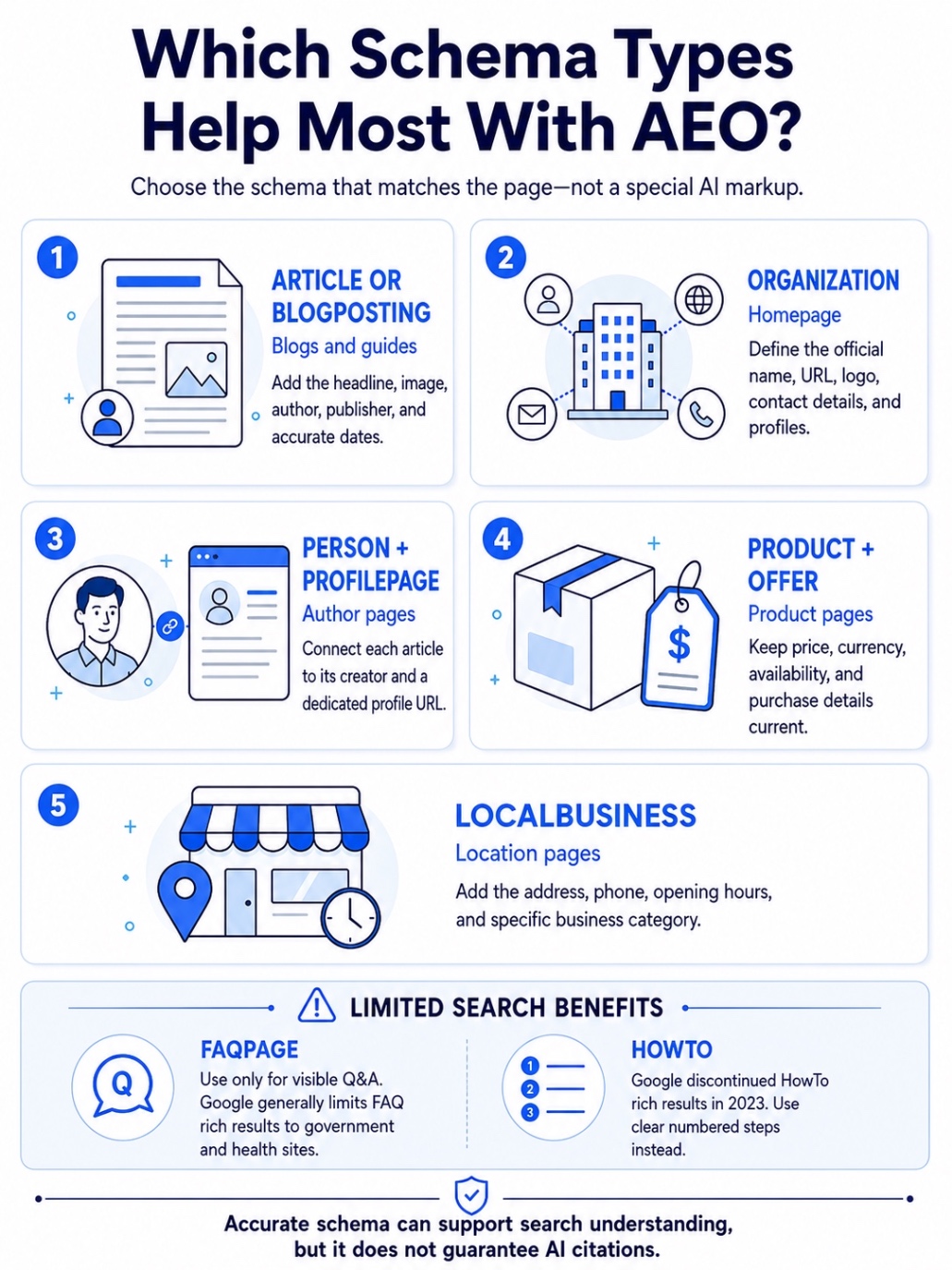
No schema type is specifically required for AEO. Choose the type that accurately matches the page’s visible content. Structured data can help search engines understand a page and enable supported search features, but it does not guarantee AI citations.
1. Article or BlogPosting Schema
Use Article or BlogPosting schema for blogs, guides, and editorial content. Include the headline, image, author, publisher, publication date, and modification date. Only update the modification date after making meaningful changes.
2. Organization Schema
Add Organization schema to the homepage to define the company’s official name, URL, logo, contact details, and external profiles. Use the same organization details across the site to help search engines identify the correct business entity.
3. Person and ProfilePage Schema
Connect each article to its author using Person schema and a profile URL. Dedicated author pages can use ProfilePage schema with the author as the main entity. This identifies the content creator but does not prove expertise by itself.
4. Product and Offer Schema
Use Product and Offer schema on pages focused on a specific product. Include accurate details such as the product name, price, currency, availability, and purchase conditions. Keep the markup synchronized with the visible page.
5. LocalBusiness Schema
Use LocalBusiness schema for companies with a physical location or defined service area. Include the business name, address, phone number, opening hours, and relevant business category. Choose the most specific subtype available.
What About FAQPage and HowTo Schema?
Use FAQPage schema only when the questions and answers are visible on the page. Google generally limits FAQ rich results to authoritative government and health websites.
Google discontinued HowTo rich results in 2023. For instructional content, use clear numbered steps and appropriate Article or BlogPosting schema rather than expecting HowTo markup to improve AI visibility.
What Are the Most Common Schema Markup Mistakes?

Schema errors do not usually lower rankings directly. However, they can make markup invalid, prevent eligibility for supported search features, or trigger a structured-data manual action. Schema also does not guarantee visibility in AI-generated answers. Avoid these common implementation mistakes.
1. Markup Does Not Match Visible Content
Structured data must accurately represent information users can access on the page. Do not mark up hidden ratings, reviews, prices, questions, or answers.
Misleading markup may be ignored, lose eligibility for search features, or result in a structured-data manual action. Schema should clarify existing content, not introduce information that users cannot see.
2. The Schema Type Does Not Match the Page
Choose the most specific type that accurately represents the page. For example, do not use Recipe schema for general instructions, Product schema on a category page, or LocalBusiness schema without corresponding business details.
Do not add FAQPage or HowTo markup solely to earn rich results. Google no longer displays either FAQ or HowTo rich results.
3. Properties, URLs, or Images Are Inaccurate
Required and recommended properties vary by search feature. Check the current Google documentation for the specific schema type instead of relying on a generic checklist.
Ensure names, prices, URLs, availability, and other values are complete and current. Image URLs must be relevant, accessible, crawlable, indexable, and in a supported format.
4. Plugin and Custom Markup Contradict Each Other
Themes, CMS platforms, and SEO plugins may already generate schema. Audit the existing output before adding custom JSON-LD.
Multiple schema types and separate JSON-LD blocks are allowed. Problems arise when they provide conflicting names, URLs, authors, or identifiers for the same entity. Keep related information consistent and connect entities using matching identifiers where appropriate.
5. Dates, Authors, and Identifiers Are Inconsistent
Use ISO 8601 formatting for publication and modification dates, including timezone information. Only change the modification date after making a meaningful update to the content.
Include every visible author and identify each as a Person or Organization. Add a valid profile or organization URL where available. Author markup helps identification but does not prove expertise by itself.
6. The Published Page Is Not Tested
Validate the markup before publishing and test the live URL afterward. Use the Schema Markup Validator for general Schema.org markup and Google’s Rich Results Test for currently supported search features.
Finally, inspect the published URL to confirm that search engines can access the page and see the structured data in the rendered HTML.
How Do I Test and Validate Schema Markup for AEO?

Testing schema for AEO uses the same tools and standards as other structured data. Validate the code during development, then test the published page to confirm that search engines can access the final output. Passing validation does not guarantee a rich result or inclusion in an AI-generated answer.
1. Use the Rich Results Test for Google Features
Google’s Rich Results Test checks markup that supports current Google search features. It identifies detected items, critical errors, and non-critical issues.
Test the code before publishing, then test the live URL. The URL option is more reliable because it checks the rendered page. FAQ and HowTo markup will not produce Google rich results because both features have been discontinued.
2. Use the Schema Markup Validator for Structure
The Schema Markup Validator checks markup against the broader Schema.org vocabulary without applying Google-specific feature requirements.
Use it to find syntax errors, invalid properties, and incorrect relationships across all schema types. A clean result confirms that the structure is understood by the validator, but it does not verify that the information is accurate, visible, or eligible for a Google search feature.
3. Test the Published and Rendered Page
A code snippet may validate correctly while the published version fails because of a CMS, plugin, template, caching, or JavaScript issue.
After publishing, test the live URL and inspect the rendered HTML. Use URL Inspection to confirm that Google can access the page and see the structured data. Check that the page is not blocked by robots.txt, a noindex directive, login requirements, or other access controls.
4. Prioritize Critical Errors
A critical error usually makes the affected structured-data item ineligible for its supported search feature. Other valid items on the same page may still remain eligible.
Non-critical issues generally identify missing recommended properties. Fix them when the properties are relevant and available, but do not add inaccurate information simply to remove a warning.
5. Fix, Retest, and Monitor
Correct the reported issue, rerun the validator, and confirm that the live page contains the updated markup. Start with a small set of pages before applying a new template across the entire site.
After deployment, monitor the relevant structured-data reports in Search Console. This helps identify problems introduced later by template updates, plugin changes, or serving issues.
How Do I Measure AEO Impact After Adding Schema?
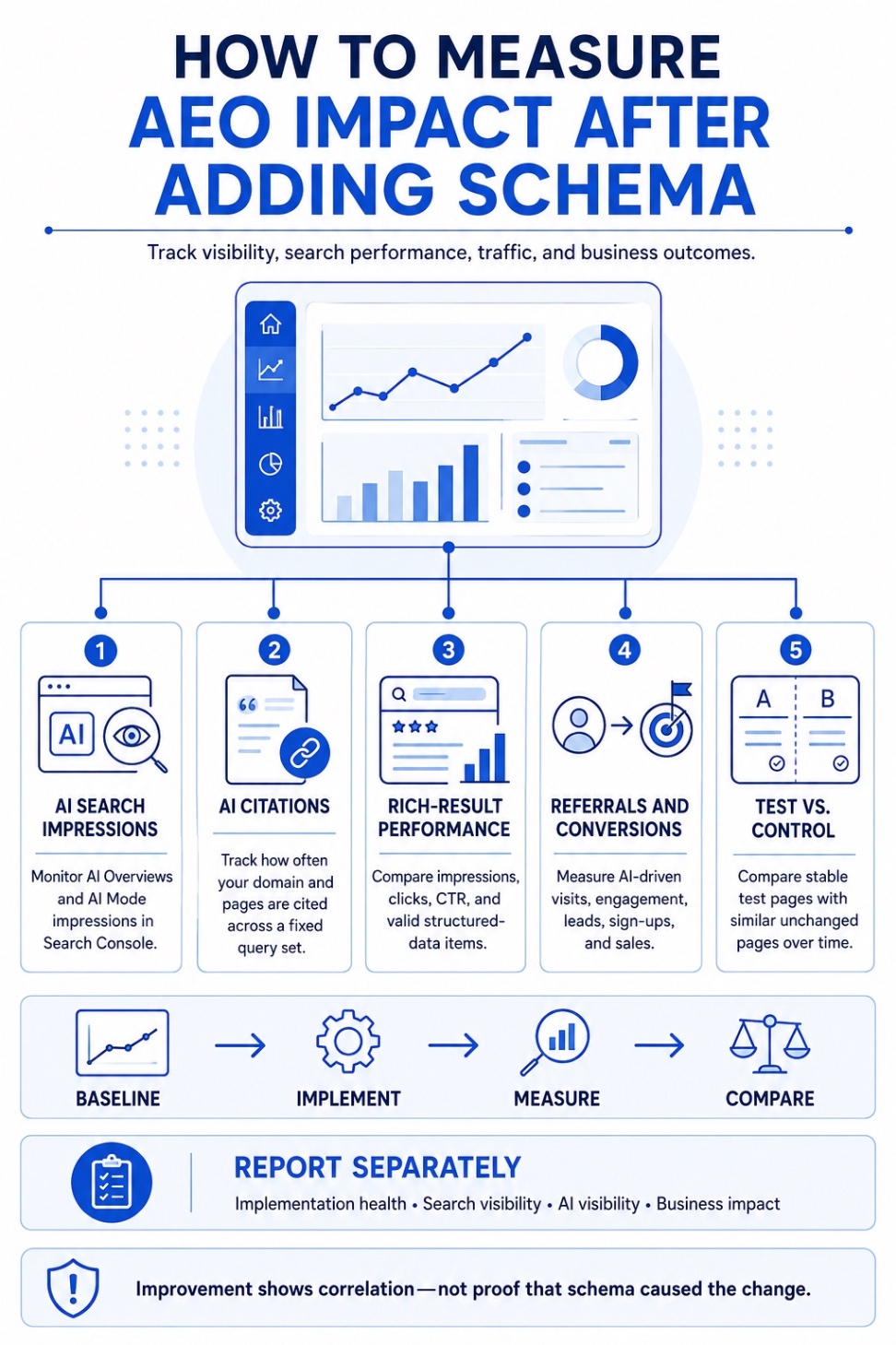
Measure the impact of schema across four areas: implementation health, rich-result performance, AI visibility, and referral outcomes. Establish a baseline before deployment and compare the results over time. Treat any improvement as a correlation rather than proof that schema alone caused it.
1. Track generative AI impressions in Search Console
If available for your property, use Search Console’s Generative AI performance report to monitor impressions from AI Overviews and AI Mode.
Compare impressions by page, date, country, and device before and after implementation. The report is still being rolled out and does not provide query-level citation data, so combine it with other tracking methods.
2. Monitor citations across answer engines
Create a fixed set of questions relevant to your business and check them regularly across ChatGPT, Perplexity, Google, and other important answer engines.
Record how often your domain is cited, which pages are selected, and whether visibility changes over time. Use consistent prompts and conditions because AI-generated answers can vary. A citation is a visibility signal, but it does not prove that schema caused the inclusion.
3. Measure rich-result performance
Use Search Console’s rich-result status reports to confirm that Google can read the markup and to monitor valid and invalid items.
For supported search features, use the Search appearance filter in the Performance report to compare impressions, clicks, CTR, and average position. This provides a more direct view of whether eligible schema is improving how pages appear in traditional search results.
4. Track AI referral traffic and conversions
Use your analytics platform to measure visits from AI tools and what users do after arriving. ChatGPT referral links include utm_source=chatgpt.com, making that traffic easier to identify.
Track engaged sessions, sign-ups, leads, and conversions; not just citations. A page may receive greater AI visibility without generating clicks, so visibility and business impact should be reported separately.
5. Compare test pages with a control group
Select a group of stable pages, record several months of baseline data, and add schema to only the test group. Compare their performance with similar pages that remain unchanged.
Keep content, titles, and internal links stable during the test where possible. Also record crawl dates, major site changes, seasonality, and algorithm updates. This reduces outside influences and gives you a more reliable view of schema’s contribution.
How You Can Strengthen Your AEO Strategy With Scalenut
Adding schema markup is an important step for AEO, but markup alone does not show whether your pages are actually getting surfaced, cited, or outperformed in AI search. Scalenut helps bridge that gap by combining AI visibility tracking with content optimization and SEO execution, so you can move from schema setup to measurable search impact.
- AI Visibility Tracking: Monitor how often your brand appears in AI answers and track brand mentions, prompt coverage, and visibility trends across AI search workflows.
- Prompt And Topic Insights: Identify the prompts, topics, and opportunity areas connected to your brand so you can align your content with real user questions and AI retrieval patterns.
- Content Optimization For AI And SEO: Improve pages with real-time GEO scores, AI-readability signals, and step-by-step optimization suggestions designed to strengthen visibility across search and AI engines.
- Competitor AI Visibility Analysis: Benchmark your brand against competitors by comparing visibility, mentions, and relative positioning in AI-generated results.
- End-To-End SEO Execution: Plan, create, optimize, and audit content in one platform built to help teams improve performance in both traditional search and AI-driven discovery.
If you are already investing in schema markup, Scalenut gives you a practical way to connect that work to broader AEO outcomes like stronger AI visibility, better content decisions, and more actionable optimization.
Book a demo to see how Scalenut can help you turn your AEO strategy into measurable growth.
Conclusion
Effective schema implementation starts with accurate content and a schema type that matches the page’s purpose. Use JSON-LD, keep the markup consistent with visible information, check for plugin conflicts, and validate the published page. This strengthens technical SEO and can make eligible pages available for supported rich results.
Treat AEO schema generation as a precise, page-level process. Schema gives search engines and other AI systems clearer context, but the content must still be useful, crawlable, and indexed. It also does not control featured snippets, which Google selects from page content.
Start with high-value pages, confirm that Google can read the markup, and monitor search visibility, AI impressions, referral traffic, and conversions before expanding it across your site.
Frequently Asked Questions
How do I know if my schema markup for AEO is working?
Use Google’s Rich Results Test for supported Google features and the Schema Markup Validator for general Schema.org checks. Test the published URL and monitor Search Console. Passing validation confirms the markup can be parsed, but it does not guarantee search visibility.
Can I use multiple schema types on one page for AEO?
Yes. Google supports multiple relevant schema types on one page, whether nested or placed in separate blocks. Keep shared details consistent, connect related entities with the same ID where appropriate, and avoid irrelevant or contradictory information that could affect rich-result eligibility.
How often should I update my schema markup for optimal AEO results?
There is no fixed update schedule. Revise schema whenever visible content changes, especially prices, availability, dates, ratings, or author details. Review it after template, theme, CMS, or plugin changes, and keep all time-sensitive information accurate.
Is there an easy way for small businesses to add schema markup for AEO without coding skills?
Yes. WordPress plugins such as Schema Pro and Rank Math can add JSON-LD through guided interfaces without manual coding. Review the mapped values, check for schema already added by your theme or plugins, and validate the published output.
Are there tools that can help generate or validate schema markup for AEO?
Yes. Google’s Structured Data Markup Helper can assist with generation. Use the Rich Results Test for supported Google features and the Schema Markup Validator for general Schema.org validation. Always review and test generated markup before publishing it.
How long does it take for Google to detect new or updated schema markup?
As with traditional SEO, there is no fixed timeline. Google must recrawl and reindex the page, which can take a few days to a few weeks. Faster detection does not guarantee changes in search rankings or organic traffic. Use URL Inspection to monitor progress.
Why can valid schema markup pass testing but still not produce a rich result?
Validation confirms Google can read the markup and checks applicable feature requirements. A comprehensive schema may still not appear because Google selects search features based on the query, device, location, and overall experience. Schema cannot replace broader trust signals or establish AI citation eligibility.
Should schema markup be added site-wide or only to selected pages?
Apply reusable markup only where the information remains accurate across a page type or site. Add article schema to each relevant blog post and service schema only to genuine service pages. Page-level mapping prevents irrelevant markup and reveals schema gaps.
How can I identify which plugin, theme, or template is generating existing schema?
Test the live URL, inspect the rendered HTML for application/ld+json scripts, and compare the output with your plugin, theme, and template settings. For a safe technical implementation, disable suspected sources only in staging. Treat schema as an SEO enhancement that supports machine understanding.
Should I remove FAQPage or HowTo markup now that Google no longer supports their rich results?
You do not need to remove accurate FAQPage or HowTo markup solely because Google discontinued their rich results. Both remain valid Schema.org types. Keep them only when they match visible content and serve a clear purpose. Do not replace them with unrelated speakable schema.


.svg)


.webp)