

AirOps Review: Is It The Right SEO And GEO Tool In 2026?

AirOps Review: Quick Summary
- Best For: Enterprise SEO teams, content operations teams, agencies, and brands managing large content libraries.
- Not Best For: Solo creators, beginners, or small teams that want a quick keyword-to-blog workflow without setup.
- Strongest Features: AI Search Insights, AI Actions, Grids, no-code workflows, Brand Kits, Knowledge Bases, Page360, Offsite, and CMS integrations.
- Pricing: AirOps offers a 14-day free trial, but advanced capabilities like AI Search Visibility Insights, content refresh, content creation, social engagement, and higher limits are mainly built for teams ready to move into paid or custom plans.
- Main Limitation: AirOps can feel heavy if your team does not already have the strategy, content volume, and workflow maturity to make full use of it.
- Best Alternative: Scalenut is a more practical option if you want AI visibility tracking, GEO content creation, optimization, audits, internal linking, and AI traffic insights in a simpler SEO + GEO workflow. Scalenut is also more affordable compared to AirOps with annual pricing starting at $24/month.
When AirOps showed up in my research, what stood out was that it does not position itself as just another AI writing tool. It brings AI search visibility, content refreshes, workflows, Grids, Brand Kits, Knowledge Bases, CMS publishing, and human review into one content operations system.
A tool can offer a lot of automation, but the real test is whether it makes SEO and GEO execution easier, or only works well for teams that already have a mature content process.
In this AirOps review, I’ll break down its features, pricing, pros and cons, real user feedback, best-fit use cases, and how it compares with Scalenut for teams that want a simpler and more efficient way to track, create, optimize, and improve SEO and GEO content.
What Is AirOps And How Does It Help Scale SEO And GEO Workflows In 2026?
AirOps is an AI search and content operations platform for teams that want to scale SEO, GEO, and content refresh workflows. What I like is that it treats content like a system, not a one-off AI task, by connecting SEO data, AI models, Brand Kits, Knowledge Bases, CMS platforms, and human review into reusable workflows. But it works best when your team already has a clear content process because AirOps can scale that process, not fix a messy strategy on its own.
How Does AirOps Help With SEO And GEO Workflows?
- AI Search Visibility: Tracks where your brand appears across AI search engines, which prompts mention you, where competitors show up, and which content opportunities need attention.
- Workflow Automation: Helps teams build repeatable workflows for SERP analysis, briefs, drafts, metadata updates, content refreshes, reviews, and publishing.
- Grids For Bulk Execution: Lets teams run workflows across many pages, topics, or content tasks at once, which is useful for bulk refreshes and page-level optimization.
- Brand Governance: Uses Brand Kits, Knowledge Bases, and human review steps to keep AI outputs more accurate, on-brand, and aligned with approved company context.
- CMS Publishing: Connects with CMS platforms so approved content updates can move closer to publishing without endless copying and pasting between tools.
What Are The Pros Of AirOps?
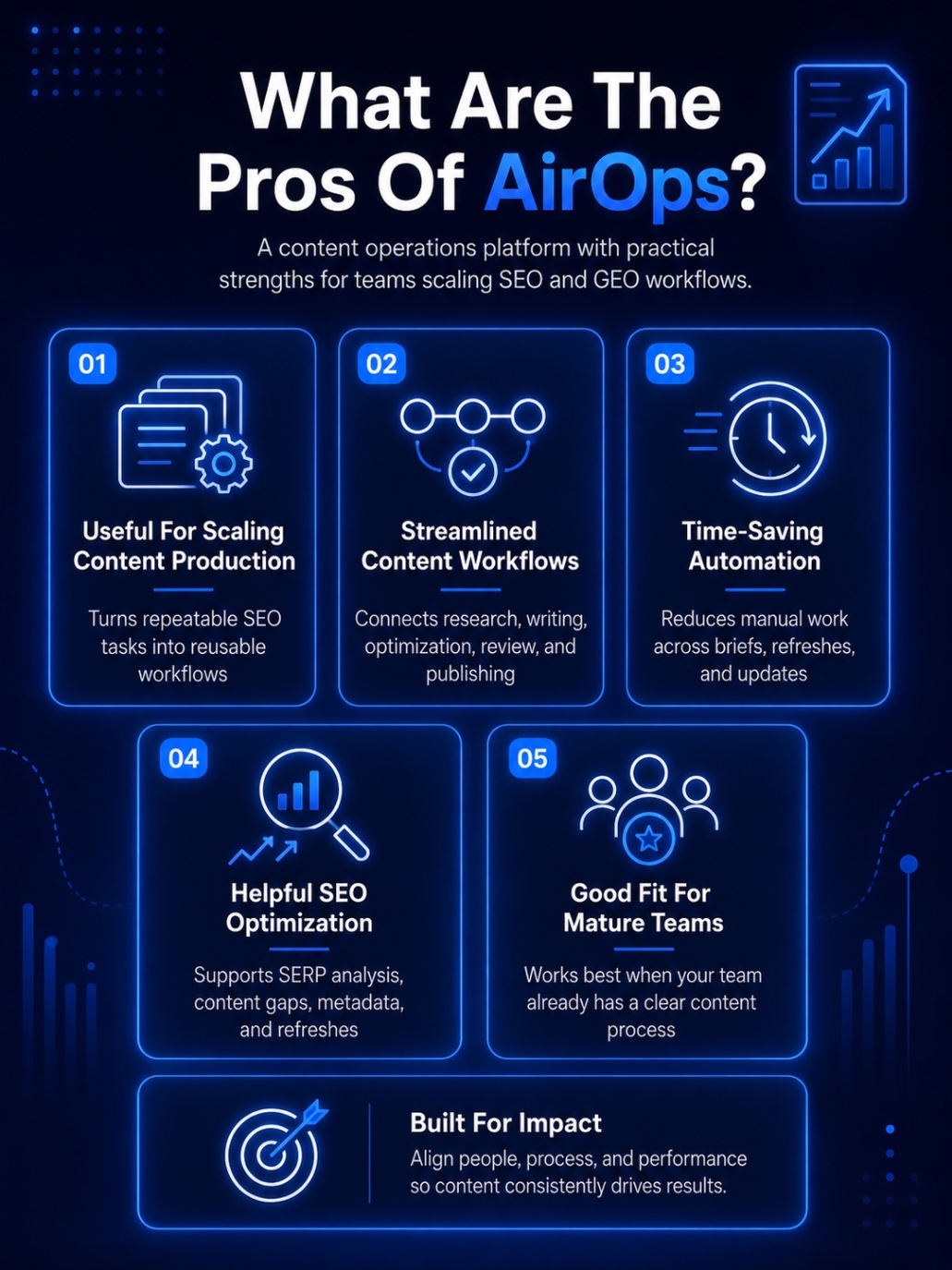
Here’s where AirOps feels strongest:
1. Useful For Scaling Content Production
AirOps is genuinely useful if your team is creating or refreshing content at scale. The platform helps turn repeatable SEO tasks into workflows, which means you are not starting from scratch every time you need a brief, draft, metadata update, or page refresh.
This is probably its biggest strength. If your team already has a working content process, AirOps can help you scale it faster.
2. Streamlined Content Workflows
One thing AirOps does well is bring research, writing, optimization, review, and publishing closer together.
Instead of jumping between spreadsheets, AI tools, docs, SEO platforms, and your CMS, AirOps lets you build workflows that connect these steps. That makes the content process feel more organized, especially for teams managing many pages or campaigns at once.
3. Strong Time-Saving Automation
The automation is useful for repetitive content tasks like generating briefs, updating meta tags, refreshing old pages, repurposing content, or running workflows across multiple URLs.
4. Helpful SEO Optimization Capabilities
AirOps is also strong on the SEO side. It can help with SERP analysis, content gaps, metadata, refresh workflows, and content optimization.
For teams focused on both SEO and AI search visibility, this is helpful because the platform does not treat content creation and optimization as separate workflows.
5. Good Fit For Teams With Existing Processes
AirOps works best when your team already knows what it wants to scale.
If you have clear briefs, review rules, brand guidelines, and publishing workflows, AirOps gives you a way to systemize them. That is where the tool feels powerful. It helps mature teams move faster without completely losing control over quality.
What Are The Cons Of AirOps?
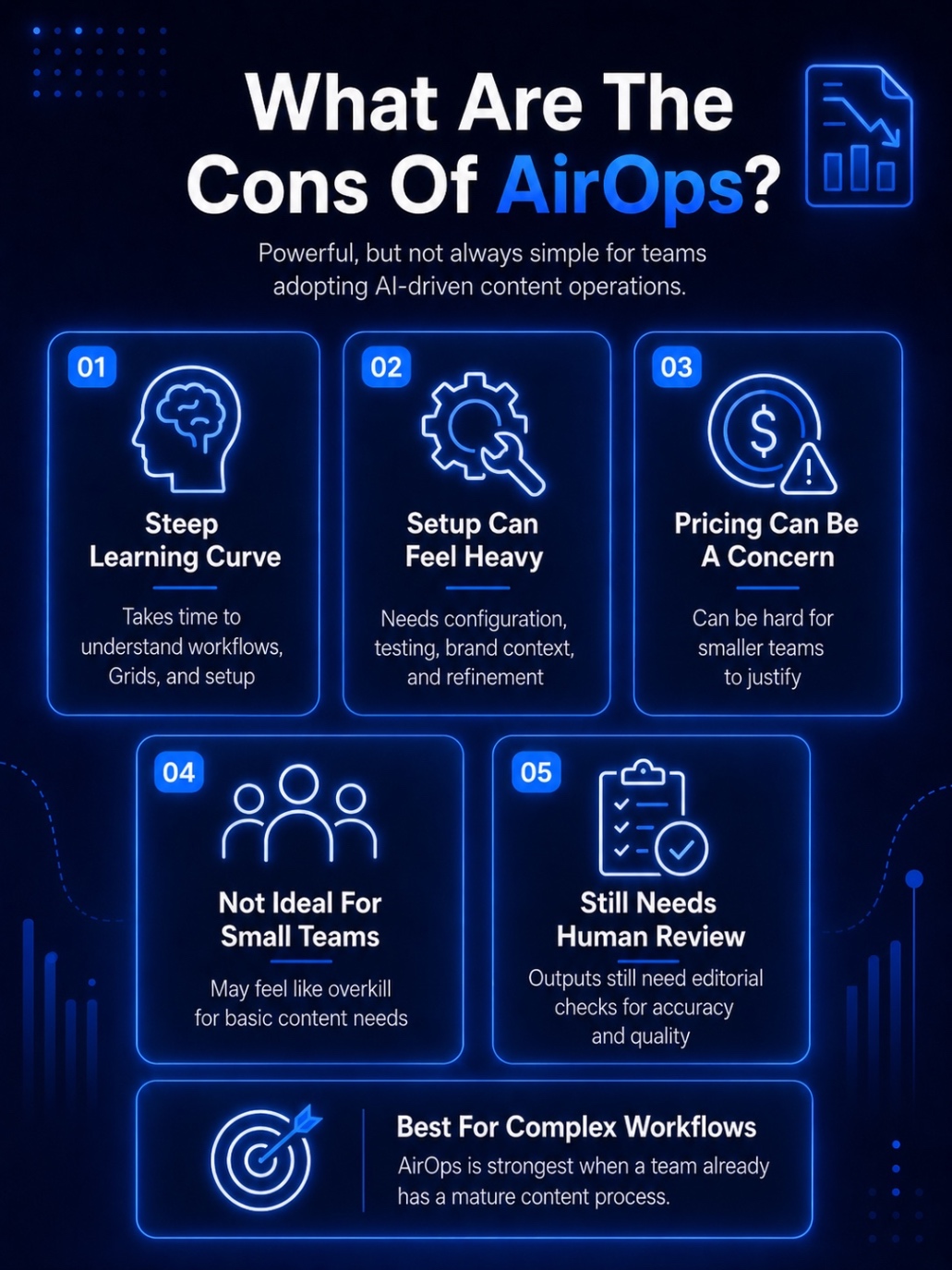
AirOps is powerful, but it is not the easiest tool to adopt. Here are the main areas where AirOps can feel limited.
1. Steep Learning Curve
AirOps can take time to understand, especially if your team is new to workflow automation.
The platform has Workflows, Grids, Brand Kits, Knowledge Bases, AI models, integrations, and review steps. That flexibility is useful, but it also means setup is not instant. You need time to understand how the pieces fit together.
2. Setup Can Feel Heavy
AirOps works best when workflows are built properly. That means your team may need to spend time configuring steps, adding brand context, connecting tools, testing outputs, and refining prompts.
If you are expecting a simple plug-and-play writing tool, this can feel like too much work in the beginning.
3. Pricing Can Be A Concern
Pricing is one of the bigger drawbacks, especially for smaller teams.
AirOps is clearly built for teams that have enough content volume to justify the investment. If you are not creating or refreshing a lot of content, the cost can feel harder to justify compared to simpler SEO and GEO tools.
4. Not Ideal For Solo Creators Or Small Teams
AirOps may feel like overkill if you only need keyword research, content writing, or basic optimization.
Solo creators, small agencies, and lean marketing teams may not use enough of the platform to get full value from it. In those cases, a simpler tool with clearer pricing and faster execution may make more sense.
5. Still Needs Human Review
AirOps can speed up content operations, but it does not remove the need for editors, strategists, and SEO judgment.
AI-generated outputs still need review for accuracy, tone, structure, and usefulness. So while AirOps helps with scale, it should not be treated as a replacement for a strong content strategy or editorial process.
Looking for something lighter than AirOps? Explore the top GEO tools for small businesses in 2026 to find simpler, more affordable options.
AirOps Review: What Are Real Users Saying?
AirOps is rated 4.6 on G2, and a lot of users seem to appreciate it for making content operations easier to manage. The biggest positives are its usefulness, ease of use, streamlined content workflows, time-saving automation, and SEO optimization capabilities. That makes sense because AirOps is built to help teams reduce repetitive work and scale content production more systematically.
But AirOps also has a few clear trade-offs. The platform can take time to learn, especially because it combines workflows, Grids, Brand Kits, Knowledge Bases, AI models, and integrations. Pricing also seems to be a concern for smaller teams and solo creators, which makes AirOps feel better suited for larger content operations than lean marketing teams.
“This software has a steep learning curve, and it is not a plug and play. This is suitable for mid size to Enterprise customers, who are interested in automations and producing high quality content at scale. Also, it does not provide integrations to CRM or other popular platforms that businesses use on a regular basis.”, says Richard C on G2.
That is where Scalenut starts to make more sense for leaner SEO and GEO teams. It gives teams a more affordable way to manage AI visibility, SEO/GEO content workflows, content planning, optimization, and execution without the heavier setup or pricing complexity.
Want to explore more tools beyond AirOps? Check out the 10 best AI tools for Generative Engine Optimization in 2026 to find platforms that help with tracking, optimization, and execution.
What Are The Core AirOps Features For SEO And GEO Workflows?
AirOps brings together eight core features for SEO and GEO teams: AI Search Insights, AI Actions, Grids, no-code workflows, CMS and SEO integrations, Brand Kits, Knowledge Bases, Page360, and Offsite visibility. Together, these features help teams track visibility, automate content workflows, refresh pages, and manage large-scale content operations more systematically.
Let's explore the 8 key AirOps AI tool features and capabilities in detail to understand how this AI SEO tool can streamline your AI SEO workflows:
1. AI Search Insights: Track Your Brand's Presence On AI Engines
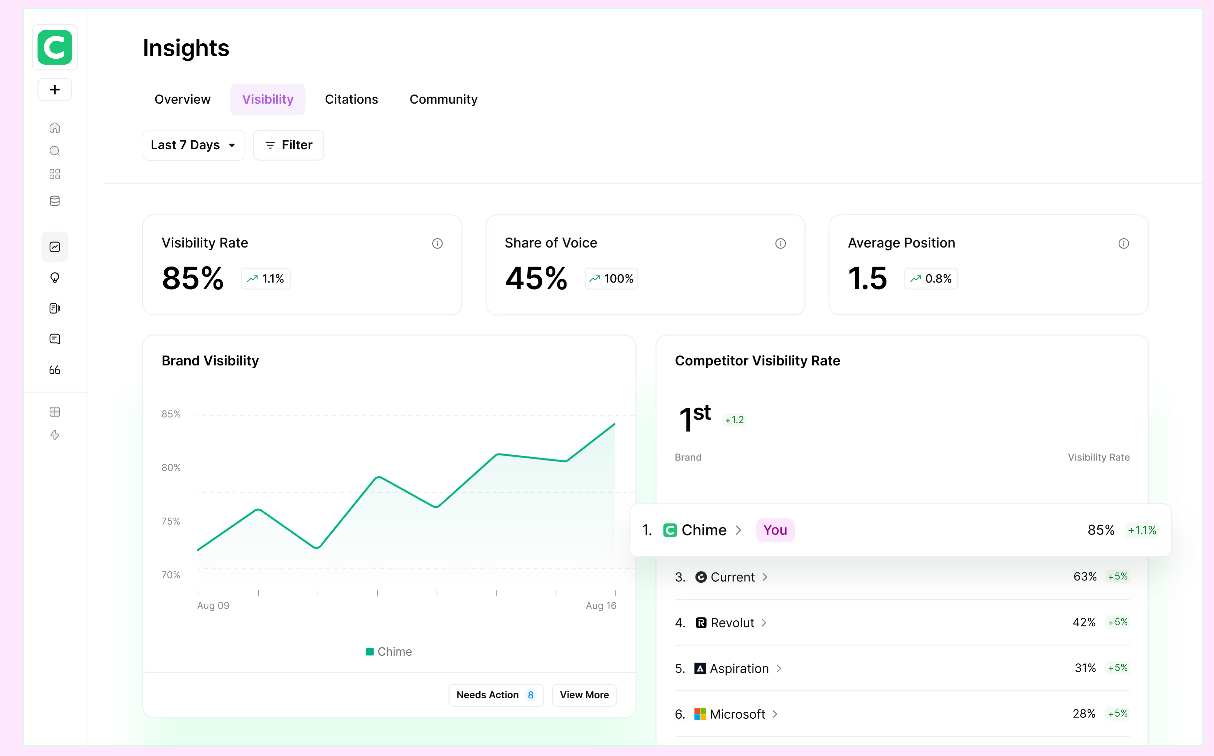
AirOps Insights helps you understand how your brand appears across AI search engines, not just Google.
It tracks visibility across platforms like ChatGPT, Gemini, Claude, Perplexity, and other AI search surfaces. You can see where your brand is mentioned, cited, missing, or losing visibility to competitors.
This is useful because ranking on Google does not automatically mean your brand is getting cited in AI answers. AirOps helps you spot that gap clearly.
a) Full Visibility Tracking
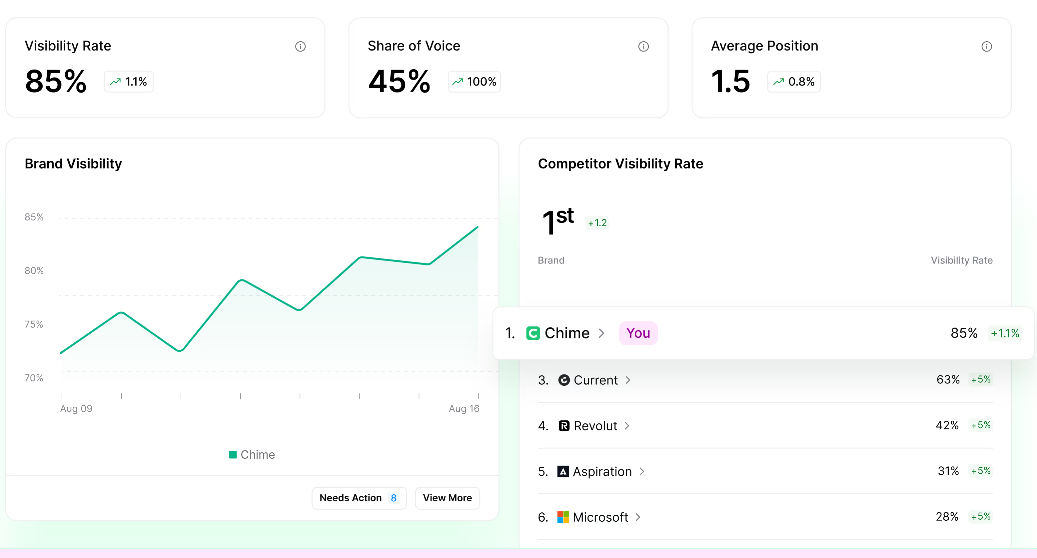
AirOps Insights tracks brand mentions, citation rate, share of voice, sentiment, and average position across prompts, topics, competitors, and AI engines.
It also connects AI visibility with performance data from sources like GSC and GA4, so you can tie AI mentions back to pages, traffic signals, and content opportunities.
b) Prioritized Opportunities & Actionable Recommendations
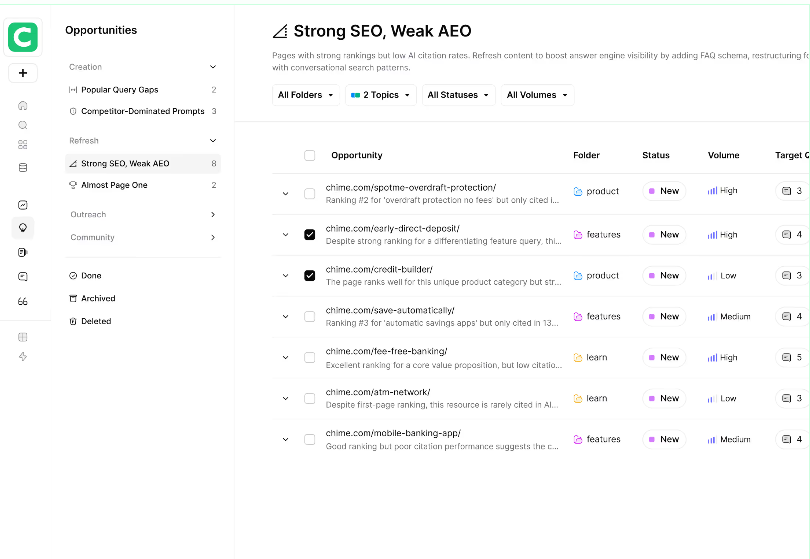
AirOps does not just show you where visibility is weak. It helps you decide what to fix next.
If a competitor is getting cited more often for an important topic, AirOps can surface that as an opportunity for a content refresh, new page, or optimization workflow.
The best part is that these insights connect with AirOps workflows and Grids, so teams can move from analysis to execution without rebuilding tasks manually in another tool.
Want to see which tools can actually help you track and act on AI visibility insights? Explore our list of the best AI monitoring tools for 2026.
2. AI Actions: AirOps AI Workflow Automation Features
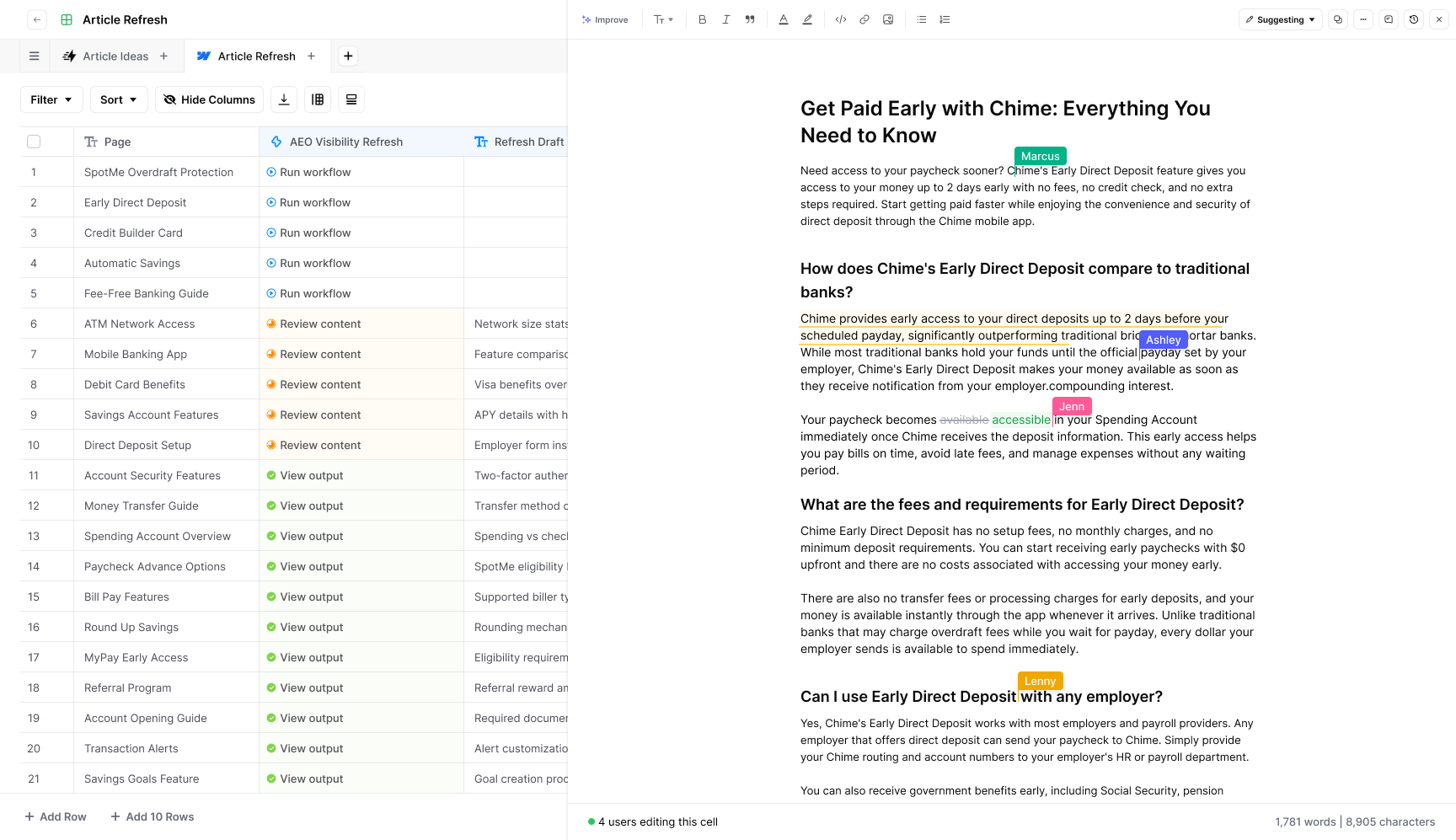
Finding SEO and AI search opportunities is one thing. Actually turning them into refreshed pages, new content, and published updates is where most teams slow down.
This is where AirOps Actions becomes useful. It helps teams move from visibility insights to structured content workflows, so execution does not get stuck between spreadsheets, briefs, writers, editors, and CMS updates.
a) Turn Insights Into Execution
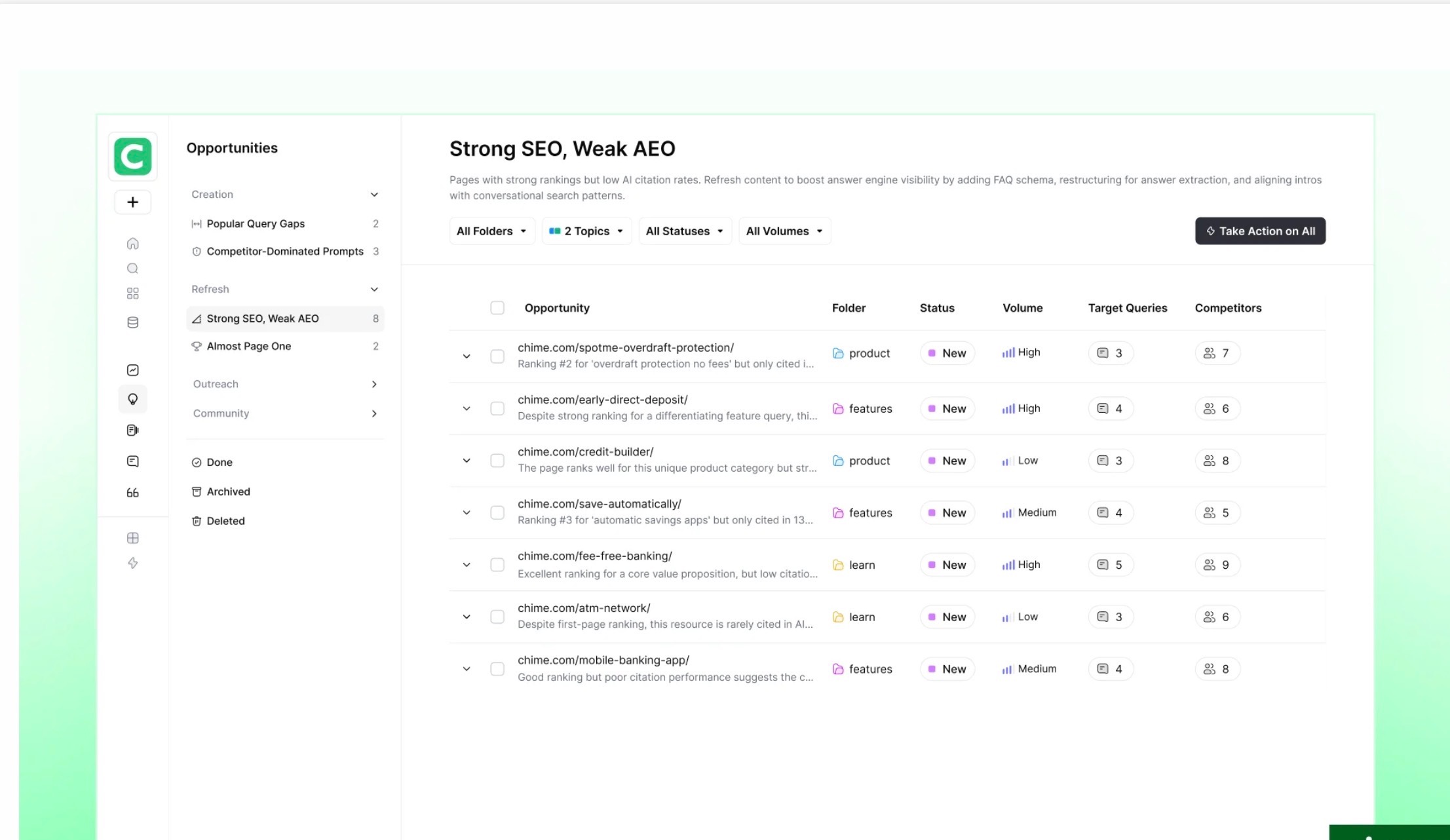
AirOps Actions helps teams turn visibility gaps, competitor insights, and content opportunities into actual workflows.
Instead of manually converting every insight into a task, teams can use AirOps to create, optimize, refresh, and move content through a more repeatable process. For large SEO teams, this is useful because it reduces the gap between “we found an opportunity” and “we shipped the update.”
b) Blend Human + AI Collaboration: AirOps Collaboration Between Teams And AI
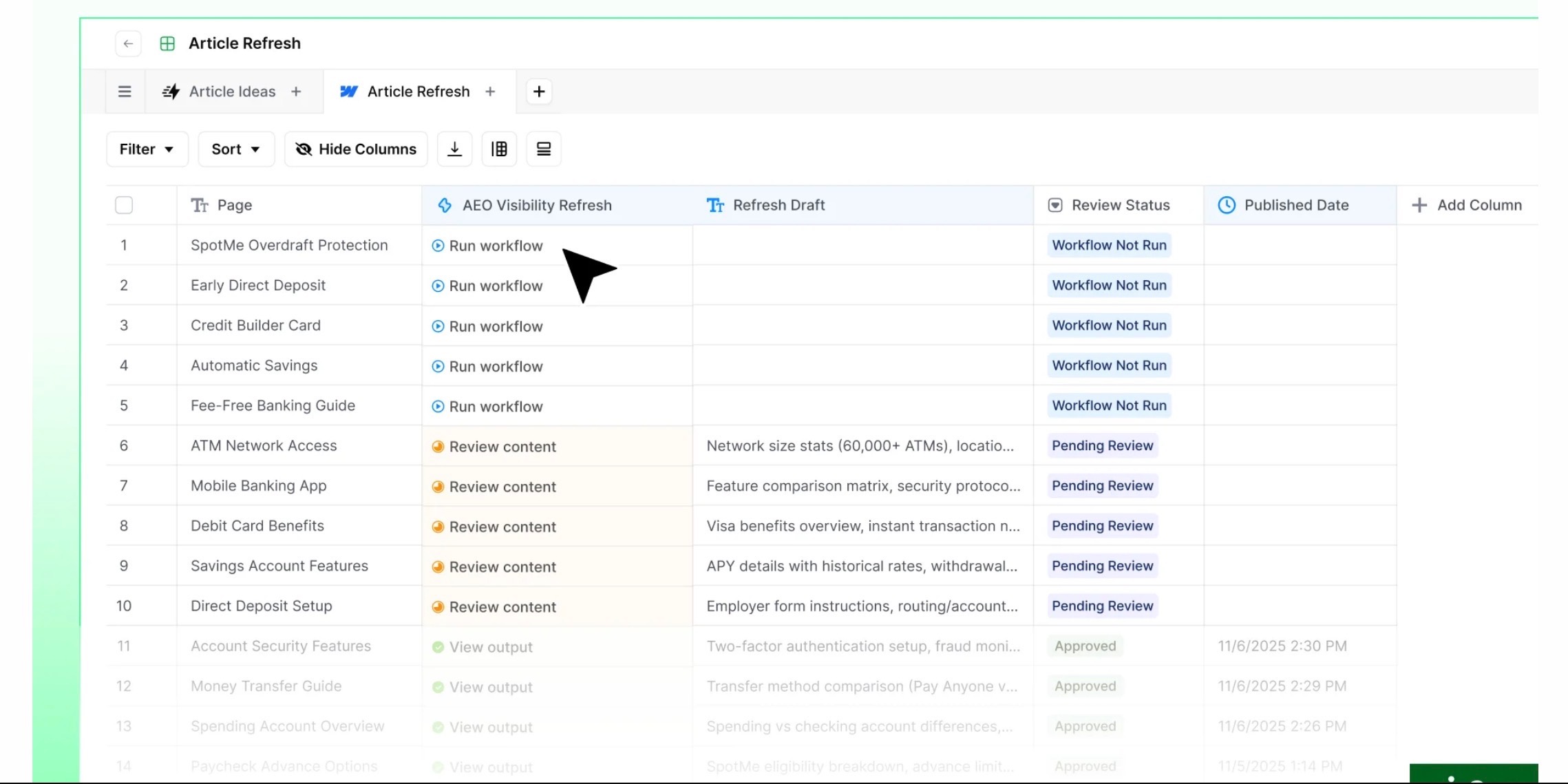
AirOps does not fully remove humans from the process, which I actually see as a good thing.
AI can help with speed, research, drafting, and workflow execution, while your team still controls accuracy, expertise, brand voice, and final approval. This makes the platform better suited for teams that want scale without letting AI publish unchecked content.
c) Orchestrate Content At Scale
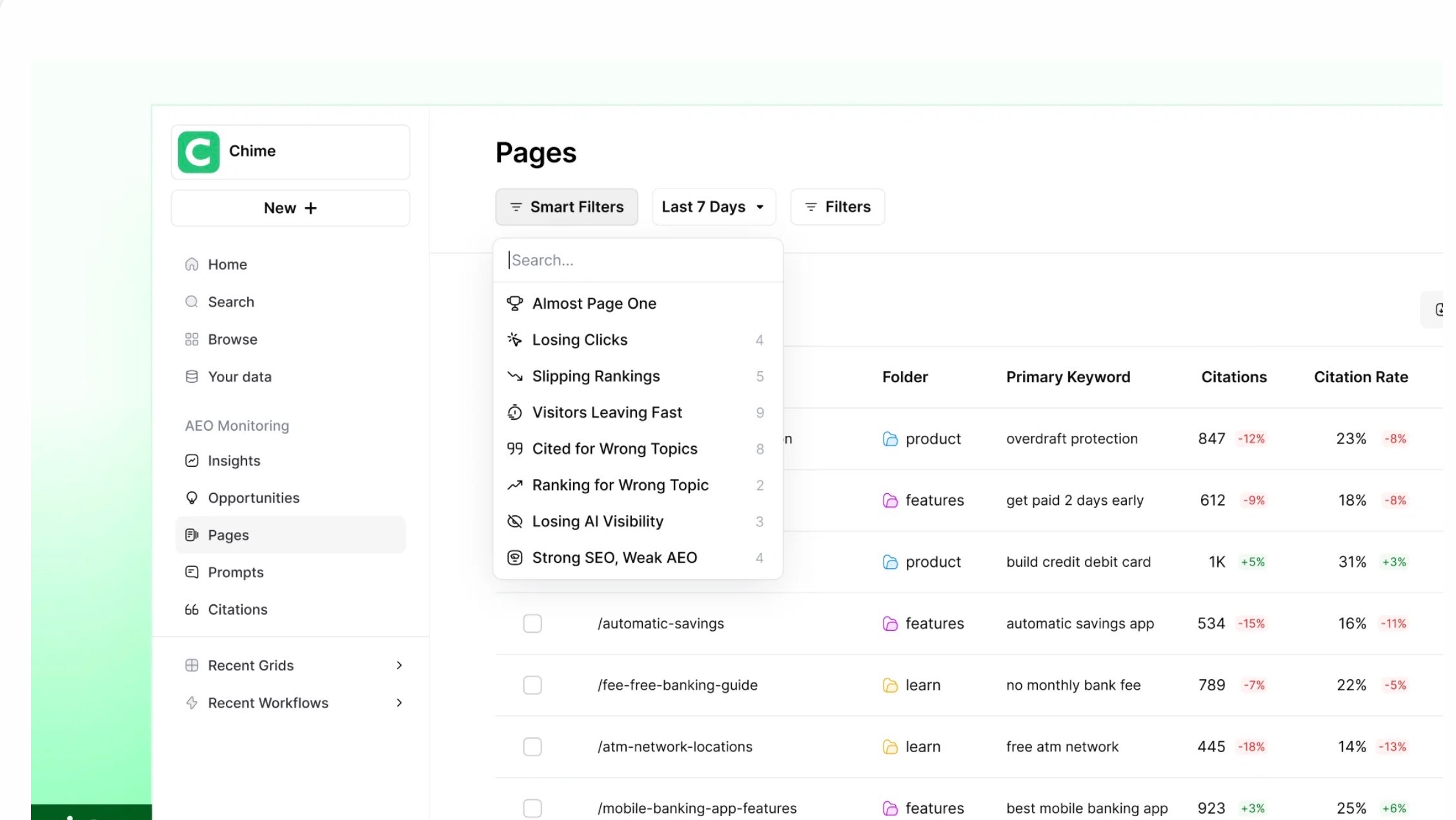
AirOps Actions also helps teams manage multiple content workflows from one place.
You can coordinate refreshes, content creation, optimization tasks, approvals, and publishing workflows without losing track of what is in progress. This is especially helpful for teams handling large content libraries or multiple SEO campaigns at the same time.
d) Workflow Automation With Copilot Guidance
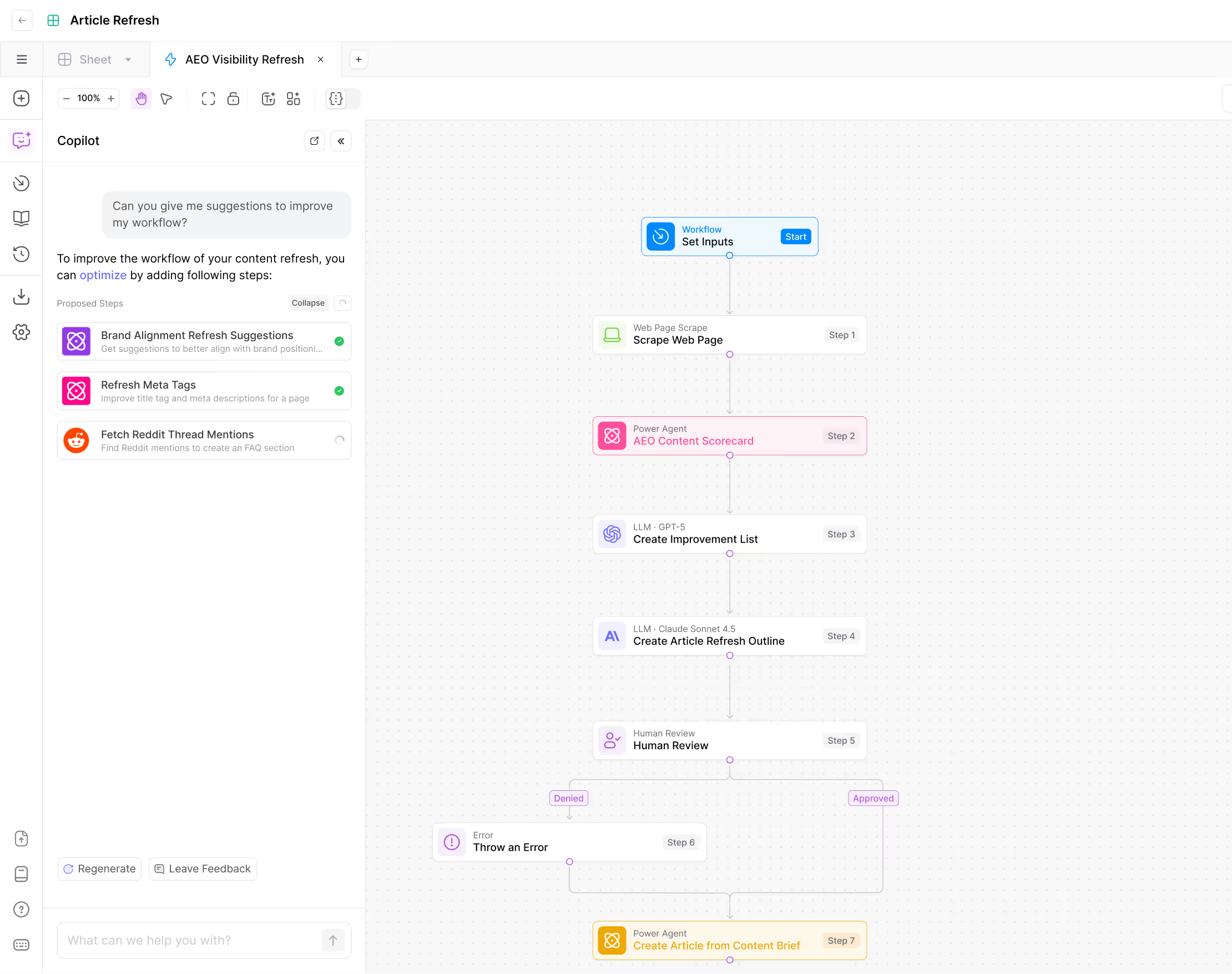
AirOps Copilot supports the workflow-building process by helping teams improve and troubleshoot workflows.
It can suggest workflow steps, refine instructions, and make automation easier to set up, which is useful because AirOps can feel heavy at first. The feature does not remove the learning curve completely, but it does make workflow creation more guided and less intimidating.
3. Grids - AirOps Scalability Features
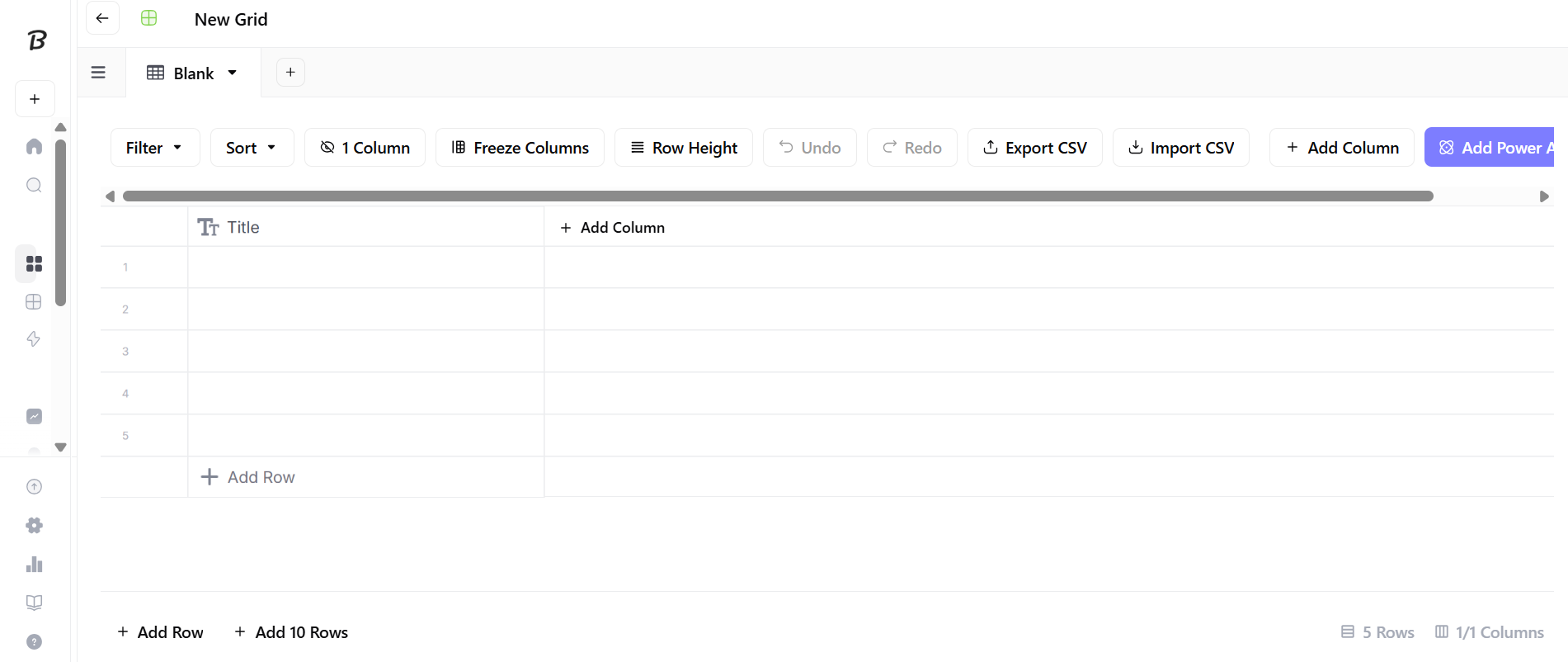
AirOps Grids is where the platform starts to feel built for scale.
It gives teams a spreadsheet-style workspace where they can run AI workflows across hundreds of pages, topics, or content tasks without managing everything manually. You can use it for bulk content refreshes, metadata optimization, article updates, content briefs, and CMS-ready outputs.
The useful part is that it does not treat automation as a black box. Teams can review outputs, track progress, and keep human approval in the process before anything goes live.
a) Spreadsheet-Style Interface For Orchestrating Content Operations
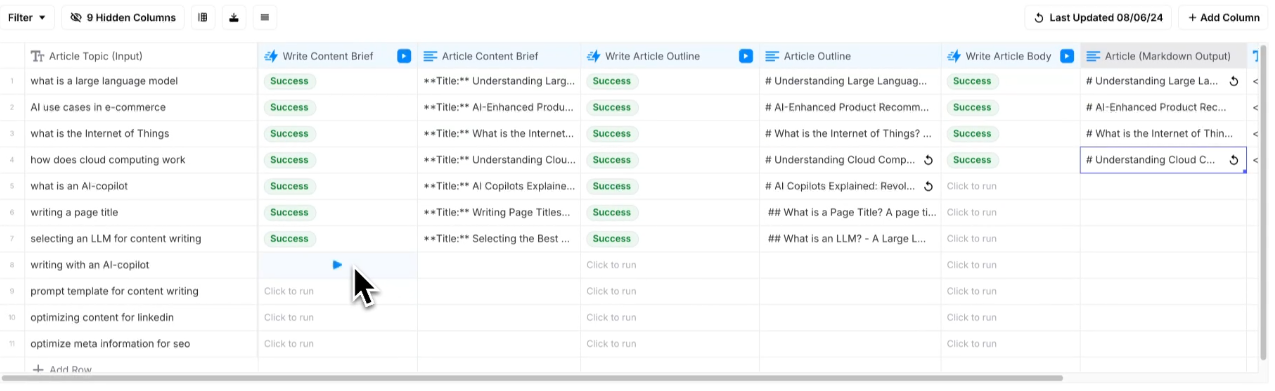
AirOps Grids works like a familiar spreadsheet, but with AI workflows built into it.
Each row can represent a page, keyword, topic, content brief, or campaign task. Teams can then run predefined workflows across those rows to create drafts, update content, optimize metadata, analyze competitors, or repurpose content at scale.
This is helpful because most content teams already manage SEO work in spreadsheets. AirOps keeps that structure but adds automation, workflow control, and CMS connectivity on top of it.
b) Import Data, Run AI Workflows Row By Row, And Manage Bulk Content Operations
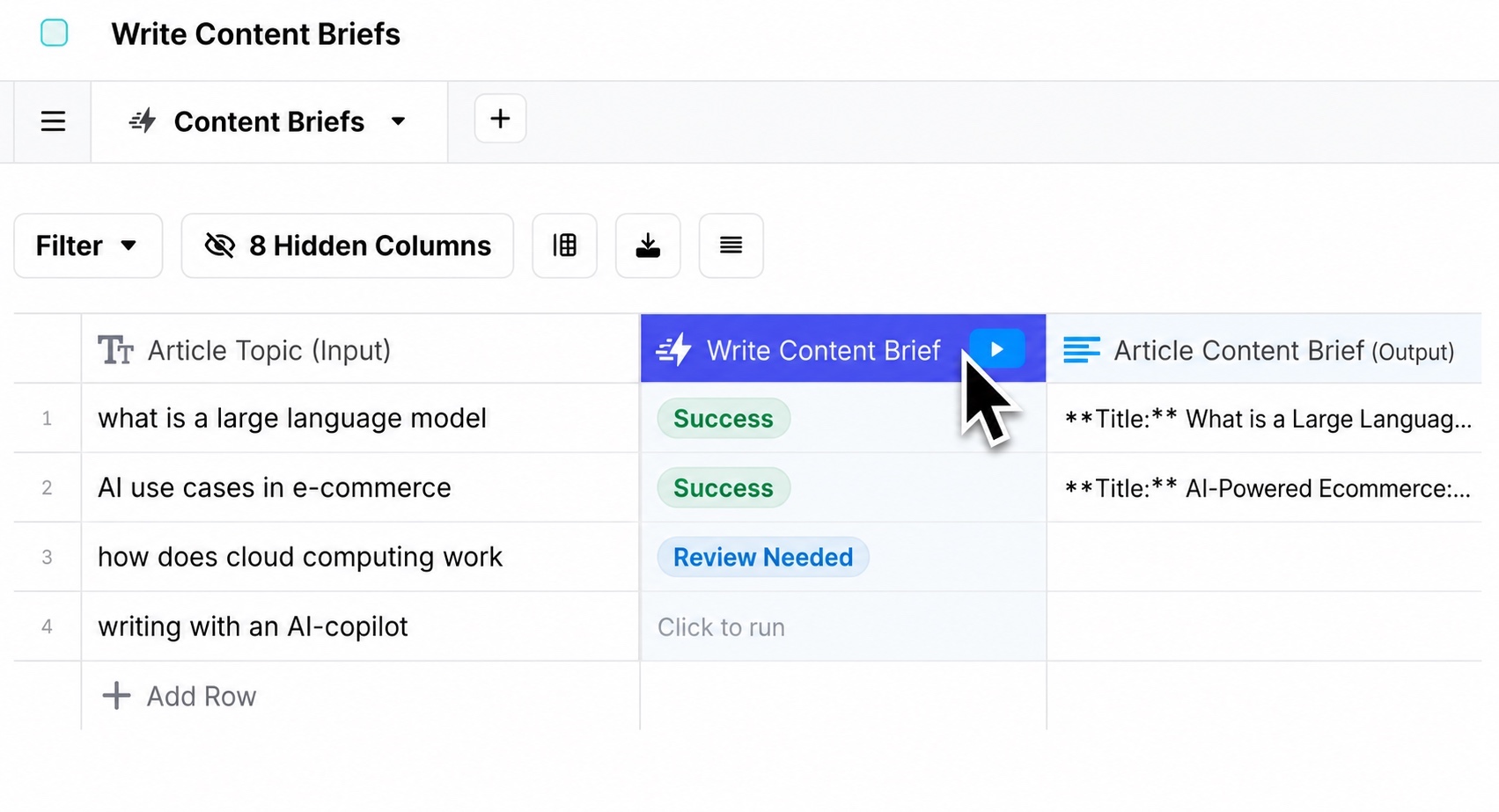
AirOps Grids supports data imports from sources like CSV files, CMS platforms, and SEO tools.
Once the data is inside the Grid, teams can run workflows on a single row or in bulk. That means you can refresh one page, update a group of pages, or run the same SEO workflow across a large content library.
For content teams, this is where AirOps feels practical. It helps you scale repetitive SEO tasks without losing page-level control.
c) Supervise Workflows, Provide Human Review, And Repurpose Content Across Channels
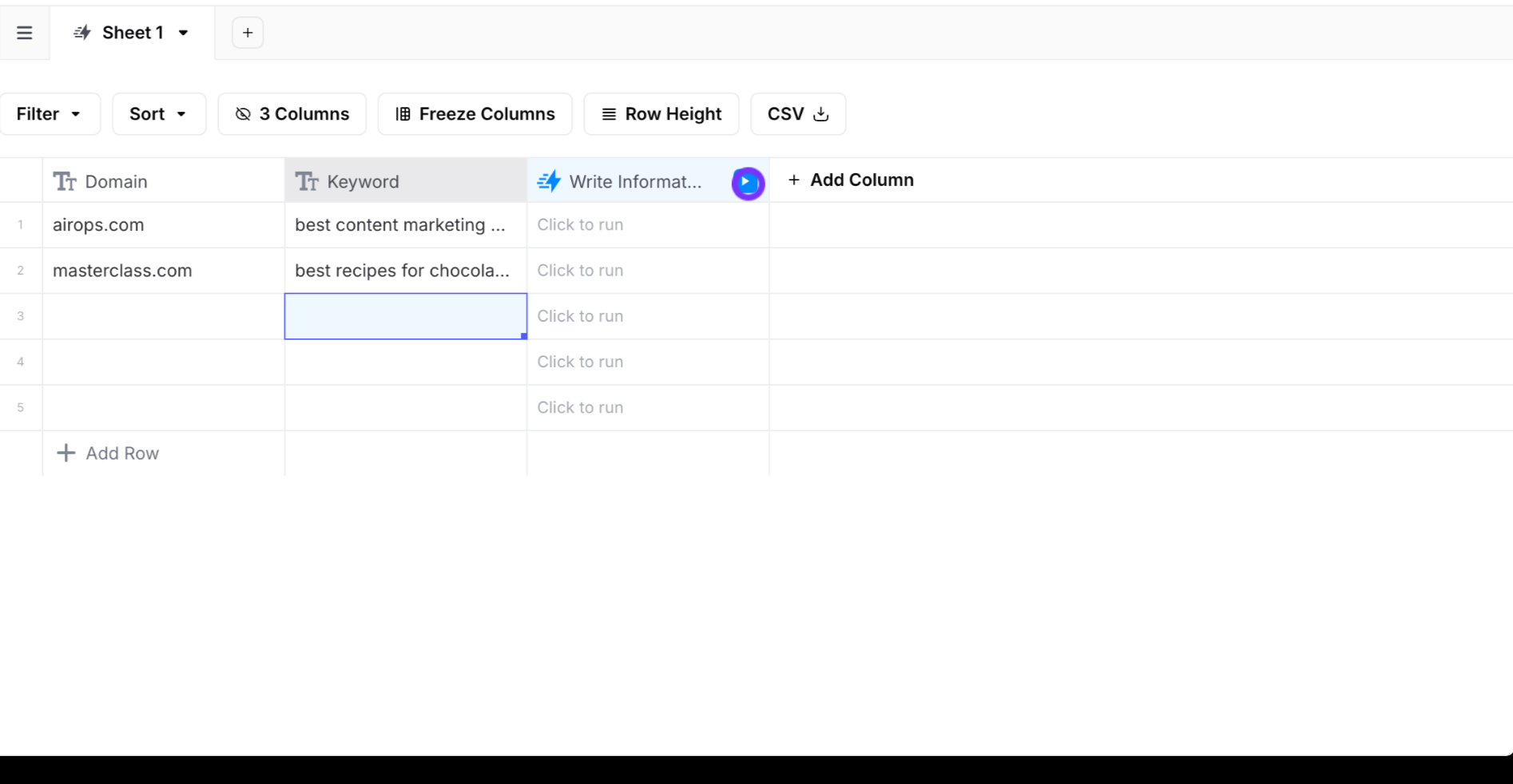
Grids are not just for running automation. They also help teams supervise the work.
You can review outputs, track workflow status, pause for editorial checks, and make sure content still matches your brand guidelines before it moves forward.
AirOps also supports repurposing content across channels, which is useful if your team wants to turn one content asset into different formats without rebuilding the whole workflow from scratch.
What I like about Grids is that it keeps bulk SEO work organized. It is especially useful for teams managing large content libraries, where updating pages one by one quickly becomes impossible.
4. No-Code Workflow Builder
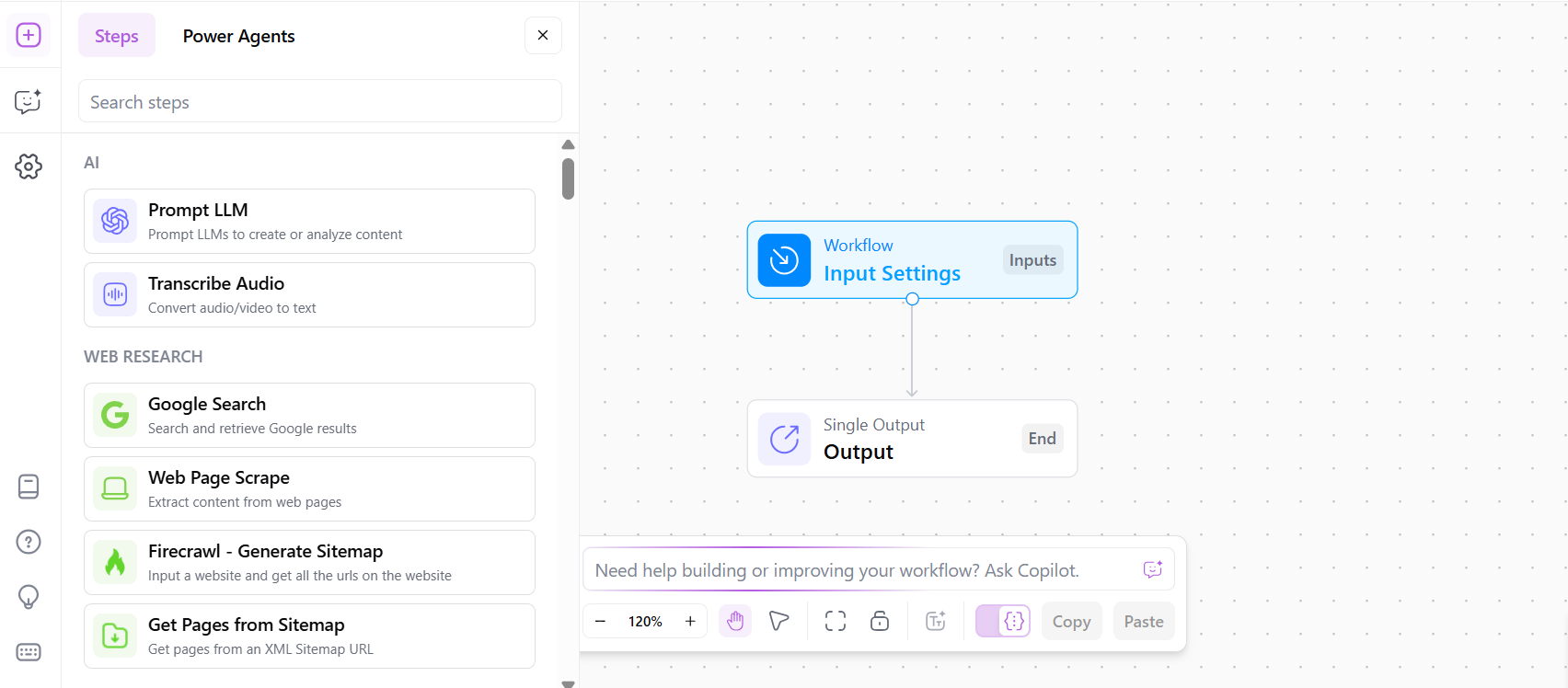
AirOps Workflows lets teams build repeatable SEO and content workflows without writing code.
This is where the platform feels more flexible than a regular AI writing tool. Instead of using AI for one-off drafts, you can build workflows for research, keyword analysis, content briefs, drafting, optimization, review, and publishing.
a) Drag-and-Drop Workflow Builder
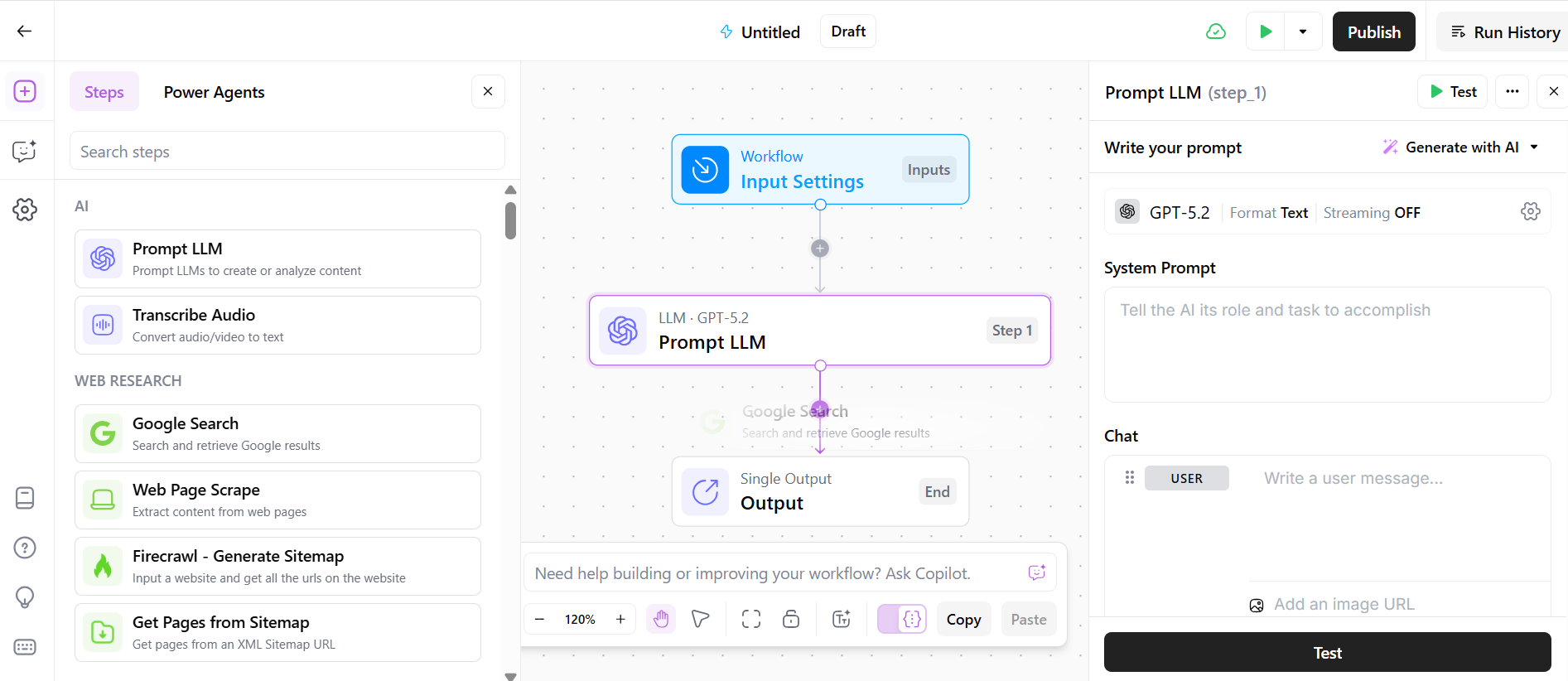
AirOps provides a visual, no-code workflow builder where teams can map multi-step content processes.
You can connect steps for SERP research, content ideation, AI-assisted drafting, metadata optimization, internal review, and CMS publishing. This makes it easier to turn your existing SEO process into a repeatable workflow instead of rebuilding it manually every time.
b) Integration with AI Models & Brand Data
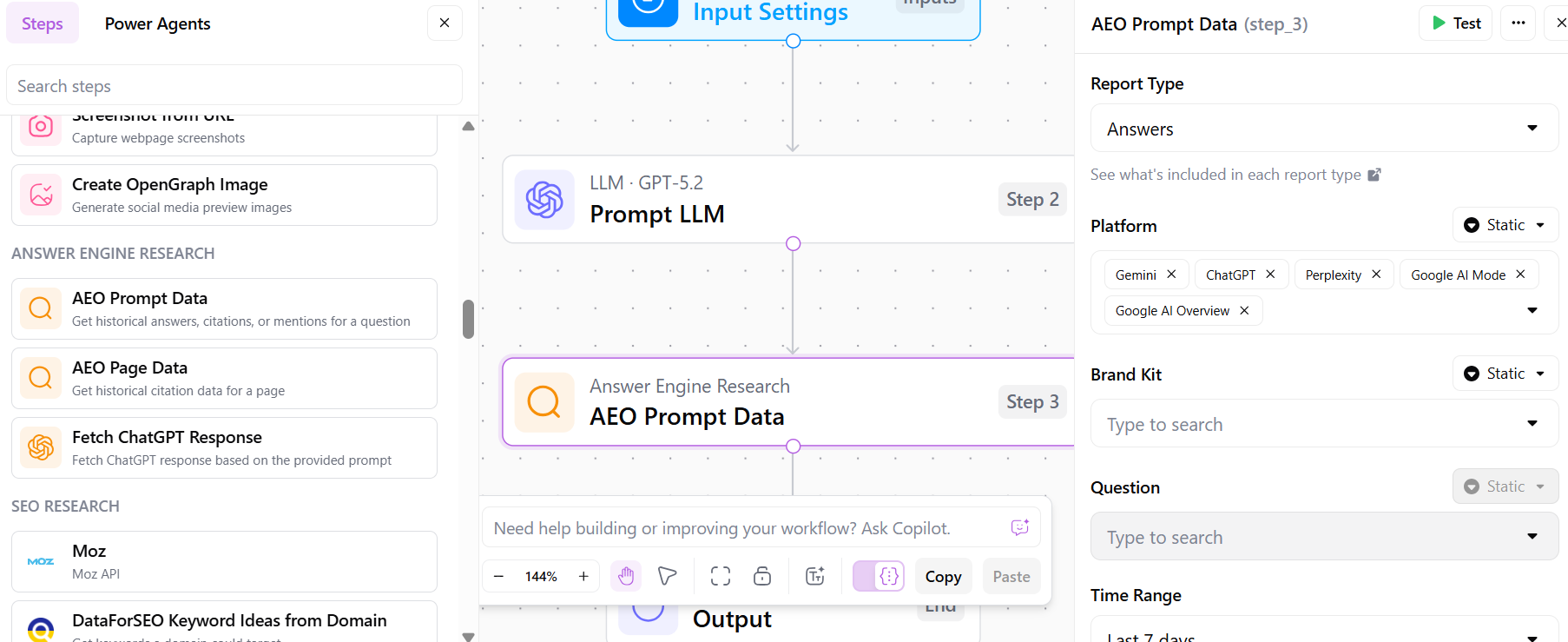
AirOps supports 30+ AI models and lets teams connect their own Brand Kits and Knowledge Bases.
This is useful because the AI is not working from a blank prompt. It can pull from your brand voice, product information, internal documentation, existing content, and other approved sources.
That helps teams create content that feels more accurate and on-brand, especially when multiple writers, editors, or stakeholders are involved.
c) Web Data Capture & Insights
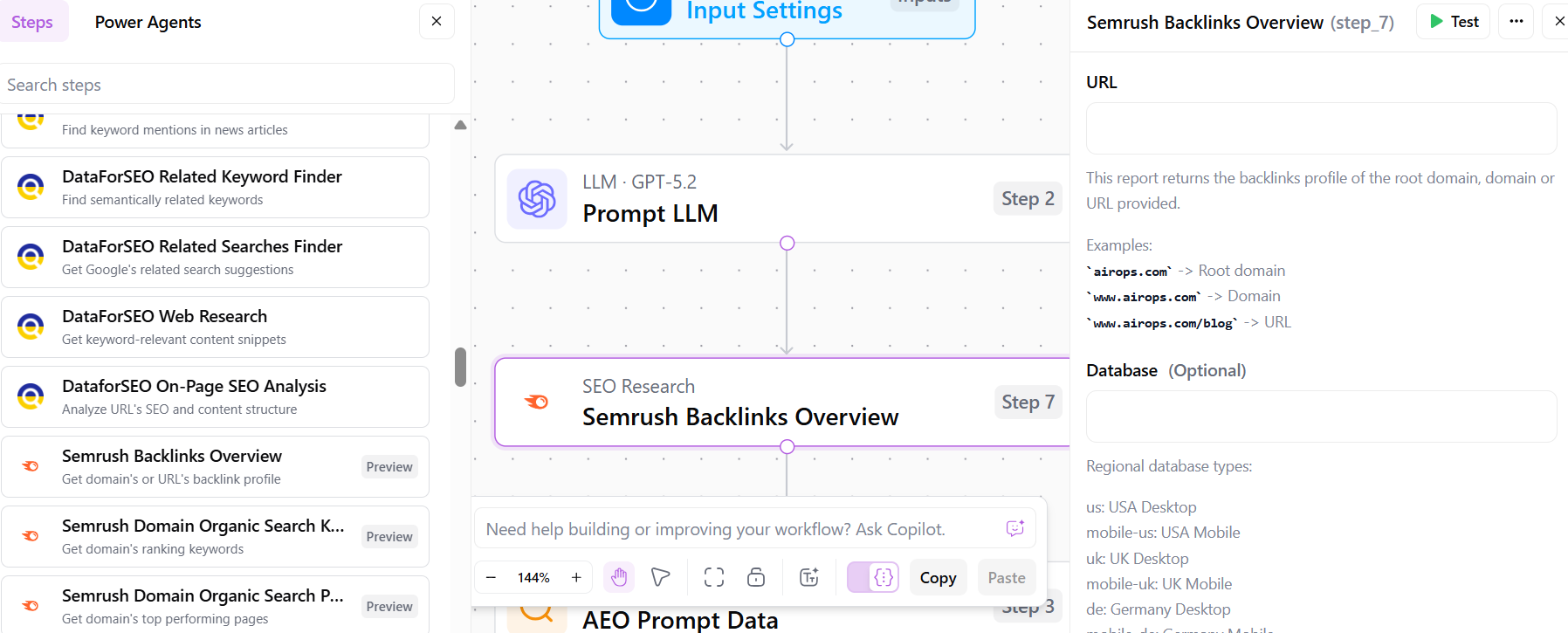
AirOps can pull live web data into workflows, including competitor pages, search results, and other online sources.
For SEO and GEO teams, this is helpful because content decisions should not depend only on static briefs. You can bring fresh market, competitor, and search context into the workflow before creating or refreshing a page.
d) Workflow Templates & Scheduled Execution
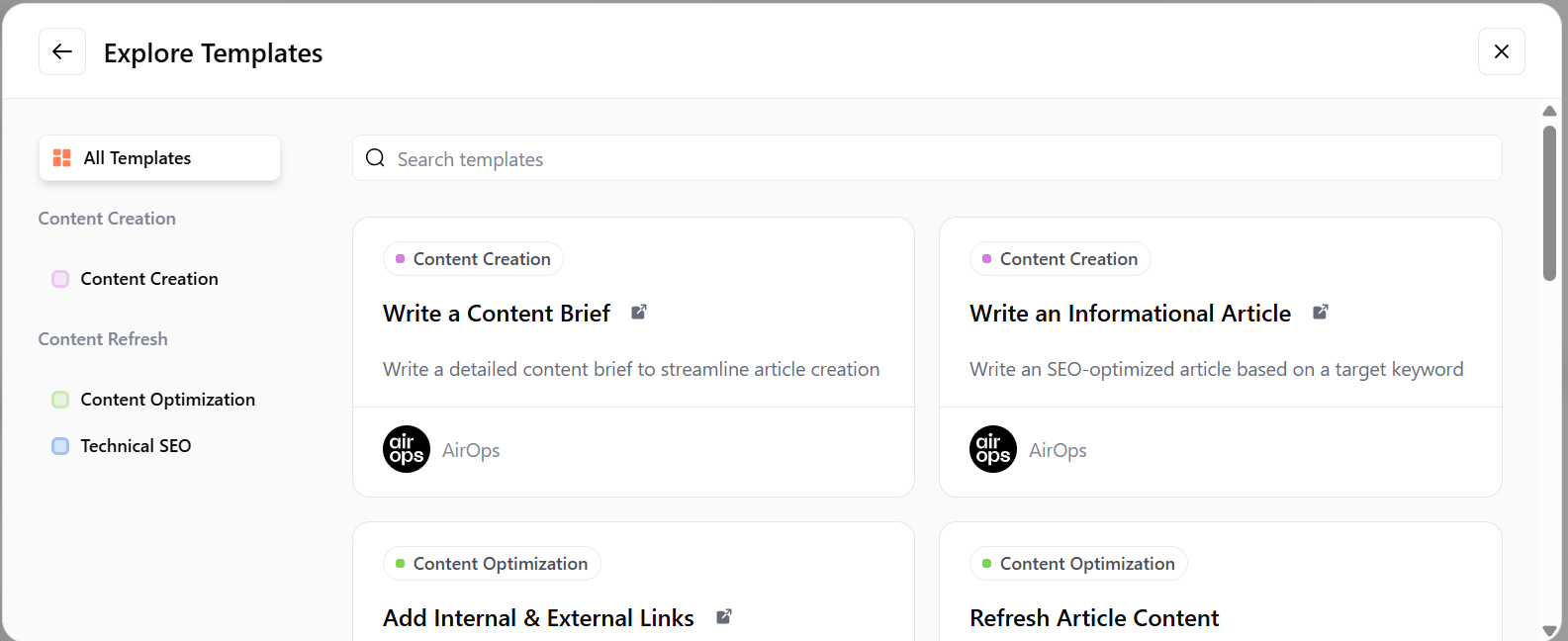
AirOps also offers reusable workflow templates for common tasks like content briefs, SEO refreshes, content creation, and optimization.
These templates can be customized, reused, and scheduled, which saves time once your team has figured out a workflow that works. The setup may take some effort in the beginning, but once it is in place, it can make repetitive content operations much easier to scale.
What I like about this feature is that AirOps does not force teams into a fixed writing flow. It gives mature content teams the flexibility to turn their own process into a repeatable system.
5. Direct CMS And Semrush Integrations

AirOps becomes more useful when you connect it with the tools your content team already uses.
Instead of creating content inside AirOps and manually copying it into your CMS, SEO tool, or project tracker, you can connect the platform with your existing stack and move content through the workflow more smoothly.
a) Content Management Systems (CMS)
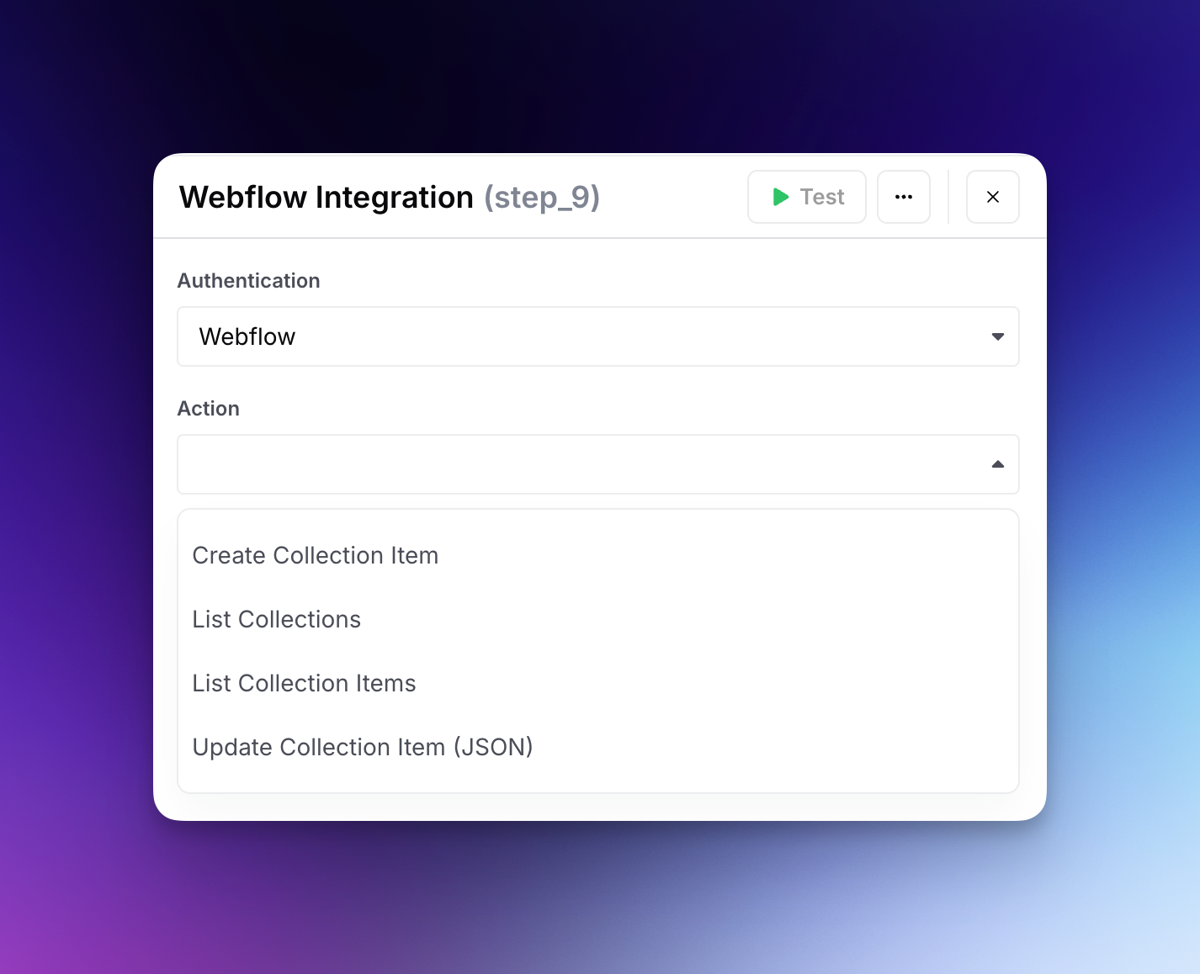
AirOps integrates with CMS platforms like Webflow, WordPress, Contentful, Sanity, ContentStack, Ghost, Strapi, and HubSpot.
This allows teams to import existing content, run refresh or optimization workflows, and push approved updates back into the CMS without constant copy-pasting.
For teams managing large content libraries, this is a real time-saver. It makes AirOps more practical for content refreshes, programmatic SEO pages, and bulk publishing workflows.
b) Premium Data & Content Providers

AirOps also connects with SEO and research tools like Semrush, Ahrefs, and Google Search Console.
This is helpful because workflows can use search and performance data instead of relying only on manual inputs. For example, teams can bring keyword, ranking, or content performance context into workflows before creating briefs, updating pages, or prioritizing refreshes.
AirOps also supports stock imagery providers like Getty and Unsplash, which can help teams enrich content assets without leaving the workflow.
c) LLM (AI Model) Integrations
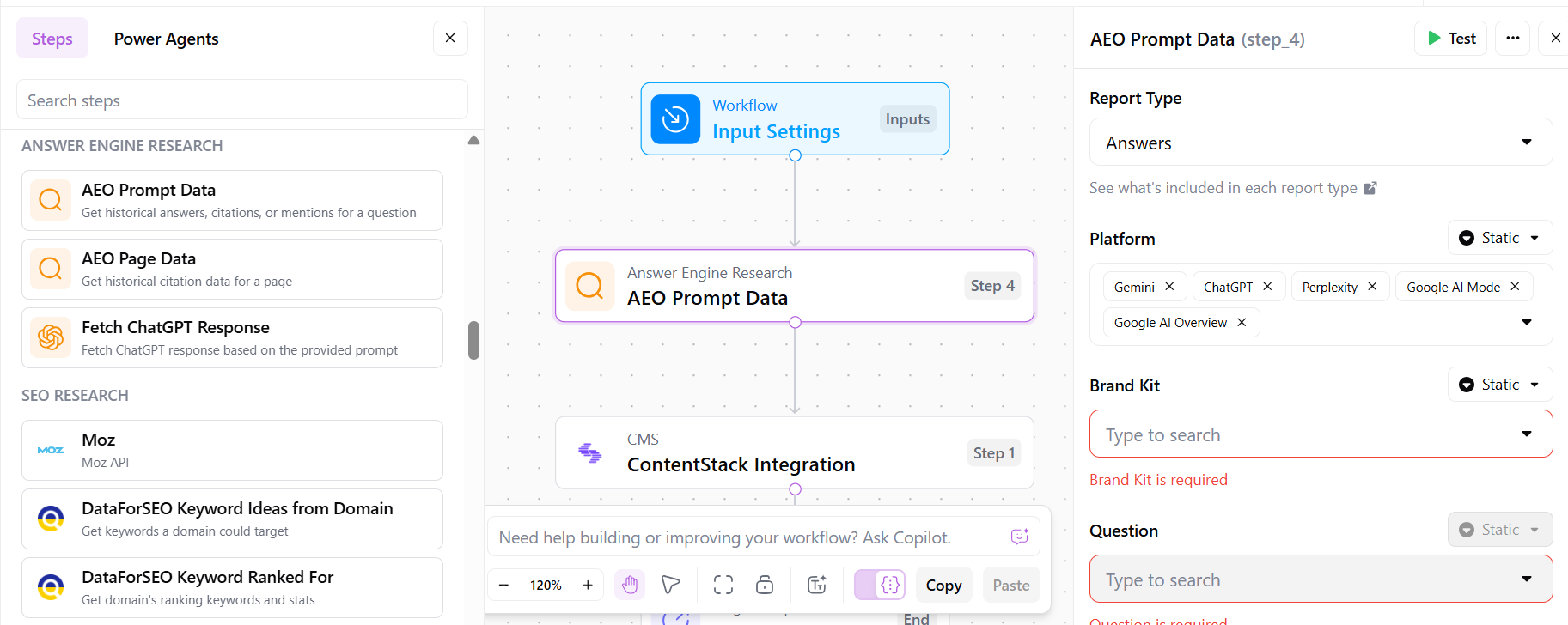
AirOps supports 30+ AI models, including models from providers like OpenAI, Anthropic, and other major AI platforms.
This gives teams flexibility because they are not locked into one model for every task. You can use different models for research, drafting, summarization, optimization, or content transformation depending on the workflow.
For content teams, this matters because not every AI task needs the same model. Some workflows need speed, while others need better reasoning, stronger writing, or more accurate analysis.
d) Bring Your Own Data
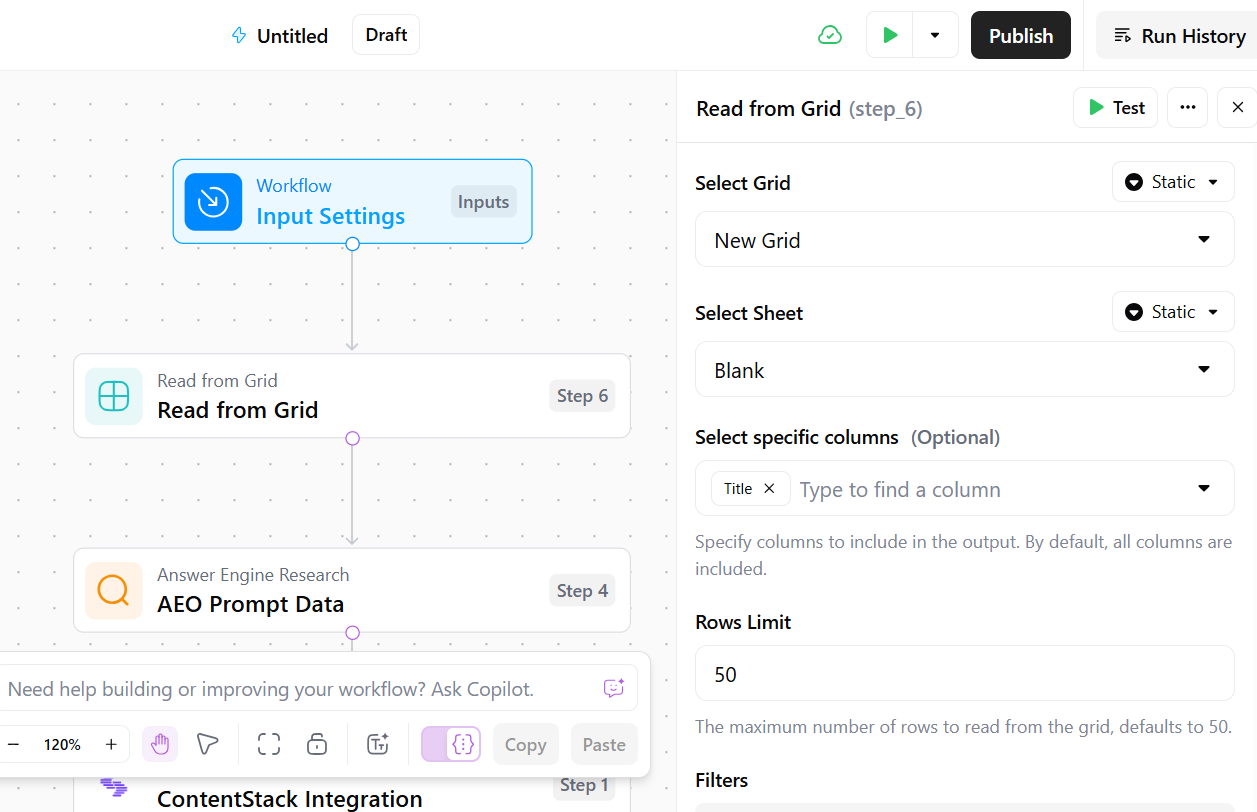
AirOps lets teams connect their own Brand Kits, Knowledge Bases, and approved content sources.
That means workflows can pull from product details, support docs, internal resources, existing blog content, brand guidelines, and other company-approved information.
This is one of the more important parts of the platform because AI output is only as good as the context behind it. When your workflows use your own data, the content is more likely to stay accurate, consistent, and aligned with your brand voice.
What I like about AirOps integrations is that they reduce the messy handoff between research, writing, editing, and publishing. For larger teams, that handoff is usually where content operations start to slow down.
6. Brand Kit And Knowledge Bases
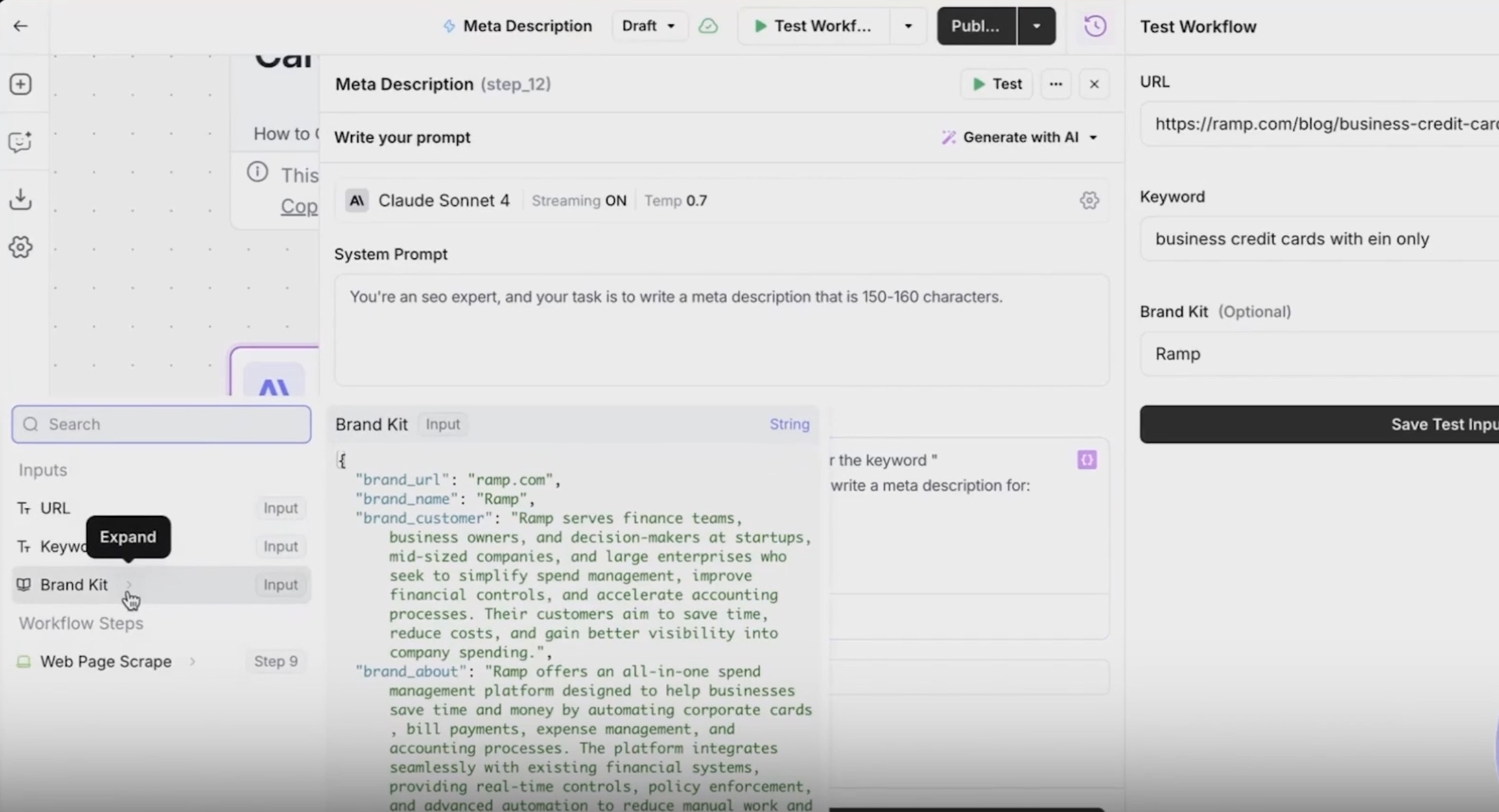
AirOps Brand Kit and Knowledge Bases help teams keep AI-generated content grounded in the right brand context.
With AirOps Brand Kit features, teams can store brand voice, tone, writing rules, audiences, product lines, regions, and content guidelines. Knowledge Bases go deeper by letting workflows pull from approved sources like internal docs, product details, support content, blog archives, and customer resources.
This matters because AI workflows can move fast, but without the right context, the output can easily sound generic or off-brand.
What I like about this feature is that it makes brand consistency part of the workflow instead of leaving it to scattered prompts and manual reminders.
7. Page360: Unified Content Performance Insights
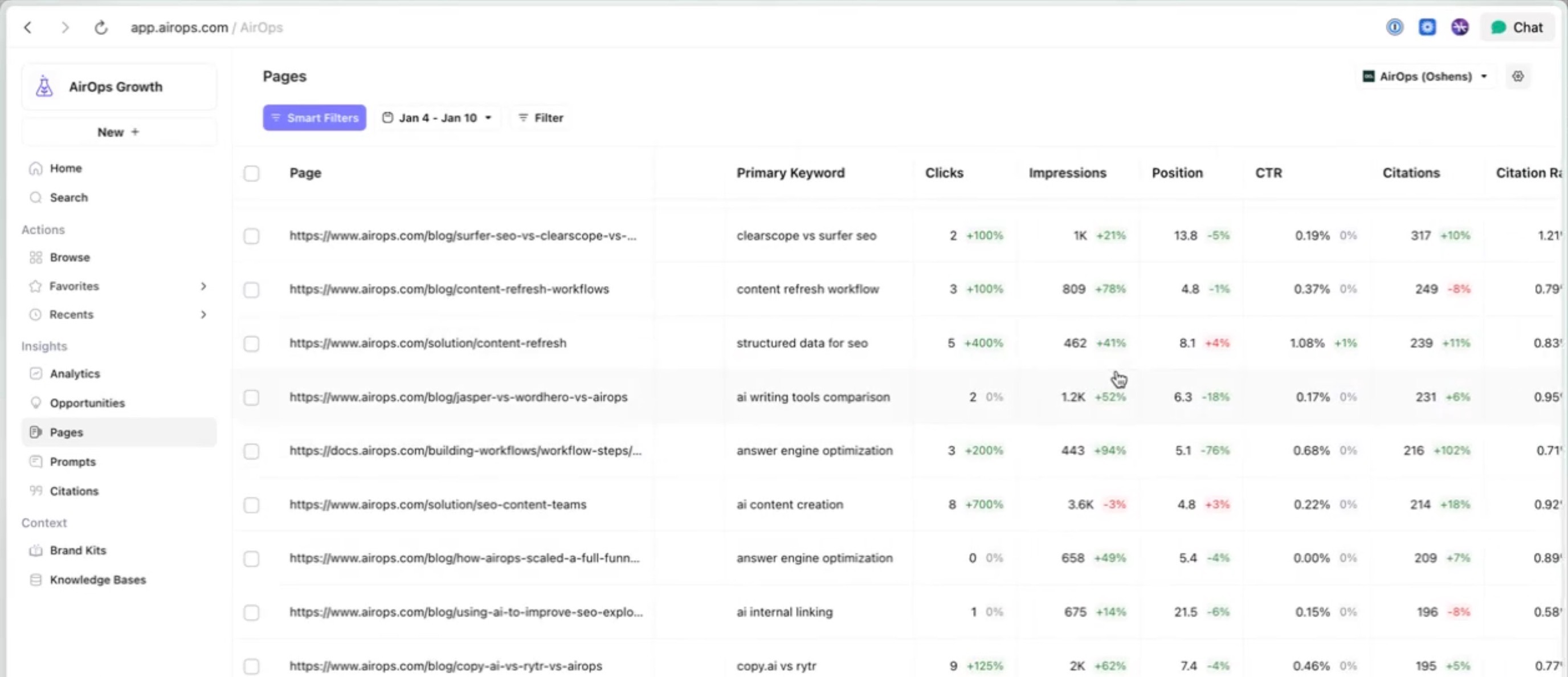
Page360 brings SEO performance, AI search visibility, engagement data, and content freshness into one view.
For content teams, this is useful because refresh planning can get messy. A page may still rank on Google but lose AI citations, while another may get impressions but weak engagement. Page360 helps connect those signals so teams can prioritize the pages that are actually worth updating.
What I like about Page360 is that it makes content refreshes feel more strategic. It moves teams from “we should update old blogs” to “these are the pages that need attention now.”
8. Offsite: Third-Party Visibility For AI Search
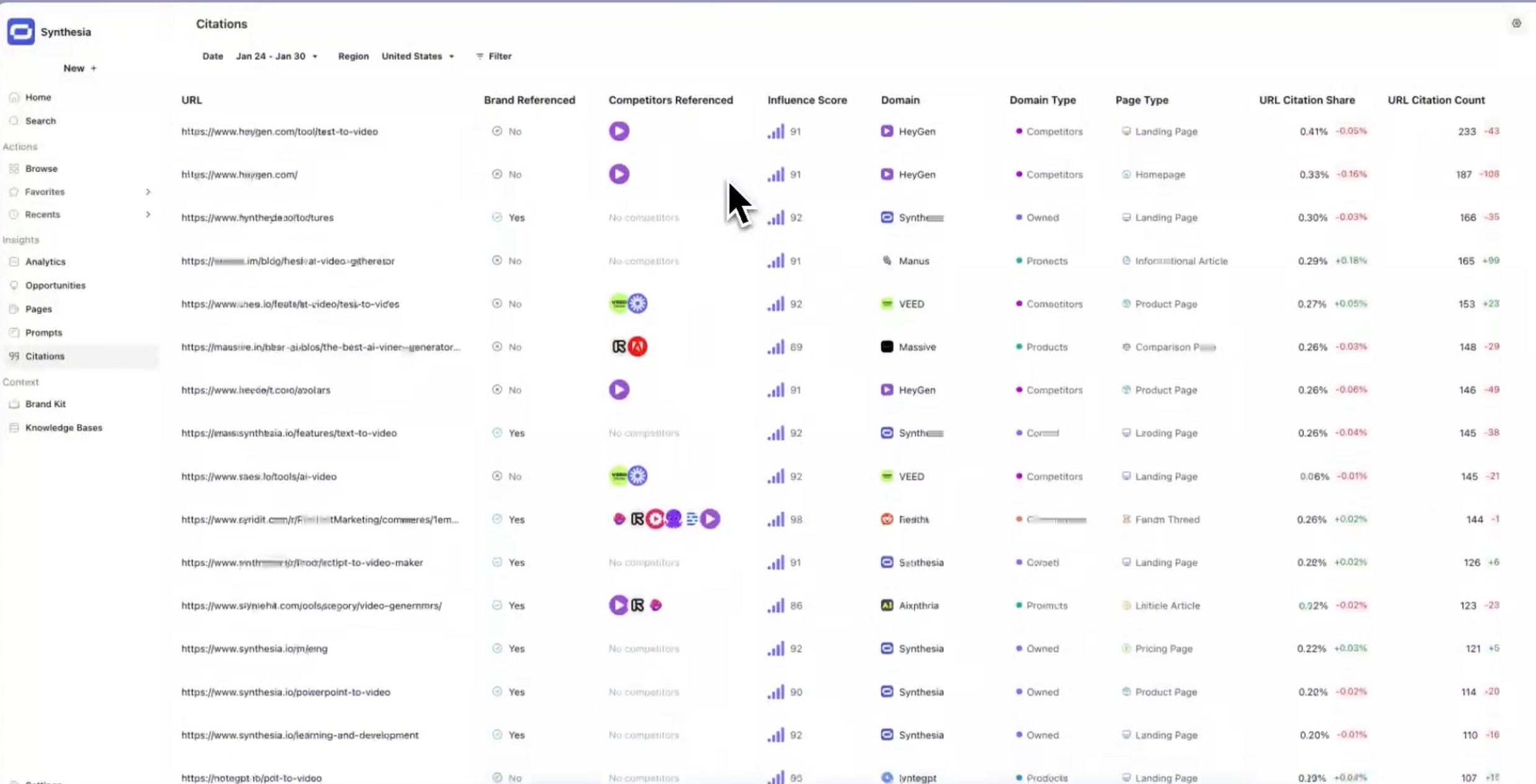
AirOps Offsite focuses on a part of GEO that many teams miss: AI visibility is not shaped only by your own website.
AI search engines often pull from third-party pages, review sites, listicles, forums, communities, and comparison content when forming answers. Offsite helps teams identify which external sources matter, find mention opportunities, and measure whether those placements improve AI search visibility.
Offsite is useful to content teams because it expands GEO beyond blog optimization. If AI engines trust wider web signals, teams need to understand where those signals are coming from.
AirOps Pricing Review: Is It Worth The Cost?
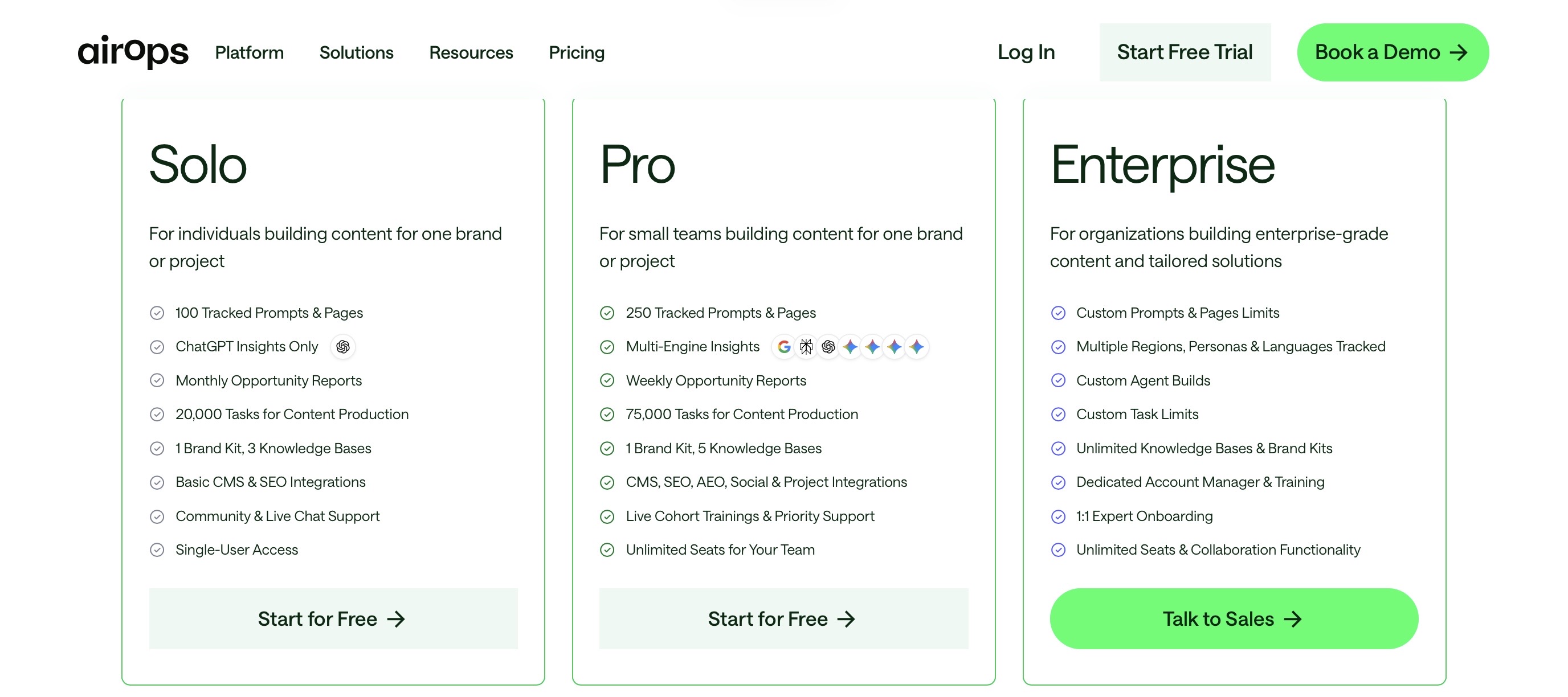
AirOps offers Solo, Pro, and Enterprise plans. Its pricing is based on task volume and specific needs, so teams may need to evaluate usage limits, tracked prompts, pages, and task overages before deciding if it fits their budget.
For larger content operations teams, this pricing model can make sense because AirOps is built around AI search visibility, workflows, Grids, Brand Kits, Knowledge Bases, and CMS integrations. But for teams that want a more transparent and affordable SEO + GEO workflow, a tool like Scalenut is easier to evaluate. Scalenut’s annual pricing starts at $24/month, with AI visibility tracking, GEO content workflows, keyword planning, optimization, and content execution available in a much simpler pricing structure.
Need budget-friendly options beyond AirOps? Explore the best GEO tools under $100/month for 2026 to find affordable platforms that still help with AI visibility, optimization, and execution.
Is AirOps The Right Fit For Your Team?
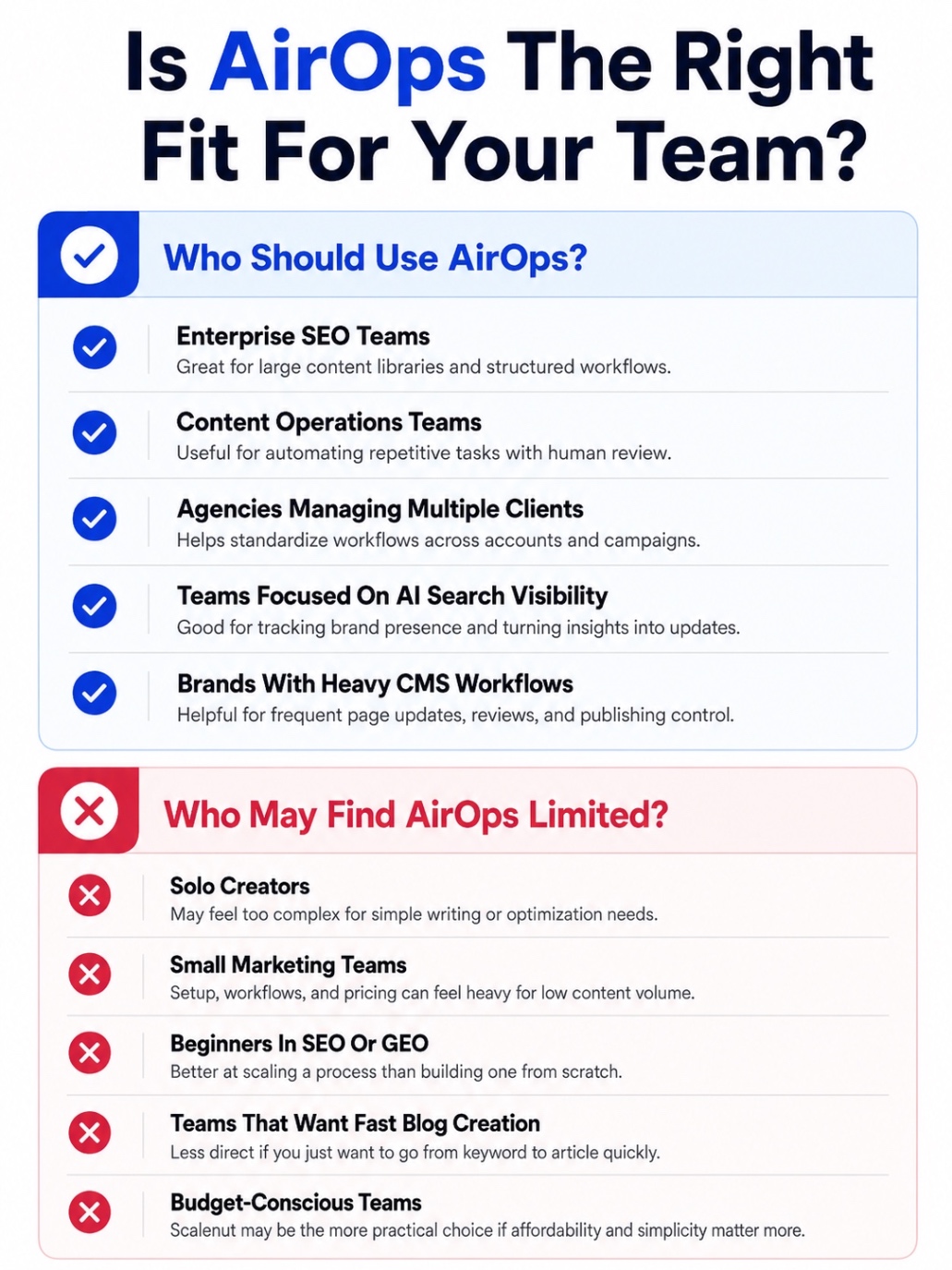
Who Should Use AirOps?
- Enterprise SEO Teams: A good fit if you manage large content libraries and need structured workflows for research, refreshes, optimization, and publishing.
- Content Operations Teams: Useful if your team already has a defined content process and wants to automate repetitive tasks without losing human review.
- Agencies Managing Multiple Clients: Helpful for teams that need repeatable workflows, brand context, and scalable execution across different accounts or campaigns.
- Teams Focused On AI Search Visibility: A strong fit if you want to track how your brand appears across AI search engines and connect those insights to content updates.
- Brands With Heavy CMS Workflows: Useful if your team regularly updates pages, pushes content to a CMS, and needs better control over review and publishing.
Who May Find AirOps Limited?
- Solo Creators: AirOps may feel too complex if you only need simple keyword research, blog writing, or basic content optimization.
- Small Marketing Teams: The setup, workflows, and pricing may feel heavy if your team does not have enough content volume to justify the platform.
- Beginners In SEO Or GEO: AirOps can scale a strong process, but it will not build your entire content strategy for you.
- Teams That Want Fast Blog Creation: If your main need is to go from keyword to optimized article quickly, AirOps may feel less direct than a tool built specifically for SEO content execution.
- Budget-Conscious Teams: AirOps is better suited for serious content operations. If affordability and simplicity matter more, Scalenut may be the more practical choice.
What Is The Best Alternative To AirOps In 2026?
AirOps makes sense if your team needs custom AI workflows for AI search visibility, content refreshes, optimization, CMS publishing, Grids, Brand Kits, and Knowledge Bases. But if you want a simpler way to plan, create, optimize, refresh, and track SEO/GEO content, Scalenut is often the better fit because it connects visibility tracking with content execution without the heavy workflow setup.
Want to compare more AirOps competitors before deciding? Explore the top AirOps alternatives for SEO, GEO, and AI visibility workflows.
When Should You Choose AirOps?
Choose AirOps if you mainly need:
- Custom Workflow Automation: You want to build detailed workflows for research, briefs, optimization, refreshes, and publishing.
- Grids For Bulk Execution: You need to run workflows across hundreds of pages, URLs, topics, or metadata updates.
- CMS-Connected Operations: You want your content workflows to connect with your CMS and project management tools.
- Brand Governance: You need Brand Kits, Knowledge Bases, and review steps to keep AI content controlled and on-brand.
- AI Search Visibility: You want to track your brand across AI search engines and connect those insights to content action.
AirOps works best when your team already has a clear process and enough content volume to justify the setup.
When Is Scalenut A Better Fit?
Scalenut is the better choice if you want SEO and GEO execution without building workflows from scratch.
It helps teams track AI visibility, find content gaps, plan topics, create GEO-ready content, optimize existing pages, audit performance, improve internal links, monitor Reddit conversations, and track AI bot activity from one place.
That makes Scalenut a stronger fit for SEO teams, content teams, agencies, and growth teams that want to improve visibility, not just manage a complex content operations system.
How Does AirOps Compare To Other GEO Platforms?
1. AirOps Vs Profound AI

AirOps is better if you want AI search visibility connected with content workflows, refreshes, CMS publishing, and execution. Profound AI is stronger for enterprise teams that need deeper AI visibility intelligence, prompt tracking, answer engine analytics, and competitive insights.
For a full breakdown, read our AirOps vs Profound AI comparison to see which tool fits your GEO workflow better.
2. AirOps Vs Surfer AI

AirOps focuses more on workflow automation, AI search visibility, content refreshes, and CMS-connected operations. Surfer AI is better suited for teams that mainly want AI-assisted article creation and content optimization around search intent, topical coverage, and on-page SEO.
Still comparing both? Read our AirOps vs Surfer AI comparison before choosing the right SEO and GEO tool.
3. AirOps Vs Scrunch AI

AirOps is stronger for teams that want custom workflows, Grids, content refreshes, Brand Kits, and CMS publishing. Scrunch AI is more focused on AI search visibility, customer experience insights, brand monitoring, and understanding how AI systems represent your brand.
Want a deeper look? Read our Scrunch AI vs AirOps comparison to see which platform is better for AI visibility and execution.
4. AirOps Vs AthenaHQ
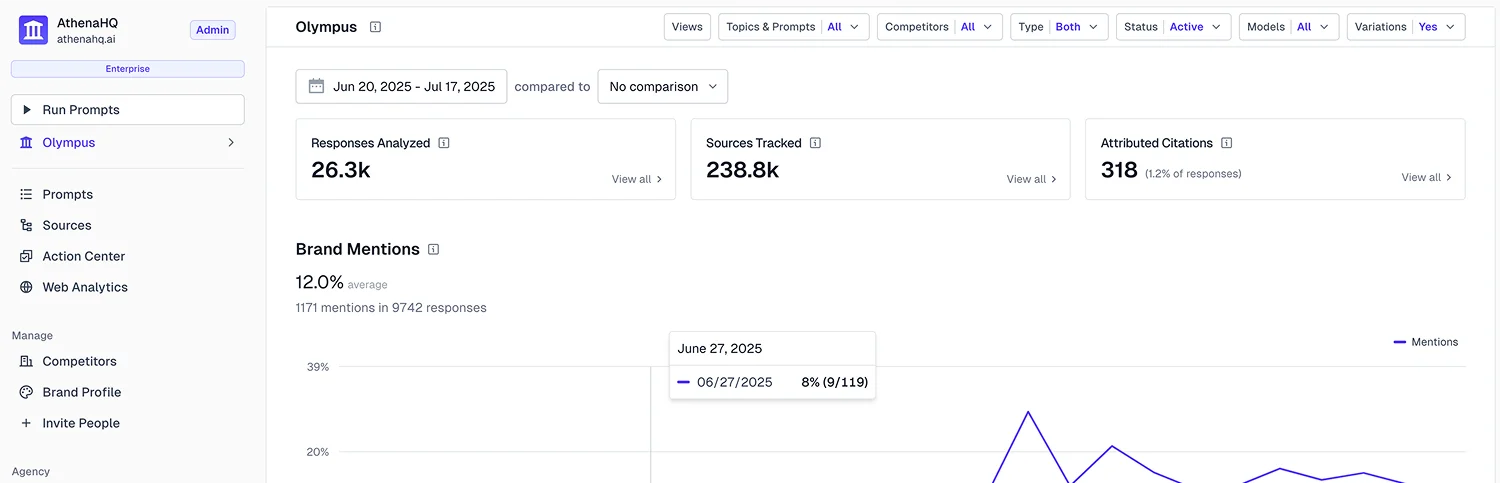
AirOps works well for teams that want AI search insights tied to content production and workflow automation. AthenaHQ is better for teams that need AI visibility tracking, competitor benchmarking, reporting, and recommendations without building complex content workflows.
Need more clarity? Read our AthenaHQ vs AirOps comparison to understand which tool gives you the better GEO workflow.
AirOps Vs Scalenut: Which Tool Is Better For GEO?
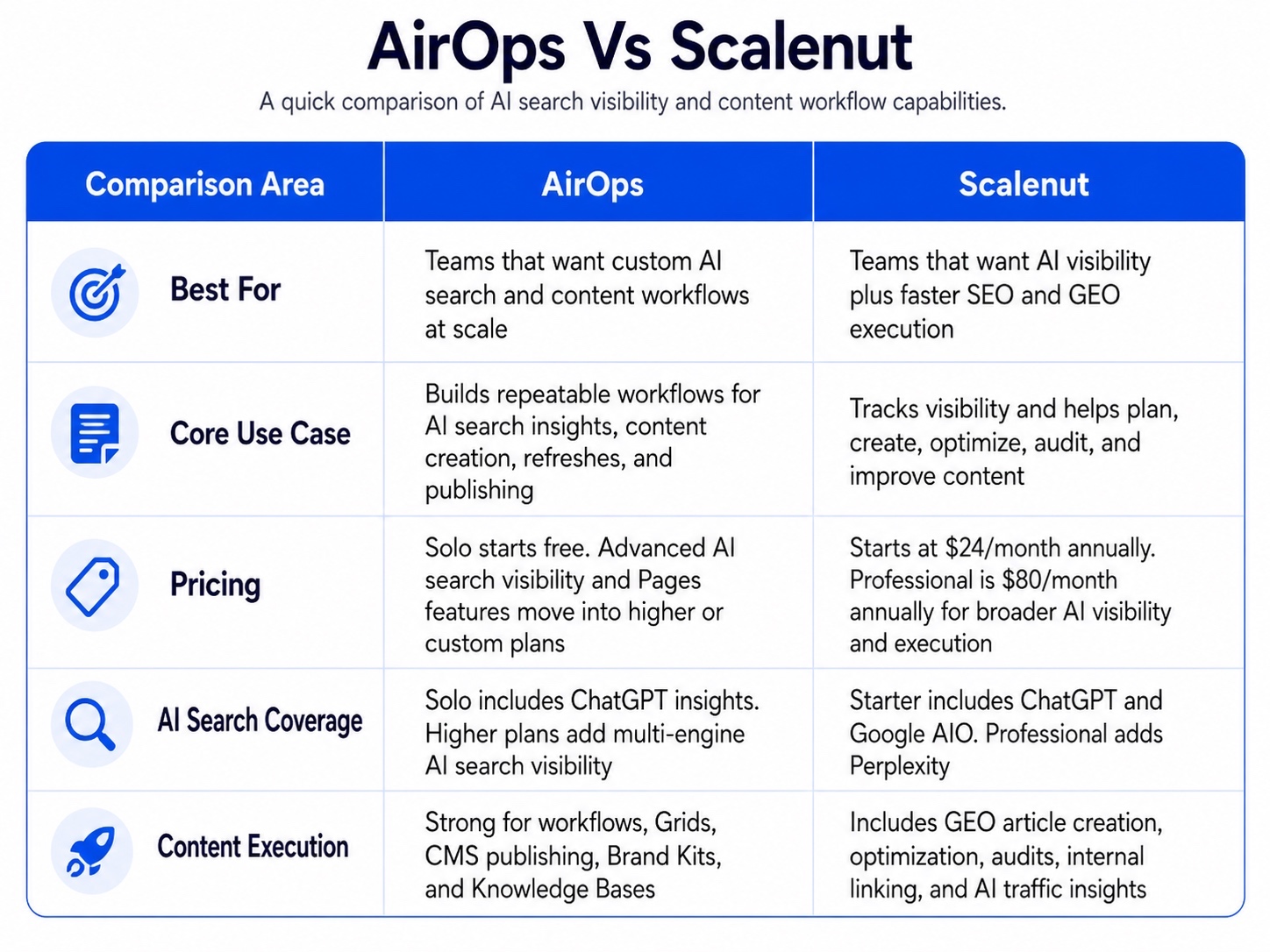
AirOps and Scalenut are built for different workflows. AirOps is stronger if you want deep workflow customization for large-scale content operations. Scalenut is stronger if you want a simpler path from AI visibility tracking to SEO and GEO content planning, creation, optimization, and refreshes.
If I were choosing for a team that needs to improve visibility quickly, I would lean toward Scalenut. AirOps gives you a powerful workflow system, but Scalenut gives you a clearer execution path.
Here are the Scalenut features that make it stand out:
1. AI Visibility Tracking And Brand Monitoring
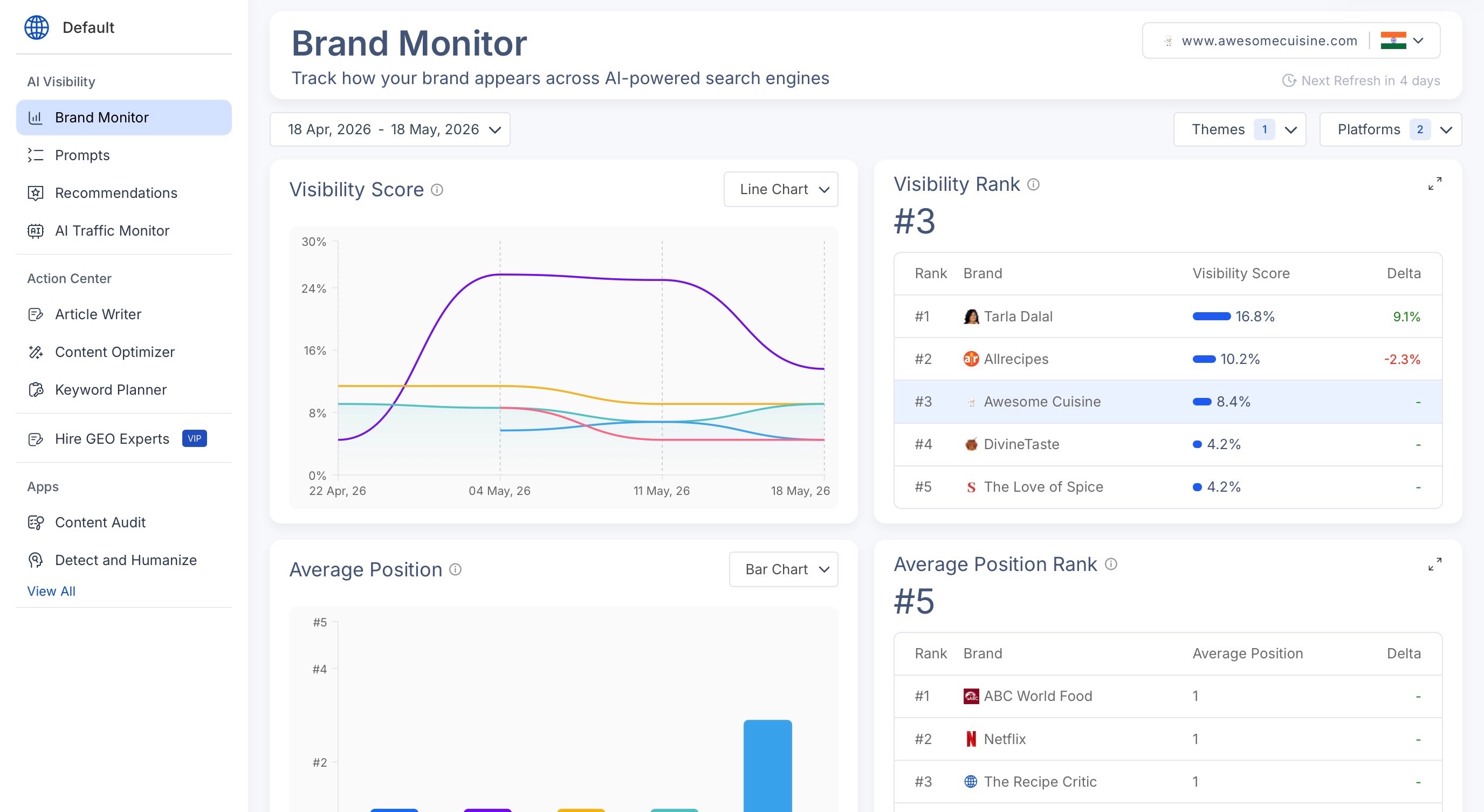
Scalenut does not treat AI visibility as a basic “mentioned or not mentioned” report.
You can track where your brand appears, where competitors are taking visibility, which prompts matter, and whether your presence is improving over time. That gives teams a clearer benchmark before deciding what to fix next.
2. Prompt-Level Insights And Competitor Context
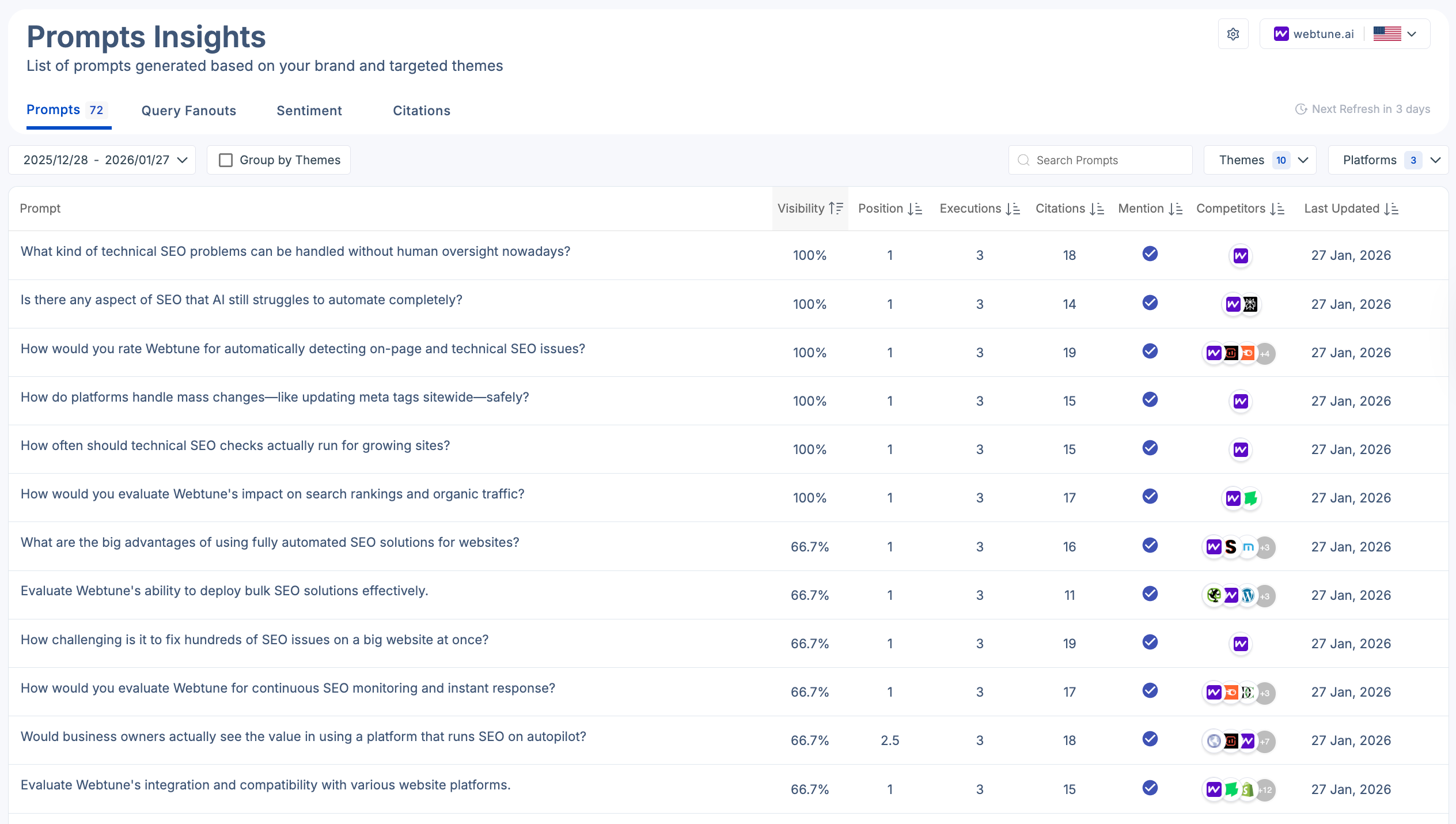
Prompt tracking becomes more useful when you can see the context around each prompt.
Scalenut helps you understand where your brand appears, where it gets skipped, which competitors show up instead, and what content opportunities those gaps point toward. That makes it more practical for GEO work because the data connects directly to content decisions.
3. GEO Action Center For Content Execution
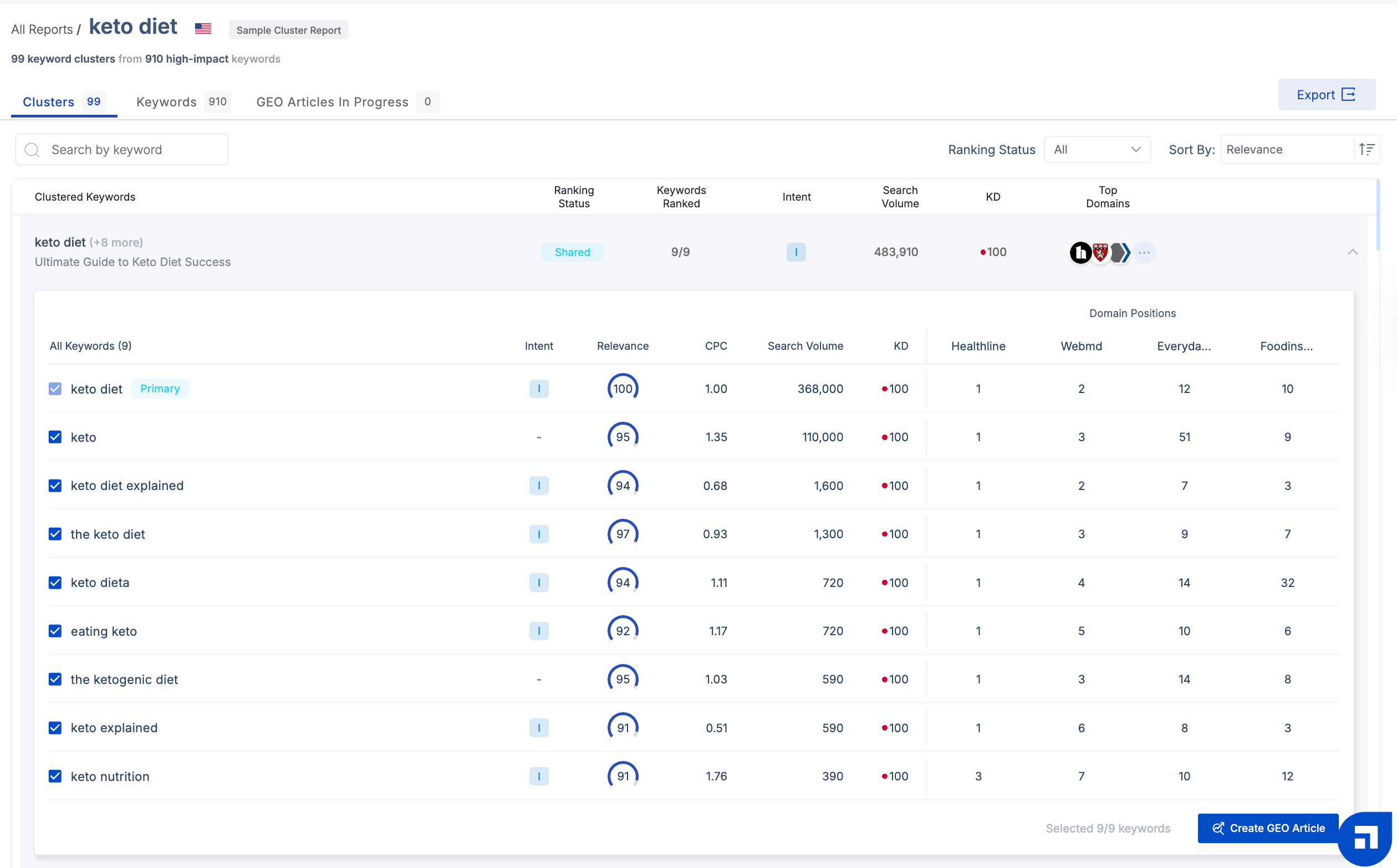
This is where Scalenut feels more practical for many teams.
Once you find a visibility gap, Scalenut helps you move into action. You can create content, optimize pages, audit existing assets, strengthen topical coverage, and improve pages so they are easier for search engines and AI systems to understand.
4. AI Traffic Monitor And LLM Interaction Signals
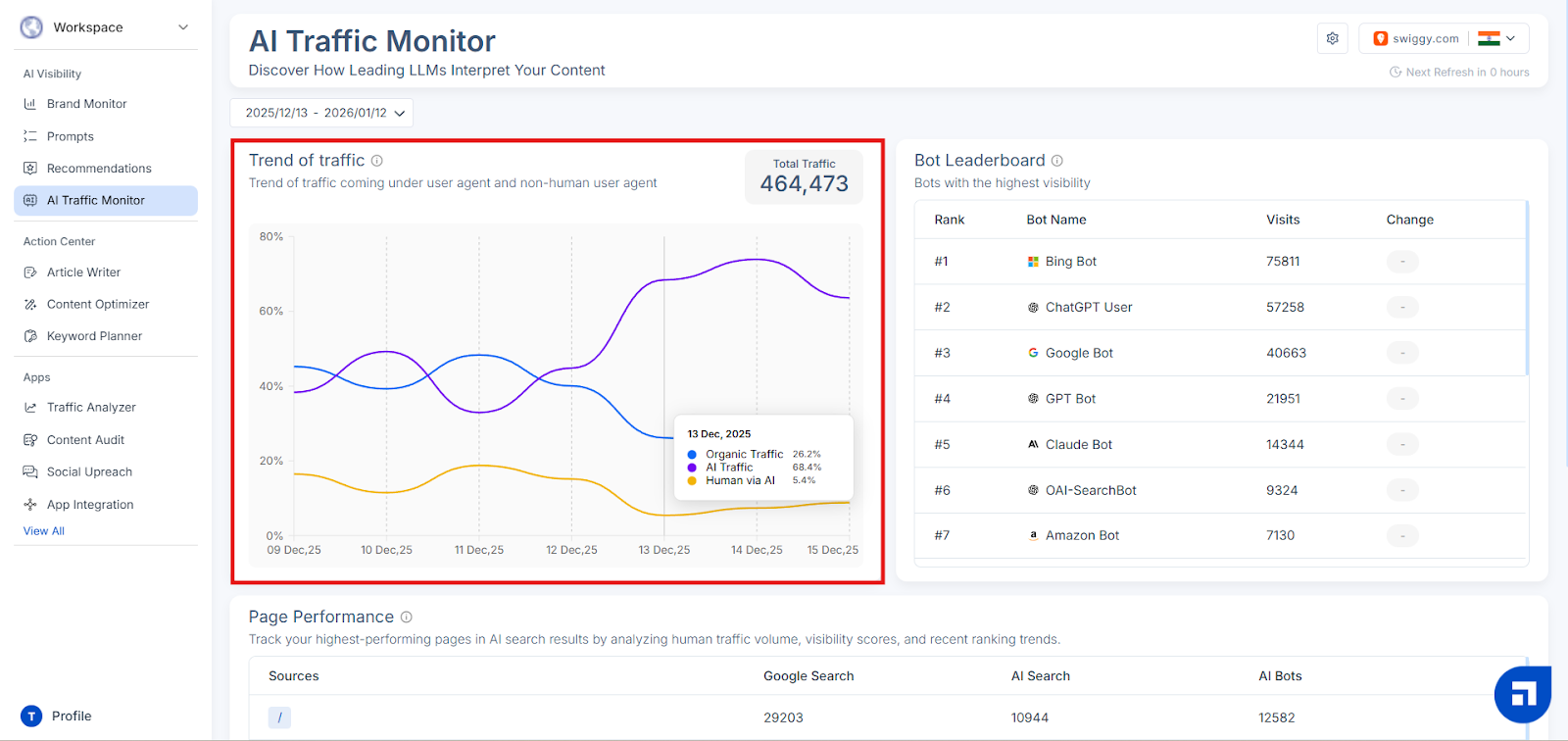
Scalenut’s AI Traffic Monitor helps teams understand how AI systems interact with their site.
You can track AI bot activity, top AI sources, referenced pages, and AI traffic trends. It is not a GA4 replacement, but it adds a useful GEO layer by showing which pages AI systems may be touching or relying on.
5. GEO Content Creation And Optimization
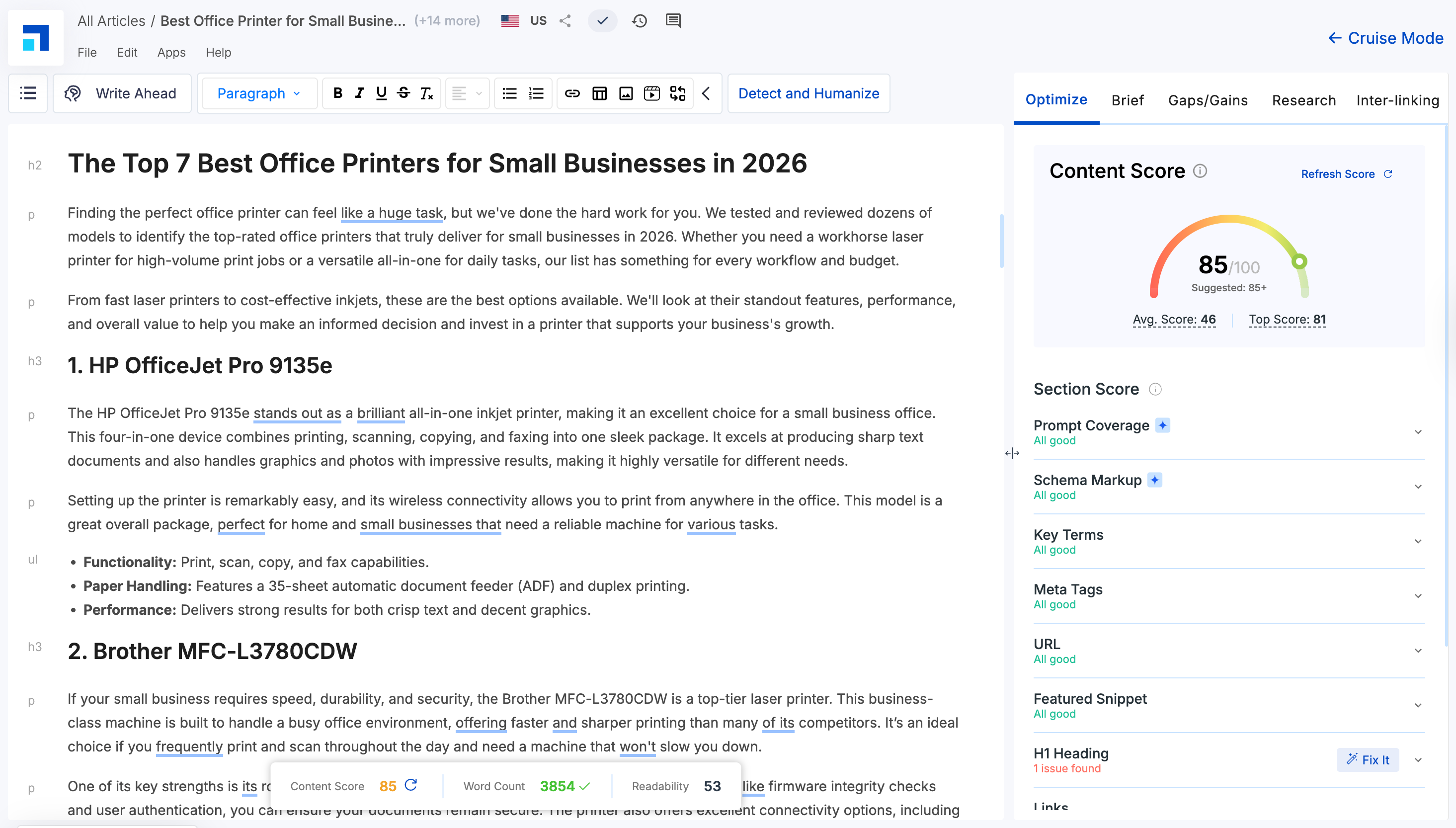
This is where Scalenut feels more execution-focused than AirOps.
Once you know where your brand is missing, you need to create new content, refresh existing pages, improve structure, and optimize for both search engines and AI answers. Scalenut supports that workflow with GEO-ready content creation, content scoring, optimization suggestions, keyword planning, topic clusters, and internal linking.
AirOps is still a strong choice for teams that need deep workflow customization. But if your goal is to track AI visibility and quickly turn those insights into SEO and GEO content improvements, Scalenut feels like the more straightforward option.
For a more detailed comparison read our blog on Scalenut vs AirOps to understand which AI SEO tool is the best fit for your team in 2026.
Bottom Line: Should You Choose AirOps Or Scalenut?
Choose AirOps if your team needs a highly customizable workflow system for AI search visibility, content refreshes, CMS publishing, Brand Kits, Knowledge Bases, and large-scale content operations. It makes the most sense when you already have the strategy, team, and process to build and manage advanced workflows.
Choose Scalenut if you want a more practical SEO + GEO workflow that helps you track AI visibility, plan topics, create optimized content, improve existing pages, audit performance, build topic clusters, manage internal links, and monitor AI traffic from one platform.
If your goal is deep workflow customization, AirOps is a strong option. But if you want to move faster from visibility gaps to content execution, Scalenut feels like the more straightforward choice.
Want expert help turning AI visibility insights into real GEO wins? Schedule a free call with Scalenut’s experts and build a sharper path to better search and AI visibility.
Frequently Asked Questions
Does AirOps automate the entire content workflow?
AirOps can automate many parts of the content workflow, including research, briefs, drafting, optimization, refreshes, and CMS publishing. But it does not remove human oversight completely. Teams can still add review steps to check accuracy, quality, brand voice, and final output before publishing.
Is AirOps worth using for improving SEO and AEO workflows?
AirOps can be worth using if your team wants to connect AI search visibility, content refreshes, workflows, and publishing in one system. It works best for teams that already have a clear SEO or AEO process and need help scaling execution. If you want a simpler way to move from planning to content creation and optimization, Scalenut may be easier to work with.
What are the main strengths and weaknesses of AirOps as an AI SEO tool?
AirOps’ biggest strengths are workflow automation, Grids, AI search visibility, CMS integrations, Brand Kits, and Knowledge Bases. Its main weaknesses are the learning curve, setup effort, and pricing fit, especially for smaller teams that need faster SEO and GEO execution.
What are the key features offered by AirOps in 2026?
AirOps offers AI Search Insights, AI Actions, Grids, no-code workflows, Brand Kits, Knowledge Bases, Page360, Offsite, CMS integrations, and content refresh workflows. These features make it stronger as a content operations platform than as a simple AI writing tool.
What are the best alternatives if AirOps does not fit my needs?
If AirOps feels too complex or workflow-heavy, Scalenut is a more practical alternative for SEO and GEO content execution. It helps with AI visibility tracking, GEO content creation, content optimization, keyword planning, audits, internal linking, and AI traffic monitoring in a simpler workflow.
Is AirOps easy to use for beginners?
AirOps is not the easiest tool for beginners. The interface is no-code, but the platform includes Workflows, Grids, Brand Kits, Knowledge Bases, AI models, integrations, and review steps. It works better for teams that already understand their SEO or content process and want to scale it.
What are the main use cases for AirOps in digital marketing?
AirOps is mainly used for AI search visibility tracking, SEO content workflows, content refreshes, brief creation, metadata updates, CMS publishing, brand governance, and large-scale content operations. It is best suited for teams managing high content volume across multiple pages or campaigns.
How easy is it to set up and start using AirOps for content optimization?
AirOps is no-code, so you do not need developers to get started. But setup still takes time because you need to configure workflows, connect data sources, add brand context, test outputs, and set review steps. It works best for teams with an existing SEO process, while beginners may find a simpler tool like Scalenut easier for content optimization.
How does AirOps flexibility compare to Writer and Jasper?
AirOps flexibility compared to Writer and Jasper is stronger for teams that want to build custom SEO, GEO, and content workflows using Grids, Brand Kits, Knowledge Bases, and AI search visibility. Writer and Jasper are stronger for enterprise AI agents, brand-safe content generation, and broader marketing productivity workflows.
How does AirOps compare to Copy.ai for B2B workflows?
In an AirOps vs Copy.ai B2B workflows comparison, AirOps feels more useful for SEO content operations, refreshes, CMS publishing, and AI search visibility. Copy.ai is more focused on go-to-market workflows across sales, marketing, outreach, and revenue teams.
What AirOps collaboration features help agency teams?
AirOps collaboration features for agency teams include reusable workflows, Grids, Brand Kits, Knowledge Bases, CMS integrations, and review steps. These help agencies manage repeatable content workflows across clients while keeping brand context, approvals, and publishing processes more organized.
What are the main AirOps content optimization workflows advantages?
The biggest AirOps content optimization workflows advantages are scale, structure, and consistency. Teams can analyze opportunities, build briefs, refresh pages, optimize metadata, use brand context, and move approved content toward publishing without rebuilding the same SEO process manually every time.


.svg)


.webp)